cannot install KB978464 (microsoft silverlight)

Dadinictus

New member
Member
Local time
8:36 PM
Messages
30

My Computer

Computer Manufacturer/Model Number
Acer Aspire 8943G
OS
Windows 7 Home Premium 64 bit
CPU
Intel Core i3 350M 2.27GHz
Motherboard
?
Memory
4 GB DDR3
Graphics Card(s)
Ati Mobility Radeon HD 5650
Sound Card
?
Monitor(s) Displays
18.4" Full HD 1080p LED LCD
Screen Resolution
1920x1080
Hard Drives
500GB HDD
PSU
?
Case
?
Cooling
?
Mouse
Razer Mamba
Internet Speed
15 Mbps

My Computer

Computer Manufacturer/Model Number
Custom made
OS
Windows 7 Professional x64 PL
CPU
AMD Athlon 4450e
Motherboard
Giga-Byte GA-MA69G-S3H
Memory
GoodRam DDR2 2x2048MB (FSB 800MHz)
Graphics Card(s)
nVidia GeForce 9600GT (G94-300) 1024 MB
Monitor(s) Displays
SAMSUNG SyncMaster HS2P301688
Hard Drives
Seagate ST3750330AS 750GB
PSU
Corsair 550W
Cooling
AeroCool ExtremeEngine 3T
There is something problem with this update -MS glitch

Make sure you have the newest version installed (version 4) if not I suggest update it from main site:

Get Silverlight | Microsoft Silverlight

and next install this update Download details: Security Update for Microsoft .NET Framework 3.5.1 on Windows 7 and Windows Server 2008 R2

when you do that KB978464 should disappeared in Windows Update

details:
Security Update for Microsoft Silverlight (KB978464) - dslreports.com

same problem occurs when i attempt to install latest version of silverlight.
 

My Computer

Computer Manufacturer/Model Number
Acer Aspire 8943G
OS
Windows 7 Home Premium 64 bit
CPU
Intel Core i3 350M 2.27GHz
Motherboard
?
Memory
4 GB DDR3
Graphics Card(s)
Ati Mobility Radeon HD 5650
Sound Card
?
Monitor(s) Displays
18.4" Full HD 1080p LED LCD
Screen Resolution
1920x1080
Hard Drives
500GB HDD
PSU
?
Case
?
Cooling
?
Mouse
Razer Mamba
Internet Speed
15 Mbps
[

same problem occurs when i attempt to install latest version of silverlight.

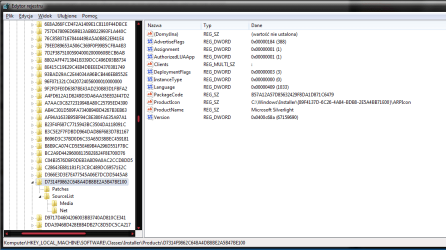
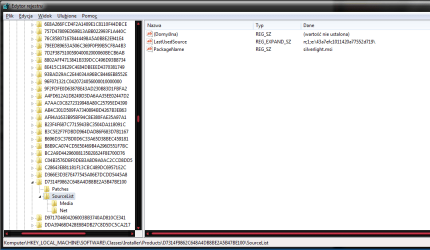
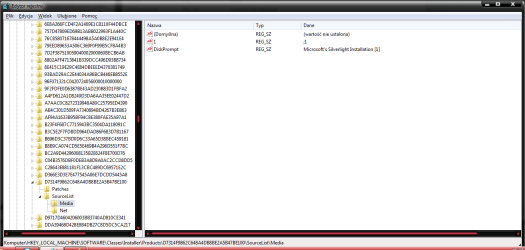
I think your problem is equivalent for issues with Office discussed here:Explain "The feature you are trying to use is on a network resource that is unavailable"

As article says you have to verify keys in

HKLM\SOFTWARE\Classes\Installer\Products\<Silverlight key>

examples from my computer for Silverlight

S1.png
SW.png
S2-1.png
S3-1.png

I think the second image for you is the most important

if you find the same Silverlight subkey in HKCU delete it,that mean delete key

HKCU\SOFTWARE\Classes\Installer\Products\<Silverlight key>

if you have it.

Maybe another solution would be also removing completely HKLM\SOFTWARE\Classes\Installer\Products\<Silverlight key> + restart.Ultimate solution uninstall Silverlight and reinstall it again.
 
Last edited:

My Computer

Computer Manufacturer/Model Number
Custom made
OS
Windows 7 Professional x64 PL
CPU
AMD Athlon 4450e
Motherboard
Giga-Byte GA-MA69G-S3H
Memory
GoodRam DDR2 2x2048MB (FSB 800MHz)
Graphics Card(s)
nVidia GeForce 9600GT (G94-300) 1024 MB
Monitor(s) Displays
SAMSUNG SyncMaster HS2P301688
Hard Drives
Seagate ST3750330AS 750GB
PSU
Corsair 550W
Cooling
AeroCool ExtremeEngine 3T
Hello and new here

Same issue with Silverlight update to 4.0 - I first started seeing this error message with MS Security Essentials (which I have yet to successfully get reinstalled)

Is this a problem outside of the application installers and maybe with Windows installer/update?

MS support had me running around trying all sorts of stuff - no specific nor immediate idea to what was causing the problem.

Quite frustrating to say the least - there are no clear indicators of what is causing this.
 

My Computer

OS
Windows 7
"Hi,
I would suggest you to follow these steps and check if it helps.
Method 1:
Step 1:
If you have installed any security software on the computer, then I would suggest you to temporarily disable antivirus software installed on the computer and check if the same issue occurs. If the same issue occurs even after disabling it, then there are no issues with the security software and try to enable it back.

Step 2:
If it works fine after disabling the security software, then you should get in touch with the security software vendor for more help.

Method 2:
Try downloading the update from the below link and then try to install it and check if It helps:
http://www.microsoft.com/downloads/details.aspx?familyid=7e3f6c16-1339-49bc-a60c-ddc6c3a54850&displaylang=en
Method 3:
Try performing clean boot and then try to install the update and check if it helps, here is the link:
http://support.microsoft.com/kb/929135
Make sure that you put back the computer to normal startup mode once it is done.
Azam – Microsoft Support.
Visit ourMicrosoft Answers Feedback Forum and, if you have any feed backs you can post here."

[Microsoft Answers Website]

Unable to install Update for Microsoft Silverlight (KB982926), error: 663

Try them suggestions, could help :)
 

My Computer

Computer type
PC/Desktop
Computer Manufacturer/Model Number
GIGABYTE Rig (Custom)
OS
Windows 7 Professional (x64/SP1) /Linux Mint 16
CPU
Intel i5-3570k 3.40 GHz @ 4.6 GHz
Motherboard
GIGABYTE Z77X-D3H
Memory
8GB (2133MHz) DDR3
Graphics Card(s)
Asus GTX560 Ti (Nvidia)
Monitor(s) Displays
HP 23", Acer 19" and a Dell 17"
Screen Resolution
1080p, 1440x900 and 1280x1024
Hard Drives
Sandisk Extreme 120GB (SSD), WD 2TB green and 4 other HDDs
PSU
Antec 620w High Current Gamer
Case
Corsair Obsidian 600D
Cooling
CPU - Antec KÜHLER H₂O 920
Keyboard
Steelseries 6Gv2
Mouse
Roccat LUA
Internet Speed
4 - 6mb/s
Antivirus
ESET NOD32
Browser
Chrome/Firefox
Other Info
Intel Gigabit CT (PCIE NIC) and Thinkpad T61p,
Yeah, that was my next option - I have the Cleanup Utility installed - just finished a restore point

I'd rather not poke around in the registry, like I said it might not be the application but rather something wrong with windows installer/updates (the whole .msi errors and what not)

Now here is my concern with windows cleanup utility - it didn't fix my MSSE issue - I still cannot install with the "Unable to locate a network..." error. Maybe it's an AV compatibility issue, but I have my doubts.

so I hate to say it but I'm skeptical

Going to run MS Fixit for error code 64C (from Silverlight update) with Windows Updates
 

My Computer

OS
Windows 7
Windows Installer Cleanup not working properly on Vista/Windows 7 especially it has problem with 64bit systems thus Microsoft removed this tool from officiall sites:

Try to fix this in similar way like for other MSI installer as I showed in post 4:

Find subkey in HKLM\SOFTWARE\Classes\Installer\Products key which relate to MSE and try to fix it or easiest way -delete it.Check also subkeys in HKCU\SOFTWARE\Classes\Installer\Products
 

My Computer

Computer Manufacturer/Model Number
Custom made
OS
Windows 7 Professional x64 PL
CPU
AMD Athlon 4450e
Motherboard
Giga-Byte GA-MA69G-S3H
Memory
GoodRam DDR2 2x2048MB (FSB 800MHz)
Graphics Card(s)
nVidia GeForce 9600GT (G94-300) 1024 MB
Monitor(s) Displays
SAMSUNG SyncMaster HS2P301688
Hard Drives
Seagate ST3750330AS 750GB
PSU
Corsair 550W
Cooling
AeroCool ExtremeEngine 3T
thanks for the continued input

Nope - Fixit did not work for the MSI - Silverlight error continues.

Now what I'm noticing is that the Silverlight installer is referencing a key on a partition created by the manufacturer for storing data. At this time all apps are on the main C partition - I checked my registry for the key and it is not there

So Which key would I remove for Silverlight? How do I make that distinction?

ok so I toggled down the keys and found a string value ref Silverlight - is this the key we remove? How is this safer than the uninstall utility?

HKCU doesn't have an installer subkey - I guess that is ok considering I'm the admin right?

thanks again!
 

My Computer

OS
Windows 7
So Which key would I remove for Silverlight? How do I make that distinction?
Highlight keyHKLM\SOFTWARE\Classes\Installer\Products,next in menu

Edit>>Search and type the word Silverlight and check where it open...

HKCU doesn't have an installer subkey
It's possible and OK.
 

My Computer

Computer Manufacturer/Model Number
Custom made
OS
Windows 7 Professional x64 PL
CPU
AMD Athlon 4450e
Motherboard
Giga-Byte GA-MA69G-S3H
Memory
GoodRam DDR2 2x2048MB (FSB 800MHz)
Graphics Card(s)
nVidia GeForce 9600GT (G94-300) 1024 MB
Monitor(s) Displays
SAMSUNG SyncMaster HS2P301688
Hard Drives
Seagate ST3750330AS 750GB
PSU
Corsair 550W
Cooling
AeroCool ExtremeEngine 3T
fixed both silverlight and msse - both reinstalled with current versions - also ran the System Update readiness tool for good measure

thumbs up
 

My Computer

OS
Windows 7
Back
Top