cannot install lbp 3300 printer driver

jackquals

New member
Local time
1:05 AM
Messages
19
I got an error message said cannot correctly run this installer on this operating system when I try to install Canon LBP 3300 laser printer. The driver I download the driver from Canon website, it's also available for windows 7. And my Windows 7 is Home premium.
 

My Computer

OS
windows 7
Well providing you downloaded the porper bit driver 32 or 64 bit for your OS. And you get an error. First off is your printer reconized in device manager. If so try and force the install by going to the device in device manager>click update driver>browse my computer>let my pick>have disk>browse>navigate to the place you downloaded the driver>click (or double click) the .if file>hit ok>then next and let it install. Please post back if this doesn'r work. Thanks. Fabe
 

My Computer

Computer Manufacturer/Model Number
Self Built
OS
Windows 7 ultimate 64 bit / XP Home sp3
CPU
intel Core 2 Duo E8400 3.0ghz
Motherboard
Asus P5ND bios 1401
Memory
8 gigs 1066 OCZ Fata1ty
Graphics Card(s)
EVGA GTX 580 Call of Duty Black Ops Edition
Sound Card
Creative Soundblaster Audigy 2zs
Monitor(s) Displays
Asus 24in LCD's 2MS X2
Screen Resolution
1920x1080p @60Hz
Hard Drives
WD Caviar 500 Black/ WD Caviar 200 Blue
PSU
OCZ 700W GameXtreme
Case
NZXT Apollo
Cooling
Corsair H50 CPU/120mm x3 /60mm x2 /Corsair Dominator Ram
Keyboard
Logitech Bluetooth Wireless MX5000
Mouse
Logitech Bluetooth Wireless MX1000
Internet Speed
Download 19.83 Upload 0.97
Other Info
Logitech Z2300 Speakers/ Bose Noise Cancelling Headphones/Avermedia PCI-e Hybrid TV Bravo/Epson NX415 all in one/ 4 Port Powered USB Hub/ LG 10x Bluray Burner /TSST Corp DVDRW External
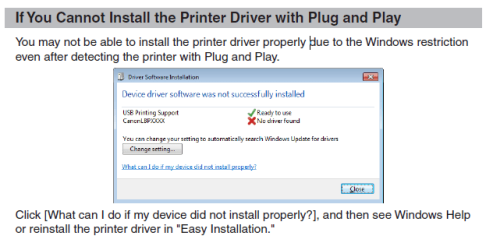
Thanks Fabe! My case is I bought a new PC with Windows 7 Home premium. After I connect the LBP3300 to my PC, I found Canon CAPT USB Device on unspecified devices of devices & printers. On its property, I double click LBP3300 on hardware tab. And then click change settings. It prompts another window allow me to change driver. I locate it to the folder in which download drivers are there. It said Window cannot find driver software for your device. The folder is automatically unzipped with the download file and there is also a Windows 7 note on it. Part of which is on attachment. I just wonder what is easy installation which is mentioned on attachment.
 

Attachments

  • Capture.PNG
    Capture.PNG
    15.6 KB · Views: 426

My Computer

OS
windows 7
That i don't know but I don't see any harm in following through with it. fabe
 

My Computer

Computer Manufacturer/Model Number
Self Built
OS
Windows 7 ultimate 64 bit / XP Home sp3
CPU
intel Core 2 Duo E8400 3.0ghz
Motherboard
Asus P5ND bios 1401
Memory
8 gigs 1066 OCZ Fata1ty
Graphics Card(s)
EVGA GTX 580 Call of Duty Black Ops Edition
Sound Card
Creative Soundblaster Audigy 2zs
Monitor(s) Displays
Asus 24in LCD's 2MS X2
Screen Resolution
1920x1080p @60Hz
Hard Drives
WD Caviar 500 Black/ WD Caviar 200 Blue
PSU
OCZ 700W GameXtreme
Case
NZXT Apollo
Cooling
Corsair H50 CPU/120mm x3 /60mm x2 /Corsair Dominator Ram
Keyboard
Logitech Bluetooth Wireless MX5000
Mouse
Logitech Bluetooth Wireless MX1000
Internet Speed
Download 19.83 Upload 0.97
Other Info
Logitech Z2300 Speakers/ Bose Noise Cancelling Headphones/Avermedia PCI-e Hybrid TV Bravo/Epson NX415 all in one/ 4 Port Powered USB Hub/ LG 10x Bluray Burner /TSST Corp DVDRW External
Is this the driver you downloaded and isntalled?

Printer Driver

If not try it.

I'm not sure if you need to install the driver first before attaching the printer or the otherway around. Might want to read the manual just incase.
 

My Computer

Computer Manufacturer/Model Number
Lenovo ThinkPad T60
OS
Windows 7 Ultimate 64Bit
CPU
GenuineIntel Intel(R) Core(TM) DuoCore T2400 @ 1.83GHz
Motherboard
Intel(R) 82801G (ICH7 Family)
Memory
2.00 GB
Graphics Card(s)
Mobile Intel(R) 945 Express Chipset
Sound Card
SoundMAX Integrated Digital HD Audio
Monitor(s) Displays
ThinkPad Display
Screen Resolution
1400x1050
Hard Drives
100Gb SATA
Keyboard
Standard Keyboard
Mouse
HID-compliant Mouse
Internet Speed
Cable Broadband - 54Mbps
Other Info
Intel(R) PRO/1000 PL Network Connection
11a/b/g Wireless LAN Mini PCI Express Adapter
Thank you Fabe. I already rang Canon to report this problem. They said they will have 64 bits driver available by the end of this month. My new PC is 64 bits, so it could be the reason why.
 

My Computer

OS
windows 7
Thanks Aem! I tried the driver you mentioned. The problem is the same. Got to wait util Canon provides 64bit driver for it.

Is this the driver you downloaded and isntalled?

Printer Driver

If not try it.

I'm not sure if you need to install the driver first before attaching the printer or the otherway around. Might want to read the manual just incase.
 

My Computer

OS
windows 7

My Computer

Computer Manufacturer/Model Number
Lenovo ThinkPad T60
OS
Windows 7 Ultimate 64Bit
CPU
GenuineIntel Intel(R) Core(TM) DuoCore T2400 @ 1.83GHz
Motherboard
Intel(R) 82801G (ICH7 Family)
Memory
2.00 GB
Graphics Card(s)
Mobile Intel(R) 945 Express Chipset
Sound Card
SoundMAX Integrated Digital HD Audio
Monitor(s) Displays
ThinkPad Display
Screen Resolution
1400x1050
Hard Drives
100Gb SATA
Keyboard
Standard Keyboard
Mouse
HID-compliant Mouse
Internet Speed
Cable Broadband - 54Mbps
Other Info
Intel(R) PRO/1000 PL Network Connection
11a/b/g Wireless LAN Mini PCI Express Adapter
Your welcome as aem said you could try the 64 bit Vista but you'd need to use compatibility mode. Download the driver>unpack if needed>find the setup.exe file right click on it>properties>drop down menu select Vista>check the run in ccompatibility mode box. Install as administrator. Best of luck. Fabe
 

My Computer

Computer Manufacturer/Model Number
Self Built
OS
Windows 7 ultimate 64 bit / XP Home sp3
CPU
intel Core 2 Duo E8400 3.0ghz
Motherboard
Asus P5ND bios 1401
Memory
8 gigs 1066 OCZ Fata1ty
Graphics Card(s)
EVGA GTX 580 Call of Duty Black Ops Edition
Sound Card
Creative Soundblaster Audigy 2zs
Monitor(s) Displays
Asus 24in LCD's 2MS X2
Screen Resolution
1920x1080p @60Hz
Hard Drives
WD Caviar 500 Black/ WD Caviar 200 Blue
PSU
OCZ 700W GameXtreme
Case
NZXT Apollo
Cooling
Corsair H50 CPU/120mm x3 /60mm x2 /Corsair Dominator Ram
Keyboard
Logitech Bluetooth Wireless MX5000
Mouse
Logitech Bluetooth Wireless MX1000
Internet Speed
Download 19.83 Upload 0.97
Other Info
Logitech Z2300 Speakers/ Bose Noise Cancelling Headphones/Avermedia PCI-e Hybrid TV Bravo/Epson NX415 all in one/ 4 Port Powered USB Hub/ LG 10x Bluray Burner /TSST Corp DVDRW External
  • Like
Reactions: JMH
The driver from Aem's last link is also available for Windows 7 as what is stated on that site. Now I can install it as a local printer. But actually the printer is connected to a Win xp box. From my Win7, I can see it. But from dowloaded setup program, if I choose to install from networking, it cannot find it, even I choose to locate by manually specified IP. Is there any way to change local printer to a remote printer?
 

My Computer

OS
windows 7
The driver from Aem's last link is also available for Windows 7 as what is stated on that site. Now I can install it as a local printer. But actually the printer is connected to a Win xp box. From my Win7, I can see it. But from dowloaded setup program, if I choose to install from networking, it cannot find it, even I choose to locate by manually specified IP. Is there any way to change local printer to a remote printer?

Are you set up on a workgroup? Networking home computers running different versions of Windows

Here is how to set up printer: Add a device or computer to a network.

Cheers,
Tara
Windows Outreach Team
 

My Computer

OS
Windows 7
To jackquals// Did you really succeed to install a driver of lbp-3310 to your lbp-3300 for a local printer? If it's true, that'll be a happy news to many people suffering from abcense of vista/win7 x64 driver.
 

My Computer

OS
win XP
I can install driver of lbp 3310 on my WIndows7 as a local printer. But actually my printer is lbp 3300 and the printer is on a Win xp box on our LAN. I changed port to \\winpx\sharedprinter. And when I tried to print something. Printer seems going to work, unfortunately print nothing. I think it could be because of different model. Canon told me they will release 64bit driver of lbp 3300. So far just wait and see!
 

My Computer

OS
windows 7
Back
Top