Cannot install MS .Net Framwork 4.6.1

Hans L

New member
Member
VIP
Local time
7:00 AM
Messages
175
Hello: Windows 7 Ultimate x64 here.

I have installed over forty Windows updates today (I must have turned on my auto install last October :-), but the software in the subject line and, for instance, MicrosoftFixit50123.msi, steadfastly refuse to install.

It all started when iTunes and QuickTime could not be installed. I have removed most things Apple.

I have tried repair with install disk, but to no avail. I am sure there are repair options I have not tried, so I would be very happy for some tips on what to do.

Regards,

Hans L
 

My Computer

Computer Manufacturer/Model Number
BIOS American MegaTrend 1238
OS
Windows 7 Ultimate
CPU
Intel Core Duo E6600 @ 2.40 GHz
Motherboard
ASUS P5B-Deluxe
Memory
3 GB
Graphics Card(s)
Nvidia eVGA GeForce 8600 GTS & 7600 GT
Monitor(s) Displays
Iiyama PLE431S/PLH431S

My Computer

Computer type
PC/Desktop
Computer Manufacturer/Model Number
Custom assembled by me :}
OS
Win-7-Pro64bit 7-H-Prem-64bit
CPU
i7-5930K 2nd i9-9940x both water blocked VRM's too
Motherboard
ASUS SABERTOOTH X99 2nd ASUS x299 Apex
Memory
Trident-z 3200C14 2nd Trident-z 3600C16
Graphics Card(s)
EVGA 1080ti ftw3 2nd Titan Xp both water blocked
Sound Card
Built-in Realtek
Monitor(s) Displays
1-AOC G2460PG 24"G-Sync 144Hz/ 2nd 1-ASUS VG248QE 24" 144Hz
Screen Resolution
1920 x 1080 144Hz
Hard Drives
2-Samsung M.2 Evo & Evo Plus
2-Samsung 850 EVO 500GB SSD's/ 3-2.5 W.D. Black 1tb-&3-1tb/3-3.5 WD Black 1tb hdd's
PSU
EVGA SuperNOVA 1000-P2 2nd 1200-P2
Case
2-Corsair Obsidian Series 450D Black ATX Mid Tower
Cooling
Custom water loops
Keyboard
Logitech G710+/ 2nd Logitech G910
Mouse
2-RedDragon M901 Perdition 16400 dpi Gaming mouse = wired
Internet Speed
Comcast Ping 19ms 89.31mbps download speed 6.12mbps upload
Antivirus
Malwarebytes Pro/ Superantispyware Pro
Browser
FireFox & Pale moon
Other Info
2nd ASUS X299 Apex/Intel i9-9940x with Custom water loop/7H-Prem-x64/Corsair 450D case/Ram Trident-z 3600C16 4x8gb / Samsung970Evo plus 500gb SSD/Dual ssd EZ swap evo/PSU EVGA SuperNova 1200w-P2 80+Platinum/GPU Titan Xp /8-ML-140 on push-pull on 2-280GTX rads
I'm not so great on these issues, so may I ask, which version do I need/want?

Thanks,

Hans L
 

My Computer

Computer Manufacturer/Model Number
BIOS American MegaTrend 1238
OS
Windows 7 Ultimate
CPU
Intel Core Duo E6600 @ 2.40 GHz
Motherboard
ASUS P5B-Deluxe
Memory
3 GB
Graphics Card(s)
Nvidia eVGA GeForce 8600 GTS & 7600 GT
Monitor(s) Displays
Iiyama PLE431S/PLH431S
Hi,
I'd say anything that comes up as Important
Which 4.5.2 is the version i have and as long as it's up to date that will be the one I keep

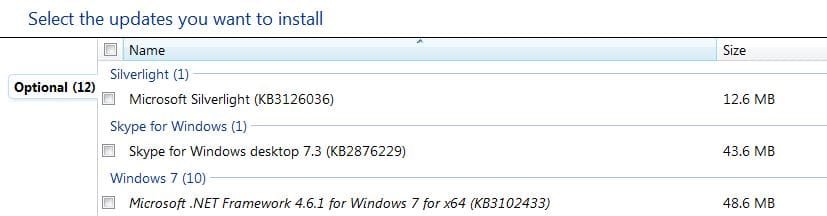
So far 4.6.1 is in the Optional section and I have no intention of loading that update anytime soon
net exper.JPG

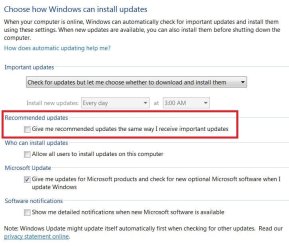
This requires update setting to be set like this
update settings.JPG
 

My Computer

Computer type
PC/Desktop
Computer Manufacturer/Model Number
Custom assembled by me :}
OS
Win-7-Pro64bit 7-H-Prem-64bit
CPU
i7-5930K 2nd i9-9940x both water blocked VRM's too
Motherboard
ASUS SABERTOOTH X99 2nd ASUS x299 Apex
Memory
Trident-z 3200C14 2nd Trident-z 3600C16
Graphics Card(s)
EVGA 1080ti ftw3 2nd Titan Xp both water blocked
Sound Card
Built-in Realtek
Monitor(s) Displays
1-AOC G2460PG 24"G-Sync 144Hz/ 2nd 1-ASUS VG248QE 24" 144Hz
Screen Resolution
1920 x 1080 144Hz
Hard Drives
2-Samsung M.2 Evo & Evo Plus
2-Samsung 850 EVO 500GB SSD's/ 3-2.5 W.D. Black 1tb-&3-1tb/3-3.5 WD Black 1tb hdd's
PSU
EVGA SuperNOVA 1000-P2 2nd 1200-P2
Case
2-Corsair Obsidian Series 450D Black ATX Mid Tower
Cooling
Custom water loops
Keyboard
Logitech G710+/ 2nd Logitech G910
Mouse
2-RedDragon M901 Perdition 16400 dpi Gaming mouse = wired
Internet Speed
Comcast Ping 19ms 89.31mbps download speed 6.12mbps upload
Antivirus
Malwarebytes Pro/ Superantispyware Pro
Browser
FireFox & Pale moon
Other Info
2nd ASUS X299 Apex/Intel i9-9940x with Custom water loop/7H-Prem-x64/Corsair 450D case/Ram Trident-z 3600C16 4x8gb / Samsung970Evo plus 500gb SSD/Dual ssd EZ swap evo/PSU EVGA SuperNova 1200w-P2 80+Platinum/GPU Titan Xp /8-ML-140 on push-pull on 2-280GTX rads
When I see what you write, I realize I have only a very vague idea of what MS .Net Framwork actually is used for. So, consequently, I do not understand why you prefer one version (4.5.2) over another (the new 4.6.1). Now, I do not expect you to be my teacher, but maybe you would say a word or two about why you do not want to install the latest version?

Hans L
 

My Computer

Computer Manufacturer/Model Number
BIOS American MegaTrend 1238
OS
Windows 7 Ultimate
CPU
Intel Core Duo E6600 @ 2.40 GHz
Motherboard
ASUS P5B-Deluxe
Memory
3 GB
Graphics Card(s)
Nvidia eVGA GeForce 8600 GTS & 7600 GT
Monitor(s) Displays
Iiyama PLE431S/PLH431S
Hans,

The .NET framework is used by many Windows programs to perform system functions. It handles the actual window functions for example. Some computer languages use it as a library of functions to get jobs done, and some programs wont work without .NET because they were written in a language that requires it to run.

That being said, having the newest version of .NET framework will give you maximum compatibility with the newest programs. I always have the latest version installed on my computer, but I am doing development work and I need my computer to be able to use all of the functions that .NET has to offer. You may not need to have the newest version unless you get a new-ish program that requires it. In that case, it's a simple matter to install the latest version. In fact most installers of new software that require a specific version of .NET will install it for you.
 

My Computer

Computer type
PC/Desktop
Computer Manufacturer/Model Number
Mellon Labs (custom build)
OS
Win 7 Pro x64/Win 10 Pro x64 dual boot
CPU
AMD FX 8350 Vishera @ 4200
Motherboard
ASUS M5A97 R2.0
Memory
16 GB Mushkin Blackline DDR3-2400 @ 1866 (9-10-10-10-31)
Graphics Card(s)
XFX Radeon R9 280 Double D Black Edition
Sound Card
Realtek HD Audio on MB. Sounds great.
Monitor(s) Displays
Acer 24", Acer 22"
Screen Resolution
3840 x 1080
Hard Drives
1 x Mushkin Chronos 120 GB SSD (Win 10)
1 x Samsung 850 EVO 250 GB SSD (Win 7)
1 x WD 1TB SATA Blue
1 x WD 1TB SATA Green
PSU
Corsair TX-750
Case
CoolerMaster HAF 912+
Cooling
Coolermaster Seidon 240M Liquid AIO. 6 case fans
Keyboard
Logitech G710+
Mouse
Logitech G500s
Internet Speed
Much better since I got fiber, but still way overpriced.
Antivirus
MSE, Malware Bytes for scanning
Browser
Firefox
Other Info
Corsair VOID USB headphones.

A Mellon Labs X-1 - LCD Smartie driven system status display.

Brought to you by the letter E
Yep see Mellon Head's post :)
 

My Computer

Computer type
PC/Desktop
Computer Manufacturer/Model Number
Custom assembled by me :}
OS
Win-7-Pro64bit 7-H-Prem-64bit
CPU
i7-5930K 2nd i9-9940x both water blocked VRM's too
Motherboard
ASUS SABERTOOTH X99 2nd ASUS x299 Apex
Memory
Trident-z 3200C14 2nd Trident-z 3600C16
Graphics Card(s)
EVGA 1080ti ftw3 2nd Titan Xp both water blocked
Sound Card
Built-in Realtek
Monitor(s) Displays
1-AOC G2460PG 24"G-Sync 144Hz/ 2nd 1-ASUS VG248QE 24" 144Hz
Screen Resolution
1920 x 1080 144Hz
Hard Drives
2-Samsung M.2 Evo & Evo Plus
2-Samsung 850 EVO 500GB SSD's/ 3-2.5 W.D. Black 1tb-&3-1tb/3-3.5 WD Black 1tb hdd's
PSU
EVGA SuperNOVA 1000-P2 2nd 1200-P2
Case
2-Corsair Obsidian Series 450D Black ATX Mid Tower
Cooling
Custom water loops
Keyboard
Logitech G710+/ 2nd Logitech G910
Mouse
2-RedDragon M901 Perdition 16400 dpi Gaming mouse = wired
Internet Speed
Comcast Ping 19ms 89.31mbps download speed 6.12mbps upload
Antivirus
Malwarebytes Pro/ Superantispyware Pro
Browser
FireFox & Pale moon
Other Info
2nd ASUS X299 Apex/Intel i9-9940x with Custom water loop/7H-Prem-x64/Corsair 450D case/Ram Trident-z 3600C16 4x8gb / Samsung970Evo plus 500gb SSD/Dual ssd EZ swap evo/PSU EVGA SuperNova 1200w-P2 80+Platinum/GPU Titan Xp /8-ML-140 on push-pull on 2-280GTX rads
Back
Top