Cannot install security updates since KB4457139

Gizm0

New member
Local time
12:19 AM
Messages
13
Is there anybody who would be able to help me?

I have a problem installing updates, I have already wrote about it in:
https://www.sevenforums.com/windows-updates-activation/418421-kb4486563-fails-install.html

But thread became dead after my first response.

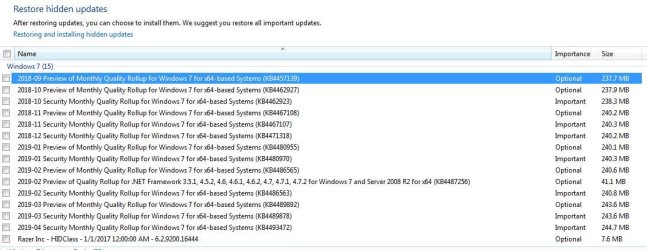
My problem persist and judging by the unsuccessfully installed updates, it has started
with 2018-09-Preview of monthly Quality Rollup for Windows 7 for 64x-based Systems
That means 2018-08 was the last successfully installed update - every single one after this fails with the same error:
Code 80070003

Can somebody help me out with this?
 

Attachments
  • 01.JPG
    01.JPG
    122.4 KB · Views: 1

My Computer

Computer type
PC/Desktop
OS
Win7 Ultimate x64
Hello Gizm0, :-)

If you haven't already, you might see if using Option 3 in the tutorial below to completely reset Windows Update may help.

:ar: Windows Update - Reset
 

My Computer

Computer type
PC/Desktop
Computer Manufacturer/Model Number
Self built custom
OS
64-bit Windows 11 Pro for Workstations
CPU
Intel i7-8700K OC'd to 5 GHz
Motherboard
ASUS ROG Maximus XI Formula Z390
Memory
64 GB (4x16GB) G.SKILL TridentZ RGB DDR4 3600 MHz
Graphics Card(s)
ASUS ROG-STRIX-GTX1080TI-O11G-GAMING
Sound Card
Integrated
Monitor(s) Displays
2 x Samsung Odyssey G7 27"
Screen Resolution
2560x1440
Hard Drives
1TB Samsung 990 PRO M.2,
4TB Samsung 990 PRO PRO M.2,
TerraMaster F8 SSD Plus NAS
PSU
Seasonic Prime Titanium 850W
Case
Thermaltake Core P3
Cooling
Corsair Hydro H115i
Keyboard
Logitech wireless K800
Mouse
Logitech MX Master 4
Internet Speed
2 Gb/s Download and 100 Mb/s Upload
Antivirus
Malwarebyte Anti-Malware Premium
Browser
Google Chrome
Other Info
Logitech Z625 speaker system,
Logitech BRIO 4K Pro webcam,
HP Color LaserJet Pro MFP M477fdn,
APC SMART-UPS RT 1000 XL - SURT1000XLI,
Galaxy S23 Plus phone
Hello Gizm0, :-)

If you haven't already, you might see if using Option 3 in the tutorial below to completely reset Windows Update may help.

:ar: Windows Update - Reset

Hi Brink,
Tried it just now (Option 3, then MS Easy Fix), didn´t help, problem persist.
 

My Computer

Computer type
PC/Desktop
OS
Win7 Ultimate x64

My Computer

Computer type
PC/Desktop
Computer Manufacturer/Model Number
Self built custom
OS
64-bit Windows 11 Pro for Workstations
CPU
Intel i7-8700K OC'd to 5 GHz
Motherboard
ASUS ROG Maximus XI Formula Z390
Memory
64 GB (4x16GB) G.SKILL TridentZ RGB DDR4 3600 MHz
Graphics Card(s)
ASUS ROG-STRIX-GTX1080TI-O11G-GAMING
Sound Card
Integrated
Monitor(s) Displays
2 x Samsung Odyssey G7 27"
Screen Resolution
2560x1440
Hard Drives
1TB Samsung 990 PRO M.2,
4TB Samsung 990 PRO PRO M.2,
TerraMaster F8 SSD Plus NAS
PSU
Seasonic Prime Titanium 850W
Case
Thermaltake Core P3
Cooling
Corsair Hydro H115i
Keyboard
Logitech wireless K800
Mouse
Logitech MX Master 4
Internet Speed
2 Gb/s Download and 100 Mb/s Upload
Antivirus
Malwarebyte Anti-Malware Premium
Browser
Google Chrome
Other Info
Logitech Z625 speaker system,
Logitech BRIO 4K Pro webcam,
HP Color LaserJet Pro MFP M477fdn,
APC SMART-UPS RT 1000 XL - SURT1000XLI,
Galaxy S23 Plus phone
Hi Gizm0
Sorry for the delay.
CheckSUR looks good
looking at CBS
 

My Computer

Computer type
PC/Desktop
Computer Manufacturer/Model Number
HP Desktop & Compaq Laptop
OS
Win 10 x64, Linux Lite, Win 7 x64, BlackArch, & Kali
Hard Drives
Samsung 850 Pro 256Gb,
Hitachi HDD 1Tb,
Crucial MX SSD 250Gb
Segate 3Tb USB 3.0 Ext. Backup HDD
Internet Speed
150Mbps dn, 20Mbps up
Antivirus
Avast Free, Malwarebytes Anti-Exploit & Anti-Ransomware
Browser
Firefox, Chrome, Opera, & VPN
Dual posts, so, posting here too!
CBS.log didn't go back far enough.
You stated you deleted the .cab files correct? (archived cbs.logs)
 

My Computer

Computer type
PC/Desktop
Computer Manufacturer/Model Number
HP Desktop & Compaq Laptop
OS
Win 10 x64, Linux Lite, Win 7 x64, BlackArch, & Kali
Hard Drives
Samsung 850 Pro 256Gb,
Hitachi HDD 1Tb,
Crucial MX SSD 250Gb
Segate 3Tb USB 3.0 Ext. Backup HDD
Internet Speed
150Mbps dn, 20Mbps up
Antivirus
Avast Free, Malwarebytes Anti-Exploit & Anti-Ransomware
Browser
Firefox, Chrome, Opera, & VPN
Dual posts, so, posting here too!
CBS.log didn't go back far enough.
You stated you deleted the .cab files correct? (archived cbs.logs)

Yes, as I said, forum didn´t allow me to put file that big as an attachment.
But they are still uploaded on the external site:
CBS-full.zip | Ulož.to

Just click on "Stáhnout pomalu" (slow download) retype the letters from captcha and click on "stáhnout" (download).
 
Last edited:

My Computer

Computer type
PC/Desktop
OS
Win7 Ultimate x64
CBS persist
Code:
01-29 21:12:02, Info                  CBS    DriverUpdateUninstallUpdates failed [HRESULT = 0x80070003 - ERROR_PATH_NOT_FOUND]
2019-01-29 21:12:02, Error                 CBS    Doqe: Failed uninstalling driver updates [HRESULT = 0x80070003 - ERROR_PATH_NOT_FOUND]
2019-01-29 21:12:02, Info                  CBS    Perf: Doqe: Uninstall ended.
2019-01-29 21:12:02, Info                  CBS    Failed uninstalling driver updates [HRESULT = 0x80070003 - ERROR_PATH_NOT_FOUND]
2019-01-29 21:12:02, Error                 CBS    Shtd: Failed while processing non-critical driver operations queue. [HRESULT = 0x80070003 - ERROR_PATH_NOT_FOUND]
2019-01-29 21:12:02, Info                  CBS    Shtd: Rolling back KTM, because drivers failed.
2019-01-29 21:12:02, Info                  CBS    Progress: UI message updated. Operation type: Update. Stage: 1 out of 1. Temporary Rollback.
Hard-links broken
I'd recommend Repair Install
View attachment Repair Install Instructions.docx

Repair Install
 
Last edited by a moderator:

My Computer

Computer type
PC/Desktop
Computer Manufacturer/Model Number
HP Desktop & Compaq Laptop
OS
Win 10 x64, Linux Lite, Win 7 x64, BlackArch, & Kali
Hard Drives
Samsung 850 Pro 256Gb,
Hitachi HDD 1Tb,
Crucial MX SSD 250Gb
Segate 3Tb USB 3.0 Ext. Backup HDD
Internet Speed
150Mbps dn, 20Mbps up
Antivirus
Avast Free, Malwarebytes Anti-Exploit & Anti-Ransomware
Browser
Firefox, Chrome, Opera, & VPN
CBS persist
Code:
01-29 21:12:02, Info                  CBS    DriverUpdateUninstallUpdates failed [HRESULT = 0x80070003 - ERROR_PATH_NOT_FOUND]
2019-01-29 21:12:02, Error                 CBS    Doqe: Failed uninstalling driver updates [HRESULT = 0x80070003 - ERROR_PATH_NOT_FOUND]
2019-01-29 21:12:02, Info                  CBS    Perf: Doqe: Uninstall ended.
2019-01-29 21:12:02, Info                  CBS    Failed uninstalling driver updates [HRESULT = 0x80070003 - ERROR_PATH_NOT_FOUND]
2019-01-29 21:12:02, Error                 CBS    Shtd: Failed while processing non-critical driver operations queue. [HRESULT = 0x80070003 - ERROR_PATH_NOT_FOUND]
2019-01-29 21:12:02, Info                  CBS    Shtd: Rolling back KTM, because drivers failed.
2019-01-29 21:12:02, Info                  CBS    Progress: UI message updated. Operation type: Update. Stage: 1 out of 1. Temporary Rollback.
Hard-links broken
I'd recommend Repair Install
View attachment 407917

Repair Install

Before I am gonna attempt to do that, is there no other way?
Like uninstalling some older update/s and installing never ones?
 

My Computer

Computer type
PC/Desktop
OS
Win7 Ultimate x64
Yes Gizm0, other way <here> & follow instructions!
 

My Computer

Computer type
PC/Desktop
Computer Manufacturer/Model Number
HP Desktop & Compaq Laptop
OS
Win 10 x64, Linux Lite, Win 7 x64, BlackArch, & Kali
Hard Drives
Samsung 850 Pro 256Gb,
Hitachi HDD 1Tb,
Crucial MX SSD 250Gb
Segate 3Tb USB 3.0 Ext. Backup HDD
Internet Speed
150Mbps dn, 20Mbps up
Antivirus
Avast Free, Malwarebytes Anti-Exploit & Anti-Ransomware
Browser
Firefox, Chrome, Opera, & VPN
Yes Gizm0, other way <here> & follow instructions!

Windows Update Forum Posting Instructions | Sysnative Forums

Hello Snick,
I apologize for a longer hiatus, only now I had a time to look at it.
I was going according to the instructions posted here:
Windows Update Forum Posting Instructions | Sysnative Forums

Here are the results:
Step #1 - I am already registered here, on sevenforums, hope that counts.
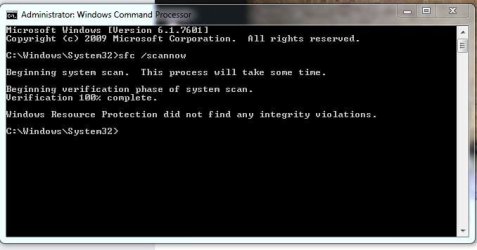
Step #2 - Run SFC Scan - ended with "Windows Resource Protection did not find any integrity violations" (see pic. 01) - moved to step 3
Step #3 - Done. I have tried to install the update after this step (as it was sugested in https://support.microsoft.com/en-us...-by-using-the-dism-or-system-update-readiness), it still ended with the same error, so I continued with step 4
Step #4 - Done, SFCFix.txt included in the attachments
Step #5 - Done, complete zip is here: https://drive.google.com/file/d/1WMzd4WviRsrOqRlvS_JvnmwEhZZdf0vc/view?usp=sharing
Step #6 - Uploading to this thread.

Hope you can read something meaningul out of it.
 

Attachments

  • 01.JPG
    01.JPG
    41.5 KB · Views: 27
  • SFCFix.txt
    SFCFix.txt
    1.1 KB · Views: 1

My Computer

Computer type
PC/Desktop
OS
Win7 Ultimate x64
Okay,

Repair Install did not help, I would have to reinstall the Windows.
Thank you for the help.
 

My Computer

Computer type
PC/Desktop
OS
Win7 Ultimate x64

My Computer

Computer type
PC/Desktop
Computer Manufacturer/Model Number
HP Desktop & Compaq Laptop
OS
Win 10 x64, Linux Lite, Win 7 x64, BlackArch, & Kali
Hard Drives
Samsung 850 Pro 256Gb,
Hitachi HDD 1Tb,
Crucial MX SSD 250Gb
Segate 3Tb USB 3.0 Ext. Backup HDD
Internet Speed
150Mbps dn, 20Mbps up
Antivirus
Avast Free, Malwarebytes Anti-Exploit & Anti-Ransomware
Browser
Firefox, Chrome, Opera, & VPN

My Computer

Computer type
PC/Desktop
OS
Win7 Ultimate x64
Last edited:

My Computer

Computer type
PC/Desktop
Computer Manufacturer/Model Number
HP Desktop & Compaq Laptop
OS
Win 10 x64, Linux Lite, Win 7 x64, BlackArch, & Kali
Hard Drives
Samsung 850 Pro 256Gb,
Hitachi HDD 1Tb,
Crucial MX SSD 250Gb
Segate 3Tb USB 3.0 Ext. Backup HDD
Internet Speed
150Mbps dn, 20Mbps up
Antivirus
Avast Free, Malwarebytes Anti-Exploit & Anti-Ransomware
Browser
Firefox, Chrome, Opera, & VPN
Back
Top