Cannot install SP1

Vincenzo

New member
Power User
Local time
6:29 PM
Messages
218
I restored my HP laptop to factory image. Windows Update comes up with SP1 and 9 other updates. I installed the other updates, reboot, then install SP1 KB976932, which oddly shows as only 13 MB. After a reboot, system information does not show the OS as having SP1. Run Win update again, it finds a .net update, install it, reboot. WU finds SP1 again, (same KB number but this time says it is79 - 200 MB), and nine more .net updates. Install the .net updates. Reboot and try to install SP1 again, it gets 75% through, then sits there for hours until I cancel it.

I've run the System Update Readiness Tool. All it does is install a hotfix KB947821. But same thing happens again when I try to install SP1. (Is the System Update Readiness tool supposed to do anything other than the Hotfix? Why not just call it a hotfix then?)

Any ideas what else I can try?

Thanks
 

My Computer

OS
Windows 7 Professional x64
Vincenzo mate it is one heck of a big update and from experience it sometimes takes a few goes but take a look at this Learn how to install Windows 7 Service Pack 1 (SP1) in that listing is a link to the actual SP1 download it might be worth a try. Download Windows 7 and Windows Server 2008 R2 Service Pack 1 (KB976932) from Official Microsoft Download Center

Now I know you wanted to do a factory restore but myself I would have gone with this http://www.sevenforums.com/tutorials/219487-clean-reinstall-factory-oem-windows-7-a.html the ISO is no longer available but take a look at the first paragraph re the ei.cfg removal tool with it you could install from any Windows install disk even a friends. Personally I do this rather than a factory default restore because it gets rid of all the wretched bloatware. All you need for this is the activation code from the sticker on your machine plus the disk will have SP1 on it of course unless it is very old. But the choice is yours of course.:)
 

My Computer

Computer type
PC/Desktop
Computer Manufacturer/Model Number
Own build (new) Desk1 / Asus ROG Win 7 / Desk2 1st build
OS
Desk1 7 Home Prem / Desk2 10 Pro / Main lap Asus ROG 10 Pro 2 laptop Toshiba 7 Pro Asus P2520 7 & 10
CPU
Desk1 i5 3750K / Laptop i7 GTX 860M / Desk2 i5 2500
Motherboard
Desk1 Asus P877-V / Desk2 Gigabyte H67 UD3H / Laptop ?
Memory
Desk1 8GB (1866) / Desk2 16GB (1333) / Laptop 8Gb DDR3
Graphics Card(s)
Desk 1& 2NVidia GTX 650 & Laptops on board Intel
Sound Card
Desk 1 & 2 -XONAR DG Realtek High Def audio Laptop
Monitor(s) Displays
Desk 1 Benq HD 2450 / Desk2 Philips 24" / Laptop 17.5"
Screen Resolution
1920x1080 D1 & D2 & Laptop 1
Hard Drives
Desk1 Samsung 120GB 830 SSD
Asus ROG 256GB 850 Pro SSD
Desk2 Samsung 840 256 SSD
Toshiba 120GB EVO
PSU
Desk 1 Corsair HX 1050/ Laptop ? / Desk 2 Corsair HX 650
Case
Desk 1 Cooler HAF XM ? Toshiba laptop / Desk2 Coolermaster
Cooling
Fans on all Desk1 -2 Desk2 - all Coolermasters 5 Laptop ?
Keyboard
Desk 1 MS Sidewinder X6 Desk 2 MS Sidewinder X 4
Mouse
Desk 1&2 - Gigabyte MS 900 gamer - laptop - Logitec wireless
Internet Speed
ADSL2+
Other Info
One other Desktop (tester) and spare Toshba laptop both with SSD's
Running Kaspersky 2016 ISS on all machines config'd identically
Logitec audio stereo systems on each machine (x3)
Canon MG5250MFC
Router/modem TP-Link running WPA2SK
An odd thing seems to be going on. After the last go round at this, when it was stuck at 75% for three hours, I cancelled it and told it to shut down. Then it said it was installing an update. When I turned it on the next day, System info says it has SP1 now. Not sure what to think. But it is finding more updates now, so maybe it is actually at SP1.

Actually I wanted to do a clean install first but could not get the machine to boot from the install disc. I have a thread on that issue here http://www.sevenforums.com/installa...ot-windows-installation-disc.html#post3004792

Thanks
 

My Computer

OS
Windows 7 Professional x64
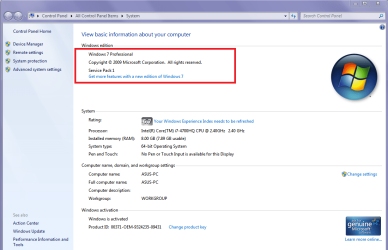
Vincenzo mate > Start > right click on Computer > click Properties and it will flash up a window like my pic it will tell you if SP1 is there.
 

Attachments

  • SP1X.PNG
    SP1X.PNG
    49.1 KB · Views: 0

My Computer

Computer type
PC/Desktop
Computer Manufacturer/Model Number
Own build (new) Desk1 / Asus ROG Win 7 / Desk2 1st build
OS
Desk1 7 Home Prem / Desk2 10 Pro / Main lap Asus ROG 10 Pro 2 laptop Toshiba 7 Pro Asus P2520 7 & 10
CPU
Desk1 i5 3750K / Laptop i7 GTX 860M / Desk2 i5 2500
Motherboard
Desk1 Asus P877-V / Desk2 Gigabyte H67 UD3H / Laptop ?
Memory
Desk1 8GB (1866) / Desk2 16GB (1333) / Laptop 8Gb DDR3
Graphics Card(s)
Desk 1& 2NVidia GTX 650 & Laptops on board Intel
Sound Card
Desk 1 & 2 -XONAR DG Realtek High Def audio Laptop
Monitor(s) Displays
Desk 1 Benq HD 2450 / Desk2 Philips 24" / Laptop 17.5"
Screen Resolution
1920x1080 D1 & D2 & Laptop 1
Hard Drives
Desk1 Samsung 120GB 830 SSD
Asus ROG 256GB 850 Pro SSD
Desk2 Samsung 840 256 SSD
Toshiba 120GB EVO
PSU
Desk 1 Corsair HX 1050/ Laptop ? / Desk 2 Corsair HX 650
Case
Desk 1 Cooler HAF XM ? Toshiba laptop / Desk2 Coolermaster
Cooling
Fans on all Desk1 -2 Desk2 - all Coolermasters 5 Laptop ?
Keyboard
Desk 1 MS Sidewinder X6 Desk 2 MS Sidewinder X 4
Mouse
Desk 1&2 - Gigabyte MS 900 gamer - laptop - Logitec wireless
Internet Speed
ADSL2+
Other Info
One other Desktop (tester) and spare Toshba laptop both with SSD's
Running Kaspersky 2016 ISS on all machines config'd identically
Logitec audio stereo systems on each machine (x3)
Canon MG5250MFC
Router/modem TP-Link running WPA2SK
Yes, that screen says Service Pack 1. It just seems odd the way it seemed locked up, yet now it says it is installed.
 

My Computer

OS
Windows 7 Professional x64
But I guess it is installed. Previously SP1 was the only update available. Now it presents 188 updates.
 

My Computer

OS
Windows 7 Professional x64
Yes mate it would not run that well at all and I don't think it would do any more updates. It is a pain to be honest and up to recently one could get and ISO that included the SP1 but right now the only way of doing that is the get a genuine disk retail or OEM and run the ei.cfg tool to "unlock" the disk for you to download the Windows version you want - worth keeping in mind if you have to do this again.

For that matter this might interest you for that purpose it explains that tool I mentioned.
http://www.sevenforums.com/tutorials/219487-clean-reinstall-factory-oem-windows-7-a.html < it is near the to of the intro.

As for it doing what it did mate it never fails to amaze me how these happen from time to time and I reckon sometimes it is down to luck and being in the right place at the right time if you get my drift.

Just one other tutorial you might like - I use it all the time
http://www.sevenforums.com/tutorials/11728-optimize-windows-7-a.html

John:)
 

My Computer

Computer type
PC/Desktop
Computer Manufacturer/Model Number
Own build (new) Desk1 / Asus ROG Win 7 / Desk2 1st build
OS
Desk1 7 Home Prem / Desk2 10 Pro / Main lap Asus ROG 10 Pro 2 laptop Toshiba 7 Pro Asus P2520 7 & 10
CPU
Desk1 i5 3750K / Laptop i7 GTX 860M / Desk2 i5 2500
Motherboard
Desk1 Asus P877-V / Desk2 Gigabyte H67 UD3H / Laptop ?
Memory
Desk1 8GB (1866) / Desk2 16GB (1333) / Laptop 8Gb DDR3
Graphics Card(s)
Desk 1& 2NVidia GTX 650 & Laptops on board Intel
Sound Card
Desk 1 & 2 -XONAR DG Realtek High Def audio Laptop
Monitor(s) Displays
Desk 1 Benq HD 2450 / Desk2 Philips 24" / Laptop 17.5"
Screen Resolution
1920x1080 D1 & D2 & Laptop 1
Hard Drives
Desk1 Samsung 120GB 830 SSD
Asus ROG 256GB 850 Pro SSD
Desk2 Samsung 840 256 SSD
Toshiba 120GB EVO
PSU
Desk 1 Corsair HX 1050/ Laptop ? / Desk 2 Corsair HX 650
Case
Desk 1 Cooler HAF XM ? Toshiba laptop / Desk2 Coolermaster
Cooling
Fans on all Desk1 -2 Desk2 - all Coolermasters 5 Laptop ?
Keyboard
Desk 1 MS Sidewinder X6 Desk 2 MS Sidewinder X 4
Mouse
Desk 1&2 - Gigabyte MS 900 gamer - laptop - Logitec wireless
Internet Speed
ADSL2+
Other Info
One other Desktop (tester) and spare Toshba laptop both with SSD's
Running Kaspersky 2016 ISS on all machines config'd identically
Logitec audio stereo systems on each machine (x3)
Canon MG5250MFC
Router/modem TP-Link running WPA2SK
OK thanks, I'll read it through.
 

My Computer

OS
Windows 7 Professional x64
Back
Top