cannot install windows seven with p4s800

hendra987989

New member
Local time
12:51 AM
Messages
7
hi

i wanted to install windows seven home edition to my pc but when i choose the costum instalation, then delete my existing partition, the installer shows error which said that i have to enable my disk controller on my BIOS.

i don't know where to set up the disk controller.

can someone help?
 

My Computer

OS
windows xp professional sp2
CPU
intel pentium 4 2.8 ghz
Motherboard
asus p4s800
Memory
1gb
Graphics Card(s)
nvidia geforce 4 mx 440
Sound Card
onboard
hi

i wanted to install windows seven home edition to my pc but when i choose the costum instalation, then delete my existing partition, the installer shows error which said that i have to enable my disk controller on my BIOS.

i don't know where to set up the disk controller.

can someone help?

Not really sure of your question, but if I am right what you have to do is this. Before you begin you have to go into your BIOS, and set it that it boots from the DVD. After that is done, just put in the DVD, boot up and follow the screens. When you get to the screen that gives you the advanced options, chose advanced and then make your partitions.
To get into bios, read your computer manual, for the key to use. In general, you boot up, during boot you hit some key (usually an f key) repepeatdly, until you get to the bios screen. My dell is f12. If I understood your question, just follow my advice, if not just wait others will be along, soon. Merry Christmas, and the best to you.
 

My Computer

Computer type
PC/Desktop
Computer Manufacturer/Model Number
Dell XPS 420
OS
Windows 10, Home Clean Install
CPU
Intel Core2 processsor Q8200(2.33Ghz 1333FSB) Quad Core Tech
Motherboard
Dell
Memory
6 gb
Graphics Card(s)
ATI Radeon 256MB HD3650
Sound Card
Intergrated 7.1 Channel Audio
Monitor(s) Displays
Dell SP2009W 20"
Hard Drives
640 GB Serial ATA Hard drive
Cooling
Fan
Keyboard
Dell USB Keyboard
Mouse
Dell Premium Optical USB
Internet Speed
DSL 2.85
hm, i think i understand how to boot up the dvd.

but, when i create the partition, there is an error which said that i have to enable the disk's contoller in my computer bios menu in order to get the computer able to run the installer.

does this has anything to do with my current bios version.

i got an awward medallion bios ver 6.0
 

My Computer

OS
windows xp professional sp2
CPU
intel pentium 4 2.8 ghz
Motherboard
asus p4s800
Memory
1gb
Graphics Card(s)
nvidia geforce 4 mx 440
Sound Card
onboard
hm, i think i understand how to boot up the dvd.

but, when i create the partition, there is an error which said that i have to enable the disk's contoller in my computer bios menu in order to get the computer able to run the installer.

So we do not misunderstand. You can just put the DVD in the computer and boot up the normal way, which is what I think you are doing, because if you did that you would not be able to make a partition or you could go to bios to boot from the DVD and not boot from your present OS. If I am mistaken, about your problem sorry.
 

My Computer

Computer type
PC/Desktop
Computer Manufacturer/Model Number
Dell XPS 420
OS
Windows 10, Home Clean Install
CPU
Intel Core2 processsor Q8200(2.33Ghz 1333FSB) Quad Core Tech
Motherboard
Dell
Memory
6 gb
Graphics Card(s)
ATI Radeon 256MB HD3650
Sound Card
Intergrated 7.1 Channel Audio
Monitor(s) Displays
Dell SP2009W 20"
Hard Drives
640 GB Serial ATA Hard drive
Cooling
Fan
Keyboard
Dell USB Keyboard
Mouse
Dell Premium Optical USB
Internet Speed
DSL 2.85
but i did boot up the dvd not from windows os.

changed the set up to cd rom as the primary boot device, restart, boot the dvd, choose custom install, delete the partition and create the new partition, but an error alert comes.

i try booting up using my vista disk but having the same problem.
 

My Computer

OS
windows xp professional sp2
CPU
intel pentium 4 2.8 ghz
Motherboard
asus p4s800
Memory
1gb
Graphics Card(s)
nvidia geforce 4 mx 440
Sound Card
onboard
Ok then there is a possiblity that there is a problem with your Hard Drive or your mother board. You will have to ascertain if that is the case. You can test your HD at the manufacturers website. For the motherboard, I am at a loss. There are many others with more exptertise in this area and they will come by to make sure you have an answer so that you can have a Merry Christmas. Take care.
 

My Computer

Computer type
PC/Desktop
Computer Manufacturer/Model Number
Dell XPS 420
OS
Windows 10, Home Clean Install
CPU
Intel Core2 processsor Q8200(2.33Ghz 1333FSB) Quad Core Tech
Motherboard
Dell
Memory
6 gb
Graphics Card(s)
ATI Radeon 256MB HD3650
Sound Card
Intergrated 7.1 Channel Audio
Monitor(s) Displays
Dell SP2009W 20"
Hard Drives
640 GB Serial ATA Hard drive
Cooling
Fan
Keyboard
Dell USB Keyboard
Mouse
Dell Premium Optical USB
Internet Speed
DSL 2.85
ok, thanks for the help

and merry christmas for you too
 

My Computer

OS
windows xp professional sp2
CPU
intel pentium 4 2.8 ghz
Motherboard
asus p4s800
Memory
1gb
Graphics Card(s)
nvidia geforce 4 mx 440
Sound Card
onboard
You are truly a very nice person, which make me even more unhappy that I could not help. TY for the rep and I did not waste my time. Its people like you that show appreciation (many that I have helped do not even do that), that make this all worthwhile. Thanks a lot.
 

My Computer

Computer type
PC/Desktop
Computer Manufacturer/Model Number
Dell XPS 420
OS
Windows 10, Home Clean Install
CPU
Intel Core2 processsor Q8200(2.33Ghz 1333FSB) Quad Core Tech
Motherboard
Dell
Memory
6 gb
Graphics Card(s)
ATI Radeon 256MB HD3650
Sound Card
Intergrated 7.1 Channel Audio
Monitor(s) Displays
Dell SP2009W 20"
Hard Drives
640 GB Serial ATA Hard drive
Cooling
Fan
Keyboard
Dell USB Keyboard
Mouse
Dell Premium Optical USB
Internet Speed
DSL 2.85
you're exaggerating. don't mention it, it's just a click away.

i just figured out a way

i'm gonna clean install my xp and upgrade it to windows 7

i think it's gonna work
 

My Computer

OS
windows xp professional sp2
CPU
intel pentium 4 2.8 ghz
Motherboard
asus p4s800
Memory
1gb
Graphics Card(s)
nvidia geforce 4 mx 440
Sound Card
onboard
No, XP cannot be in-place upgraded to Win7. However you can try to run the Win7 DVD from XP to see if it helps.

I believe you need to set your SATA controller in the BIOS to AHCI. Enter BIOS setup by typing the F Key given on first bootup screen, usually F1 or F2, then check SATA controller setting.

Now boot from the Win7 DVD, select Custom install, use Drive tools to format the partition and install.

If you get the error message please provide the exact wording as the one you describe is not recognized.
 
when in the install windows, there is a yellow triangle with (!) in it that said "Windows cannot be installed to disk 0 partition 1. (show details)"

so i clicked it and a windows appear saying "WIndows cannot be installed ti this disk. This computer hardware may not support booting this disk. Ensure that the disk's controller is enabled in the computer's BIOS menu."

i think my hdd is not sata.

yeah i tried to upgrade, but it said to use some software so i just choose the custom install, it worked but whenever i boot up there always this screen that let me choose earlier windows or windows seven that's kinda annoying.
 

My Computer

OS
windows xp professional sp2
CPU
intel pentium 4 2.8 ghz
Motherboard
asus p4s800
Memory
1gb
Graphics Card(s)
nvidia geforce 4 mx 440
Sound Card
onboard
Do you have a working WIndows 7? If so, why are you reporting that there is an error saying it cannot be installed to Disk 0 Partition 1? This does not make sense to me.

If there is a Dual Boot menu then maybe you installed Windows 7 to another partition and left XP in place. Have you tried to boot into Earlier Version of Windows?

Look in Disk Management to see what partitions are there and whether XP is still there, or just Windows 7.

in the BIOS check your BIOS version number so we can see if there is an update.

Did you build your computer or does it have a make and model number?
 
Last edited:
it's working after i installed again my xp and then install windows 7 form the os.

i built it, it's old though.

i've already flashed the latest bios from asus. the version is 1009 now. or maybe this will help, i got "award medallion BIOS version 6.00" text during boot up.

no, i chose custom install to the same partition as xp.

i've search through the BIOS menu, and there is no menu that contains AHCI.
 

My Computer

OS
windows xp professional sp2
CPU
intel pentium 4 2.8 ghz
Motherboard
asus p4s800
Memory
1gb
Graphics Card(s)
nvidia geforce 4 mx 440
Sound Card
onboard
it's working after i installed again my xp and then install windows 7 form the os.

i built it, it's old though.

i've already flashed the latest bios from asus. the version is 1009 now. or maybe this will help, i got "award medallion BIOS version 6.00" text during boot up.

no, i chose custom install to the same partition as xp.

i've search through the BIOS menu, and there is no menu that contains AHCI.

Hi

Delete all your partition first, & do a clean install.

Take look at this:

http://www.sevenforums.com/tutorials/1649-clean-install-windows-7-a.html?ltr=C
 

My Computer

OS
ME/XP/Vista/Win7
From looking at your motherboard on the ASUS website. It only uses IDE hard drives, so there is no SATA controller.

Your motherboard is about anywhere from 4-6 years old, according to the ASUS website. Fairly old technology, but not too old.

Are the drives showing up during the POST process on the motherboard? Press the "DELETE" key during startup and see what's going on.

I've attached a RAR file of your motherboard manual, maybe that will help. If its the wrong one, go to the ASUS website and download the right one.
 

My Computer

Computer Manufacturer/Model Number
Custom Build by Nibiru2008 Computer Shop
OS
Windows 7 Professional X64 Build 7600.16385 (win7_rtm.090713-1255)
CPU
Intel Core 2 Duo E8400 Wolfdale 3.0GHz 6MB L2 Cache
Motherboard
Gigabyte GA-EP45-UD3R F12 BIOS
Memory
Mushkin Enhanced Blackline PC8500 DDR2 6 GB (2x2GB & 2x1GB)
Graphics Card(s)
XFX Radeon HD 5770 1 GB DDR5
Sound Card
Onboard Realtek Azalia HD Audio
Monitor(s) Displays
ViewSonic VX2250wm 22" Widescreen LED Backlight LCD
Screen Resolution
1920 X 1080p HD
Hard Drives
OCZ Vertex 2 60GB SSD, Samsung F3 HD502HJ 500GB, Samsung F1 HD502IJ 500GB, Samsung HD102SJ 1TB, Western Digital WD500AAKS 500GB
PSU
Bgears B-Tarantula 550 watt with Pigtail Modular Cabling
Case
Lian Li PC-7F Black Anodized All Aluminum bottom PSU mount
Cooling
Xigmatek Nepartak S983 3-Pipe HDT CPU Cooler & 92mm PWM Fan
Keyboard
KeyTronic Lifetime Series Model: LT Designer Black Full Size
Mouse
Logitech Wireless Trackman Wheel
Internet Speed
30 Mbps Down 2 Mbps Up Turbo RoadRunner
Other Info
G DATA Internet Security
So do you want to try to clean reinstall from boot, or get rid of the boot menu?

The installer may not have that older IDE controller which it can only find when run from XP.
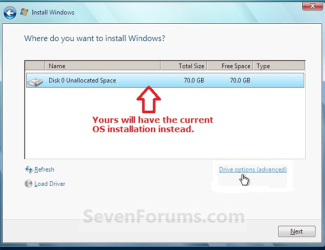
So when you try to boot it for a Custom install using Drive tools to format, you'll need to insert the unzipped IDE controller driver from a flash stick at the Load drivers link shown here:

Capture.PNG

Then Refresh to see if drives appear in window shown, use Drive tools to delete, create New and format before install.

If you want to get rid of the boot menu, try first deleting the Earlier version listing in msconfig>boot tab.

If this fails, then install EasyBCD and use the Add/Remove tab to remove Earlier Version listing.

View attachment 43655
 
Back
Top