Cannot install Windows XP back onto a Win7 CPU

justince

New member
Local time
10:41 AM
Messages
8
I've recently wanted to change back to XP. However, anytime i pop in my XP disk and boot it from the bios, it blue screens me. It gets as far when its loading drivers and sort to the point it says in the grey bar, "Setup is loading Windows", and some how it bluescreens me (doesnt let me get to the option of formatting the drive), but the error is...odd. It says its pointing as the main directory as the F drive, not the C drive.

Help please, i really hope this harddrive isnt trashed for whatever reason.
 

My Computer

OS
Win7
Would be more likely that your XP install CD is trashed. Make sure you go into bios and disable all boot devices but your cd/dvd drive. Do you only have one hard drive in the system? If not unplug all other drives but the one you want to install on.
 

My Computer

OS
Windows 7 RC 7100
CPU
E2160 Intel Dual Core
Motherboard
Abit IP35-E
Memory
4GB
Graphics Card(s)
Nvidia Geforce 250
Sound Card
Realtek HD 7.1
Monitor(s) Displays
Benq G2400W 24"
Screen Resolution
1920x1200
Hard Drives
750GB Samsung
1TB Seagate
PSU
PC Power & Cooling Silencer 750
Case
Antec
Cooling
Liquid Nitrogen
Keyboard
Microsoft ComfortCurve
Mouse
Logitech MX518
Internet Speed
10Mb up, 1Mb down
Nah, this only happens on my windows 7 cpu.
I have one hard drive. I'll try disabling all boot drives tomorow and post feedback. It's been a long day for me.
 

My Computer

OS
Win7

My Computer

Computer Manufacturer/Model Number
Too many to list.
OS
XP, Seven, 2008R2
CPU
AMD, Intel, VIA
Motherboard
Various
Memory
Corsair, Kingston, etc.
Graphics Card(s)
ATI, NVIDIA
Monitor(s) Displays
Samsung
Hard Drives
Maxtor, Western Digital
Keyboard
qwerty
Internet Speed
22 Mb/s @ home, 1 Gb/s @ server
Other Info
All of my systems still run fastest on XP 32-bit for the most part. Win7 is fun to play with, but I still prefer XP for raw speed, security, and functionality.
I've recently wanted to change back to XP. However, anytime i pop in my XP disk and boot it from the bios, it blue screens me. It gets as far when its loading drivers and sort to the point it says in the grey bar, "Setup is loading Windows", and some how it bluescreens me (doesnt let me get to the option of formatting the drive), but the error is...odd. It says its pointing as the main directory as the F drive, not the C drive.

Help please, i really hope this harddrive isnt trashed for whatever reason.
When you boot to the DISK. go to advanced, move to Command
type Format C: then enter. It really is hard to install backwards. you have to FORMAT the HDD first.
 
When you say boot to the disk, you mean disk as in windows disk? It doesnt even allow me to get to the option of formatting the harddrive, thats the problem. If im not mistaken, newer disks of XP i believe (may be wrong) have a gui version of installing from the bios..this is from the text version.
 

My Computer

OS
Win7
We need your system specs to help you anymore. Important information like chipset, whether your dvd and hard drives are SATA, what service pack is the install XP disk. You may need to install chipset drivers and sata drivers when the XP disk boots up.
 

My Computer

OS
Windows 7 RC 7100
CPU
E2160 Intel Dual Core
Motherboard
Abit IP35-E
Memory
4GB
Graphics Card(s)
Nvidia Geforce 250
Sound Card
Realtek HD 7.1
Monitor(s) Displays
Benq G2400W 24"
Screen Resolution
1920x1200
Hard Drives
750GB Samsung
1TB Seagate
PSU
PC Power & Cooling Silencer 750
Case
Antec
Cooling
Liquid Nitrogen
Keyboard
Microsoft ComfortCurve
Mouse
Logitech MX518
Internet Speed
10Mb up, 1Mb down
I have no clue what my motherboard is considering it was a repalcement computer from HP due to warranty, and i believe hd and dvd drives are sata.
 

My Computer

OS
Win7
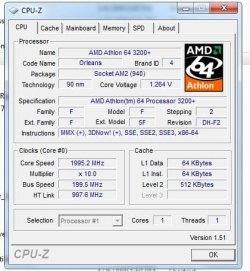
Do a search for CPU-Z at majorgeeks . com for a program to get system spec,etc.

I think you may need to download a 3rd party utility CD to pre-format your HD, before you try the re-install of XP.

Help us here at SevenForums Help you by giving us the most info on your system as you can.

" Doc "
 

Attachments

  • Cpu-z.JPG
    Cpu-z.JPG
    46.9 KB · Views: 92

My Computer

Computer type
PC/Desktop
Computer Manufacturer/Model Number
Built them myself, Science Experiments !
OS
Win7 Enterprise, Win7 x86 (Ult 7600), Win7 x64 Ult 7600, TechNet RTM on AMD x64 (2.8Ghz)
CPU
AMD fx8350 4ghz, AMD-32 2400mhz, AMD-64 3200mhz, AMDx64 2.8G
Motherboard
SIS 755, ECS-K8M890M-M (Ult 7600), GigaByte & others
Memory
2gb, 4gb on the Ult 7600, 4gb on Technet RTM, 32gb on FX8350
Graphics Card(s)
Draw my own Graphics, several nVidia cards
Sound Card
on motherboard
Monitor(s) Displays
19" flat scr, 28" I-Inc widescr,22" Emprex Widescr, 23" Acer
Screen Resolution
1280 x 1024, 1440 x 900, 1920 x 1080
Hard Drives
6 pata Ide HD's & 2 Sata HD's
added 80gb external on Ult 7600 computer,
numerous extra 1tb, 2TB, 3Tb SATA HD's
A collection of ext HD Docks w/ HDs
PSU
430w, 550w, 600w, 700, 800, etc
Case
All Generic Full Towers
Cooling
Open Air & a few fans, some w/ colored LEDs
Keyboard
Compaq & Dell recycled from GoodWill
Mouse
Made in China Optical Wired Mouse
Internet Speed
Fast Cable InterNet
Antivirus
AVG Free on 24 different Desktops, NO Problems!
Browser
IE 8 is preferred, but use FireFox sometimes
Other Info
Linksys Routers, switches, & Hubs
Too Many USB Flash Drives to count, Biggest is 64GB !
Eight computers in my home network.
Sixteen computers at my business network.
Linked via TeamViewer !
Lots of old used spare computer parts everywhere!
EASEUS Partition Master Home Edition 4.0.1

Freeware also @ majorgeeks to partition your HD

" Doc "
 

My Computer

Computer type
PC/Desktop
Computer Manufacturer/Model Number
Built them myself, Science Experiments !
OS
Win7 Enterprise, Win7 x86 (Ult 7600), Win7 x64 Ult 7600, TechNet RTM on AMD x64 (2.8Ghz)
CPU
AMD fx8350 4ghz, AMD-32 2400mhz, AMD-64 3200mhz, AMDx64 2.8G
Motherboard
SIS 755, ECS-K8M890M-M (Ult 7600), GigaByte & others
Memory
2gb, 4gb on the Ult 7600, 4gb on Technet RTM, 32gb on FX8350
Graphics Card(s)
Draw my own Graphics, several nVidia cards
Sound Card
on motherboard
Monitor(s) Displays
19" flat scr, 28" I-Inc widescr,22" Emprex Widescr, 23" Acer
Screen Resolution
1280 x 1024, 1440 x 900, 1920 x 1080
Hard Drives
6 pata Ide HD's & 2 Sata HD's
added 80gb external on Ult 7600 computer,
numerous extra 1tb, 2TB, 3Tb SATA HD's
A collection of ext HD Docks w/ HDs
PSU
430w, 550w, 600w, 700, 800, etc
Case
All Generic Full Towers
Cooling
Open Air & a few fans, some w/ colored LEDs
Keyboard
Compaq & Dell recycled from GoodWill
Mouse
Made in China Optical Wired Mouse
Internet Speed
Fast Cable InterNet
Antivirus
AVG Free on 24 different Desktops, NO Problems!
Browser
IE 8 is preferred, but use FireFox sometimes
Other Info
Linksys Routers, switches, & Hubs
Too Many USB Flash Drives to count, Biggest is 64GB !
Eight computers in my home network.
Sixteen computers at my business network.
Linked via TeamViewer !
Lots of old used spare computer parts everywhere!
I've recently wanted to change back to XP. However, anytime i pop in my XP disk and boot it from the bios, it blue screens me. It gets as far when its loading drivers and sort to the point it says in the grey bar, "Setup is loading Windows", and some how it bluescreens me (doesnt let me get to the option of formatting the drive), but the error is...odd. It says its pointing as the main directory as the F drive, not the C drive.

Help please, i really hope this harddrive isnt trashed for whatever reason.

Maybe you could tell us what issues caused you to want to go back to XP?

The knowledgeable people here might be able to resolve those issues for you.

MS support for XP will soon be ending, probably not in the next several months, but soon.

Another option might be to dual boot, depending if you have the HD space available.
 

My Computer

Computer type
PC/Desktop
Computer Manufacturer/Model Number
76~2.0
OS
Windows 7 Ult x64 - SP1/ Windows 8 Pro x64
CPU
Intel Core i5-3570K 4.6GHz
Motherboard
Gigabyte GA-Z77X UD3H, f18
Memory
8GB (2X4GB) DDR3 1600 Corsair Vengeance CL8 1.5v
Graphics Card(s)
Sapphire HD 7770 Vapor-X OC 1GB DDR5
Sound Card
Onboard VIA VT2021
Monitor(s) Displays
22" LCD Dell
Screen Resolution
1680x1050
Hard Drives
Samsung 840Pro 128GB SSD,
Seagate Barracuda 500GB SATA2 7200rpm 32MB cache, Seagate Barracuda 1TB SATA2 7200rpm 32MB cache,
PSU
Corsair HX650W
Case
Cooler Master Storm Scout
Cooling
Corsair H80 2x12cm Noctua NF P12 , 2x14cm case fans
Keyboard
Logitech Wave
Mouse
CM Sentinel
Internet Speed
Dismal
Antivirus
Avast
Browser
Opera Next
Other Info
Haswell laptop: HP Envy 17t-j, i7-4700MQ, GeForce 740M 2GB DDR3, 17.3" Full HD 1920x1080, 16GB RAM, Samsung 840 Pro 128GB, 1TB Hitachi 7200 HDD,
Desktop: eSATA ports,
External eSATA Seagate 500GB SATA2 7200rpm,
External WD USB 500GB
if you are using windows XP before you can bring it back without using any CD.. wait till i upload a screenshot of this so you can follow it easily ok? :)
 

My Computer

OS
windows 7, Vista
Did you have Windows XP installed on that computer before? And did you install it or did it come that way from the manufacturer.


Imageshack - sysinfopg1

I wasnt able to remove the hard drive from the boot seqence, only change the

order. And no, i had vista on this machine.
 

My Computer

Computer type
PC/Desktop
Computer Manufacturer/Model Number
Built them myself, Science Experiments !
OS
Win7 Enterprise, Win7 x86 (Ult 7600), Win7 x64 Ult 7600, TechNet RTM on AMD x64 (2.8Ghz)
CPU
AMD fx8350 4ghz, AMD-32 2400mhz, AMD-64 3200mhz, AMDx64 2.8G
Motherboard
SIS 755, ECS-K8M890M-M (Ult 7600), GigaByte & others
Memory
2gb, 4gb on the Ult 7600, 4gb on Technet RTM, 32gb on FX8350
Graphics Card(s)
Draw my own Graphics, several nVidia cards
Sound Card
on motherboard
Monitor(s) Displays
19" flat scr, 28" I-Inc widescr,22" Emprex Widescr, 23" Acer
Screen Resolution
1280 x 1024, 1440 x 900, 1920 x 1080
Hard Drives
6 pata Ide HD's & 2 Sata HD's
added 80gb external on Ult 7600 computer,
numerous extra 1tb, 2TB, 3Tb SATA HD's
A collection of ext HD Docks w/ HDs
PSU
430w, 550w, 600w, 700, 800, etc
Case
All Generic Full Towers
Cooling
Open Air & a few fans, some w/ colored LEDs
Keyboard
Compaq & Dell recycled from GoodWill
Mouse
Made in China Optical Wired Mouse
Internet Speed
Fast Cable InterNet
Antivirus
AVG Free on 24 different Desktops, NO Problems!
Browser
IE 8 is preferred, but use FireFox sometimes
Other Info
Linksys Routers, switches, & Hubs
Too Many USB Flash Drives to count, Biggest is 64GB !
Eight computers in my home network.
Sixteen computers at my business network.
Linked via TeamViewer !
Lots of old used spare computer parts everywhere!
Hi there.

If it is a NEW computer you will have to slipstream SATA drivers on to the XP disk before you can install it - or if you are lucky your BIOS might have an "Enable SATA as IDE (legacy mode)" type of option.

Backup any DATA you need before you start including your email. If you have Outlook you can download an email backup utility from microsoft - pfbackup.exe.

So first ensure you have at least an XP SP2 (SP3 is better) install CD. Copy this to your hard drive (using W7). Now download the SATA / Chipset drivers (or use Driverpacks -- google for their site).

Now use nLite (download via google) and Slipstream into your XP install Cd that you've copied to your HD.

Create a NEW CD with nLite.

Boot it -- delete all partitions found on your disk when prompted for Windows install. Create your Windows XP partition - 15 GB should be MORE than enough for a windows XP installation - save the rest for data / dual boot in case you want to re-install W7 at a later time.

Install your Windows XP system

You should be able to hunt down any missing drivers etc after you've installed windows XP.


The Driver packs method is probably the best as the driverpacks contain almost every XP driver on the planet.

( I used to do this quite a lot when "De-Vista-ing" older computers to run on XP again - these old machines were delivered with VISTA which used to run like a dog on older hardware).

Follow the tutorial here

Driverpacks Tutorial


Cheers
jimbo
 

My Computer

Computer type
PC/Desktop
Computer Manufacturer/Model Number
Custom built, several laptops HP/ASUS
OS
Linux CENTOS 7 / various Windows OS'es and servers
CPU
Intel i7 Intel i5
Memory
8GB, 16GB
Graphics Card(s)
On Motherboard
Sound Card
Realtek HD audio
Monitor(s) Displays
Apple Cinema display, Samsung LCD
Screen Resolution
1920 X 1080
Hard Drives
4 X 1TB SATA
Mouse
Toshiba wireless laser
Internet Speed
> 20MB up
Back
Top