Cannot install WMP 11

basenji

New member
Local time
4:24 AM
Messages
4
I've been having problems playing some media fileswith WMP, checking out what version I have it's WMP 9, rather strange because I assumed when I purchased W7 Home Premium and did a fresh install (machine originally had Vista installed) that I would have a newer version of the player.

Tried to update from the player option tab and am told I already have the newest version, very confused here!

I've checked the disc and unlike previous versions of Windows you don't get the option to install other programme, I'm sure we had this option on XP discs.

Downloaded WMP11 and it asked to validate, validation passed yet when I try to install WMP it again asks for validation and again passes, I've been going round in circles here.

Services tells me I Have Software Protection enabled.

I did do a fresh installation and not an upgrade so I believed WMP12 was included with 7 and should have installed, this was done last year and never any problems until now, as I rarely use WMP just the the Media Centre I'd never bothered to check the version of WMP until now.

Can anyone give me any help on this please. Thankyou.
 

My Computer

OS
Windows 7 Home Premium 32 bit

My Computer

Computer Manufacturer/Model Number
Hewlett packard/p6512uk
OS
Microsoft Windows 7 Home Premium 64-bit 7600
CPU
IIx4 amd athelon 635 processor
Motherboard
FOXCONN 2AA9
Memory
2x2gb
Graphics Card(s)
ati radeon HD 5450
Sound Card
(1) Realtek High Definition Audio (2) AMD High Definition
Monitor(s) Displays
samsung lcd tv 32"
Screen Resolution
1360x 768
Hard Drives
(1) WDC WD10 01FAES-60Z2A0 SATA Disk Device (2) Maxtor OneTouch USB Device (3) ST310003 33AS USB Device (4) WD My Book 1111 USB Device
PSU
?
Cooling
air!
Keyboard
wireless hp
Mouse
wireless Hp,optical
Internet Speed
1.10mb/s
Antivirus
MSE
Browser
Firefox
Are you sure ? Not only strange, but also odd. Any version lower that 12 does not run in windows7. I hope you have checked it rightly ... open media player > Ctrl+M to open menu bar > Help > About windows media player .

Can you post a screenshot of your full desktop covering the full taskbar, with this window open ? Without seeing the situation, it is difficult to suggest you further steps, other than that one posted by boohbah !
 

My Computer

Computer type
PC/Desktop
Computer Manufacturer/Model Number
Self Assembled
OS
Microsoft Windows 10 Pro Insider Preview 64-bit
CPU
Intel(R) Core(TM) i3-4130 CPU @ 3.40GHz
Motherboard
Gigabyte Technology Co., Ltd. B85M-D3H
Memory
Corsair Vengence 4GB x2 (8.00GB Dual-Channel DDR3 @ 798MHz)
Graphics Card(s)
2047MB GeForce GTS 450 (ZOTAC International)
Sound Card
Onboard (Realtek High Definition Audio)
Monitor(s) Displays
LG Flatron E2040T
Screen Resolution
1600x900
Hard Drives
Western Digital 1 TB
Seagate 500 GB
PSU
Corsair VS550
Case
Cooler Master K380
Cooling
Cooler Master Seidon 120V Plus
Keyboard
Logitech MK260r
Mouse
Logitech MK260r
Internet Speed
PMPL Broadband
Antivirus
Windows Defender + MBAM
Browser
Firefox
Other Info
Dell Studio 15" Laptop
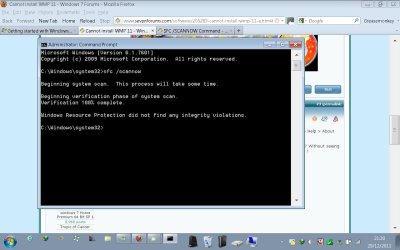
Thankyou, I shall run the sfc /scannow then post screen shots.
 

My Computer

OS
Windows 7 Home Premium 32 bit
Well I've really messed up now, whilst the scan was running I googled and read to turn off the WMP feature and install new player from MS website, scan came up no errors.

I tried again to install the download I had tried previously I'd found it on mediafire, and was asked again to validate, same again, validated but couldnt install, around in circles again.

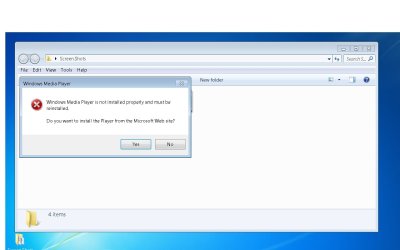
I couldn't find a download for W7 on the MS website so I googled and found a download of WMP 11 on Cnet, installed it, turned the feature back on, the player along with WMC appeared on the Start/All Programmes menu, clicked it, nothing, just the message to install from MS website (screenshot) this took me here Get Windows Media Player - Microsoft Windows and I have no idea where on that page to find the correct download.

The only 32bit available to download from there is the one for XP, could I use that one? As of now I have no WMP at all.

Sorry not that savvy on posting on forums (not that good on fixing anything either) it's taken me a while to work out how to take and post screen shots here.

Appreciate the help, although all this is quite daunting to me, would it be easier to just repair or reinstall the operating system? I'm completely lost with this, I recently spent days trying to remove a virus eventually had to buy a programme to remove it.
 

Attachments

  • scan.jpg
    scan.jpg
    86.5 KB · Views: 13
  • error.jpg
    error.jpg
    51.6 KB · Views: 20

My Computer

OS
Windows 7 Home Premium 32 bit

My Computer

Computer Manufacturer/Model Number
Hewlett packard/p6512uk
OS
Microsoft Windows 7 Home Premium 64-bit 7600
CPU
IIx4 amd athelon 635 processor
Motherboard
FOXCONN 2AA9
Memory
2x2gb
Graphics Card(s)
ati radeon HD 5450
Sound Card
(1) Realtek High Definition Audio (2) AMD High Definition
Monitor(s) Displays
samsung lcd tv 32"
Screen Resolution
1360x 768
Hard Drives
(1) WDC WD10 01FAES-60Z2A0 SATA Disk Device (2) Maxtor OneTouch USB Device (3) ST310003 33AS USB Device (4) WD My Book 1111 USB Device
PSU
?
Cooling
air!
Keyboard
wireless hp
Mouse
wireless Hp,optical
Internet Speed
1.10mb/s
Antivirus
MSE
Browser
Firefox
:doh:
 

My Computer

Computer type
PC/Desktop
Computer Manufacturer/Model Number
Gigabyte Technology Co., Ltd.
OS
Win 7 Ultimate 64-bit SP1 (desktop)
CPU
Intel Core 2 Duo E8400
Motherboard
Gigabyte GA-EP35-DS3R
Memory
2x 2GB OCZ DDR II SDRAM PC2-6400
Graphics Card(s)
NVIDIA GeForce 9400GT
Monitor(s) Displays
HP 2009m(primary), Acer P191W
Screen Resolution
1600x900, 1440x900
Hard Drives
Internal:WD Caviar Black 640GB 32MB cache 7200RPM
External:Samsung Story Station 1TB HDD desktop drive
500GB Toshiba portable drive
PSU
Antec Earthwatts EA500D
Case
Antec Sonata III
Cooling
4 fans
Keyboard
Logitech Wave
Mouse
Logitech M-SBF90
Internet Speed
Slow due to home Wireless-G router
Antivirus
MSE, Hitman Pro, Malwarebytes
Browser
Chrome and Palemoon
Other Info
Laptop....Acer 5750Z-4835
15.6" HD Widescreen CineCrystal™ LED-backlit LCD Display: (1366x768 resolution, 16:9 aspect ratio)
Intel® Pentium® Processor B940 (2.0GHz, 2MB L3 cache)
Windows® 7 Home Premium,500GB Hard Drive,4GB DDR3 RAM, Intel® HD Graphics,8X DVD-Super Multi Double-Layer Drive
Multi-in-1 Digital Media Card Reader,802.11b/g/n Wi-Fi
Chrome and Palemoon, MSE, Hitman Pro
I would turn off WMP in Windows features, then I would try uninstalling the ver 11 that you attempted to install (should be in the programs and features of control panel since you installed manually). finally....turn it back on in features and it should install the correct version that is bundled with Win7.

If this process does not work then I would use a restore point as mentioned above.
 

My Computer

Computer Manufacturer/Model Number
Systemax N2000 Gaming PC
OS
Windows 7 Ultimate x64
CPU
Q6600 @2.4ghz (G0 stepping)
Motherboard
XFX nforce 680i LT
Memory
8 gb OCZ vista essential sli PC-6400
Graphics Card(s)
Dual 9800gt in SLI mode
Sound Card
Integrated 8.1 High Definition Audio
Monitor(s) Displays
Dual Sceptre x246w 24 inch monitors
Screen Resolution
1920 x 1200 each monitor
Hard Drives
500 GB SATA II / 7500 rpm
PSU
Cooler Master Real Power Pro 1250W
Case
N2000 server tower
Cooling
Thermaltake Bigwater 760 is
Keyboard
MS Intelitype 6000 v2.0
Mouse
MS Intelipoint 6000
Internet Speed
Wi-power 1.5GB up / 512k down
Other Info
Windows 7 Ultimate x64, Windows 7 Pro x64, Windows Home Premium X86, Windows XP pro, Windows Home Server x86, Ubuntu 10.4 x86 and x64, Ubuntu server 10.4, SQL Server 2005, MySQL 5.0

My Computer

Computer type
PC/Desktop
Computer Manufacturer/Model Number
Self Assembled
OS
Microsoft Windows 10 Pro Insider Preview 64-bit
CPU
Intel(R) Core(TM) i3-4130 CPU @ 3.40GHz
Motherboard
Gigabyte Technology Co., Ltd. B85M-D3H
Memory
Corsair Vengence 4GB x2 (8.00GB Dual-Channel DDR3 @ 798MHz)
Graphics Card(s)
2047MB GeForce GTS 450 (ZOTAC International)
Sound Card
Onboard (Realtek High Definition Audio)
Monitor(s) Displays
LG Flatron E2040T
Screen Resolution
1600x900
Hard Drives
Western Digital 1 TB
Seagate 500 GB
PSU
Corsair VS550
Case
Cooler Master K380
Cooling
Cooler Master Seidon 120V Plus
Keyboard
Logitech MK260r
Mouse
Logitech MK260r
Internet Speed
PMPL Broadband
Antivirus
Windows Defender + MBAM
Browser
Firefox
Other Info
Dell Studio 15" Laptop
Back
Top