
Cannot load saved images after attempted (failed) W10 to W7 downgrade

lyonkster

New member
Local time
11:11 AM
Messages
4
First time poster here with a head scratcher (to me).

My 6 mo old Dell XPS8700 came with W7 Pro 64 bit. About two weeks ago I decided to take the plunge to W10. Upgraded without issues, and been running great for two weeks.

This weekend I decided to go back to W7 and create an image of W7 just before I upgraded (in case I decide to downgrade later, after 30 days). Turns out to have been a bad move.

Prior to downgrading, I created images of the W10 system with not one but three tools (EaseUS, Aomei, and Macrium).

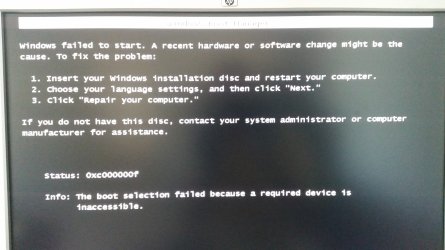
I tried using the Restore W7 function in W10, which started fine but then crashed (I don't recall the error message, but it was not very clear). Subsequently the PC would not boot, I got the dreaded "Windows failed to start. A recent hardware or software change blah blah", and the repair disk option did nothing. http://answers.microsoft.com/en-us/...dware-or/8dad59b9-a08d-4cb8-8ddf-1c164b7caf65

I thought "no problem, I have the images saved". I tried to restore the W10 image using Macrium and the rescue disk. The image loaded, but when I tried to boot, I got the same exact error message.

I did the same thing with Aomei and EaseUS, and again got the exact same error messages. I simply could not boot up the PC.

After screwing with it most of the day, I found an Aomei image from 5 months ago. I was able to restore that one and the system now boots up fine. So while I need to download a bunch of programs to get back to where I was, I think (hope) that I am on the road to recovery.

What I don't get (aside from why Windows took a dump on downgrading in such an ugly way) is why none of my images are restoring correctly. I thought maybe it's a hardware problem with the SSD, but the older image did install.

What am I missing? Is it possible that the images that Aomei, Macrium, and EaseUS created while in the W10 environment cannot be reloaded in the W7 environment?

It just makes me wonder what I should do differently next time to avoid a similar disaster.

Thanks!
 

Attachments
  • 20160501_162732.jpg
    20160501_162732.jpg
    209.3 KB · Views: 0

My Computer My Computer

At a glance

Win 7 Pro 64
Computer type
PC/Desktop
Computer Manufacturer/Model Number
Dell XPS8700
OS
Win 7 Pro 64
Hi and welcome to SevenForums,
Did you share the drive with the images with both os's ?

Was this drive with the images always connected or only when you created them and tried to restore them ?

Win-10 does not play well with sharing drives
Mostly because of fast startup in win-10
Disabled it's not as bad but personally I'll never share a drive with win-10 I need for win-7.
Fast Startup - Turn On or Off in Windows 10 - Windows 10 Forums

I also disable fast start in bios.
 

My Computer My Computer

At a glance

Win-7-Pro64bit 7-H-Prem-64biti7-5930K 2nd i9-9940x both water blocked VRM'...Trident-z 3200C14 2nd Trident-z 3600C16EVGA 1080ti ftw3 2nd Titan Xp both water blocked
Computer type
PC/Desktop
Computer Manufacturer/Model Number
Custom assembled by me :}
OS
Win-7-Pro64bit 7-H-Prem-64bit
CPU
i7-5930K 2nd i9-9940x both water blocked VRM's too
Motherboard
ASUS SABERTOOTH X99 2nd ASUS x299 Apex
Memory
Trident-z 3200C14 2nd Trident-z 3600C16
Graphics Card(s)
EVGA 1080ti ftw3 2nd Titan Xp both water blocked
Sound Card
Built-in Realtek
Monitor(s) Displays
1-AOC G2460PG 24"G-Sync 144Hz/ 2nd 1-ASUS VG248QE 24" 144Hz
Screen Resolution
1920 x 1080 144Hz
Hard Drives
2-Samsung M.2 Evo & Evo Plus
2-Samsung 850 EVO 500GB SSD's/ 3-2.5 W.D. Black 1tb-&3-1tb/3-3.5 WD Black 1tb hdd's
PSU
EVGA SuperNOVA 1000-P2 2nd 1200-P2
Case
2-Corsair Obsidian Series 450D Black ATX Mid Tower
Cooling
Custom water loops
Keyboard
Logitech G710+/ 2nd Logitech G910
Mouse
2-RedDragon M901 Perdition 16400 dpi Gaming mouse = wired
Internet Speed
Comcast Ping 19ms 89.31mbps download speed 6.12mbps upload
Antivirus
Malwarebytes Pro/ Superantispyware Pro
Browser
FireFox & Pale moon
Other Info
2nd ASUS X299 Apex/Intel i9-9940x with Custom water loop/7H-Prem-x64/Corsair 450D case/Ram Trident-z 3600C16 4x8gb / Samsung970Evo plus 500gb SSD/Dual ssd EZ swap evo/PSU EVGA SuperNova 1200w-P2 80+Platinum/GPU Titan Xp /8-ML-140 on push-pull on 2-280GTX rads
Thanks for the reply! I'm not completely sure what "sharing a drive" means, but let me know if this helps - the OS drive is an SSD, and the data resides on a 1 TB HDD inside the same machine. When I made the images, I saved them on the HDD. The data HDD was always connected to the machine as a data drive. Is that what you were asking?
 

My Computer My Computer

At a glance

Win 7 Pro 64
Computer type
PC/Desktop
Computer Manufacturer/Model Number
Dell XPS8700
OS
Win 7 Pro 64
Hi,
Yes :)
Win-10 imho needs it's own drives for data and system images
If all you had was win-7 system images I would of kept it totally separate and on it's own drive and disconnected when upgrading to win-10.

Either way win-10 fast start probably corrupted the images.
Many times testing win-10 I was repeatedly prompted with alerts in win-7 that the drive shared with win-10 must be initialized before use this has a very good chance to loose what ever data is on the drive
During testing all the drives I used were just transferring files from 7 to 10 so there was no real loss but was a very good wake up call for me to keep these operating system well separated :)
And fast start off.
 

My Computer My Computer

At a glance

Win-7-Pro64bit 7-H-Prem-64biti7-5930K 2nd i9-9940x both water blocked VRM'...Trident-z 3200C14 2nd Trident-z 3600C16EVGA 1080ti ftw3 2nd Titan Xp both water blocked
Computer type
PC/Desktop
Computer Manufacturer/Model Number
Custom assembled by me :}
OS
Win-7-Pro64bit 7-H-Prem-64bit
CPU
i7-5930K 2nd i9-9940x both water blocked VRM's too
Motherboard
ASUS SABERTOOTH X99 2nd ASUS x299 Apex
Memory
Trident-z 3200C14 2nd Trident-z 3600C16
Graphics Card(s)
EVGA 1080ti ftw3 2nd Titan Xp both water blocked
Sound Card
Built-in Realtek
Monitor(s) Displays
1-AOC G2460PG 24"G-Sync 144Hz/ 2nd 1-ASUS VG248QE 24" 144Hz
Screen Resolution
1920 x 1080 144Hz
Hard Drives
2-Samsung M.2 Evo & Evo Plus
2-Samsung 850 EVO 500GB SSD's/ 3-2.5 W.D. Black 1tb-&3-1tb/3-3.5 WD Black 1tb hdd's
PSU
EVGA SuperNOVA 1000-P2 2nd 1200-P2
Case
2-Corsair Obsidian Series 450D Black ATX Mid Tower
Cooling
Custom water loops
Keyboard
Logitech G710+/ 2nd Logitech G910
Mouse
2-RedDragon M901 Perdition 16400 dpi Gaming mouse = wired
Internet Speed
Comcast Ping 19ms 89.31mbps download speed 6.12mbps upload
Antivirus
Malwarebytes Pro/ Superantispyware Pro
Browser
FireFox & Pale moon
Other Info
2nd ASUS X299 Apex/Intel i9-9940x with Custom water loop/7H-Prem-x64/Corsair 450D case/Ram Trident-z 3600C16 4x8gb / Samsung970Evo plus 500gb SSD/Dual ssd EZ swap evo/PSU EVGA SuperNova 1200w-P2 80+Platinum/GPU Titan Xp /8-ML-140 on push-pull on 2-280GTX rads
If you have a System Reserved partition that's probably where the bootloader is installed.
You would need to restore the System Reserved partition and the Windows partition when restoring. Also with Macrium v6 restoring the MBR (Master Boot Record) is optional. You should restore the MBR when restoring a different OS. With Macrium you can mount the backup image and see what partitions are in it. Probably the other backup utilities can also do this. A lot of times a Startup Repair fixes boot issues after restoring a backup image. [URL]http://www.sevenforums.com/tutorials/681-startup-repair.html[/URL]
 

My Computer My Computer

At a glance

Multi-Boot W7_Pro_x64 W8.1_Pro_x64 W10_Pro_x6...AMD Athlon II x4 6206GB GSkill DDR2 800AMD 4670 GPU + AMD 4200 IGP
Computer type
PC/Desktop
Computer Manufacturer/Model Number
home built
OS
Multi-Boot W7_Pro_x64 W8.1_Pro_x64 W10_Pro_x64 +Linux_VMs +Chromium_VM
CPU
AMD Athlon II x4 620
Motherboard
Gigabyte GA-MA785G-UD3H
Memory
6GB GSkill DDR2 800
Graphics Card(s)
AMD 4670 GPU + AMD 4200 IGP
Sound Card
on board Realtek ALC889A
Monitor(s) Displays
RCA 40" LCD TV, Insignia 32" LCD TV, HP 15" LCD monitor
Screen Resolution
1680 x 1050
Hard Drives
OCZ Vertex 3 120GB,
Samsung F3 1TB (3),
Several others - WD, Seagate, Hitachi, ...
PSU
Corsair 500 W
Case
Rosewill mid tower
Cooling
CM 90mm rifle
Keyboard
Gyration wireless, Logitech wireless, Dell USB wired
Mouse
Gyration wireless, Logitech wireless, V7 USB wired
Internet Speed
Spectrum - 100Mbps D / 10Mbps U
Antivirus
Avast, MBAM3, EMET, WinPatrol
Browser
Pale Moon, Firefox, IE
Other Info
2 multi-boot PC's
Mainly HTPC/Office/Gen purpose (no gaming).
Trendnet USB KVM.
LG DVD burner/Blue Ray Player.
Tray system for removable SATA backup drives.

Not currently OCd, under-volted.
I use Hybrid sleep, rarely re-boot or shutdown.

Hauppauge HD-PVR, Avermedia PCIe TV Tuner, Hauppauge PCI TV Tuner.
Wow, I'm learning more about W10 than I ever wanted to! Thanks.

DavidE, I did try to restore both the OS and the System reserved partitions (i.e. I imaged all partitions on the SSD, and then asked for all the partitions to be restored). Maybe I screwed something up.

What does not seem to add up though is that I was able to restore an earlier image, one that I made back in September and that has been sitting on the same data drive HDD the whole time. That would seem to contradict some of the suggestions above, but perhaps if W10 ends up corrupting data/images, it does not corrupt them all uniformly, and the September image escaped unscathed.

Regardless, I think from now on I am making clones of important configurations rather than images, seems like there are fewer things that can go wrong :).
 

My Computer My Computer

At a glance

Win 7 Pro 64
Computer type
PC/Desktop
Computer Manufacturer/Model Number
Dell XPS8700
OS
Win 7 Pro 64
I store Macrium backup images for all OS's on the same HD and haven't had any problems with an image getting corrupted.
I have a separate Backup folder for each OS.
I haven't reverted back to Win 7 after upgrading to Win 10, so i can't comment on doing that.

I do agree the Win 10 Fast Startup can wreak havoc on a multi-boot PC, i learned that the hard way.

If you go with cloning, it uses an entire HD for the backup, so you can only keep one (the latest) clone per backup device (HD).

I share some drives/partitions for all OS's (W7, W8.1, W10) and haven't had a problem with that.
Keeping everything separate is probably safer, but i want to share my Data and Portable Programs with all OS's.
I don't want to duplicate this stuff, for each OS.

I agree, that is weird that an older image works, but not the newer ones.
 

My Computer My Computer

At a glance

Multi-Boot W7_Pro_x64 W8.1_Pro_x64 W10_Pro_x6...AMD Athlon II x4 6206GB GSkill DDR2 800AMD 4670 GPU + AMD 4200 IGP
Computer type
PC/Desktop
Computer Manufacturer/Model Number
home built
OS
Multi-Boot W7_Pro_x64 W8.1_Pro_x64 W10_Pro_x64 +Linux_VMs +Chromium_VM
CPU
AMD Athlon II x4 620
Motherboard
Gigabyte GA-MA785G-UD3H
Memory
6GB GSkill DDR2 800
Graphics Card(s)
AMD 4670 GPU + AMD 4200 IGP
Sound Card
on board Realtek ALC889A
Monitor(s) Displays
RCA 40" LCD TV, Insignia 32" LCD TV, HP 15" LCD monitor
Screen Resolution
1680 x 1050
Hard Drives
OCZ Vertex 3 120GB,
Samsung F3 1TB (3),
Several others - WD, Seagate, Hitachi, ...
PSU
Corsair 500 W
Case
Rosewill mid tower
Cooling
CM 90mm rifle
Keyboard
Gyration wireless, Logitech wireless, Dell USB wired
Mouse
Gyration wireless, Logitech wireless, V7 USB wired
Internet Speed
Spectrum - 100Mbps D / 10Mbps U
Antivirus
Avast, MBAM3, EMET, WinPatrol
Browser
Pale Moon, Firefox, IE
Other Info
2 multi-boot PC's
Mainly HTPC/Office/Gen purpose (no gaming).
Trendnet USB KVM.
LG DVD burner/Blue Ray Player.
Tray system for removable SATA backup drives.

Not currently OCd, under-volted.
I use Hybrid sleep, rarely re-boot or shutdown.

Hauppauge HD-PVR, Avermedia PCIe TV Tuner, Hauppauge PCI TV Tuner.
Hi,
Nobody has ever lost data if it's duplicated in at least 2 places :)
Not sharing drives insures at least to me I've done all I can to prevent data loss
Then we can get to the mechanical loss of data stuff :D
 

My Computer My Computer

At a glance

Win-7-Pro64bit 7-H-Prem-64biti7-5930K 2nd i9-9940x both water blocked VRM'...Trident-z 3200C14 2nd Trident-z 3600C16EVGA 1080ti ftw3 2nd Titan Xp both water blocked
Computer type
PC/Desktop
Computer Manufacturer/Model Number
Custom assembled by me :}
OS
Win-7-Pro64bit 7-H-Prem-64bit
CPU
i7-5930K 2nd i9-9940x both water blocked VRM's too
Motherboard
ASUS SABERTOOTH X99 2nd ASUS x299 Apex
Memory
Trident-z 3200C14 2nd Trident-z 3600C16
Graphics Card(s)
EVGA 1080ti ftw3 2nd Titan Xp both water blocked
Sound Card
Built-in Realtek
Monitor(s) Displays
1-AOC G2460PG 24"G-Sync 144Hz/ 2nd 1-ASUS VG248QE 24" 144Hz
Screen Resolution
1920 x 1080 144Hz
Hard Drives
2-Samsung M.2 Evo & Evo Plus
2-Samsung 850 EVO 500GB SSD's/ 3-2.5 W.D. Black 1tb-&3-1tb/3-3.5 WD Black 1tb hdd's
PSU
EVGA SuperNOVA 1000-P2 2nd 1200-P2
Case
2-Corsair Obsidian Series 450D Black ATX Mid Tower
Cooling
Custom water loops
Keyboard
Logitech G710+/ 2nd Logitech G910
Mouse
2-RedDragon M901 Perdition 16400 dpi Gaming mouse = wired
Internet Speed
Comcast Ping 19ms 89.31mbps download speed 6.12mbps upload
Antivirus
Malwarebytes Pro/ Superantispyware Pro
Browser
FireFox & Pale moon
Other Info
2nd ASUS X299 Apex/Intel i9-9940x with Custom water loop/7H-Prem-x64/Corsair 450D case/Ram Trident-z 3600C16 4x8gb / Samsung970Evo plus 500gb SSD/Dual ssd EZ swap evo/PSU EVGA SuperNova 1200w-P2 80+Platinum/GPU Titan Xp /8-ML-140 on push-pull on 2-280GTX rads
Thanks for the tips folks. Given what I learned from the responses, I now think that there is an advantage to making a clone rather than image. I understand that a clone uses up an entire HD, but I have a number of HDD's laying around collecting dust, and the reduced risk of compatibility issues seems to me to be worth it. I will also create images and incremental images on another HDD, but at least I'll have one clone that won't require any program to restore. Having wasted a full day on this nonsense, I'm once bitten twice shy.

And as I understand your replies, for future reference, I should not have used an HDD for image storage that's resident to the PC. It's better to connect an external HDD and load the image on it, then disconnect it to keep it out of harm's way. Is that the right takeaway?
 

My Computer My Computer

At a glance

Win 7 Pro 64
Computer type
PC/Desktop
Computer Manufacturer/Model Number
Dell XPS8700
OS
Win 7 Pro 64
Hi,
Pretty much
The images are safer disconnected after verifying them.
Easiest way to disconnect them is shutting down the machine I've found.
 

My Computer My Computer

At a glance

Win-7-Pro64bit 7-H-Prem-64biti7-5930K 2nd i9-9940x both water blocked VRM'...Trident-z 3200C14 2nd Trident-z 3600C16EVGA 1080ti ftw3 2nd Titan Xp both water blocked
Computer type
PC/Desktop
Computer Manufacturer/Model Number
Custom assembled by me :}
OS
Win-7-Pro64bit 7-H-Prem-64bit
CPU
i7-5930K 2nd i9-9940x both water blocked VRM's too
Motherboard
ASUS SABERTOOTH X99 2nd ASUS x299 Apex
Memory
Trident-z 3200C14 2nd Trident-z 3600C16
Graphics Card(s)
EVGA 1080ti ftw3 2nd Titan Xp both water blocked
Sound Card
Built-in Realtek
Monitor(s) Displays
1-AOC G2460PG 24"G-Sync 144Hz/ 2nd 1-ASUS VG248QE 24" 144Hz
Screen Resolution
1920 x 1080 144Hz
Hard Drives
2-Samsung M.2 Evo & Evo Plus
2-Samsung 850 EVO 500GB SSD's/ 3-2.5 W.D. Black 1tb-&3-1tb/3-3.5 WD Black 1tb hdd's
PSU
EVGA SuperNOVA 1000-P2 2nd 1200-P2
Case
2-Corsair Obsidian Series 450D Black ATX Mid Tower
Cooling
Custom water loops
Keyboard
Logitech G710+/ 2nd Logitech G910
Mouse
2-RedDragon M901 Perdition 16400 dpi Gaming mouse = wired
Internet Speed
Comcast Ping 19ms 89.31mbps download speed 6.12mbps upload
Antivirus
Malwarebytes Pro/ Superantispyware Pro
Browser
FireFox & Pale moon
Other Info
2nd ASUS X299 Apex/Intel i9-9940x with Custom water loop/7H-Prem-x64/Corsair 450D case/Ram Trident-z 3600C16 4x8gb / Samsung970Evo plus 500gb SSD/Dual ssd EZ swap evo/PSU EVGA SuperNova 1200w-P2 80+Platinum/GPU Titan Xp /8-ML-140 on push-pull on 2-280GTX rads
Back
Top