
WinUser7777
New member
- Local time
- 12:12 AM
- Messages
- 3
Hello, experts:
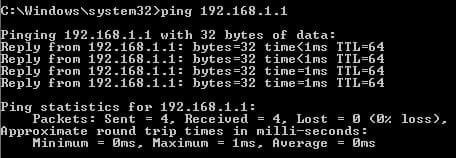
I have a Netgear Nighthawk R7000 router and two laptops running Windows 7 Home Premium. I can't access the router's admin interface from one of the laptops, BUT I can do so without a problem from the other laptop. The IP address I type in is http://192.168.1.1., and I get the generic error page, "This page can't be displayed", in IE. I have also tried Chrome and Firefox. I can successfully ping the router from the Command Prompt. The IP configuration of the laptop (ipconfig from DOS prompt) correctly shows the default gateway at 192.168.1.1 and the laptop's IP at 192.168.1.2. The subnet mask correctly shows as 255.255.255.0, as do all the other IP parameters.
The Internet is working fine on all devices, including the problem laptop.
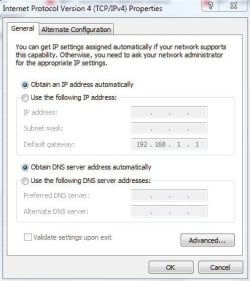
The laptop's IPv4 settings are set to autoconfig; DHCP enabled.
I have also tried a wired connection between the laptop and the router with a LAN cable with no success. The router fails to detect the laptop's wired connection: the corresponding LAN port light on the router lights up for about a minute, then dies.
I have also tried booting the laptop from a Ubuntu Linux disk, and the connection to the router's interface WAS successful and immediate, both wireless and wired.
Things I have already tried:
(1) I can access the router's interface from the other laptop and even my phones
(2) I can access the router's interface from the problem laptop when running Linux/Ubuntu.
Attached are my ipconfig output and my IPv4 config snapshot.
Thank you all!
I have a Netgear Nighthawk R7000 router and two laptops running Windows 7 Home Premium. I can't access the router's admin interface from one of the laptops, BUT I can do so without a problem from the other laptop. The IP address I type in is http://192.168.1.1., and I get the generic error page, "This page can't be displayed", in IE. I have also tried Chrome and Firefox. I can successfully ping the router from the Command Prompt. The IP configuration of the laptop (ipconfig from DOS prompt) correctly shows the default gateway at 192.168.1.1 and the laptop's IP at 192.168.1.2. The subnet mask correctly shows as 255.255.255.0, as do all the other IP parameters.
The Internet is working fine on all devices, including the problem laptop.
The laptop's IPv4 settings are set to autoconfig; DHCP enabled.
I have also tried a wired connection between the laptop and the router with a LAN cable with no success. The router fails to detect the laptop's wired connection: the corresponding LAN port light on the router lights up for about a minute, then dies.
I have also tried booting the laptop from a Ubuntu Linux disk, and the connection to the router's interface WAS successful and immediate, both wireless and wired.
Things I have already tried:
- Many, many hours seaching the various forums
- Restarting the laptop, router and modem in all possible successions many times
- Disabling the Windows firewall and Kaspersky antivirus
- Pinging the router at 192.168.1.1 -- the ping is OK, no packets lost
- Assigning the laptop a static IP (e.g., 192.168.1.6), then reverting back to autoconfig because of no success
- Resetting the router to factory defaults (again, can access the router from one laptop but not the other)
- Flushing the laptop's DNS cache from the DOS prompt using the netsh commands
- Uninstalling and reinstalling the wireless adapter driver and the wired LAN driver
(1) I can access the router's interface from the other laptop and even my phones
(2) I can access the router's interface from the problem laptop when running Linux/Ubuntu.
Attached are my ipconfig output and my IPv4 config snapshot.
Thank you all!
Attachments

My Computer
At a glance
Windows 7 Home Premium SP1Inter Core i54 GB
- Computer type
- PC/Desktop
- Computer Manufacturer/Model Number
- Gateway
- OS
- Windows 7 Home Premium SP1
- CPU
- Inter Core i5
- Memory
- 4 GB
- Antivirus
- Kaspersky
- Browser
- IE, Chrome, Firefox


