Cannot map network disk

tomsk

New member
Local time
11:32 AM
Messages
4
I have NAS, problem is that I cannot map network disk in NAS

Command:

Code:
net use u: \\192.168.1.5\home


Output:

Code:
System error 59 has occured.        

An unexpected network error occurred.


I am using Windows 7 Home Premium 64-bit, NAS is on same LAN. I tried map it from another computer in same network and it works, but it doesn't work on my PC.

I tried:

- disable firewall
- ping NAS - success
- login into NAS webadmin - success
- change Network security: LAN Manager authentication level to Send LM & NTLM - use NTLMv2 session security if negotiated in Computer Configuration/Windows Settings/Security Settings/Local Policies/Security Options using gpedit.msc
- create new key Smb2 in
HKLM:\SYSTEM\CurrentControlSet\Services\LanmanServer\Parameters to
0 and 1 (second try)
- create new key EnableDfsLoopbackTargets in HKLM:\SYSTEM\CurrentControlSet\Services\Mup\Parameters with value 1

Thank you
 

My Computer

Computer type
PC/Desktop
OS
Windows 7 Home Premium x64
In order for network shares to be mapped into drives and accessible within Windows services, you need to login as the NT AUTHORITY\SYSTEM account. To do this, download the Sysinternals Suite from Microsoft, and unzip it to a directory, say C:\TEMP
The following steps assume that you've unzipped SysInternals to C:\TEMP and all the executables are in there.

  1. Launch a command prompt as Administrator.
  2. CD \TEMP
  3. psexec -i -s cmd.exe
    This launches a new command prompt window, and step 4 should be performed in that new window.
  4. net use Z: \\servername_OR_IP\sharedfolder /u:username /persistent:yes
    Provide the credentials of a user having access to the shared folder.
  5. Create a script that runs on computer startup that has only line 4 in it acccording to Microsoft's article: Assign Computer Startup scripts.
If you need to remove it,

  1. Launch a command prompt as Administrator.
  2. CD \temp
  3. psexec -i -s cmd.exe
    This launches a new window. Step 4 should be entered in that window.
  4. net use Z: /delete
 

My Computer

Computer type
PC/Desktop
Computer Manufacturer/Model Number
Custom
OS
Both Windows 7 64 & Windows 10 LTSB
CPU
Intel 2.8Ghz,
Motherboard
Gigabyte
Memory
8GB DDR2
Graphics Card(s)
Nvidia 260+
Monitor(s) Displays
42" Samsung Plasma Display
Screen Resolution
1080
Hard Drives
Too many to list!
Case
Custom
Cooling
Custom
Keyboard
MS Sidewinder
Mouse
2 dollar ali-express mouse! It is the best ever!
Internet Speed
100MB
Antivirus
Avast
Browser
Firefox & Opera
Other Info
Helpdesk Technician
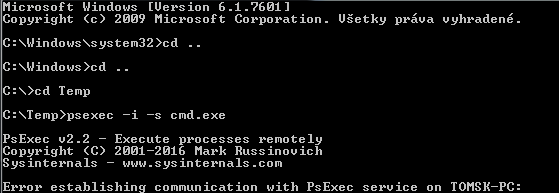
Thanks but I get an error:

55998e61ad326ddb439d51bb2bd7550d.png
 

My Computer

Computer type
PC/Desktop
OS
Windows 7 Home Premium x64

My Computer

Computer type
PC/Desktop
Computer Manufacturer/Model Number
Custom
OS
Both Windows 7 64 & Windows 10 LTSB
CPU
Intel 2.8Ghz,
Motherboard
Gigabyte
Memory
8GB DDR2
Graphics Card(s)
Nvidia 260+
Monitor(s) Displays
42" Samsung Plasma Display
Screen Resolution
1080
Hard Drives
Too many to list!
Case
Custom
Cooling
Custom
Keyboard
MS Sidewinder
Mouse
2 dollar ali-express mouse! It is the best ever!
Internet Speed
100MB
Antivirus
Avast
Browser
Firefox & Opera
Other Info
Helpdesk Technician
So I tried:

Code:
psexec -i -s -u tomsk -p mypassword cmd.exe

and it doesn't help
 

My Computer

Computer type
PC/Desktop
OS
Windows 7 Home Premium x64
If mapping through the USER share, as in "net use p: \\server1\user\%username%" the domain users need to have Full Control on the USER SHARE. For NTFS permissions, they need READ permissions on the parent USER folder, but do not let that permission propogate to subfolders or all users will be able to browse other users' home folders. Then of course, the user will need Full Control of his own home folder.

Lastly, did you create the user home folders in ADUC / Properties / Profile / Home Directory? If so, that will create the home folder with the proper NTFS permissions on the home folder itself. You can also assign the drive letter on the same dialogue and may not need the net use command.
 

My Computer

Computer type
PC/Desktop
Computer Manufacturer/Model Number
Custom
OS
Both Windows 7 64 & Windows 10 LTSB
CPU
Intel 2.8Ghz,
Motherboard
Gigabyte
Memory
8GB DDR2
Graphics Card(s)
Nvidia 260+
Monitor(s) Displays
42" Samsung Plasma Display
Screen Resolution
1080
Hard Drives
Too many to list!
Case
Custom
Cooling
Custom
Keyboard
MS Sidewinder
Mouse
2 dollar ali-express mouse! It is the best ever!
Internet Speed
100MB
Antivirus
Avast
Browser
Firefox & Opera
Other Info
Helpdesk Technician
I mean that I get an error again when I use

Code:
psexec -i -s -u tomsk -p mypassword cmd.exe

So new cmd doesn't show up.
 

My Computer

Computer type
PC/Desktop
OS
Windows 7 Home Premium x64
Didn't your equipment come with guides and helpful walk throughs?
 

My Computer

Computer type
PC/Desktop
Computer Manufacturer/Model Number
Custom
OS
Both Windows 7 64 & Windows 10 LTSB
CPU
Intel 2.8Ghz,
Motherboard
Gigabyte
Memory
8GB DDR2
Graphics Card(s)
Nvidia 260+
Monitor(s) Displays
42" Samsung Plasma Display
Screen Resolution
1080
Hard Drives
Too many to list!
Case
Custom
Cooling
Custom
Keyboard
MS Sidewinder
Mouse
2 dollar ali-express mouse! It is the best ever!
Internet Speed
100MB
Antivirus
Avast
Browser
Firefox & Opera
Other Info
Helpdesk Technician
Back
Top