
cannot mount disc

gordon55y

New member
Local time
1:54 AM
Messages
26
Hi,
I am trying to clone my root disk to a second internal HDD.
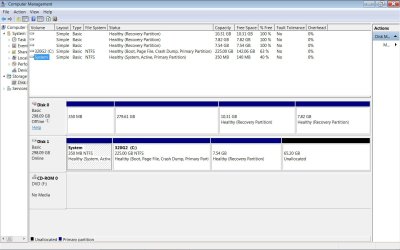
The problem is that the second destination HDD is not mounted :-(
I think it may have been a clone and W7 will not let it mount because of same registry.
How can I mount this second HDD?
thanks
 

Attachments
  • olddisc.jpg
    olddisc.jpg
    112.4 KB · Views: 1

My Computer

Computer type
Laptop
Computer Manufacturer/Model Number
Dell
OS
windows 7 pro
CPU
i5
What program are you using to clone that disc?. Most people of this Forum use Macrium Reflect for this a & imaging purposes & it has all the necessary tools to make cloning a very simple & quick operation. You can download a free version from this website.

Macrium Software | Macrium Reflect Free
 

My Computer

Computer type
PC/Desktop
Computer Manufacturer/Model Number
Self built using existing case
OS
Windows 7 Home Premium 64 bit sp1
CPU
Intel i5 3570 3.4Ghz Ivy Bridge SKT 1155 quad core
Motherboard
Gigabyte Z77-HD3 SKT 1155 2xSata 3, 4x USB 3.0
Memory
G-Skill Rip Jaws 16Gb (8x2) DDR3 -1600 PC3 12800 CL 10 red
Graphics Card(s)
Gigabyte NVIDIA GT610 1Gb DDR3 810/1200 PCI-E 2.0 Silent
Sound Card
NVIDIA High Definition & Realtech High Definition Audio
Monitor(s) Displays
2 x Philips 226V4L 16:9 aspect ratio
Screen Resolution
1920 x 1080 HD
Hard Drives
Samsung 840 Pro 256gb SSD, SATA 3.
Hitachi Touro Portable 1tb, USB 3.0 HDD used for image b/ups.
PSU
Corsair VS450
Case
Codeng
Cooling
PSU fan & CPU fan
Keyboard
Logitech
Mouse
Logitech Wireless trackball M570
Internet Speed
Wireless 3G. 3mg down & 550kb up.
Antivirus
Bitdefender Internet Security 2020
Browser
Opera (Current Version) & Firefox
Other Info
MS Office 2013 Pro. Davis weather station software. MGE Nova 600 avr UPS.
Ranger4,
Thanks for the reply.
I have been using Marcium for years, but I am disappointed with a recent serious bug.
See my post:Macrium Reflect error: do you want to scan and fix G: - Windows 7 Help Forums

So I have been looking at alternatives.
Acronis True Image has a very good interface.
And it allows me to exclude folders on image backup.
MR does not.
It allows for password.
MR does not.

I see that MR does not require the destination disk to be mounted :-)
I have a hard time trusting MR with that obvious bug :-(
Do get that MR error when executing the .mrimg file?
 

My Computer

Computer type
Laptop
Computer Manufacturer/Model Number
Dell
OS
windows 7 pro
CPU
i5
Excuse me if I'm not understanding but, when you say the HD is not mounted, do you mean that it is "offline"?
If so (in disk management) you can right-click on the square box to the left of the HD that is "offline" and choose "online"
Again, if I'm not getting your question I apologize.
 

My Computer

Computer type
PC/Desktop
Computer Manufacturer/Model Number
Custom build
OS
Windows 7 Home Premium 64bit.
CPU
Intel Core i5-3570K
Motherboard
Gigabyte Intel Z77 Dual Thunderbolt ATX Motherboard
Memory
Crucial Ballistix Tactical 8GB
Graphics Card(s)
EVGA NVIDIA GeForce GTX 660 - 2048MB
Sound Card
Realtek High Definition Audio
Monitor(s) Displays
ViewSonic 27 inch hdmi
Screen Resolution
1980 x 1080p
Hard Drives
Crucial m4 256GB SSD
PSU
CORSAIR 600W
Case
Rosewill R5 Mid-Tower Case
Cooling
Positive air flow
Keyboard
Microsoft SideWinder X6 Keyboard (IntelliType Pro)
Mouse
Microsoft SideWinder Mouse (IntelliPoint)
Antivirus
Panda Cloud
Browser
Comodo Dragon
Other Info
SandboxIE
SoBored,
Thankyou, that fixed it. :-)
I had not tried that.

Actually it was a bit more enigmatic.
First, I hovered over the left side of the offline disc and did a right click and selected online.
An error said something about a signature collision and then sent me to a windows help
page to initialize the disc. After reading that, I went back to the manage disc.
It was still offline. A bit OCD, I again right clicked on the disc and selected online.
And it came online. WTF?
Anyhow, thanks
 

My Computer

Computer type
Laptop
Computer Manufacturer/Model Number
Dell
OS
windows 7 pro
CPU
i5
Glad I could help (?) sort of (?)
Looking at your screenshot it looked like the 'offline' disk was initialized so I didn't say anything (if a volume isn't initialized the BLUE bar is BLACK)
 

My Computer

Computer type
PC/Desktop
Computer Manufacturer/Model Number
Custom build
OS
Windows 7 Home Premium 64bit.
CPU
Intel Core i5-3570K
Motherboard
Gigabyte Intel Z77 Dual Thunderbolt ATX Motherboard
Memory
Crucial Ballistix Tactical 8GB
Graphics Card(s)
EVGA NVIDIA GeForce GTX 660 - 2048MB
Sound Card
Realtek High Definition Audio
Monitor(s) Displays
ViewSonic 27 inch hdmi
Screen Resolution
1980 x 1080p
Hard Drives
Crucial m4 256GB SSD
PSU
CORSAIR 600W
Case
Rosewill R5 Mid-Tower Case
Cooling
Positive air flow
Keyboard
Microsoft SideWinder X6 Keyboard (IntelliType Pro)
Mouse
Microsoft SideWinder Mouse (IntelliPoint)
Antivirus
Panda Cloud
Browser
Comodo Dragon
Other Info
SandboxIE
Back
Top