
FascinatingPH
New member
- Local time
- 5:02 PM
- Messages
- 4
Hey guys,
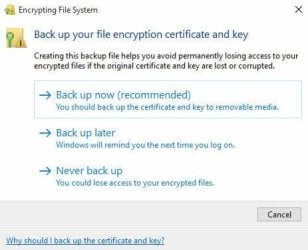
I have a unit with a dead motherboard but with other stuff working like the hard drive and power supply. So I decided to change the mobo only. Then I removed the hard drive and placed in on an enclosure to back up my previous files so I can perform a clean install of windows. However, I had encrypted files in there. Then this window popped up (screenshot below) I accidentally closed that window. How can I bring that window back up again cause can't move the files from my hard drive to another system.
Thanks
I have a unit with a dead motherboard but with other stuff working like the hard drive and power supply. So I decided to change the mobo only. Then I removed the hard drive and placed in on an enclosure to back up my previous files so I can perform a clean install of windows. However, I had encrypted files in there. Then this window popped up (screenshot below) I accidentally closed that window. How can I bring that window back up again cause can't move the files from my hard drive to another system.
Thanks
Attachments
My Computer
- Computer type
- PC/Desktop
- Computer Manufacturer/Model Number
- Custom build
- OS
- Windows 7 Professional x64


