Cannot Open Docs from Windows Explorer

PollyH

New member
Local time
10:24 AM
Messages
9
I am using Windows 7 Ultimate x64 on a new computer. I can no longer open documents from Window Explorer, as I used to be able to do in XP. Also, everytime I try to open any of the office programs (and some others as well) I get a box that asks me if I want to allow that program to make changes to my computer. I never used to get that in XP. I am the only person using this computer and I believe that I set it up so that I have administrative privileges on everything. So I assume that I have not set some permission correctly. Could someone give me some advice on how to do this. All these warnings and questions are annoying.
 

My Computer

OS
Windows 7 Ultimate 64 bit
" everytime I try to open any of the office programs (and some others as well) I get a box that asks me if I want to allow that program to make changes to my computer."

This is User Account Control trying to secure your computer from incoming connections/applications . You can edit these settings to your liking by clicking the windows button, and typing user account control in the index search box. From there edit the settings of 'User Account Control' to your liking of XP, which would mean you need to turn it off basically. This method is not deemed secure, but will satisfy you, it did me :D
 

My Computer

Computer Manufacturer/Model Number
Custom - No OEM
OS
Windows 7 Professional x64
CPU
Intel Core i5 CPU 661 @, 3.33 GHz
Motherboard
BIOSTAR GROUP - TPower I55
Memory
16 GB
Graphics Card(s)
nVidia GeForce GTX 465 1024 MB GDDR5
Monitor(s) Displays
LG Flatron 22"
Screen Resolution
1920x1080
Hard Drives
1 TB - Hitachi
Case
ZALMAN
Keyboard
Dynex W7 Keyboard
Mouse
Logitech MX518
Internet Speed
CABLE 20 Down, 6 Up (wireless)
I am using Windows 7 Ultimate x64 on a new computer. I can no longer open documents from Window Explorer, as I used to be able to do in XP. Also, everytime I try to open any of the office programs (and some others as well) I get a box that asks me if I want to allow that program to make changes to my computer. I never used to get that in XP. I am the only person using this computer and I believe that I set it up so that I have administrative privileges on everything. So I assume that I have not set some permission correctly. Could someone give me some advice on how to do this. All these warnings and questions are annoying.

Polly,
Welcome to SevenForums.

Let's concentrate on the .doc problem.

You should not be having this problem.
I have Win 7 Ultimate (32 bit version). I have MS office 2010l.
I have my UAC slider set to one down from all of the way up to the top.

Would you please use the snipping tool to make a snapshot of what you see?

WIN | type SNIP | ENTER
WIN
is the key with the wavy flag.

Make a snip and then post in your next msg.
Screenshot - How to post

Are you using MS Office? If yes, which version?
 

My Computer

Computer Manufacturer/Model Number
Toshiba Satellite S875D-S7239 laptop
OS
MS Windows 7 Ultimate SP1 64-bit
CPU
AMD A10-4600M
Motherboard
AMD Pumori (Socket FT1)
Memory
6.00 GB Dual-Channel DDR3 @ 798MHz (11-11-12-28)
Graphics Card(s)
AMD Radeon HD 7660G
Sound Card
High Definition Audio Device
Monitor(s) Displays
Generic PnP Monitor (1600x900@60Hz)
Screen Resolution
1600x900@60Hz
Hard Drives
SSD 119GB Corsair CSSD-V128GB2 ATA Device
Keyboard
Standard PS/2 Keyboard
Mouse
HP Wireless Optical Mobile Mouse Model FHA-3410
Internet Speed
What the local pub, local coffee shop offers.
Other Info
Optical Drive:MATSHITA BD-CMB UJ160B ATA Device


Also have an Asus ha1002xp netbook with Win 7 Ultimate installed.
That did the trick jailbirdslanger. What threats does doing this pose? The warnings seem dire. Should I be OK if I have firewall/virus protection, etc.?
 

My Computer

OS
Windows 7 Ultimate 64 bit
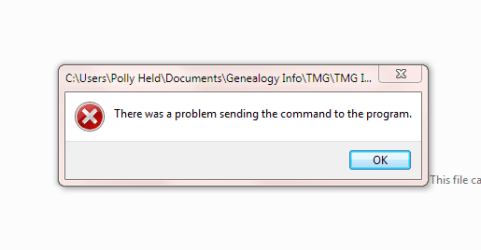
I am using Office 2007. When I try to open a Word document from Windows Explorer, I first get the User Account Control window that asks "Do you want to allow the following program to make changes to this computer?". I say yes and it opens Word but not the document and this window comes up.

Capture.PNG
 

My Computer

OS
Windows 7 Ultimate 64 bit
Polly,

This solution is worse, far worse, than the disease.

If you have any doubts on this issue, please post a question in the System Security forum of this site.

You definitely need an anti-virus software and a firewall. They are NOT sufficient to protect you.

For an anti-virus, I recommend, without reservations, the AV software used by the majority of the experienced people helping others here, namely, Microsoft Security Essentials.
MSE - Microsoft Security Essentials

Download MSE,
Uninstall any AV, anti-whatever software you have installed.
Install MSE.

Uninstall any 3rd party firewall software.
Turn on Windows Firewall.

Do NOT install any of those super-duper speed-up-your-computer/clean-up-your computer programs.

Do install, if you would like, the number one "cleaner" program. This program is free and is miles and miles above anything else in this category.
The program is:CCleaner
 

My Computer

Computer Manufacturer/Model Number
Toshiba Satellite S875D-S7239 laptop
OS
MS Windows 7 Ultimate SP1 64-bit
CPU
AMD A10-4600M
Motherboard
AMD Pumori (Socket FT1)
Memory
6.00 GB Dual-Channel DDR3 @ 798MHz (11-11-12-28)
Graphics Card(s)
AMD Radeon HD 7660G
Sound Card
High Definition Audio Device
Monitor(s) Displays
Generic PnP Monitor (1600x900@60Hz)
Screen Resolution
1600x900@60Hz
Hard Drives
SSD 119GB Corsair CSSD-V128GB2 ATA Device
Keyboard
Standard PS/2 Keyboard
Mouse
HP Wireless Optical Mobile Mouse Model FHA-3410
Internet Speed
What the local pub, local coffee shop offers.
Other Info
Optical Drive:MATSHITA BD-CMB UJ160B ATA Device


Also have an Asus ha1002xp netbook with Win 7 Ultimate installed.
I am using Office 2007. When I try to open a Word document from Windows Explorer, I first get the User Account Control window that asks "Do you want to allow the following program to make changes to this computer?". I say yes and it opens Word but not the document and this window comes up.

View attachment 111923

Polly,
What happens if you first open Word, and then from inside Word-you try to open the file?

Oh yes, If you have been running without an Anti-Virus program. Then stop everything and download and use Microsoft Security Essentials.

This is unbelievably mandantory. Running without AV software is fool-hardy at best.
 

My Computer

Computer Manufacturer/Model Number
Toshiba Satellite S875D-S7239 laptop
OS
MS Windows 7 Ultimate SP1 64-bit
CPU
AMD A10-4600M
Motherboard
AMD Pumori (Socket FT1)
Memory
6.00 GB Dual-Channel DDR3 @ 798MHz (11-11-12-28)
Graphics Card(s)
AMD Radeon HD 7660G
Sound Card
High Definition Audio Device
Monitor(s) Displays
Generic PnP Monitor (1600x900@60Hz)
Screen Resolution
1600x900@60Hz
Hard Drives
SSD 119GB Corsair CSSD-V128GB2 ATA Device
Keyboard
Standard PS/2 Keyboard
Mouse
HP Wireless Optical Mobile Mouse Model FHA-3410
Internet Speed
What the local pub, local coffee shop offers.
Other Info
Optical Drive:MATSHITA BD-CMB UJ160B ATA Device


Also have an Asus ha1002xp netbook with Win 7 Ultimate installed.
I have Norton Internet Security and prefer that. Are you saying that I have picked up a virus and that is what is causing my problem?
 

My Computer

OS
Windows 7 Ultimate 64 bit
I can open documents if I first open Word, but as I said, I cannot open the documents from Windows Explorer.
 

My Computer

OS
Windows 7 Ultimate 64 bit
Your problem with Word is not normal. Try to fix it by running Microsoft Office Diagnostics. You find those in e.g. Word Options > Resources.
I have Norton Internet Security and prefer that. Are you saying that I have picked up a virus and that is what is causing my problem?
I would stick with NIS. Beats MSE hands down. I have both (on different systems) and that is my experience.
 

My Computer

Computer Manufacturer/Model Number
HP, Dell, Gateway, Toshiba - 4 laptops and 2 desktops
OS
Vista, Windows7, Mint Mate, Zorin, Windows 8
CPU
from 1.6GHz Duo to i7
Monitor(s) Displays
2x HP w2207
Hard Drives
5x HDD, 7x SSD, 12x Externals
Keyboard
with trackball - no mices
Mouse
Trackball mice
Internet Speed
DSL 6000
I'll try that and let you know the outcome.
 

My Computer

OS
Windows 7 Ultimate 64 bit
whs, I ran MS Office Diagnostics and it showed no problems.
 

My Computer

OS
Windows 7 Ultimate 64 bit

My Computer

Computer type
PC/Desktop
Computer Manufacturer/Model Number
Bruce ... somewhere in his 40's
OS
Windows 7 Ultimate 32bit SP1
CPU
Intel(R) Core(TM)2 Quad CPU @ 2.40GHz, 2400 MHz
Motherboard
INTEL/D975XBX2
Memory
4 GB
Graphics Card(s)
ATI Radeon HD 2600 Pro
Monitor(s) Displays
Samsung SyncMaster 914v
Screen Resolution
1280 x 1024
Hard Drives
2/500GB each ... ST3500630AS ATA Device.
One is not connected
PSU
Rocketfish 700 W
Case
G.Skill Gigabyte Chassis
Keyboard
Standard PS/2 Keyboard
Mouse
Microsoft PS/2 Mouse
Internet Speed
DSL
Antivirus
Avira Internet Security
Browser
IE 11
Other Info
ATI HDMI Audio
Hmm, too bad. But it was worth a try. Maybe it helps another time.

A while ago, we had a similar problem. The person ended up reinstalling Office 2007 (which is really not a big deal). Just make sure you uninstall the current version with free Revo (advanced option).
 

My Computer

Computer Manufacturer/Model Number
HP, Dell, Gateway, Toshiba - 4 laptops and 2 desktops
OS
Vista, Windows7, Mint Mate, Zorin, Windows 8
CPU
from 1.6GHz Duo to i7
Monitor(s) Displays
2x HP w2207
Hard Drives
5x HDD, 7x SSD, 12x Externals
Keyboard
with trackball - no mices
Mouse
Trackball mice
Internet Speed
DSL 6000
I have Norton Internet Security and prefer that. Are you saying that I have picked up a virus and that is what is causing my problem?

Antivirus programs, including NIS, have been know to interfere. Testing is simple. Uninstall, uninstall such things as SpyBot, install MSE, turn on Windows Firewall.

Problem gone?
 

My Computer

Computer Manufacturer/Model Number
Toshiba Satellite S875D-S7239 laptop
OS
MS Windows 7 Ultimate SP1 64-bit
CPU
AMD A10-4600M
Motherboard
AMD Pumori (Socket FT1)
Memory
6.00 GB Dual-Channel DDR3 @ 798MHz (11-11-12-28)
Graphics Card(s)
AMD Radeon HD 7660G
Sound Card
High Definition Audio Device
Monitor(s) Displays
Generic PnP Monitor (1600x900@60Hz)
Screen Resolution
1600x900@60Hz
Hard Drives
SSD 119GB Corsair CSSD-V128GB2 ATA Device
Keyboard
Standard PS/2 Keyboard
Mouse
HP Wireless Optical Mobile Mouse Model FHA-3410
Internet Speed
What the local pub, local coffee shop offers.
Other Info
Optical Drive:MATSHITA BD-CMB UJ160B ATA Device


Also have an Asus ha1002xp netbook with Win 7 Ultimate installed.
I'm sorry but I don't see how to do the first step. Are you saying I should right click on the name of the document in Windows Explorer and run as Administrator? I'm confused.
 

My Computer

OS
Windows 7 Ultimate 64 bit
Take 'ownership' if you are the Administrator ... how to do that is in the link I gave you up above.
 

My Computer

Computer type
PC/Desktop
Computer Manufacturer/Model Number
Bruce ... somewhere in his 40's
OS
Windows 7 Ultimate 32bit SP1
CPU
Intel(R) Core(TM)2 Quad CPU @ 2.40GHz, 2400 MHz
Motherboard
INTEL/D975XBX2
Memory
4 GB
Graphics Card(s)
ATI Radeon HD 2600 Pro
Monitor(s) Displays
Samsung SyncMaster 914v
Screen Resolution
1280 x 1024
Hard Drives
2/500GB each ... ST3500630AS ATA Device.
One is not connected
PSU
Rocketfish 700 W
Case
G.Skill Gigabyte Chassis
Keyboard
Standard PS/2 Keyboard
Mouse
Microsoft PS/2 Mouse
Internet Speed
DSL
Antivirus
Avira Internet Security
Browser
IE 11
Other Info
ATI HDMI Audio
I'm sorry but I don't see how to do the first step. Are you saying I should right click on the name of the document in Windows Explorer and run as Administrator? I'm confused.


TAKEOWN


Make an administrator owner of a file​

1. Go to an elevated command prompt, that is,
WIN key | type cmd.exe | right-click on cmd.exe in the list shown | click on Run as administrator
2. type Takeown /F filename and hit Enter where
filename specifies the filename or directory name pattern.
Wildcard "*" can be used to specify the pattern. sharename\filename allowed

Example: take ownership of a file named MyLostfile in your Documents folder
WIN key | type cmd.exe | right-click on cmd.exe in the list shown | click on Run as administrator
Type:
cd /D %userprofile%\Documents and hit Enter
Takeown /f mylostfile and hit Enter

Example: take ownership of drive I and every folder and file therein:
Type: takeown /F I:\ /R
the /R parameter specifies to “recurse”

NOTE:
TAKING OWNERSHIP IS OFTEN NOT SUFFICIENT
IF YOU CAN NOT USE THE FILE, THEN GIVE YOUR SELF FULL PERMISSION.
YOU CAN GIVE YOURSELF FULL PERMISSION WITH EITHER WINDOWS EXPLORER OR THE ICACLS COMMAND.
 

My Computer

Computer Manufacturer/Model Number
Toshiba Satellite S875D-S7239 laptop
OS
MS Windows 7 Ultimate SP1 64-bit
CPU
AMD A10-4600M
Motherboard
AMD Pumori (Socket FT1)
Memory
6.00 GB Dual-Channel DDR3 @ 798MHz (11-11-12-28)
Graphics Card(s)
AMD Radeon HD 7660G
Sound Card
High Definition Audio Device
Monitor(s) Displays
Generic PnP Monitor (1600x900@60Hz)
Screen Resolution
1600x900@60Hz
Hard Drives
SSD 119GB Corsair CSSD-V128GB2 ATA Device
Keyboard
Standard PS/2 Keyboard
Mouse
HP Wireless Optical Mobile Mouse Model FHA-3410
Internet Speed
What the local pub, local coffee shop offers.
Other Info
Optical Drive:MATSHITA BD-CMB UJ160B ATA Device


Also have an Asus ha1002xp netbook with Win 7 Ultimate installed.
I resolved the problem. I found a thread on another forum that instructed finding the Winword.exe file and look at its properties and on the Compatibility tab I found that my Compatibility Mode was set to Run this program in compatibility mode for Windows XP (Service Pack 3). I unchecked that and it solved the problem. I can now open my Word docs from Windows Explorer.
 

My Computer

OS
Windows 7 Ultimate 64 bit
Polly,
Many thanks for getting back to us with the solution.

My only nagging question in the back of my mind is how did winword.exe ever get set the wrong way in the first place. That definitely required an action by either an individual or by one of those "wonder" programs.
 

My Computer

Computer Manufacturer/Model Number
Toshiba Satellite S875D-S7239 laptop
OS
MS Windows 7 Ultimate SP1 64-bit
CPU
AMD A10-4600M
Motherboard
AMD Pumori (Socket FT1)
Memory
6.00 GB Dual-Channel DDR3 @ 798MHz (11-11-12-28)
Graphics Card(s)
AMD Radeon HD 7660G
Sound Card
High Definition Audio Device
Monitor(s) Displays
Generic PnP Monitor (1600x900@60Hz)
Screen Resolution
1600x900@60Hz
Hard Drives
SSD 119GB Corsair CSSD-V128GB2 ATA Device
Keyboard
Standard PS/2 Keyboard
Mouse
HP Wireless Optical Mobile Mouse Model FHA-3410
Internet Speed
What the local pub, local coffee shop offers.
Other Info
Optical Drive:MATSHITA BD-CMB UJ160B ATA Device


Also have an Asus ha1002xp netbook with Win 7 Ultimate installed.
Back
Top