
I have 5 PC's set up, all identical HP builds. All are running Win 7 Home Premium. On one of them, I cannot print from the guest account. I can print just fine from the Admin account.
The printer is an HP 1505N networked printer.
I have checked the Security tab & permissions -- Everyone is set to PRINT. The printer shows up in the list, but you cannot print to it (the print button is greyed out).
I tried removing and reinstalling.
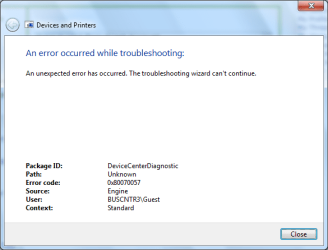
If I go to troubleshoot the printer, I get "An error occured while troubleshooting."
The only AV/Firewall program running Is Microsoft Security Essentials.
Again, this is only one 1 of the 5 PC's. Please help!
Screenshots:
http://imgur.com/yq9uY.png
http://imgur.com/3r0z7.png
The printer is an HP 1505N networked printer.
I have checked the Security tab & permissions -- Everyone is set to PRINT. The printer shows up in the list, but you cannot print to it (the print button is greyed out).
I tried removing and reinstalling.
If I go to troubleshoot the printer, I get "An error occured while troubleshooting."
The only AV/Firewall program running Is Microsoft Security Essentials.
Again, this is only one 1 of the 5 PC's. Please help!
Screenshots:
http://imgur.com/yq9uY.png
http://imgur.com/3r0z7.png
Attachments

My Computer
- Computer Manufacturer/Model Number
- Hewlett Packard dv4-1222nr
- OS
- Windows 7
- CPU
- AMD Turion X2 RM-72 2.10 GHz Dual-Core Mobile Processor
- Memory
- 4GB
- Graphics Card(s)
- ATI Radeon HD 3200 Graphics RS780M
- Monitor(s) Displays
- 14.1" LCD
- Hard Drives
- 250GB (5400RPM)
- Internet Speed
- 3.0 MBPS (down) / 1.0MBPS (up)
