Cannot print from Windows Photo Viewer

justinlee

New member
Local time
4:43 PM
Messages
25
Having a recent issue with Windows Photo Viewer in that it will not print. When trying to print, a dialogue box comes up saying 'Getting ready to print...' It appears for 1 second then disappears and nothing prints. It used to work up until a recent update.

Please note that i am able to print everything else ok e.g. Word, Pictures from other photo viewers etc, just not from Windows Photo Viewer. Having Googled this i see there are many others with this problem regardless of what printer they are using.

Any help appreciated.
 

My Computer

Computer Manufacturer/Model Number
Sony Vaio
OS
Windows 7 Home Premium x64
CPU
Intel Core Duo P7450 @ 2.13GHz
Motherboard
Chipset type: Intel PM45, Data Bus Speed: 1066MHz
Memory
4GB
Graphics Card(s)
NVIDIA GeForce 9600M GT (HDMI, VGA)
Hard Drives
1TB Internal, 1TB External
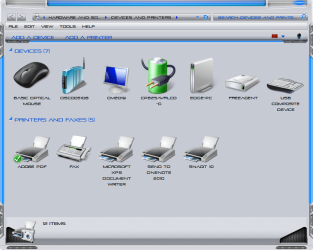
Have you installed any other software like adobe or snagit that may have changed the default printer. Make sure you have the correct printer selected, as you can see in my screenshot I have numerous printers and the default that is selected is the adobe printer which printer I use is on a network and not even showing but check and see if your default printer has changed.
 

Attachments

  • 9-1-2011 6-40-34 AM.png
    9-1-2011 6-40-34 AM.png
    46.9 KB · Views: 22

My Computer

Computer Manufacturer/Model Number
Alienware
OS
Windows 7 Ultimate x64
CPU
I7
Motherboard
GA-X58-USB3
Memory
6 x 1.5V DDR3 DIMM sockets supporting up to 24 GB of system
Graphics Card(s)
GeForce GTX 580
Sound Card
Realtek ALC892 codec 2/4/5.1/7.1-channel
Monitor(s) Displays
NEC Display Solutions E321 Black 32"
Screen Resolution
1366 x 768
Hard Drives
OCZ Colossus LT Series OCZSSD2-1CLSLT1T 3.5" 1TB SATA II MLC Internal Solid State Drive
PSU
XFX Black Edition XPS-850W-BES 850W ATX12V
Case
Antec
Cooling
Zalman
Keyboard
Microsoft
Mouse
Microsoft
I haven't installed any other software. The only thing i can think that may have affected it is a recent update of my Samsung Printer Driver. Also, the correct printer is selected.
 

My Computer

Computer Manufacturer/Model Number
Sony Vaio
OS
Windows 7 Home Premium x64
CPU
Intel Core Duo P7450 @ 2.13GHz
Motherboard
Chipset type: Intel PM45, Data Bus Speed: 1066MHz
Memory
4GB
Graphics Card(s)
NVIDIA GeForce 9600M GT (HDMI, VGA)
Hard Drives
1TB Internal, 1TB External
If windows update did this you should be able to "Roll Back" the driver to the previous driver that was installed by going into device manager and selecting your printer and right click on it and select properties and then driver tab then roll back driver to a previous version.
 

My Computer

Computer Manufacturer/Model Number
Alienware
OS
Windows 7 Ultimate x64
CPU
I7
Motherboard
GA-X58-USB3
Memory
6 x 1.5V DDR3 DIMM sockets supporting up to 24 GB of system
Graphics Card(s)
GeForce GTX 580
Sound Card
Realtek ALC892 codec 2/4/5.1/7.1-channel
Monitor(s) Displays
NEC Display Solutions E321 Black 32"
Screen Resolution
1366 x 768
Hard Drives
OCZ Colossus LT Series OCZSSD2-1CLSLT1T 3.5" 1TB SATA II MLC Internal Solid State Drive
PSU
XFX Black Edition XPS-850W-BES 850W ATX12V
Case
Antec
Cooling
Zalman
Keyboard
Microsoft
Mouse
Microsoft
Back
Top