Cannot receive any Window Updates

UPDATE:

It appears I have discovered what the issue was with my problem machine here. Our System Essentials VM was off and our GP pushes windows update settings to use it. Interesting that other machines on the domain aren't showing the same issue but this computer is definitely not doing updates as a result of this. If I turn on the VM, windows update works, if I pause/turn off the VM, update fails.

So what does this mean for the OP? Not quite sure at this point. My issue was surely GP/Domain related so it doesn't really apply to the OP. To throw it out there because I didn't see it posted in this thread, have you tried running the FixIT utility from Microsoft yet? Although it says Vista on it, it is the correct tool for Win7 as well. Check your proxy settings in IE, reset IE to default settings to be sure. Check your hosts file for any entries. Make SURE your computer is clean of infection/malware. Also remove your AV/AS if necessary once you're sure it is clean(you can always reinstall), disable windows firewall and defender and try the update again. At this point that's all I can think of for you to try. If anything else comes to mind I'll surely post it.

Good luck, if you do resolve things please let us know what did it, I'd be very interested to hear the resolution for this.
 
Last edited:

My Computer

OS
.
"... I'd scrutinize those items on your computer to the best of your ability, I suspect one of them is blocking updates in some way...."

I think your ability far exceeds mine so I 'll be interested in anything you find.
 

My Computer

Computer Manufacturer/Model Number
Dell Inspiron 545 S
OS
Windows 7 Home Premium 64bit
Keyboard
101-key QWERTY
Mouse
yes
Internet Speed
cable
Zarnic check your profile page, I just sent you a message but I'll post it here for you too....

If you have a min, I don't mind taking a look via teamviewer for you. I'll need your teamviewer connection ID and password to connect though. You will be able to see everything I'm doing while I'm connected and are able to end the connection at any time you'd like.
 

My Computer

OS
.
Er... teamviewer? Huh?
 

My Computer

Computer Manufacturer/Model Number
Dell Inspiron 545 S
OS
Windows 7 Home Premium 64bit
Keyboard
101-key QWERTY
Mouse
yes
Internet Speed
cable
zarnic, Copy and paste these lines in Note pad.

@Echo on
pushd\windows\system32\drivers\etc
attrib -h -s -r hosts
echo 127.0.0.1 localhost>HOSTS
attrib +r +h +s hosts
popd
ipconfig /release
ipconfig /renew
ipconfig /flushdns
netsh winsock reset all
netsh int ip reset all
shutdown -r -t 1
del %0


Save as flush.bat to your desktop. Right click to run as Administrator. Your computer will reboot itself.

Next, download Malwarebytes' Anti-Malware, but before saving to your desktop re-name it to zarnic.exe |MG| Malwarebytes Anti-Malware 1.50.1.1100 Download
* Double-click zarnic/mbam-setup.exe and follow the prompts to install the program.
* At the end, be sure a checkmark is placed next to Update Malwarebytes' Anti-Malware and Launch Malwarebytes' Anti-Malware, then click Finish.
* If an update is found, it will download and install the latest version.
* Once the program has loaded, select Perform full scan, then click Scan.
* When the scan is complete, click OK, then Show Results to view the results.
* Be sure that everything is checked, and click Remove Selected.
* When completed, a log will open in Notepad. Please save it to a convenient location. Copy and Paste that log into your next reply.
 

My Computer

Computer type
PC/Desktop
Computer Manufacturer/Model Number
Bruce ... somewhere in his 40's
OS
Windows 7 Ultimate 32bit SP1
CPU
Intel(R) Core(TM)2 Quad CPU @ 2.40GHz, 2400 MHz
Motherboard
INTEL/D975XBX2
Memory
4 GB
Graphics Card(s)
ATI Radeon HD 2600 Pro
Monitor(s) Displays
Samsung SyncMaster 914v
Screen Resolution
1280 x 1024
Hard Drives
2/500GB each ... ST3500630AS ATA Device.
One is not connected
PSU
Rocketfish 700 W
Case
G.Skill Gigabyte Chassis
Keyboard
Standard PS/2 Keyboard
Mouse
Microsoft PS/2 Mouse
Internet Speed
DSL
Antivirus
Avira Internet Security
Browser
IE 11
Other Info
ATI HDMI Audio
Zarnic check your profile page, I just sent you a message but I'll post it here for you too....

If you have a min, I don't mind taking a look via teamviewer for you. I'll need your teamviewer connection ID and password to connect though. You will be able to see everything I'm doing while I'm connected and are able to end the connection at any time you'd like.
Er... teamviewer? Huh?
No worries zarnic, teamviewer is user friendly.
 

My Computer

Computer type
PC/Desktop
Computer Manufacturer/Model Number
Gateway DX4831-01e (Mid-Tower Desktop)
OS
Originally Win 7 Hm Prem x64 Ver 6.1.7600 Build 7601-SP1 | Upgraded to Windows 10 December 14, 2019
CPU
Intel i3 530 2.93GHz, 2933MHz 2 Cores 4 Logical Processors
Motherboard
Gateway H57M01 133 megahertz
Memory
6GB of 1,333MHz DDR3 SDRAM
Graphics Card(s)
32MB Intel Graphics Media Accelerator HD IGChip
Sound Card
Realtek High Definition Audio
Monitor(s) Displays
Gateway HX2000 20inch TFT active matrix TN
Screen Resolution
1600 x 900 x 59 hertz
Hard Drives
WDC WD10EADS-00M2B0 [HDD] (1000.20 GB) -- drive 0,
HL-DT-ST DVDRAM GH41N [CD-ROM dr]
Four card readers, and Four USB 2.0
PSU
300watts.
Case
Mid-Tower Desktop
Cooling
Stock from Gateway
Keyboard
Natural Ergonomic Keyboard 4000, see Other Info
Mouse
Orig. Gateway wore out now using Insignia USB wired optical
Internet Speed
Vz FIOS 10ms png 57.64Mbps down 65.53Mbps up Speedtest.org
Antivirus
Zamana Anti-logger with Anti-malware, MSE, Windows Firewall,
Browser
IE11.0.9600.19399-Upd ver11.0.135, Firefox 68.0.1 x64
Other Info
System Specs by Belarc.

BIOS: American Megatrends Inc. P01-A0 11/17/2009

Replaced the MS 'Natural' Standard PS/2 Enhanced 101-102 Keyboard with a new Natural Ergonomic Keyboard 4000 on August 1st 2014.

Canon Pixma MG3222 Printer.

Updated to IE11 on 12102015 | Fios Quantum Router g1100

Additional AV: SpywareBlaster, manual Mbam, SAS
The following is in response to the last post by Jacee, anyone else can ignore this if they want.

Step 1.
zarnic, Copy and paste these lines in Note pad. On Desktop SaveAs Flush.bat

Did This.

Step2:
Next, download Malwarebytes' Anti-Malware, but before saving to your desktop re-name it to zarnic.exe |MG| Malwarebytes Anti-Malware 1.50.1.1100 Download

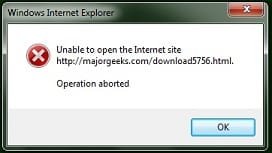
Tried but got error msg saying "... could not open the Internet site" so used my copy of Malwarebytes. Looked for update but got error msg "PROGRAM_ERROR_UPDATING (12007,0,WinHttpSendRequest) "
But ran my copy.

Step3:
* Double-click zarnic/mbam-setup.exe and follow the prompts to install the program.
* Once the program has loaded, select Perform full scan, then click Scan.
* When the scan is complete, click OK, then Show Results to view the results.
* Be sure that everything is checked, and click Remove Selected.
* When completed, a log will open in Notepad. Please save it to a convenient location. Copy and Paste that log into your next reply.

Ok, here is that log report:
Malwarebytes' Anti-Malware 1.50.1.1100
www.malwarebytes.org
Database version: 5363
Windows 6.1.7600
Internet Explorer 8.0.7600.16385
4/16/2011 7:41:18 AM
mbam-log-2011-04-16 (07-41-18).txt
Scan type: Full scan (C:\|)
Objects scanned: 277445
Time elapsed: 18 minute(s), 0 second(s)
Memory Processes Infected: 0
Memory Modules Infected: 0
Registry Keys Infected: 0
Registry Values Infected: 0
Registry Data Items Infected: 4
Folders Infected: 0
Files Infected: 0
Memory Processes Infected:
(No malicious items detected)
Memory Modules Infected:
(No malicious items detected)
Registry Keys Infected:
(No malicious items detected)
Registry Values Infected:
(No malicious items detected)
Registry Data Items Infected:
HKEY_LOCAL_MACHINE\SYSTEM\CurrentControlSet\Services\Tcpip\Parameters\DhcpNameServer (Trojan.DNSChanger) -> Bad: (93.188.166.105) Good: () -> Quarantined and deleted successfully.
HKEY_LOCAL_MACHINE\SYSTEM\CurrentControlSet\Services\Tcpip\Parameters\DhcpNameServer (Trojan.DNSChanger) -> Bad: (93.188.161.105) Good: () -> Quarantined and deleted successfully.
HKEY_LOCAL_MACHINE\SYSTEM\CurrentControlSet\Services\Tcpip\Parameters\Interfaces\{C975BB2F-86FA-49E7-80D7-90F3971561FB}\DhcpNameServer (Trojan.DNSChanger) -> Bad: (93.188.166.105) Good: () -> Quarantined and deleted successfully.
HKEY_LOCAL_MACHINE\SYSTEM\CurrentControlSet\Services\Tcpip\Parameters\Interfaces\{C975BB2F-86FA-49E7-80D7-90F3971561FB}\DhcpNameServer (Trojan.DNSChanger) -> Bad: (93.188.161.105) Good: () -> Quarantined and deleted successfully.
Folders Infected:
(No malicious items detected)
Files Infected:
(No malicious items detected)

Tried Windows Update again but still no change. Next?

(the attachment relates to my attempt to follow your link to the Malware Bytes site)
 

Attachments

  • errormsg.jpg
    errormsg.jpg
    6.1 KB · Views: 101
Last edited:

My Computer

Computer Manufacturer/Model Number
Dell Inspiron 545 S
OS
Windows 7 Home Premium 64bit
Keyboard
101-key QWERTY
Mouse
yes
Internet Speed
cable
This IP --> 93.188.166.105 is from Ukraine Promnet Ltd
Not a WA IP#

Download DDS from one of these links:
Mirror 1 Mirror 2 Mirror 3
  • Disable any script blocking protection
  • Double click the dds icon to run the tool.
  • When done, DDS will open two (2) logs:
    1. DDS.txt
    2. Attach.txt <--- will be minimized in the task tray
  • Save both reports to your desktop.
Include the contents of both logs in your next post.
 

My Computer

Computer type
PC/Desktop
Computer Manufacturer/Model Number
Bruce ... somewhere in his 40's
OS
Windows 7 Ultimate 32bit SP1
CPU
Intel(R) Core(TM)2 Quad CPU @ 2.40GHz, 2400 MHz
Motherboard
INTEL/D975XBX2
Memory
4 GB
Graphics Card(s)
ATI Radeon HD 2600 Pro
Monitor(s) Displays
Samsung SyncMaster 914v
Screen Resolution
1280 x 1024
Hard Drives
2/500GB each ... ST3500630AS ATA Device.
One is not connected
PSU
Rocketfish 700 W
Case
G.Skill Gigabyte Chassis
Keyboard
Standard PS/2 Keyboard
Mouse
Microsoft PS/2 Mouse
Internet Speed
DSL
Antivirus
Avira Internet Security
Browser
IE 11
Other Info
ATI HDMI Audio
The following is in response to the last post by Jacee, anyone else can ignore this if they want.
I do not know about "anyone else", but for me this is reading better than any "suspense novel" I have ever read. ;)
 

My Computer

Computer type
PC/Desktop
Computer Manufacturer/Model Number
Gateway DX4831-01e (Mid-Tower Desktop)
OS
Originally Win 7 Hm Prem x64 Ver 6.1.7600 Build 7601-SP1 | Upgraded to Windows 10 December 14, 2019
CPU
Intel i3 530 2.93GHz, 2933MHz 2 Cores 4 Logical Processors
Motherboard
Gateway H57M01 133 megahertz
Memory
6GB of 1,333MHz DDR3 SDRAM
Graphics Card(s)
32MB Intel Graphics Media Accelerator HD IGChip
Sound Card
Realtek High Definition Audio
Monitor(s) Displays
Gateway HX2000 20inch TFT active matrix TN
Screen Resolution
1600 x 900 x 59 hertz
Hard Drives
WDC WD10EADS-00M2B0 [HDD] (1000.20 GB) -- drive 0,
HL-DT-ST DVDRAM GH41N [CD-ROM dr]
Four card readers, and Four USB 2.0
PSU
300watts.
Case
Mid-Tower Desktop
Cooling
Stock from Gateway
Keyboard
Natural Ergonomic Keyboard 4000, see Other Info
Mouse
Orig. Gateway wore out now using Insignia USB wired optical
Internet Speed
Vz FIOS 10ms png 57.64Mbps down 65.53Mbps up Speedtest.org
Antivirus
Zamana Anti-logger with Anti-malware, MSE, Windows Firewall,
Browser
IE11.0.9600.19399-Upd ver11.0.135, Firefox 68.0.1 x64
Other Info
System Specs by Belarc.

BIOS: American Megatrends Inc. P01-A0 11/17/2009

Replaced the MS 'Natural' Standard PS/2 Enhanced 101-102 Keyboard with a new Natural Ergonomic Keyboard 4000 on August 1st 2014.

Canon Pixma MG3222 Printer.

Updated to IE11 on 12102015 | Fios Quantum Router g1100

Additional AV: SpywareBlaster, manual Mbam, SAS
... I do not know about "anyone else", but for me this is reading better than any "suspense novel" I have ever read. ;)

Anak, glad to be of service but you need to read more suspense novels. :)

Jacee, who you writing to, or want a log from?
 

My Computer

Computer Manufacturer/Model Number
Dell Inspiron 545 S
OS
Windows 7 Home Premium 64bit
Keyboard
101-key QWERTY
Mouse
yes
Internet Speed
cable
Jacee, who you writing to, or want a log from?
My post above for the two DDS logs is to you, zarnic
 

My Computer

Computer type
PC/Desktop
Computer Manufacturer/Model Number
Bruce ... somewhere in his 40's
OS
Windows 7 Ultimate 32bit SP1
CPU
Intel(R) Core(TM)2 Quad CPU @ 2.40GHz, 2400 MHz
Motherboard
INTEL/D975XBX2
Memory
4 GB
Graphics Card(s)
ATI Radeon HD 2600 Pro
Monitor(s) Displays
Samsung SyncMaster 914v
Screen Resolution
1280 x 1024
Hard Drives
2/500GB each ... ST3500630AS ATA Device.
One is not connected
PSU
Rocketfish 700 W
Case
G.Skill Gigabyte Chassis
Keyboard
Standard PS/2 Keyboard
Mouse
Microsoft PS/2 Mouse
Internet Speed
DSL
Antivirus
Avira Internet Security
Browser
IE 11
Other Info
ATI HDMI Audio

My Computer

Computer Manufacturer/Model Number
Dell Inspiron 545 S
OS
Windows 7 Home Premium 64bit
Keyboard
101-key QWERTY
Mouse
yes
Internet Speed
cable
This IP --> 93.188.166.105 is from Ukraine Promnet Ltd
Not a WA IP#

Download DDS from one of these links:

Mirror 1 Mirror 2 Mirror 3
  • Disable any script blocking protection
  • Double click the dds icon to run the tool.
  • When done, DDS will open two (2) logs:
    1. DDS.txt
    2. Attach.txt <--- will be minimized in the task tray
  • Save both reports to your desktop.
Include the contents of both logs in your next post.
Done
Here is DDS.txt :
 

Attachments

My Computer

Computer Manufacturer/Model Number
Dell Inspiron 545 S
OS
Windows 7 Home Premium 64bit
Keyboard
101-key QWERTY
Mouse
yes
Internet Speed
cable
This IP --> 93.188.166.105 is from Ukraine Promnet Ltd
Not a WA IP#

Download DDS from one of these links:


Mirror 1 Mirror 2 Mirror 3
  • Disable any script blocking protection
  • Double click the dds icon to run the tool.
  • When done, DDS will open two (2) logs:
    1. DDS.txt
    2. Attach.txt <--- will be minimized in the task tray
  • Save both reports to your desktop.
Include the contents of both logs in your next post.
Done
Here is DDS.txt :
Opps, forgot one
Here is Attach.txt:
 

Attachments

My Computer

Computer Manufacturer/Model Number
Dell Inspiron 545 S
OS
Windows 7 Home Premium 64bit
Keyboard
101-key QWERTY
Mouse
yes
Internet Speed
cable
You have a few problems! Is Win7 an upgrade from Vista? Did you do a "Clean install"?

Roxio could be causing problems ... (not unheard of :p )
Take a look at the Attach.txt. Scroll to the ==== Event Viewer Messages From Past Week ========
And see the errors.

I think if this was my computer, I'd do a clean install and not fight the same problems over and over again.
 

My Computer

Computer type
PC/Desktop
Computer Manufacturer/Model Number
Bruce ... somewhere in his 40's
OS
Windows 7 Ultimate 32bit SP1
CPU
Intel(R) Core(TM)2 Quad CPU @ 2.40GHz, 2400 MHz
Motherboard
INTEL/D975XBX2
Memory
4 GB
Graphics Card(s)
ATI Radeon HD 2600 Pro
Monitor(s) Displays
Samsung SyncMaster 914v
Screen Resolution
1280 x 1024
Hard Drives
2/500GB each ... ST3500630AS ATA Device.
One is not connected
PSU
Rocketfish 700 W
Case
G.Skill Gigabyte Chassis
Keyboard
Standard PS/2 Keyboard
Mouse
Microsoft PS/2 Mouse
Internet Speed
DSL
Antivirus
Avira Internet Security
Browser
IE 11
Other Info
ATI HDMI Audio
Thanks... Hummm, here are asnswers in the order you asked.
1. My Win 7 is not an upgrade but came with the machine. I recently did a 'Recovery' using the Dell OS disk sent to me for that purpose.
2. Doubt that Roxio is the culpert in that the program was purchased long after. Roxio is for burning CDs and DVDs.

I'll review the Attach.txt as you suggested now you go enjoy your weekend, I will too. It's too sunny to be at this machine. Ciao;)
 

My Computer

Computer Manufacturer/Model Number
Dell Inspiron 545 S
OS
Windows 7 Home Premium 64bit
Keyboard
101-key QWERTY
Mouse
yes
Internet Speed
cable
Well, it's still early here and my Husband is going to make dinner (read: fast food) tonight, so please do this...

Download Combofix from any of the links below, and save it to your desktop.<--Important
Link 1
Link 2
Link 3

Click on this link Here to see a list of programs that should be disabled.
The list is not all inclusive. If yours is not listed and you don't know how to disable it, please ask.
If your anti-virus or firewall complains, please allow this script to run as it is not malicious.
Next: Disconnect from the internet. If you are on Cable or DSL, unplug your computer from the modem.
Next: Please disable all onboard security programs (all running with back ground protection) as it may hinder the scanner from working.
This includes Antivirus, Firewall, and any Spyware scanners that run in the background.
  • Double click combofix.exe and follow the prompts.
  • When finished, it will produce a log for you. Post that log and a HiJackthis log in your next reply
Note: Do not mouseclick combofix's window while its running. That may cause it to stall
Please be patient while the scan runs, at times it may appear to stall.
When finished and after reboot (in case it asks to reboot), it should open a log, combofix.txt.
Post this log in your next reply together with a new hijackthislog.
After rebooting ensure your Security applications have been re-enabled.

In your next reply post:
ComboFix.txt
New HJT log taken after the above scan has run

***A guide and tutorial on "How to use Combofix" can be found here:
A guide and tutorial on using ComboFix
 

My Computer

Computer type
PC/Desktop
Computer Manufacturer/Model Number
Bruce ... somewhere in his 40's
OS
Windows 7 Ultimate 32bit SP1
CPU
Intel(R) Core(TM)2 Quad CPU @ 2.40GHz, 2400 MHz
Motherboard
INTEL/D975XBX2
Memory
4 GB
Graphics Card(s)
ATI Radeon HD 2600 Pro
Monitor(s) Displays
Samsung SyncMaster 914v
Screen Resolution
1280 x 1024
Hard Drives
2/500GB each ... ST3500630AS ATA Device.
One is not connected
PSU
Rocketfish 700 W
Case
G.Skill Gigabyte Chassis
Keyboard
Standard PS/2 Keyboard
Mouse
Microsoft PS/2 Mouse
Internet Speed
DSL
Antivirus
Avira Internet Security
Browser
IE 11
Other Info
ATI HDMI Audio
Post this log in your next reply together with a new hijackthislog.


In your next reply post:
ComboFix.txt
New HJT log taken after the above scan has run

Ran ComboFix and here is its' log:
(what is HiJackThis no log was created)
 

Attachments

My Computer

Computer Manufacturer/Model Number
Dell Inspiron 545 S
OS
Windows 7 Home Premium 64bit
Keyboard
101-key QWERTY
Mouse
yes
Internet Speed
cable
Navigate to c:\windows\msdownld.tmp <-- and delete this file

Next, from the control panel, click on Action Center. Set Windows to notify you before downloading and installing updates.

If UAC is turned off, turn it back on and set it to medium. Give the computer a day or two to see if you are offered updates, then let me know.
 

My Computer

Computer type
PC/Desktop
Computer Manufacturer/Model Number
Bruce ... somewhere in his 40's
OS
Windows 7 Ultimate 32bit SP1
CPU
Intel(R) Core(TM)2 Quad CPU @ 2.40GHz, 2400 MHz
Motherboard
INTEL/D975XBX2
Memory
4 GB
Graphics Card(s)
ATI Radeon HD 2600 Pro
Monitor(s) Displays
Samsung SyncMaster 914v
Screen Resolution
1280 x 1024
Hard Drives
2/500GB each ... ST3500630AS ATA Device.
One is not connected
PSU
Rocketfish 700 W
Case
G.Skill Gigabyte Chassis
Keyboard
Standard PS/2 Keyboard
Mouse
Microsoft PS/2 Mouse
Internet Speed
DSL
Antivirus
Avira Internet Security
Browser
IE 11
Other Info
ATI HDMI Audio
Navigate to c:\windows\msdownld.tmp <-- and delete this file

Next, from the control panel, click on Action Center. Set Windows to notify you before downloading and installing updates.

If UAC is turned off, turn it back on and set it to medium. Give the computer a day or two to see if you are offered updates, then let me know.

Sorry for the delay, was working outside.:mad:

Looked for msdownld.tmp but never found it. Did make that change in the Action Center and had the UAC on and as specified. See ya in a couple days. Enjoy yours, and thanks.:)
 

My Computer

Computer Manufacturer/Model Number
Dell Inspiron 545 S
OS
Windows 7 Home Premium 64bit
Keyboard
101-key QWERTY
Mouse
yes
Internet Speed
cable
Back
Top