Solved cannot record audio in windows 7 ultimate

sowndaryan

New member
Local time
2:13 AM
Messages
3
Location
tamilnadu
i have installed windows 7 ultimate.once i intalled xp and it records audio.but now in 7 not
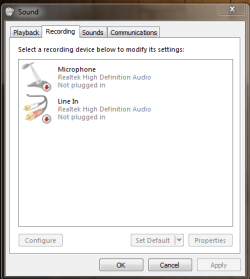
recording audio:huh:.i have correctly installed realtek for windows 7.it displays recording divices are - microphone,cd audio,line in,stereo mix(default divice).help me please! thanks in advance:confused:.record.PNG
 

My Computer

Computer Manufacturer/Model Number
lenova
OS
windows 7
CPU
intel core 2 duo
Motherboard
intel
Memory
1GB RAM
Graphics Card(s)
I have no graphics card
Monitor(s) Displays
ACER
Screen Resolution
1024x768
Keyboard
ZEBRONIC
Mouse
SMART
Internet Speed
10 kb/sec

My Computer

Computer Manufacturer/Model Number
Toshiba Satellite S875D-S7239 laptop
OS
MS Windows 7 Ultimate SP1 64-bit
CPU
AMD A10-4600M
Motherboard
AMD Pumori (Socket FT1)
Memory
6.00 GB Dual-Channel DDR3 @ 798MHz (11-11-12-28)
Graphics Card(s)
AMD Radeon HD 7660G
Sound Card
High Definition Audio Device
Monitor(s) Displays
Generic PnP Monitor (1600x900@60Hz)
Screen Resolution
1600x900@60Hz
Hard Drives
SSD 119GB Corsair CSSD-V128GB2 ATA Device
Keyboard
Standard PS/2 Keyboard
Mouse
HP Wireless Optical Mobile Mouse Model FHA-3410
Internet Speed
What the local pub, local coffee shop offers.
Other Info
Optical Drive:MATSHITA BD-CMB UJ160B ATA Device


Also have an Asus ha1002xp netbook with Win 7 Ultimate installed.
i have installed windows 7 ultimate.once i intalled xp and it records audio.but now in 7 not
recording audio:huh:.i have correctly installed realtek for windows 7.it displays recording divices are - microphone,cd audio,line in,stereo mix(default divice).help me please! thanks in advance:confused:.View attachment 166661

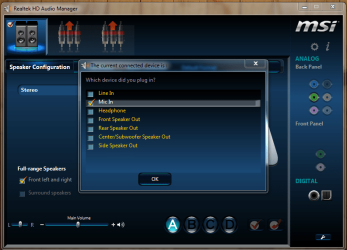
If you have a microphone or a line in cable connected, unplug them.
Plug in the microphone and you should see the Realtek jack detection pop-up.
Once you've confirmed that the mic has been plugged in, the Microphone icon should turn from red to green.

Next, plug in the Line In cable and follow the same steps as above.
Your items should now be ready to record, if the icons have changed from red to green.

mic 1.PNG

Mic 2.PNG

mic 3.PNG
 

My Computer

Computer type
PC/Desktop
Computer Manufacturer/Model Number
Custom Build
OS
Windows 7 Home Premium 64 bit
CPU
Intel Core i7-4790
Motherboard
GA-Z87X-D3H
Memory
G.SKILL 8GB (2 x 4GB) DDR3 F3-10666CL9D-8GBNT
Graphics Card(s)
AMD Radeon R7 250
Sound Card
Realtek ALC892
Monitor(s) Displays
Samsung UN32EH5000, Dell 1703FPT
Screen Resolution
1920 x 1080, 1280 x 1024
Hard Drives
WD5003AZEX
WD10EZEX
Samsung HD103SJ
Samsung 128 GB 840 PRO
PSU
SeaSonic M12II SS-500GM
Case
Fractal Design Define R4
Cooling
Zalman CNPS9900ALED
Keyboard
Logitech K800
Mouse
Logitech M705
Internet Speed
16 Mbps
Antivirus
Avast
Browser
Firefox
Other Info
Bose Companion 2 Multimedia Speakers
already plugged

I had already plugged the microphone that is in WEBCAM.But still it tells Not plugged in.
 

My Computer

Computer Manufacturer/Model Number
lenova
OS
windows 7
CPU
intel core 2 duo
Motherboard
intel
Memory
1GB RAM
Graphics Card(s)
I have no graphics card
Monitor(s) Displays
ACER
Screen Resolution
1024x768
Keyboard
ZEBRONIC
Mouse
SMART
Internet Speed
10 kb/sec
I've seen webcam's cause a lot of audio problems. If you disconnect the webcam, will all the audio functions work OK?
 

My Computer

Computer type
PC/Desktop
Computer Manufacturer/Model Number
My Own Build
OS
Windows 10 64 bit
CPU
Intel i7 6700K
Motherboard
ASUS ROG Maximus VIII Hero
Memory
16GB Corsair Dominator
Graphics Card(s)
Intel CPU Graphics
Sound Card
RealTek
Monitor(s) Displays
27" Dell S2719dgf
Screen Resolution
2560X1440
Hard Drives
1 TB Samsung 850 EVO SSD for Win 10 Pro
500GB Samsung 850 EVO SSD for Win 10 Insider
2 TB drive for backup
PSU
EVGA Supernova 750G2
Case
BeQuiet Silent Base 600
Cooling
Deepcool Captain 120EX
Keyboard
Microsoft Wireless 2000
Mouse
Microsoft wireless
Internet Speed
100 MB/sec (Cable)
Antivirus
Microsoft Defender and Malwarebytes
Browser
Edge/Firefox
Other Info
Cakewalk (Sonar) by BandLab and Studio One 4.1 Pro recording studio software. MOTU 896Mk3 Hybrid recording interface, Frontier Tranzport wireless control unit, Behringer X-Touch Control Surface.
Five USB connected optical drives for CD Audio production using Nero BurningROM
Back
Top