Cannot Reinstall windows due to a failure message [status: 0xc0000225]

Faisal2Happy

New member
Local time
8:51 AM
Messages
8
Hi guyx, i bought HP 4520s Laptop few months ago with installed windows 7, i insstalled lot of softwares in it, but now i want to restore factory settings, i know i can restore factory settings by pressing F11 at the PC startup so it starts windows setup, so i can click "REPAIR YOUR COMPUTER" to restore factory settings, but the problem is that whnever i hit F11 in PC startup it doesnt run windows setup, it shows a message that :

Windows failed to start. A recent hardware or software might be the cause.To fix the problem.

1. Insert your windows installation disc and restart your computer.
2. Choose your language settings, and then click "NEXT".
3. Click "Repair Your Computer".

If you dont have this disc, contact your system administrator or computer manufacturer for assistance.

Status: 0xc0000225

Info: The boot selection failed because a required device is inaccessible.


Here is the screen-shot of that failure message:
http://picturespk.pk/images/jdv1299094611y.jpg

now help me out how do i get rid of this problem??? can anybody tell me whats the real problem is this??? plx give me solution of it......
 

My Computer My Computer

At a glance

Windows 7 Professional 32Bitsi32GB
Computer Manufacturer/Model Number
HP Probook 4520s
OS
Windows 7 Professional 32Bits
CPU
i3
Memory
2GB
Hard Drives
320GB
Hello Faisal2Happy, welcome to Seven Forums!


If you can't find and sort the issue keeping you from doing the factory restore, here's some info you may find useful, and be sure to post back with any further questions you may have and to keep us informed.

Have a look at this tutorial at the link below to save (copy out) your data if need be.

How to Copy & Paste in Recovery Console on Windows 7 or Vista


After you have made back-ups of the data you need to save to external media; if you can find an exact Windows version that the PC shipped with you can do a clean install using the activation key on the COA sticker attached to the PC though it may require a robo-call to MS to sort the OEM batch-key.

How to Activate Windows 7 by Phone


If you can't find an exact same version, you could use the info in this tutorial to create an "all versions" installer of any version Windows to install using the same method I posted above.

Windows 7 Universal Installation Disc - Create


After you have made backups of everything you care to save, the best method is to do a complete wipe (secure erase) of the entire Hard Disk Drive first, it over-writes everything, all the old Windows code including all the old drivers/programs, giving you the best possible space to install Windows to.

SSD / HDD : Optimize for Windows Reinstallation
 

My Computer My Computer

At a glance

W 7 64-bit UltimateIntel Q9550 Yorkfield8GB Dominator 8500C5DATI : XFX 5870
Computer Manufacturer/Model Number
* BFK Customs *
OS
W 7 64-bit Ultimate
CPU
Intel Q9550 Yorkfield
Motherboard
ASUS P5Q Pro
Memory
8GB Dominator 8500C5D
Graphics Card(s)
ATI : XFX 5870
Sound Card
Realtek HD Audio 7-1
Monitor(s) Displays
1x 47" LCD HDMI & 3x 26" LCD HDMI
Screen Resolution
1920x1080P & 1920x1200
Hard Drives
1x 80GB Intel X25-M G2 SSD : 1x 500GB & 1x 640GB WD Caviar Black(s)
PSU
Corsair 620HX
Case
Cooler Master RC-690
Cooling
Tuniq Tower 120, 2x 140mm and 3x 120mm case fans
Keyboard
Microsoft 500
Mouse
Razer Diamondback 3G
Internet Speed
14 Mb/s
Other Info
1x Koutech 3Gb/s SATA HDD Hot Swap Rack
All he has is a recovery partition.

Which was what he was trying to access.

He was hitting F11 instead of F8 to access Recovery.

Mike :D
 

My Computer My Computer

At a glance

Windows7 Pro 64bit SP-1; Windows XP Pro 32bitIntel Core i7-870 Lynnfield 2.93GHz LGA 1156 ...8GB@1400MHz Crucial Ballistix DDR3-1600 4x2GBASUS ENGTX460 DirectCU/2DI/1GD5 1GB 256-bit G...
Computer Manufacturer/Model Number
Hopalong/ Godzilla
OS
Windows7 Pro 64bit SP-1; Windows XP Pro 32bit
CPU
Intel Core i7-870 Lynnfield 2.93GHz LGA 1156 95W Quad-Core
Motherboard
ASUS P7P55D-E PRO
Memory
8GB@1400MHz Crucial Ballistix DDR3-1600 4x2GB
Graphics Card(s)
ASUS ENGTX460 DirectCU/2DI/1GD5 1GB 256-bit GDDR5
Sound Card
VIA Onboard
Monitor(s) Displays
Asus VS248H-P 24"; Samsung SyncMaster 941BW 19"ws
Screen Resolution
1920x1080; 1440x900
Hard Drives
Samsung 830 120GB SSD
Intel 320 120GB SSD
Western Digital Caviar Black WD7501AALS 750GB 7200 RPM SATA 3.0Gb/s
Western Digital Caviar Black WD6401AALS 640GB 7200 RPM SATA 3.0Gb/s
PSU
COOLER MASTER Silent Pro RS850-AMBAJ3-US 850W Modular
Case
COOLER MASTER HAF 932 RC-932-KKN5-GP Black
Cooling
Scythe "Mugen-2 Rev.B" (2 ScytheKaze-Jyuni PWM fans)
Keyboard
Logitech K-320
Mouse
Kensington
Antivirus
Avast Inernet Suite
Browser
IE 9 ; Chrome
My bad.

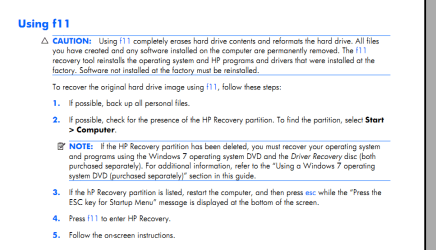
Instruction #3 in Snip below. Page 131 of manual. http://bizsupport1.austin.hp.com/bc/.../c02046514.pdf
Press the "ESC" key when as stated in the Snip I posted below.
That brings up the Start up menu.
Then select F11.

Sorry about that didn't read far enough down the pdf.

You were right BFK.
Mike
 

Attachments

  • HP recovery2.PNG
    HP recovery2.PNG
    33.6 KB · Views: 242
Last edited:

My Computer My Computer

At a glance

Windows7 Pro 64bit SP-1; Windows XP Pro 32bitIntel Core i7-870 Lynnfield 2.93GHz LGA 1156 ...8GB@1400MHz Crucial Ballistix DDR3-1600 4x2GBASUS ENGTX460 DirectCU/2DI/1GD5 1GB 256-bit G...
Computer Manufacturer/Model Number
Hopalong/ Godzilla
OS
Windows7 Pro 64bit SP-1; Windows XP Pro 32bit
CPU
Intel Core i7-870 Lynnfield 2.93GHz LGA 1156 95W Quad-Core
Motherboard
ASUS P7P55D-E PRO
Memory
8GB@1400MHz Crucial Ballistix DDR3-1600 4x2GB
Graphics Card(s)
ASUS ENGTX460 DirectCU/2DI/1GD5 1GB 256-bit GDDR5
Sound Card
VIA Onboard
Monitor(s) Displays
Asus VS248H-P 24"; Samsung SyncMaster 941BW 19"ws
Screen Resolution
1920x1080; 1440x900
Hard Drives
Samsung 830 120GB SSD
Intel 320 120GB SSD
Western Digital Caviar Black WD7501AALS 750GB 7200 RPM SATA 3.0Gb/s
Western Digital Caviar Black WD6401AALS 640GB 7200 RPM SATA 3.0Gb/s
PSU
COOLER MASTER Silent Pro RS850-AMBAJ3-US 850W Modular
Case
COOLER MASTER HAF 932 RC-932-KKN5-GP Black
Cooling
Scythe "Mugen-2 Rev.B" (2 ScytheKaze-Jyuni PWM fans)
Keyboard
Logitech K-320
Mouse
Kensington
Antivirus
Avast Inernet Suite
Browser
IE 9 ; Chrome
Hello Mike, I just hope we can help Faisal2Happy get the PC running.
 

My Computer My Computer

At a glance

W 7 64-bit UltimateIntel Q9550 Yorkfield8GB Dominator 8500C5DATI : XFX 5870
Computer Manufacturer/Model Number
* BFK Customs *
OS
W 7 64-bit Ultimate
CPU
Intel Q9550 Yorkfield
Motherboard
ASUS P5Q Pro
Memory
8GB Dominator 8500C5D
Graphics Card(s)
ATI : XFX 5870
Sound Card
Realtek HD Audio 7-1
Monitor(s) Displays
1x 47" LCD HDMI & 3x 26" LCD HDMI
Screen Resolution
1920x1080P & 1920x1200
Hard Drives
1x 80GB Intel X25-M G2 SSD : 1x 500GB & 1x 640GB WD Caviar Black(s)
PSU
Corsair 620HX
Case
Cooler Master RC-690
Cooling
Tuniq Tower 120, 2x 140mm and 3x 120mm case fans
Keyboard
Microsoft 500
Mouse
Razer Diamondback 3G
Internet Speed
14 Mb/s
Other Info
1x Koutech 3Gb/s SATA HDD Hot Swap Rack
@Bare Foot Kid:
Thanks for the Tutorials, i jknow these turotials, but i need windows 7 dvd to perform these methods and i dnt have dvd..

@Mike: buddy u are right, i cannt see HP recovery Partition in My Computer, so now wht should i do now???

and the failure i mentioned above, displays when i press F11 at the startup..
 

My Computer My Computer

At a glance

Windows 7 Professional 32Bitsi32GB
Computer Manufacturer/Model Number
HP Probook 4520s
OS
Windows 7 Professional 32Bits
CPU
i3
Memory
2GB
Hard Drives
320GB
Hello again.


Do you know anyone that would let you use their Windows 7 DVD so you could use that to do a clean install using the activation key on the COA sticker on your PC like I wrote above, or perhaps you could find a download of an ISO you could use, though forum rules prohibit the posting of such links.
 

My Computer My Computer

At a glance

W 7 64-bit UltimateIntel Q9550 Yorkfield8GB Dominator 8500C5DATI : XFX 5870
Computer Manufacturer/Model Number
* BFK Customs *
OS
W 7 64-bit Ultimate
CPU
Intel Q9550 Yorkfield
Motherboard
ASUS P5Q Pro
Memory
8GB Dominator 8500C5D
Graphics Card(s)
ATI : XFX 5870
Sound Card
Realtek HD Audio 7-1
Monitor(s) Displays
1x 47" LCD HDMI & 3x 26" LCD HDMI
Screen Resolution
1920x1080P & 1920x1200
Hard Drives
1x 80GB Intel X25-M G2 SSD : 1x 500GB & 1x 640GB WD Caviar Black(s)
PSU
Corsair 620HX
Case
Cooler Master RC-690
Cooling
Tuniq Tower 120, 2x 140mm and 3x 120mm case fans
Keyboard
Microsoft 500
Mouse
Razer Diamondback 3G
Internet Speed
14 Mb/s
Other Info
1x Koutech 3Gb/s SATA HDD Hot Swap Rack
Download a recovery dvd from neosmart.

Download Windows 7 System Recovery Discs — The NeoSmart Files

Then run a startup repair using that dvd.

http://www.sevenforums.com/tutorials/681-startup-repair.html

Hopefully that'll sort out your problem. If it doesnt try running system restore from the dvd. If that too doesnt help, run bootrec commands from the command prompt.

How to use the Bootrec.exe tool in the Windows Recovery Environment to troubleshoot and repair startup issues in Windows

Once the startup issue is resolved, you can try restoring from the OEM partition again using F11. FYI, if you havent made restore disks and the oem partition fails to work, you can order restore disks from the oem for a nominal charge.
 

My Computer My Computer

At a glance

Windows 7 x64 pro/ Windows 7 x86 Pro/ XP SP3 x86
Computer Manufacturer/Model Number
Too many to describe...
OS
Windows 7 x64 pro/ Windows 7 x86 Pro/ XP SP3 x86
Recover Windows 7 Operating System Using HP Recovery - HP Customer Care (United States - English)


Another option from within Windows.
Restore the PC to its original condition with the HP Recovery Manager from within Windows 7


If the PC can be started and opens to the Windows desktop, you can use the HP Recovery Manager on the hard drive to restore the PC to the original factory condition by following the steps below.
  1. Click Start
    c01403500.gif
    and enter Recovery in the search field. Select Recovery Manager from the list when it becomes available. Allow the action to continue, if prompted. The HP Recovery Manager opens.

  1. Alternately, click Start
    c01403500.gif
    , All Programs , Recovery Manager , and then Recovery Manager . Allow the action to continue, if prompted. The HP Recovery Manager opens.

    Click System recovery . The PC will restart and reopen the Recovery Manager.
    When the PC restarts, select the System recovery option and click Next .
    c01904001.jpg

    If prompted to use the Microsoft System Restore program, click No , and then click Next .
    When prompted, if you want to backup your personal files and settings, select the Back up your files first (recommended) option, and then click Next . Follow the on-screen instructions.
    When prompted to Recover without backing up your files , please STOP before clicking Next .
    WARNING:This is the final opportunity to change your mind about recovering the PC and deleting all the files and programs. Once you click Next , the restore process cannot be stopped.

    [*]If you are satisfied that you want to begin the recover process, click Next . The PC immediately begins formatting the hard drive and destroying all data.
The recovery process may take up to several hours and will return the PC to its original condition. Any custom settings, drivers, software programs and updates, and/or hardware updates are lost and must be reinstalled.
 

My Computer My Computer

At a glance

Windows7 Pro 64bit SP-1; Windows XP Pro 32bitIntel Core i7-870 Lynnfield 2.93GHz LGA 1156 ...8GB@1400MHz Crucial Ballistix DDR3-1600 4x2GBASUS ENGTX460 DirectCU/2DI/1GD5 1GB 256-bit G...
Computer Manufacturer/Model Number
Hopalong/ Godzilla
OS
Windows7 Pro 64bit SP-1; Windows XP Pro 32bit
CPU
Intel Core i7-870 Lynnfield 2.93GHz LGA 1156 95W Quad-Core
Motherboard
ASUS P7P55D-E PRO
Memory
8GB@1400MHz Crucial Ballistix DDR3-1600 4x2GB
Graphics Card(s)
ASUS ENGTX460 DirectCU/2DI/1GD5 1GB 256-bit GDDR5
Sound Card
VIA Onboard
Monitor(s) Displays
Asus VS248H-P 24"; Samsung SyncMaster 941BW 19"ws
Screen Resolution
1920x1080; 1440x900
Hard Drives
Samsung 830 120GB SSD
Intel 320 120GB SSD
Western Digital Caviar Black WD7501AALS 750GB 7200 RPM SATA 3.0Gb/s
Western Digital Caviar Black WD6401AALS 640GB 7200 RPM SATA 3.0Gb/s
PSU
COOLER MASTER Silent Pro RS850-AMBAJ3-US 850W Modular
Case
COOLER MASTER HAF 932 RC-932-KKN5-GP Black
Cooling
Scythe "Mugen-2 Rev.B" (2 ScytheKaze-Jyuni PWM fans)
Keyboard
Logitech K-320
Mouse
Kensington
Antivirus
Avast Inernet Suite
Browser
IE 9 ; Chrome
@HOPALONG X : i didnt find and recovery manager in my program files...

@Bare Foot Kid: Buddy i found a Sticker of [Microsoft Windows 7 Pro Key] on the back of my laptop.. can i use this key to install a clean windows from another DVD?

@Bill2 : Thanks for the useful knowledgeable links.... but let me tell u that might be i destroyed my Recovery partition... so can u help me out how to check that is there any recovery partition available or not??

Thanks all of u guyx..... :)
 

My Computer My Computer

At a glance

Windows 7 Professional 32Bitsi32GB
Computer Manufacturer/Model Number
HP Probook 4520s
OS
Windows 7 Professional 32Bits
CPU
i3
Memory
2GB
Hard Drives
320GB
Click on start orb, type diskmgmt.msc, hit Enter, then post a screenshot of that window. Basically, it should show an HP recovery partition. If it isnt there, you might have destroyed it.

Unless you clean installed windows, the HP "recovery manager" program would definitely be there. Click on Start orb, all programs, look for either recovery manager or HP folder, then look inside the HP folder. You can also search by ""recovery manager". But this'll work only if the recovery partition is intact. Didnt you make recovery disks?

Yes, you can install win7 pro from another dvd, then use that sticker key to activate.
 

My Computer My Computer

At a glance

Windows 7 x64 pro/ Windows 7 x86 Pro/ XP SP3 x86
Computer Manufacturer/Model Number
Too many to describe...
OS
Windows 7 x64 pro/ Windows 7 x86 Pro/ XP SP3 x86
Hello again.


You can do a clean install as has been suggested using that key on the sticker attached to the PC though it may require a robo-call to MS to sort the OEM batch-key.

How to Activate Windows 7 by Phone


If you're sure the recovery partition is gone and after you have copied out or made back-ups of the data you need to save to external media, the best way forward is to use Step One of this tutorial at the link below to do a wipe (secure erase) to the entire Hard Disk Drive / Solid State Drive.
  • Then if you do not want to create the new Windows 7 "System Reserved" partition use the outline in Step Two #2 to create, format and mark Active a single 100GB partition to do the installation to.
  • If you do want to create the "System Reserved" partition use the outline in Step Two #3 to create, format and mark Active the System Reserved partition and then create and format the 100GB partition to do the installation to.
Either way, running the "clean all" then creating and formatting the partition(s) using diskpart will get you the best possible space to do a clean install of Windows 7 to; you can always extend the Windows partition to include the remaining unallocated space on the HDD / SSD or create additional partitions after the installation completes if you choose.

SSD / HDD : Optimize for Windows Reinstallation

DISKPART : At PC Startup
 

My Computer My Computer

At a glance

W 7 64-bit UltimateIntel Q9550 Yorkfield8GB Dominator 8500C5DATI : XFX 5870
Computer Manufacturer/Model Number
* BFK Customs *
OS
W 7 64-bit Ultimate
CPU
Intel Q9550 Yorkfield
Motherboard
ASUS P5Q Pro
Memory
8GB Dominator 8500C5D
Graphics Card(s)
ATI : XFX 5870
Sound Card
Realtek HD Audio 7-1
Monitor(s) Displays
1x 47" LCD HDMI & 3x 26" LCD HDMI
Screen Resolution
1920x1080P & 1920x1200
Hard Drives
1x 80GB Intel X25-M G2 SSD : 1x 500GB & 1x 640GB WD Caviar Black(s)
PSU
Corsair 620HX
Case
Cooler Master RC-690
Cooling
Tuniq Tower 120, 2x 140mm and 3x 120mm case fans
Keyboard
Microsoft 500
Mouse
Razer Diamondback 3G
Internet Speed
14 Mb/s
Other Info
1x Koutech 3Gb/s SATA HDD Hot Swap Rack

My Computer My Computer

At a glance

Windows 7 Professional 32Bitsi32GB
Computer Manufacturer/Model Number
HP Probook 4520s
OS
Windows 7 Professional 32Bits
CPU
i3
Memory
2GB
Hard Drives
320GB
Faisal, that snip shows the recovery partition is intact. You have been explained all available options in the previous posts, let me summarize them for you.

1) Start windows normally, then create recovery disks, then restore to factory settings from these disks.

2) Order recovery disks from HP.

3) Clean install windows with a generic disk, then activate with the COA key.

Good luck.
 

My Computer My Computer

At a glance

Windows 7 x64 pro/ Windows 7 x86 Pro/ XP SP3 x86
Computer Manufacturer/Model Number
Too many to describe...
OS
Windows 7 x64 pro/ Windows 7 x86 Pro/ XP SP3 x86
Ok ok. Dear... Let me work on the previous tips u hav given... thnx Bill :)
 

My Computer My Computer

At a glance

Windows 7 Professional 32Bitsi32GB
Computer Manufacturer/Model Number
HP Probook 4520s
OS
Windows 7 Professional 32Bits
CPU
i3
Memory
2GB
Hard Drives
320GB
Restart the computer, tap the F8 key repeatedly as soon as it shows the boot screen, select Repair My Computer.

You should see the options to Factory Recover on the menu which displays after choosing Repair My Computer.
 
Back
Top