
Solved cannot remove FolderLock

Bushman5

New member
Local time
3:25 PM
Messages
84
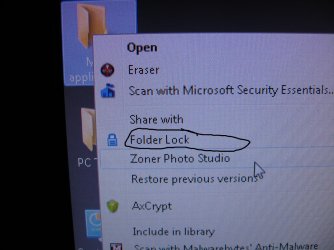
i tried FolderLock Folder Lock - File Lock and File Encryption Software Free Download but realized i had to pay for it after 15 uses. Since i do not conduct business online, i went to Programs/Features and removed it, as well as removed the download file from Downloads. did a sys restart but FolderLock is still there when i right click on a file.

SEE ATTACHED PHOTO

how do i get get rid of it?
 

Attachments
  • folderlockphoto1.JPG
    folderlockphoto1.JPG
    352.6 KB · Views: 8

My Computer

Computer Manufacturer/Model Number
homebuilt
OS
WIN7 Ultimate, 64bit OEM
CPU
i5-750 quad core
Motherboard
MSI P55-GD55 (MS-7589) (CPU1)
Memory
8GB dual channel DDR3 @ 668MHZ (9-9-9-24) 4 x 2GB each
Graphics Card(s)
ATI Radeon HD5750
Sound Card
onboard
Monitor(s) Displays
LG widescreen LCD 1920 x 1080 FLATRON
Hard Drives
2 x WD 500 GB SATA drives, room for 8 more in the drive bays. 1 WD USB 320 GB used for backup the system.
PSU
SEASONIC M-12D 850 watt sli ready
Case
ANTEC DARK FLEET (biggest one they make)
Cooling
case: 6 x 120mm fans 2 x 140mm fans, CPU: Corsair H50
Keyboard
generic
Mouse
microsoft wireless
Internet Speed
bloody slow thanks to Canadian ISP's throttling our net
Other Info
soon to have a ZALMAN RESERATOR just for the GPU...also dedicated 500 GB of virtual memory for paging file,caching
I think that the best way, to be sure it is gone is to use system restore from a point before the download.
If that cannot be done, try revno.
http://www.revouninstaller.com/

I assume that you mean that the program is still there and not just the files that it locked.
 

My Computer

Computer type
PC/Desktop
Computer Manufacturer/Model Number
Dell XPS 420
OS
Windows 10, Home Clean Install
CPU
Intel Core2 processsor Q8200(2.33Ghz 1333FSB) Quad Core Tech
Motherboard
Dell
Memory
6 gb
Graphics Card(s)
ATI Radeon 256MB HD3650
Sound Card
Intergrated 7.1 Channel Audio
Monitor(s) Displays
Dell SP2009W 20"
Hard Drives
640 GB Serial ATA Hard drive
Cooling
Fan
Keyboard
Dell USB Keyboard
Mouse
Dell Premium Optical USB
Internet Speed
DSL 2.85
you need to remember your password so that you will successfully uninstall it. i've used folderlock in the past (xp days) but when i transfered to 7, i did not use it anymore. a system restore could be helpful. i also forgot my password before and i tried uninstalling it through tuneup but i did not work. never heard of revouninstaller then so i cannot comment on it. if you're as unlucky as me, i had to reinstall my xp just to get rid of folder lock.

but on second thought, if you dont really need to uninstall it, just let it be. its true that the trial version lasts up to 15 uses and after that, your locked files can now be seen but if those files are not that important you could just let it there. seven also has bitlocker but i've never tried it yet.
 

My Computer

Computer Manufacturer/Model Number
Desktop is a DIY and laptop is an Acer Aspire 4745
OS
7 all the way!
CPU
core 2 duo (desktop) i5 (laptop)
Motherboard
asus for desktop
Memory
2gb for both machines
Graphics Card(s)
nvidia 512mb GS for desktop; hd 5470 for laptop
Monitor(s) Displays
19" AOC 913fw
i tried FolderLock Folder Lock - File Lock and File Encryption Software Free Download but realized i had to pay for it after 15 uses. Since i do not conduct business online, i went to Programs/Features and removed it, as well as removed the download file from Downloads. did a sys restart but FolderLock is still there when i right click on a file.

SEE ATTACHED PHOTO

how do i get get rid of it?

If you just want to get rid of the context menu item you can try this,

Context Menu Editor for Windows 7 & Vista v 1.0 Released | The Windows Club

Always a good idea to back up the registry just in case.

http://www.sevenforums.com/tutorials/4230-registry-backup-restore.html
 

My Computer

Computer type
PC/Desktop
Computer Manufacturer/Model Number
Self Built
OS
Win 10 Pro x64
CPU
Intel I5-2500K @3.3GHz
Motherboard
Asrock P67 Extreme4
Memory
16GB G.Skill Ripjaws X (4x4GB)
Graphics Card(s)
EVGA GeForce 750 Ti SC 2GB
Sound Card
ASUS Xonar DG 5.1 Channels 24-bit 96KHz PCI Interface Sound
Monitor(s) Displays
auria eq2367
Screen Resolution
1920 x 1080
Hard Drives
250GB Samsung 850 EVO SSD
1TB WD Blue
1TB Hitachi
PSU
SeaSonic X 650W 80 Plus Gold
Case
Corsair Obsidian 750D
Cooling
Corsair H60, Three 140mm case fans
Keyboard
Logitech Wireless Keyboard K520
Mouse
Logitech Wireless Mouse M310
Internet Speed
Wave Broadband ~ 100 dn 5 up
Antivirus
Windows Defender, Malwarebytes Premium
Browser
Edge, IE11, Chrome
Other Info
Laptop specs: HP g7-1365dx /
CPU: AMD A6-3420M APU with Radeon(tm) HD Graphics /
RAM: Crucial 8Gb (2x4Gb) /
SSD: Crucial M4-CT128M4SSD2 ATA Device/ FW 000F /
GFX: AMD Radeon HD 6520G /
OS: Windows 10 Pro x64
SOLVED!!!!!!!!!! after a few months of trying to remove folderlock (trial version) and not succeeding, i found this:

The PEN: HOW TO's: Remove "FOLDER LOCK" without a password

i re-downloaded folderlock, and used the key that is shown in the link above. Then I went to OPTIONS, and uninstalled folderlock. It removed BOTH the old portions of folderlock and the freshly downloaded one.

FINALLY!!!!!
 

My Computer

Computer Manufacturer/Model Number
homebuilt
OS
WIN7 Ultimate, 64bit OEM
CPU
i5-750 quad core
Motherboard
MSI P55-GD55 (MS-7589) (CPU1)
Memory
8GB dual channel DDR3 @ 668MHZ (9-9-9-24) 4 x 2GB each
Graphics Card(s)
ATI Radeon HD5750
Sound Card
onboard
Monitor(s) Displays
LG widescreen LCD 1920 x 1080 FLATRON
Hard Drives
2 x WD 500 GB SATA drives, room for 8 more in the drive bays. 1 WD USB 320 GB used for backup the system.
PSU
SEASONIC M-12D 850 watt sli ready
Case
ANTEC DARK FLEET (biggest one they make)
Cooling
case: 6 x 120mm fans 2 x 140mm fans, CPU: Corsair H50
Keyboard
generic
Mouse
microsoft wireless
Internet Speed
bloody slow thanks to Canadian ISP's throttling our net
Other Info
soon to have a ZALMAN RESERATOR just for the GPU...also dedicated 500 GB of virtual memory for paging file,caching
SOLVED!!!!!!!!!! after a few months of trying to remove folderlock (trial version) and not succeeding, i found this:

The PEN: HOW TO's: Remove "FOLDER LOCK" without a password

i re-downloaded folderlock, and used the key that is shown in the link above. Then I went to OPTIONS, and uninstalled folderlock. It removed BOTH the old portions of folderlock and the freshly downloaded one.

FINALLY!!!!!

Thanks for posting your solution. :)
If it's fine with you, I'll mark this thread as solved for the mods to close.

Take care and regards
 

My Computer

Computer Manufacturer/Model Number
Custom
OS
Win7 HP (x64)/Win7 Ultimate (x64)
CPU
Core i7 920
Motherboard
Intel X58
Memory
6 x 2GB Corsair XMS3
Graphics Card(s)
CF HD4890
Sound Card
Asus Xonar
Monitor(s) Displays
Dell 2408WFP
Screen Resolution
1920 x 1200
Hard Drives
2 x 150GB WDC Velociraptors (Raid 0)
1 x 1TB Seagate
1 x 1.5TB Seagate
PSU
Corsair HX1000W
Case
Antec 1200
Keyboard
Razer Lycosa/N52te
Mouse
Razer Lachesis
close away! :cool:
 

My Computer

Computer Manufacturer/Model Number
homebuilt
OS
WIN7 Ultimate, 64bit OEM
CPU
i5-750 quad core
Motherboard
MSI P55-GD55 (MS-7589) (CPU1)
Memory
8GB dual channel DDR3 @ 668MHZ (9-9-9-24) 4 x 2GB each
Graphics Card(s)
ATI Radeon HD5750
Sound Card
onboard
Monitor(s) Displays
LG widescreen LCD 1920 x 1080 FLATRON
Hard Drives
2 x WD 500 GB SATA drives, room for 8 more in the drive bays. 1 WD USB 320 GB used for backup the system.
PSU
SEASONIC M-12D 850 watt sli ready
Case
ANTEC DARK FLEET (biggest one they make)
Cooling
case: 6 x 120mm fans 2 x 140mm fans, CPU: Corsair H50
Keyboard
generic
Mouse
microsoft wireless
Internet Speed
bloody slow thanks to Canadian ISP's throttling our net
Other Info
soon to have a ZALMAN RESERATOR just for the GPU...also dedicated 500 GB of virtual memory for paging file,caching
Back
Top