Cannot remove IE8

McDougal

New member
Power User
Local time
1:02 PM
Messages
271
Hey all,

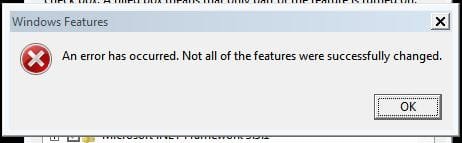
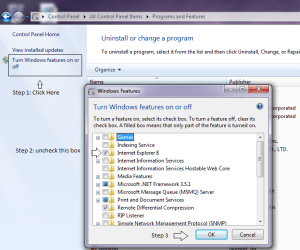
Recently I posted about being unable to install the SP1 Release Candidate....I looked at those two links and was still unable to fix the problem, I decided to just skip it, and I hid the update so it wouldn't notify me again. I decided that I no longer needed IE8, and I want to remove it through the turn Windows features on or off control panel item. However....this is the first time I've had this problem, when I tried to remove it, I got an error message saying that some elements could not be removed. I rebooted, and IE was still installed, and there was no configuring features notification in the welcome screen while rebooting. Does anybody know how to fix this problem? I'm doing a sfc/scannow right now....

Thanks :)!

-McDougal
 

My Computer

Computer Manufacturer/Model Number
self built
OS
Windows 8 Pro x64; Win 7 Home Premium x64 SP1 on VirtualBox
CPU
Intel Core i3-2120 @ 3.3GHz
Motherboard
ASUS P8Z68-M Pro
Memory
8GB DDR3
Graphics Card(s)
ZOTAC GeForce GTX 560 Ti
Sound Card
Realteck HD Audio
Monitor(s) Displays
ASUS VS228 21.5" 1080p
Screen Resolution
1920x1080
Hard Drives
120GB SanDisk SSD;
500GB 7200RPM HDD
PSU
500W 80PLUS Bronze Certified
Case
Antec Three Hundred Illusion
Keyboard
Microsoft Comfort Curve Keyboard 2000 v1.0
Mouse
Microsoft Wireless Mobile Mouse 3000
Internet Speed
26/22Mbps Verizon FiOS
Other Info
very first PC build
I think that it was in use. Make sure that it is off and then try to turn off, again.
 

My Computer

Computer type
PC/Desktop
Computer Manufacturer/Model Number
Dell XPS 420
OS
Windows 10, Home Clean Install
CPU
Intel Core2 processsor Q8200(2.33Ghz 1333FSB) Quad Core Tech
Motherboard
Dell
Memory
6 gb
Graphics Card(s)
ATI Radeon 256MB HD3650
Sound Card
Intergrated 7.1 Channel Audio
Monitor(s) Displays
Dell SP2009W 20"
Hard Drives
640 GB Serial ATA Hard drive
Cooling
Fan
Keyboard
Dell USB Keyboard
Mouse
Dell Premium Optical USB
Internet Speed
DSL 2.85

My Computer

Computer Manufacturer/Model Number
Hopalong/ Godzilla
OS
Windows7 Pro 64bit SP-1; Windows XP Pro 32bit
CPU
Intel Core i7-870 Lynnfield 2.93GHz LGA 1156 95W Quad-Core
Motherboard
ASUS P7P55D-E PRO
Memory
8GB@1400MHz Crucial Ballistix DDR3-1600 4x2GB
Graphics Card(s)
ASUS ENGTX460 DirectCU/2DI/1GD5 1GB 256-bit GDDR5
Sound Card
VIA Onboard
Monitor(s) Displays
Asus VS248H-P 24"; Samsung SyncMaster 941BW 19"ws
Screen Resolution
1920x1080; 1440x900
Hard Drives
Samsung 830 120GB SSD
Intel 320 120GB SSD
Western Digital Caviar Black WD7501AALS 750GB 7200 RPM SATA 3.0Gb/s
Western Digital Caviar Black WD6401AALS 640GB 7200 RPM SATA 3.0Gb/s
PSU
COOLER MASTER Silent Pro RS850-AMBAJ3-US 850W Modular
Case
COOLER MASTER HAF 932 RC-932-KKN5-GP Black
Cooling
Scythe "Mugen-2 Rev.B" (2 ScytheKaze-Jyuni PWM fans)
Keyboard
Logitech K-320
Mouse
Kensington
Antivirus
Avast Inernet Suite
Browser
IE 9 ; Chrome
You can turn it off
 

My Computer

Computer type
PC/Desktop
Computer Manufacturer/Model Number
Dell XPS 420
OS
Windows 10, Home Clean Install
CPU
Intel Core2 processsor Q8200(2.33Ghz 1333FSB) Quad Core Tech
Motherboard
Dell
Memory
6 gb
Graphics Card(s)
ATI Radeon 256MB HD3650
Sound Card
Intergrated 7.1 Channel Audio
Monitor(s) Displays
Dell SP2009W 20"
Hard Drives
640 GB Serial ATA Hard drive
Cooling
Fan
Keyboard
Dell USB Keyboard
Mouse
Dell Premium Optical USB
Internet Speed
DSL 2.85
Ahhh!
OP stated remove so I wasn't sure.

Thanks Rich.
 

My Computer

Computer Manufacturer/Model Number
Hopalong/ Godzilla
OS
Windows7 Pro 64bit SP-1; Windows XP Pro 32bit
CPU
Intel Core i7-870 Lynnfield 2.93GHz LGA 1156 95W Quad-Core
Motherboard
ASUS P7P55D-E PRO
Memory
8GB@1400MHz Crucial Ballistix DDR3-1600 4x2GB
Graphics Card(s)
ASUS ENGTX460 DirectCU/2DI/1GD5 1GB 256-bit GDDR5
Sound Card
VIA Onboard
Monitor(s) Displays
Asus VS248H-P 24"; Samsung SyncMaster 941BW 19"ws
Screen Resolution
1920x1080; 1440x900
Hard Drives
Samsung 830 120GB SSD
Intel 320 120GB SSD
Western Digital Caviar Black WD7501AALS 750GB 7200 RPM SATA 3.0Gb/s
Western Digital Caviar Black WD6401AALS 640GB 7200 RPM SATA 3.0Gb/s
PSU
COOLER MASTER Silent Pro RS850-AMBAJ3-US 850W Modular
Case
COOLER MASTER HAF 932 RC-932-KKN5-GP Black
Cooling
Scythe "Mugen-2 Rev.B" (2 ScytheKaze-Jyuni PWM fans)
Keyboard
Logitech K-320
Mouse
Kensington
Antivirus
Avast Inernet Suite
Browser
IE 9 ; Chrome
Actually, you could be right. The terms remove and turn off are used. I assumed the OP was trying to turn off, which is easily done.
 

My Computer

Computer type
PC/Desktop
Computer Manufacturer/Model Number
Dell XPS 420
OS
Windows 10, Home Clean Install
CPU
Intel Core2 processsor Q8200(2.33Ghz 1333FSB) Quad Core Tech
Motherboard
Dell
Memory
6 gb
Graphics Card(s)
ATI Radeon 256MB HD3650
Sound Card
Intergrated 7.1 Channel Audio
Monitor(s) Displays
Dell SP2009W 20"
Hard Drives
640 GB Serial ATA Hard drive
Cooling
Fan
Keyboard
Dell USB Keyboard
Mouse
Dell Premium Optical USB
Internet Speed
DSL 2.85
Yes....I did mean turn off, sorry for the misunderstanding. My sfc /scannow scan finished....and it detected errors it was unable to repair, and it said to check the CBS.log file for more information, but the content of the file is too large, so I am unable to attach it. So, I think this is a bigger problem than just being unable to turn off IE8, due to the scan results, and being unable to install SP1 RC, I think it is a big system-wide problem. Does anybody have any idea what might be going wrong? If you need me to get any specific info out of the log file, I'd be more than happy to do anything it takes to get this back to normal....

Thanks for the help :)!

-McDougal
 

My Computer

Computer Manufacturer/Model Number
self built
OS
Windows 8 Pro x64; Win 7 Home Premium x64 SP1 on VirtualBox
CPU
Intel Core i3-2120 @ 3.3GHz
Motherboard
ASUS P8Z68-M Pro
Memory
8GB DDR3
Graphics Card(s)
ZOTAC GeForce GTX 560 Ti
Sound Card
Realteck HD Audio
Monitor(s) Displays
ASUS VS228 21.5" 1080p
Screen Resolution
1920x1080
Hard Drives
120GB SanDisk SSD;
500GB 7200RPM HDD
PSU
500W 80PLUS Bronze Certified
Case
Antec Three Hundred Illusion
Keyboard
Microsoft Comfort Curve Keyboard 2000 v1.0
Mouse
Microsoft Wireless Mobile Mouse 3000
Internet Speed
26/22Mbps Verizon FiOS
Other Info
very first PC build

My Computer

Computer type
PC/Desktop
Computer Manufacturer/Model Number
Dell XPS 420
OS
Windows 10, Home Clean Install
CPU
Intel Core2 processsor Q8200(2.33Ghz 1333FSB) Quad Core Tech
Motherboard
Dell
Memory
6 gb
Graphics Card(s)
ATI Radeon 256MB HD3650
Sound Card
Intergrated 7.1 Channel Audio
Monitor(s) Displays
Dell SP2009W 20"
Hard Drives
640 GB Serial ATA Hard drive
Cooling
Fan
Keyboard
Dell USB Keyboard
Mouse
Dell Premium Optical USB
Internet Speed
DSL 2.85
Okay, I'll give SFC another two tries...and report back with the results :)! Do you think running it in safe mode would work?
 

My Computer

Computer Manufacturer/Model Number
self built
OS
Windows 8 Pro x64; Win 7 Home Premium x64 SP1 on VirtualBox
CPU
Intel Core i3-2120 @ 3.3GHz
Motherboard
ASUS P8Z68-M Pro
Memory
8GB DDR3
Graphics Card(s)
ZOTAC GeForce GTX 560 Ti
Sound Card
Realteck HD Audio
Monitor(s) Displays
ASUS VS228 21.5" 1080p
Screen Resolution
1920x1080
Hard Drives
120GB SanDisk SSD;
500GB 7200RPM HDD
PSU
500W 80PLUS Bronze Certified
Case
Antec Three Hundred Illusion
Keyboard
Microsoft Comfort Curve Keyboard 2000 v1.0
Mouse
Microsoft Wireless Mobile Mouse 3000
Internet Speed
26/22Mbps Verizon FiOS
Other Info
very first PC build
You can try safe mode, but it may not be necessary. Do the SFC if it cannot fix the errors, try IE 8 again and make sure that it is not being used. If you cannot get it to work, pick another browser and make it the default. IE will just be there but do nothing, just like it is off.
 

My Computer

Computer type
PC/Desktop
Computer Manufacturer/Model Number
Dell XPS 420
OS
Windows 10, Home Clean Install
CPU
Intel Core2 processsor Q8200(2.33Ghz 1333FSB) Quad Core Tech
Motherboard
Dell
Memory
6 gb
Graphics Card(s)
ATI Radeon 256MB HD3650
Sound Card
Intergrated 7.1 Channel Audio
Monitor(s) Displays
Dell SP2009W 20"
Hard Drives
640 GB Serial ATA Hard drive
Cooling
Fan
Keyboard
Dell USB Keyboard
Mouse
Dell Premium Optical USB
Internet Speed
DSL 2.85

My Computer

Computer type
Laptop
Computer Manufacturer/Model Number
Sony Vaio VPCEB47GM Laptop
OS
Win 7 Pro 64-bit
CPU
Intel i5 2.4 Ghz
Memory
8GB DDR3
Graphics Card(s)
Intel HD 3000
Sound Card
IDT High Definition
Monitor(s) Displays
15.6 WGXA Anti-Glare LED
Screen Resolution
1280x800
Hard Drives
640Gb 7200rpm
Antivirus
MSE
Browser
Opera (primary) with IE9 backup
Okay, I went into safe mode...and did another sfc scan plus attempted to turn off IE8 (while in safe mode) with the same following error attached. And no...I haven't tried System Restore, not sure if I will still have a point before I attempted to install SP1, but it's worth a try, even though I would prefer not to do it because it will erase a ton of programs and stuff that I have installed since.
 

Attachments

  • Capture.JPG
    Capture.JPG
    16.6 KB · Views: 1

My Computer

Computer Manufacturer/Model Number
self built
OS
Windows 8 Pro x64; Win 7 Home Premium x64 SP1 on VirtualBox
CPU
Intel Core i3-2120 @ 3.3GHz
Motherboard
ASUS P8Z68-M Pro
Memory
8GB DDR3
Graphics Card(s)
ZOTAC GeForce GTX 560 Ti
Sound Card
Realteck HD Audio
Monitor(s) Displays
ASUS VS228 21.5" 1080p
Screen Resolution
1920x1080
Hard Drives
120GB SanDisk SSD;
500GB 7200RPM HDD
PSU
500W 80PLUS Bronze Certified
Case
Antec Three Hundred Illusion
Keyboard
Microsoft Comfort Curve Keyboard 2000 v1.0
Mouse
Microsoft Wireless Mobile Mouse 3000
Internet Speed
26/22Mbps Verizon FiOS
Other Info
very first PC build
Tools
Intenet options
advanced
reset
This will remove any add ons and maybe the cause of the problem
 

My Computer

Computer type
PC/Desktop
Computer Manufacturer/Model Number
Dell XPS 420
OS
Windows 10, Home Clean Install
CPU
Intel Core2 processsor Q8200(2.33Ghz 1333FSB) Quad Core Tech
Motherboard
Dell
Memory
6 gb
Graphics Card(s)
ATI Radeon 256MB HD3650
Sound Card
Intergrated 7.1 Channel Audio
Monitor(s) Displays
Dell SP2009W 20"
Hard Drives
640 GB Serial ATA Hard drive
Cooling
Fan
Keyboard
Dell USB Keyboard
Mouse
Dell Premium Optical USB
Internet Speed
DSL 2.85
....I haven't tried System Restore, not sure if I will still have a point before I attempted to install SP1, but it's worth a try, even though I would prefer not to do it because it will erase a ton of programs and stuff that I have installed since.

Most of the time a restore point is automatically created whenever a Microsoft update or product is installed. You might luck out and find you have a restore point that will leave your installed programs intact.
 

My Computer

Computer type
Laptop
Computer Manufacturer/Model Number
Sony Vaio VPCEB47GM Laptop
OS
Win 7 Pro 64-bit
CPU
Intel i5 2.4 Ghz
Memory
8GB DDR3
Graphics Card(s)
Intel HD 3000
Sound Card
IDT High Definition
Monitor(s) Displays
15.6 WGXA Anti-Glare LED
Screen Resolution
1280x800
Hard Drives
640Gb 7200rpm
Antivirus
MSE
Browser
Opera (primary) with IE9 backup
Just finished the restore...will try to turn off IE8 again, @madtownidiot, that's how I've been trying to uninstall IE8 all this time....@rich46, I'll try the reset before I try removing again. Thanks everyone for the help :)!
 

My Computer

Computer Manufacturer/Model Number
self built
OS
Windows 8 Pro x64; Win 7 Home Premium x64 SP1 on VirtualBox
CPU
Intel Core i3-2120 @ 3.3GHz
Motherboard
ASUS P8Z68-M Pro
Memory
8GB DDR3
Graphics Card(s)
ZOTAC GeForce GTX 560 Ti
Sound Card
Realteck HD Audio
Monitor(s) Displays
ASUS VS228 21.5" 1080p
Screen Resolution
1920x1080
Hard Drives
120GB SanDisk SSD;
500GB 7200RPM HDD
PSU
500W 80PLUS Bronze Certified
Case
Antec Three Hundred Illusion
Keyboard
Microsoft Comfort Curve Keyboard 2000 v1.0
Mouse
Microsoft Wireless Mobile Mouse 3000
Internet Speed
26/22Mbps Verizon FiOS
Other Info
very first PC build
Unfortunately as of now I am still unable to turn off IE8. I have tried system restore, which didn't really change anything, and I am still getting the same error message. sfc /scannow still detects yet is unable to repair multiple errors, and I am stuck on what to do now, I really really do not want to reinstall, since I just reinstalled like a month or two ago. Does anybody have any more ideas?

Thanks!

-McDougal
 

My Computer

Computer Manufacturer/Model Number
self built
OS
Windows 8 Pro x64; Win 7 Home Premium x64 SP1 on VirtualBox
CPU
Intel Core i3-2120 @ 3.3GHz
Motherboard
ASUS P8Z68-M Pro
Memory
8GB DDR3
Graphics Card(s)
ZOTAC GeForce GTX 560 Ti
Sound Card
Realteck HD Audio
Monitor(s) Displays
ASUS VS228 21.5" 1080p
Screen Resolution
1920x1080
Hard Drives
120GB SanDisk SSD;
500GB 7200RPM HDD
PSU
500W 80PLUS Bronze Certified
Case
Antec Three Hundred Illusion
Keyboard
Microsoft Comfort Curve Keyboard 2000 v1.0
Mouse
Microsoft Wireless Mobile Mouse 3000
Internet Speed
26/22Mbps Verizon FiOS
Other Info
very first PC build
If you restored back as far as you could and have "multiple errors" you may have to do a full repair or reinstall since you may have a virus. Since your system sounds fairly new it may not be a hard drive problem but if the hard drive is getting flakey you could try a $90 program called "Spinrite" from www.grc.com .
 

My Computer

Computer type
PC/Desktop
Computer Manufacturer/Model Number
OQO 2+
OS
Windows 8 Pro w/MC 32-bit
CPU
Intel Atom 1.86 GHz
Motherboard
OQO 2+
Memory
2 GB
Graphics Card(s)
Intel GMA 500
Sound Card
IDT
Monitor(s) Displays
LCD
Screen Resolution
800 x 480 (portable) 1280 x 1024 (docked)
Hard Drives
64 GB SSD
PSU
9 Ah Battery (portable) or OQO Brick (docked)
Case
Shirt Pocket Sized
Cooling
Tiny Fan
Keyboard
Slide out (portable) DiNovo Edge (docked)
Mouse
Eraser head (portable) Logitech Bluetooth (docked)
Internet Speed
WWAN or 802.11G (portable) T1 (docked)
Browser
IE 10
Other Info
DVD-RW OQO Docking Station
Is this thread suggesting that Windows can live without IE even if you don't use it as your browser. I thought Windows used it for update purposes.
 

My Computer

Computer type
PC/Desktop
Computer Manufacturer/Model Number
Own build
OS
Windows 7x64 Home Premium SP1
CPU
Intel i7 2600k
Motherboard
ASUS P8Z68 Deluxe
Memory
G.Skill Ripjaws (DDR3-1600) 2x4GB
Graphics Card(s)
Nvidia GeForce GTS 450; Intel HD Graphics 3000(GT2+)
Monitor(s) Displays
Dell Ultrasharp IPS panel U2311H, Samsung SyncMaster P2350
Screen Resolution
1920x1080
Hard Drives
Samsung 850 Pro SSD 256GB, Samsung SSD 840 120GB, Seagates 1TB Barracuda ST31000528AS x2
PSU
Seasonic M12II 520W
Case
Lian Li Lancool PC-K60
Cooling
Case: 1x120mm, 3x140mm CPU: Hyper 212+
Keyboard
Logitech MK520 (wireless)
Mouse
Logitech MK520
Internet Speed
6-7 Mbps
Antivirus
Norton Security Premium, Malwarebytes on 2 (MSE on 3rd PC)
Browser
FireFox
Other Info
Audio: Logitech Z523 2.1
Back
Top