Solved Cannot Remove Intellipont

Win7rap

New member
Member
VIP
Local time
6:39 AM
Messages
120
Just got a Logitech MK710 (keyboard and mouse) to replace a refurbished MS 7000 (keyboard and mouse). When move mouse get a magnified window (sometimes) which I get rid of by pressing the 'back' button on the mouse (supposed to flip to previous web page). Tried to set the keyboard settings and mouse settings but got MS error saying that "No MS USB keyboard or mouse was found". Figured first thing was to remove Intellipoint but it's not in list of programs available to remove. What to do?

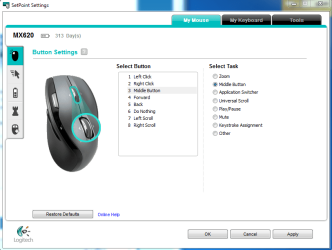
Magnified display may be due to my squeezing the "application switch" which is in the rubber sides of the mouse. I can 'fix' that easily by turning it off BUT I can't modify the keyboard or mouse because can't get past Intellipoint.
 

My Computer

OS
Win 7
I've got the MX620. Adjustments to the settings are made through 'Set Point'.

It should be in your start menu somewhere. Try Start menu/search - mouse.
 

Attachments

  • Capture.PNG
    Capture.PNG
    31.9 KB · Views: 3

My Computer

Computer Manufacturer/Model Number
Custom
OS
Windows 7 Pro x64 -- PCLinuxOS KDE4 FullMonty 2011
CPU
i7-875k @ Turbo - 7,6,5,5 - 3.6ghz
Motherboard
Asus P7P55D-E Deluxe
Memory
Corsair CMD8GX3M4A1600C8 8gb
Graphics Card(s)
Asus EAH5850 DirectCU/2DIS/1GD5
Sound Card
On Board
Monitor(s) Displays
Samsung SyncMaster T220 - Panasonic VT30a 50"
Screen Resolution
1680x1050 -
Hard Drives
Corsair Force 3 SSD 120GB x 2 ::
WD VelociRaptor 150GB WD1500HLFS x 2
PSU
Corsair HX-850 Power Supply
Case
Coolmaster HAF 932
Cooling
Corsair H50
Keyboard
Logitech Wireless MK700
Mouse
Logitech Wireless MX620
Internet Speed
Good enough for now
Other Info
Voip. Insanely cheap phone calls.

My Computer

Computer type
PC/Desktop
Computer Manufacturer/Model Number
Home Built - Jan 2013
OS
Windows 7 64 Bit Home Premium SP1
CPU
i7-3820
Motherboard
Asus P9X79-PRO - Bios 4608
Memory
GSkill F3-14900CL9Q - 16GB
Graphics Card(s)
EVGA GeForce GTX660 - Driver 352.86
Sound Card
On board Realtek ALC898
Monitor(s) Displays
Acer S271HL
Screen Resolution
1920 x 1080
Hard Drives
#1- Samsung 840 Pro Series
#2- Western Digital WD1002FAEX Sata3 Black
#3- Western Digital WD1002FAEX Sata3 Black
PSU
Corsair CMPSU-850TX-V2 - 850 watt (by Seasonic)
Case
Corsair Obsidian 550D
Cooling
Standard 3 120mm case fans, Cooler Master Hyper 212 EVO
Keyboard
MS KC-0405
Mouse
Intellimouse 5-button
Internet Speed
56 Mbits/Sec (on a good day)
Antivirus
Avast & Malwarebytes
Browser
Firefox
Other Info
Asus DVD - DRW-24B1ST 24X
I found the answer .... USE CCLEANER (didn't see it in Revo).
The 'normal' Windows ADDS/REMOVE didn't show MS Intellipoint or MS Intellitype but Ccleaner did - so I was able to remove them.

Then I changed the mouse "application switcher" to "do nothing" ... everything OK now. Now, there might be a use for "switching ... if I can teach myself NOT to put pressure when moving the mouse (with neurological problems stopping is not easy).

Bottom line - this issue is resolved.
 

My Computer

OS
Win 7
Good job. Glad you got it!
 

My Computer

Computer type
PC/Desktop
Computer Manufacturer/Model Number
Home Built - Jan 2013
OS
Windows 7 64 Bit Home Premium SP1
CPU
i7-3820
Motherboard
Asus P9X79-PRO - Bios 4608
Memory
GSkill F3-14900CL9Q - 16GB
Graphics Card(s)
EVGA GeForce GTX660 - Driver 352.86
Sound Card
On board Realtek ALC898
Monitor(s) Displays
Acer S271HL
Screen Resolution
1920 x 1080
Hard Drives
#1- Samsung 840 Pro Series
#2- Western Digital WD1002FAEX Sata3 Black
#3- Western Digital WD1002FAEX Sata3 Black
PSU
Corsair CMPSU-850TX-V2 - 850 watt (by Seasonic)
Case
Corsair Obsidian 550D
Cooling
Standard 3 120mm case fans, Cooler Master Hyper 212 EVO
Keyboard
MS KC-0405
Mouse
Intellimouse 5-button
Internet Speed
56 Mbits/Sec (on a good day)
Antivirus
Avast & Malwarebytes
Browser
Firefox
Other Info
Asus DVD - DRW-24B1ST 24X
Back
Top