
You are using an out of date browser. It may not display this or other websites correctly.
You should upgrade or use an alternative browser.
You should upgrade or use an alternative browser.
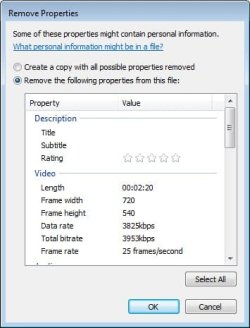
Cannot remove video properties informations
- Thread starter NY33
- Start date

- Local time
- 10:32 PM
- Messages
- 1,258
I want to remove properties from a video file but all options are inactive.
Any solution?
Thanks.
That is because Windows Vista and Windows 7 do not support editing meta-tag properties of video files like they do with image files.
You can, however, use abcAVI Tag Editor to accomplish the task.
My Computer
- Computer type
- PC/Desktop
- Computer Manufacturer/Model Number
- Virtual Machine
- OS
- Windows 7 Professional 32-bit SP1
- CPU
- AMD A4/A6
- Motherboard
- Intel Corporation 440BX Desktop Reference Platform
- Memory
- 3.00GB EDO
- Graphics Card(s)
- VMware SVGA 3D
- Sound Card
- High Definition Audio Device
- Monitor(s) Displays
- Generic Non-PnP Monitor on VMware SVGA 3D
- Screen Resolution
- 1440x900
- Hard Drives
- 1 x 60GB VMware Virtual SATA Hard Drive ATA Device
- Antivirus
- Kaspersky Total Security
- Local time
- 10:32 PM
- Messages
- 1,258
Thanks, but not working for me.
Sorry it's not working for you. I use abcAVI to tag all my videos because 7 cannot. I'm hoping that the situation will change with Windows 7 Service Pack 1.
If you find an alternative, will you let us know?
My Computer
- Computer type
- PC/Desktop
- Computer Manufacturer/Model Number
- Virtual Machine
- OS
- Windows 7 Professional 32-bit SP1
- CPU
- AMD A4/A6
- Motherboard
- Intel Corporation 440BX Desktop Reference Platform
- Memory
- 3.00GB EDO
- Graphics Card(s)
- VMware SVGA 3D
- Sound Card
- High Definition Audio Device
- Monitor(s) Displays
- Generic Non-PnP Monitor on VMware SVGA 3D
- Screen Resolution
- 1440x900
- Hard Drives
- 1 x 60GB VMware Virtual SATA Hard Drive ATA Device
- Antivirus
- Kaspersky Total Security