- Local time
- 8:41 AM
- Messages
- 63
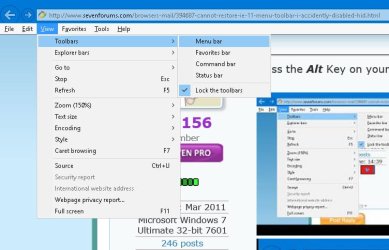
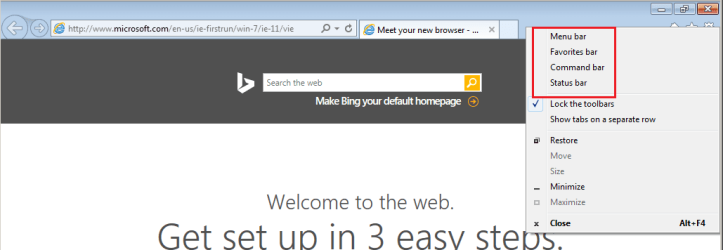
I was checking the toolbars I had displayed/enabled in IE 11 using the View/Toolbars menu option, and I accidently unchecked/disabled/hid the Menu toolbar (File, Edit, View etc.). The browser is working fine, but I cannot figure out how to make that Menu toolbar visible again, since I no longer have that menu option to use.
Can anyone tell me what to do to get the menu toolbar back working? Short of doing a sys restore, hopefully....
Thanks,
Pete B
Can anyone tell me what to do to get the menu toolbar back working? Short of doing a sys restore, hopefully....
Thanks,
Pete B
My Computer
At a glance
Microsoft Windows 7 Professional 64-bit 7601 ...Intel(R) Pentium(R) CPU G645 @ 2.90GHz8.00 GBIntel(R) HD Graphics
- Computer type
- PC/Desktop
- Computer Manufacturer/Model Number
- custom
- OS
- Microsoft Windows 7 Professional 64-bit 7601 Multiprocessor Free Service Pack 1
- CPU
- Intel(R) Pentium(R) CPU G645 @ 2.90GHz
- Motherboard
- Gigabyte Technology Co., Ltd. B75M-D3H
- Memory
- 8.00 GB
- Graphics Card(s)
- Intel(R) HD Graphics
- Sound Card
- (1) Realtek High Definition Audio (2) Intel(R) Display Aud
- Screen Resolution
- 1920 x 1080 x 32 bits (4294967296 colors) @ 60 Hz
- Hard Drives
- (1) WDC WD10EZEX-60ZF5A0 (2) HP Officejet J6400 USB Device (3) WD My Book 1130 USB Device
- Antivirus
- kasperskys
- Browser
- ie 10