Cannot Run Diablo 2 LOD PLEASE HELP!!!

surpasser

New member
Local time
10:47 AM
Messages
5
Location
Washington
Ive tried Most of everthing i read on the earlier Forums the D2Vidtest said
THIS COMPUTER CANNOT RUN DIABLO II ! video test did not detect any useable video modes... i have windows 7 obviously and my video card is really good not the best but good... I love Diablo its classic what should i try to get it to work...
i have AMD phenom(tm) X4 925 with 2.80 Ghz... any suggestions? I have tried updating patch it says most up to date, still getting UE and updaed DX runtime from microsoft...
This is reallly frustrating please help
 

My Computer

Computer Manufacturer/Model Number
HPE-112y
OS
windows 7
CPU
ACPI x64-based PC
Memory
8.0 GB
Graphics Card(s)
AMD-Phenom(tm) 2 X4 925 processor 2.80 Ghz
Sound Card
ATI HD, Realtek HD
I'm guessing you may have to tell the game to run in compatibility mode. According to sources, LoD might run on your computer but might not. I suggest telling it to run in Windows XP SP2/3 compatibility mode. That might help.

Also, read this thread:
Will windows 7 run diablo 2 lord of destruction - PC-Gaming - General

If you still cannot get it to run and have Windows 7 Pro or Ultimate, you could download the Windows XP Mode virtual system and attempt to play it that way.
 

My Computer

Computer Manufacturer/Model Number
Apple Macbook Pro (April 2009)
OS
W7 Ult. x64 | OS X
CPU
Intel Mobile Core 2 Duo 2.93Ghz [T9800 Penryn]
Motherboard
NVIDIA nForce 730i Rev. B1 [Mac-F2268EC8 (U2E1)]
Memory
4096MB Samsung DDR3 Dual Channel [PC3-8500F 1066Mhz]
Graphics Card(s)
NVIDIA GeForce 9600M GT 512MB [G96M Rev. C1]
Sound Card
SB X-Fi Surround 5.1 USB | Onboard Realtek (Disabled)
Monitor(s) Displays
Acer x223wbd 22" | Apple Anti-Glare 17" (Disabled)
Screen Resolution
{Current} 1440x900 {Acer} 1680x1050 {Apple} 1920x1200
Hard Drives
{Internal}
Seagate Momentus 320GB 2.5" 7200RPM [ST9320421AS]

{Externals}
LaCie 320GB USB 2.0 HDD [301284UR]
LaCie 750GB USB 2.0 FW400 eSATA HDD [301314U]
LaCie 1TB USB 2.0 HDD [301304UR]
PSU
Magsafe
Case
Aluminum/Unibody (MBP52)
Cooling
2 x 6000 RPM Fans
Keyboard
Logitech G-15v2 [PN 920-000379]
Mouse
Logitech G-9 [PN 910-000338]
Internet Speed
12Mbps/2.5Mbps w/ 24Mbps Speed Boost [Comcast]
Other Info
Logitech X-540 Speakers [PN 970223-0122]
Sennheiser PC-151 Headset

My Computer

Computer Manufacturer/Model Number
N/A
OS
Windows 7 Professional x64
CPU
Intel Core i7 860 @ 2.80GHz
Motherboard
Gigabyte P55-UD6
Memory
4.0GB OCZ Dual-Channel DDR3
Graphics Card(s)
GeForce GTS 250
Sound Card
HT Omega Striker 7.1
Monitor(s) Displays
Samsung Syncmaster P2570
Screen Resolution
1920x1080
Hard Drives
1000GB Western Digital
Keyboard
Saitek Eclipse (Red)
nvm thank you... i will see if that works...
 

My Computer

Computer Manufacturer/Model Number
HPE-112y
OS
windows 7
CPU
ACPI x64-based PC
Memory
8.0 GB
Graphics Card(s)
AMD-Phenom(tm) 2 X4 925 processor 2.80 Ghz
Sound Card
ATI HD, Realtek HD
I'm guessing you may have to tell the game to run in compatibility mode. According to sources, LoD might run on your computer but might not. I suggest telling it to run in Windows XP SP2/3 compatibility mode. That might help.

Also, read this thread:
Will windows 7 run diablo 2 lord of destruction - PC-Gaming - General

If you still cannot get it to run and have Windows 7 Pro or Ultimate, you could download the Windows XP Mode virtual system and attempt to play it that way.


so i cant figure out how to do the compatibility thing... howdo i do that... and i tried to download xp mode but it said i need a diff version of windows 7 i have premium 64 bit...
 

My Computer

Computer Manufacturer/Model Number
HPE-112y
OS
windows 7
CPU
ACPI x64-based PC
Memory
8.0 GB
Graphics Card(s)
AMD-Phenom(tm) 2 X4 925 processor 2.80 Ghz
Sound Card
ATI HD, Realtek HD
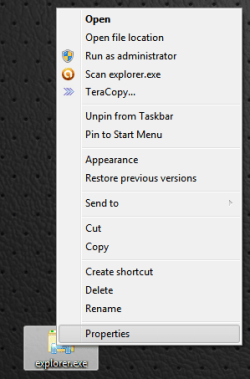
On the shortcut you use or the main exe file for the game:

Right Click > Properties

compatmodeproperties.png

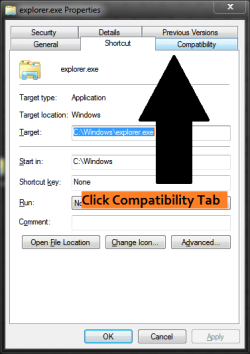
Compatibility Tab

compatmodetabselect.png

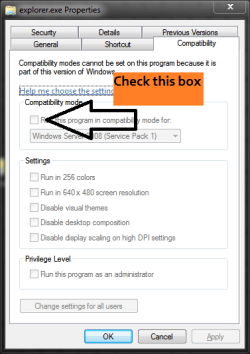
Check "Run this program in compatibility for"

compatmodecheckbox.png

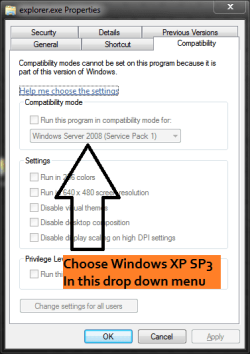
Select "Windows XP SP3" in the list.

compatmodedropdown.png

Now try to run the game.
 

My Computer

Computer Manufacturer/Model Number
Apple Macbook Pro (April 2009)
OS
W7 Ult. x64 | OS X
CPU
Intel Mobile Core 2 Duo 2.93Ghz [T9800 Penryn]
Motherboard
NVIDIA nForce 730i Rev. B1 [Mac-F2268EC8 (U2E1)]
Memory
4096MB Samsung DDR3 Dual Channel [PC3-8500F 1066Mhz]
Graphics Card(s)
NVIDIA GeForce 9600M GT 512MB [G96M Rev. C1]
Sound Card
SB X-Fi Surround 5.1 USB | Onboard Realtek (Disabled)
Monitor(s) Displays
Acer x223wbd 22" | Apple Anti-Glare 17" (Disabled)
Screen Resolution
{Current} 1440x900 {Acer} 1680x1050 {Apple} 1920x1200
Hard Drives
{Internal}
Seagate Momentus 320GB 2.5" 7200RPM [ST9320421AS]

{Externals}
LaCie 320GB USB 2.0 HDD [301284UR]
LaCie 750GB USB 2.0 FW400 eSATA HDD [301314U]
LaCie 1TB USB 2.0 HDD [301304UR]
PSU
Magsafe
Case
Aluminum/Unibody (MBP52)
Cooling
2 x 6000 RPM Fans
Keyboard
Logitech G-15v2 [PN 920-000379]
Mouse
Logitech G-9 [PN 910-000338]
Internet Speed
12Mbps/2.5Mbps w/ 24Mbps Speed Boost [Comcast]
Other Info
Logitech X-540 Speakers [PN 970223-0122]
Sennheiser PC-151 Headset

My Computer

Computer type
PC/Desktop
Computer Manufacturer/Model Number
Custom built by me.
OS
Windows 10 Pro
CPU
Intel Core i7-4770K (3.5Ghz)
Motherboard
Gigabyte G1 Sniper 5 (F10 Bios)
Memory
32 gig Corsair Dominator Platinum (4x8Gig)
Graphics Card(s)
Sapphire Tri-X R9 Fury
Sound Card
Soundblaster ZXR
Monitor(s) Displays
NEC PA242W 24" LCD Monitor
Screen Resolution
1920 x 1200
Hard Drives
Primary - Samsung 850 Pro (512gig), Samsung 840 Pro (256gig), 2TB WD Caviar Black.
PSU
EVGA Supernova 1000 G2
Case
Cooler Master HAF X
Cooling
Corsair H100i with Corsair Air Series SP120 Quiet Fans
Keyboard
Logitech Wireless Wave
Mouse
Logitech Performance MX
Internet Speed
High Speed Cable
Antivirus
Norton Security
Browser
IE11
Other Info
Memory Timings - 1866MHz @ 9-9-9-27-1T @ 1.5 volts
so i cant figure out how to do the compatibility thing... howdo i do that... and i tried to download xp mode but it said i need a diff version of windows 7 i have premium 64 bit...

you need either W7 pro or ultimate versions for XP Mode

XP Mode is geared for Enterprise/Corporate to run legacy apps within W7 thus making the transition from older versions of Windows to W7 easier....not GAMING so don't feel you are missing out on gaming because you can't use XP Mode

your best bet is to use compatibility mode like others have mentioned
 

My Computer

OS
Windows 8 Professional x64
CPU
Intel Core i7-3770K @4.5 GHz
Motherboard
Asus Sabertooth Z77
Memory
16GB G.Skill Ripjaws DDR3-1600
Graphics Card(s)
Gigabyte GeForce GTX 670 OC
Sound Card
Realtek
Monitor(s) Displays
HP 2711x 27" LED
Screen Resolution
1920 X 1080p
Hard Drives
Crucial m4 256GB SSD (system)
Seagate Barracuda XT 2TB 7200 RPM (storage)
PSU
Strider Gold Evolution ST1000-G
Case
Raven RV01
Cooling
Noctua NH-D14
Keyboard
Logitech K800
Mouse
Logitech Performance Mouse MX
Internet Speed
FIOS - 75/35 Mbps
Other Info
Pioneer black internal CD/DVD/BD read/write
Logitech Z506 5.1 speakers
--------------------------------------------------
Alienware X51/i7-3770/EVGA GTX 660ti FTW/16GB 1600/Blu-ray/2TB SATA III HD
Alright so Went to properties compatibility and followed all the instructions... changed it to WSPK3 than proceded to start the game... it then tells me to run D2VDTST... did that... same problem it said cannot run Diablo2 then went to start game again... same message about D2VDTST... I also did the whole compatibility troubleshooting thing... it just recommended SPK2 and then i tried again same problem... No UE anymore...


Just wondering could it be that my computer is hooked through HDMI to my 47 inch TV?
 

My Computer

Computer Manufacturer/Model Number
HPE-112y
OS
windows 7
CPU
ACPI x64-based PC
Memory
8.0 GB
Graphics Card(s)
AMD-Phenom(tm) 2 X4 925 processor 2.80 Ghz
Sound Card
ATI HD, Realtek HD
Thats so wierd... i remember it running when i first installed it... ive reinstalled it several times even deleted the .exe's and redownloaded form blizzard... it still says when i do the diablo video test... " no video modes detected... how do i get those to show up? Dang is making me angry...
 

My Computer

Computer Manufacturer/Model Number
HPE-112y
OS
windows 7
CPU
ACPI x64-based PC
Memory
8.0 GB
Graphics Card(s)
AMD-Phenom(tm) 2 X4 925 processor 2.80 Ghz
Sound Card
ATI HD, Realtek HD
Diablo 2 - HDMI

I know this is an ancient thread, but it still shows up high on google search. Just wondering, has anyone been able to make this work over HDMI? I have not resorted to just running it through a VM, as it is not worth all that effort just to make one game work, but I am curious.

I can confirm that D2 and LOD work on my systems through vga/dvi but none of them with HDMI. I would assume the additional security for high def is at fault, but I've not really investiaged it. No combinations of compatability mode seem to make any difference either. Still no Video Modes detected.
 

My Computer

Computer Manufacturer/Model Number
Custom
OS
7 pro /ultimate 64
CPU
i5
Motherboard
GB
Memory
8GB
Graphics Card(s)
GTX485
Sound Card
Realtek 7.1
Monitor(s) Displays
Samsung 40"
Hard Drives
1TB Sata2 750GB sata 60GB SSD
PSU
Corsair
Case
Corsair
Cooling
Corsair
D2lod in HDMI

Ive tried Most of everthing i read on the earlier Forums the D2Vidtest said
THIS COMPUTER CANNOT RUN DIABLO II ! video test did not detect any useable video modes... i have windows 7 obviously and my video card is really good not the best but good... I love Diablo its classic what should i try to get it to work...
i have AMD phenom(tm) X4 925 with 2.80 Ghz... any suggestions? I have tried updating patch it says most up to date, still getting UE and updaed DX runtime from microsoft...
This is reallly frustrating please help

ok this is what you do ( if ) you have a TV with HDMI use it as a monitor if not and you do have a pc monitor with HDMI just use the compatibility mode with admin for all users. use windows xp with sp2 mode thin run the vid test after you do the same thing for it. so in other words both the vid test and the game .exe needs to be in compatibility mode with admin for all users in windows Xp sp2
 

My Computer

OS
windows 8 x64 beta test and Windows 7 Ultimate x64
sry for answering so late to your post
 

My Computer

OS
windows 8 x64 beta test and Windows 7 Ultimate x64
Mine runs fine on win 7 64bit.
 

My Computer

Computer type
PC/Desktop
Computer Manufacturer/Model Number
Home Build
OS
Windows 8.1 Pro
CPU
i5 3550 Ivy Bridge
Motherboard
Gigabyte Z77MX-D3H
Memory
8gb 1600 GSkill 9-9-9-24 xmp
Graphics Card(s)
Gigabyte GTX 760 OC
Sound Card
VIA VT2021 onboard
Monitor(s) Displays
BenQ GL2760H 27inch hdmi; LG Flatron E2351 23inch dvi
Screen Resolution
1920x1080
Hard Drives
1x Samsung 850 Evo 120GB
1x 4TB WD Green HDD
1x 3TB WD Green HDD
2x 2TB Seagate HDD
1x 1TB Seagate External HDD
PSU
Cooler Master V750
Case
Coolermaster HAF 912 Advanced
Cooling
Standard
Keyboard
Logitech K120 USB
Mouse
Razor Abyssus USB
Internet Speed
Broadband
Antivirus
MSE + Malwarebytes
Browser
Palemoon
Other Info
It's been the worst day since yesterday (thanks Flogging Molly) so apt!
Back
Top