
cannot run setup.exe (everything else works)

tvestergren

New member
Local time
11:36 PM
Messages
9
Location
malmö, sweden
Hi.

I am new here on Seven Forums but i have used it several times before to solve various problems, so thanks for a great forum. But now I have i tricky one that doesn’t want to be solved.

It is a setup.exe file that doesn’t launch, nothing happens when I press it, (double click, right click then open or run as administrator). I did a search and found that you could restore default Windows 7 file extension type associations, so I tried that on .exe, but it still won’t start.

The setup.exe file is for a program I want to install and it is in a folder with a bunch of other stuff and not in a .iso file or something like that. I believe it isn’t broken because many of my classmates have used it recently.

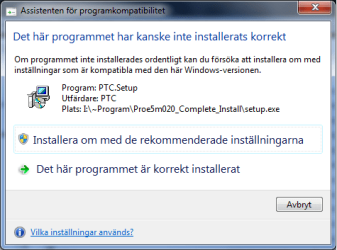
Two or three times the following window has appeared but despite what i chose nothing happens (the program hasn't been installed on this disk/windows before)
(roughly translated it says:

Assistant for program compatibility

This program may not have installed correctly

If not installed properly, try reinstalling with
settings that are compatible with this version of Windows

Reinstall with recommended settings

This program is installed correctly
)

So i tried with different capability settings, especially XP (sp3) (because the setup.exe file worked on a Windows XP (sp3) computer this morning), but still nothing.


I am grateful for any replies.

/Tommy
 

Attachments
  • skumt.png
    skumt.png
    13.4 KB · Views: 41

My Computer

OS
Windows 7 Professional x64
This may seem like a stupid question, but with some computers I've had to fix, Im going to ask it anyway...

When you double click the setup.exe there isn't an admin prompting permission in the task bar, is there? If so, click that.

otherwise I would advise installing the software as an administrator if you haven't already. If THAT doesn't work, then check your antivirus software and see if its blocking certain files from running.

let me know if none of those work, I have some other ideas.
 

My Computer

Computer Manufacturer/Model Number
Custom
OS
Windows 7 Ultimate x64
CPU
Intel Core i7 920
Motherboard
Intel DX58SO
Memory
6gb DDR3 Patriot Viper w/ XMP support
Graphics Card(s)
Nvidia Maxcore GTX295 (BFG Tech Overclocked)
Sound Card
Creative XFi
Monitor(s) Displays
21" LCD
Hard Drives
Western Digital Blue 500GB
PSU
750 Watt Corsair
Case
Antec 900
Cooling
Stock Cooling for the CPU, 8" fan on top, (3) 5" case fans
Keyboard
Logitech Wave
Mouse
Logitech MX Revolution
Internet Speed
30mbps
Other Info
Water Cooled CPU w/ Corsair H60

My Computer

Computer Manufacturer/Model Number
Insane hobo technologies. ;-)
OS
Windows 7 x64
CPU
Intel i7 2600k
Motherboard
Asrock z68 extreme 4 gen 3
Memory
G.skill Ripjaw 16gigs @ 1866
Graphics Card(s)
Nvidia gtx580 (evga)
Sound Card
Integrated HD audio + hdmi
Monitor(s) Displays
24" ASUS widescreen + 42" insignia
Screen Resolution
1080p (1920x1080)
Hard Drives
128 Samsung 830
256 Samsung 840
3 x 1tb storage drive (various)
1 western digital 1tb (eSATA)
1 Seagate 1tb (eSATA)
PSU
1 kilowatt SLI/Crossfire rated Silverstone modular
Case
NZXT Phantom + additional 220 fan
Cooling
Zalmann
Keyboard
Microsoft wireless 3000 (v2)
Mouse
MS - wireless 5000 (bluetrack)
Internet Speed
depends on if you ask me or my provider.
Other Info
The above information is provided as is, and the author assumes no responsibility for issues it may cause with your sanity or fanboyism.
Thanks for the replies. It's not a stupid question, I have a habit to screw everything up and not realy knowing what I do so a simple solution might do it, but I tried what you said and it didn't work. No prompts, tried right-click and launch as administrator and deactivated antivirus and firewalls.

I've even reinstalled Windows 7 so everything is in default but the .exe will not launch.

"Windows XP Mode" is that like when you launch "windows" on a mac?
How does that effect performance?
 

My Computer

OS
Windows 7 Professional x64
Well I don't know your system specs, or the software your trying to install, you only need to activate it when you want to, it doesn't have to be on all the time.
 

My Computer

Computer Manufacturer/Model Number
Insane hobo technologies. ;-)
OS
Windows 7 x64
CPU
Intel i7 2600k
Motherboard
Asrock z68 extreme 4 gen 3
Memory
G.skill Ripjaw 16gigs @ 1866
Graphics Card(s)
Nvidia gtx580 (evga)
Sound Card
Integrated HD audio + hdmi
Monitor(s) Displays
24" ASUS widescreen + 42" insignia
Screen Resolution
1080p (1920x1080)
Hard Drives
128 Samsung 830
256 Samsung 840
3 x 1tb storage drive (various)
1 western digital 1tb (eSATA)
1 Seagate 1tb (eSATA)
PSU
1 kilowatt SLI/Crossfire rated Silverstone modular
Case
NZXT Phantom + additional 220 fan
Cooling
Zalmann
Keyboard
Microsoft wireless 3000 (v2)
Mouse
MS - wireless 5000 (bluetrack)
Internet Speed
depends on if you ask me or my provider.
Other Info
The above information is provided as is, and the author assumes no responsibility for issues it may cause with your sanity or fanboyism.
It was a very good computer a few years back and the software is Pro Engineer (CAD).

I will try and see if it works.
 

My Computer

OS
Windows 7 Professional x64
I tried it and I was able to install the program but it doesn't work well, there is to much lag.
 

My Computer

OS
Windows 7 Professional x64
well now that it's installed you can try creating a shortcut to your normal desktop and running in windows 7 in compatibility mode.
It may run just fine.
 

My Computer

Computer Manufacturer/Model Number
Insane hobo technologies. ;-)
OS
Windows 7 x64
CPU
Intel i7 2600k
Motherboard
Asrock z68 extreme 4 gen 3
Memory
G.skill Ripjaw 16gigs @ 1866
Graphics Card(s)
Nvidia gtx580 (evga)
Sound Card
Integrated HD audio + hdmi
Monitor(s) Displays
24" ASUS widescreen + 42" insignia
Screen Resolution
1080p (1920x1080)
Hard Drives
128 Samsung 830
256 Samsung 840
3 x 1tb storage drive (various)
1 western digital 1tb (eSATA)
1 Seagate 1tb (eSATA)
PSU
1 kilowatt SLI/Crossfire rated Silverstone modular
Case
NZXT Phantom + additional 220 fan
Cooling
Zalmann
Keyboard
Microsoft wireless 3000 (v2)
Mouse
MS - wireless 5000 (bluetrack)
Internet Speed
depends on if you ask me or my provider.
Other Info
The above information is provided as is, and the author assumes no responsibility for issues it may cause with your sanity or fanboyism.
I'm not sure I understand you correct, but it still launch XP mode and then the program

what did you mean with "running in windows 7 in compatibility mode"?
 

My Computer

OS
Windows 7 Professional x64
Now that it's installed you should be able to use normal windows 7 mode just to run the application. If it gives you trouble, you can navigate to the program's main executable file , right click it, choose properties and set it for windows xp compatible mode, in the compatibility tab.
 

My Computer

Computer Manufacturer/Model Number
Insane hobo technologies. ;-)
OS
Windows 7 x64
CPU
Intel i7 2600k
Motherboard
Asrock z68 extreme 4 gen 3
Memory
G.skill Ripjaw 16gigs @ 1866
Graphics Card(s)
Nvidia gtx580 (evga)
Sound Card
Integrated HD audio + hdmi
Monitor(s) Displays
24" ASUS widescreen + 42" insignia
Screen Resolution
1080p (1920x1080)
Hard Drives
128 Samsung 830
256 Samsung 840
3 x 1tb storage drive (various)
1 western digital 1tb (eSATA)
1 Seagate 1tb (eSATA)
PSU
1 kilowatt SLI/Crossfire rated Silverstone modular
Case
NZXT Phantom + additional 220 fan
Cooling
Zalmann
Keyboard
Microsoft wireless 3000 (v2)
Mouse
MS - wireless 5000 (bluetrack)
Internet Speed
depends on if you ask me or my provider.
Other Info
The above information is provided as is, and the author assumes no responsibility for issues it may cause with your sanity or fanboyism.
It seems like a good idea, but I can't find the folder in windows 7 only in XP mode.
 

My Computer

OS
Windows 7 Professional x64

My Computer

Computer Manufacturer/Model Number
Insane hobo technologies. ;-)
OS
Windows 7 x64
CPU
Intel i7 2600k
Motherboard
Asrock z68 extreme 4 gen 3
Memory
G.skill Ripjaw 16gigs @ 1866
Graphics Card(s)
Nvidia gtx580 (evga)
Sound Card
Integrated HD audio + hdmi
Monitor(s) Displays
24" ASUS widescreen + 42" insignia
Screen Resolution
1080p (1920x1080)
Hard Drives
128 Samsung 830
256 Samsung 840
3 x 1tb storage drive (various)
1 western digital 1tb (eSATA)
1 Seagate 1tb (eSATA)
PSU
1 kilowatt SLI/Crossfire rated Silverstone modular
Case
NZXT Phantom + additional 220 fan
Cooling
Zalmann
Keyboard
Microsoft wireless 3000 (v2)
Mouse
MS - wireless 5000 (bluetrack)
Internet Speed
depends on if you ask me or my provider.
Other Info
The above information is provided as is, and the author assumes no responsibility for issues it may cause with your sanity or fanboyism.
It seems like a good idea, but I can't find the executable file in windows 7, only in XP mode.

(I missed page 2 and tought it didn't register my post :confused:)
 

My Computer

OS
Windows 7 Professional x64
I read it, but I still don't understand how you create a shortcut in windows 7 so XP mode doesn't start up.
 

My Computer

OS
Windows 7 Professional x64
I hope I'm not too much trouble. It feels like I'm very close to get rid of this problem and I'm very greatful for all the help Maguscreed
 

My Computer

OS
Windows 7 Professional x64
Did you ever fix this? I have the exact same problem.

Have you tried running Dependency Walker to see if anything is missing?
 

My Computer

Computer Manufacturer/Model Number
Acer Aspire 7738G
OS
Windows 7 Home Premium x64
CPU
Intel Core 2 Duo T6600
Memory
4GB DDR3
Graphics Card(s)
Nvidia Geforce GT 130M
Back
Top