Cannot See Any Thumbnails

foolery

New member
Local time
1:29 AM
Messages
6
Folks:

Running Windows 7 Pro and I am working with a variety of video media (some MOV, some MTS, MFX, etc.). They all play fine but I cannot see thumbnails on the vast majority of files (making it difficult to choose media - I have to PL:AY everything just to see what it is).

I have done the whole Folder Options -> deselect Show Icons Never Thumbnails, etc. and seemingly all the other forum recommendations to show me the preview image with no luck. There seems no rhyme nor reason to which files I CAN see thumbnails and which I can't (although most I can't).

Any advice? Thanks, as always.

Tom
 

My Computer

Computer type
PC/Desktop
Computer Manufacturer/Model Number
Dell
OS
Windows 7 Professional
CPU
intel quad Core i7
Memory
28 GB
Hard Drives
Crucial 500 GB SSD boot, various 4-6 TB drives in array
Antivirus
Notron
Browser
IE, Chrome
post an image of folder content. be sure to set the view to 'extra large icons'.
 

My Computer

Computer type
PC/Desktop
Computer Manufacturer/Model Number
HP (HP-P6212F)
OS
Microsoft Windows 7 Home Premium 64-bit 7601 Multiprocessor Free Service Pack 1
CPU
Pentium(R) Dual-Core CPU E5300 @ 2.60GHz
Motherboard
PEGATRON CORPORATION Benicia
Memory
6.00 GB
Graphics Card(s)
Intel(R) G33/G31 Express Chipset Family
Sound Card
Realtek High Definition Audio
Monitor(s) Displays
24'' HP WS LCD
Screen Resolution
1920 x 1080 x 32 bits (4294967296 colors) @ 60 Hz
Hard Drives
(1) ATA Hitachi HDT72106 SCSI Disk Device (2) Generic- Compact Flash USB Device (3) Generic- MS/MS-Pro USB Device (4) Generic- SD/MMC USB Device (5) Generic- SM/xD-Picture USB Device (6) Verbatim STORE N GO USB Device
Keyboard
Logitech G510s
Mouse
Logitech Trackball M570
Antivirus
Microsoft Security Essentials / Malwarebytes
Browser
IE / Firefox / Chrome
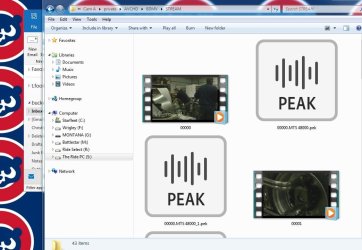
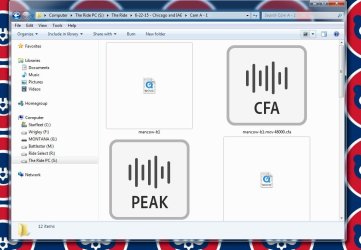
MourningStar: Thanks for the quick reply. Here are two screenshots, one where you can see the thumbnails, the other where the QT file is only and icon (as the majority of the files seem to be)... Thanks.
 

Attachments

  • fodlers1.jpg
    fodlers1.jpg
    138.8 KB · Views: 0
  • Folders 2.jpg
    Folders 2.jpg
    125.6 KB · Views: 0

My Computer

Computer type
PC/Desktop
Computer Manufacturer/Model Number
Dell
OS
Windows 7 Professional
CPU
intel quad Core i7
Memory
28 GB
Hard Drives
Crucial 500 GB SSD boot, various 4-6 TB drives in array
Antivirus
Notron
Browser
IE, Chrome
It looks as tho the thumbnails with the 'filmstrip' image are set to open with wmp (based on the small 'play' icon in the lower-right). I believe if you change the quicktime files (or any other format video files) to open with wmp as the default program it should change the thumbnail to a filmstrip view.


Additionally, if you convert all your video files to mkv you can embed ANY image of your choice to the file - this will give you total control in how you identify each file (I am not video-expert enough to know if other containers allow for this feature).


Or you can simply NAME the file to be more identifiable.
 

My Computer

Computer type
PC/Desktop
Computer Manufacturer/Model Number
HP (HP-P6212F)
OS
Microsoft Windows 7 Home Premium 64-bit 7601 Multiprocessor Free Service Pack 1
CPU
Pentium(R) Dual-Core CPU E5300 @ 2.60GHz
Motherboard
PEGATRON CORPORATION Benicia
Memory
6.00 GB
Graphics Card(s)
Intel(R) G33/G31 Express Chipset Family
Sound Card
Realtek High Definition Audio
Monitor(s) Displays
24'' HP WS LCD
Screen Resolution
1920 x 1080 x 32 bits (4294967296 colors) @ 60 Hz
Hard Drives
(1) ATA Hitachi HDT72106 SCSI Disk Device (2) Generic- Compact Flash USB Device (3) Generic- MS/MS-Pro USB Device (4) Generic- SD/MMC USB Device (5) Generic- SM/xD-Picture USB Device (6) Verbatim STORE N GO USB Device
Keyboard
Logitech G510s
Mouse
Logitech Trackball M570
Antivirus
Microsoft Security Essentials / Malwarebytes
Browser
IE / Firefox / Chrome
Back
Top