Cannot see routers homepage.

Woody

New member
Member
Local time
2:21 AM
Messages
22
Hi all,
I am hoping someone maybe able to help me with the following;
I dual boot XP and W7 (X64), I use a Linksys router which I connect to using a Linksys USB adaptor. On the XP OS I can see the routers homepage using IE, Firefox or Chrome. On the Windows & X64 boot I cannot see the homepage using any of the browsers.

I type in the router address, login and then the page is just blank, it is as though it connects but just won't show the page.

I cannot wire up the PC as I don't have a CAT5 long enough! I can use the XP boot or my laptop to connect and change settings, it would just be nice to use the Win 7 OS.

Any ideas would be most welcome.

Cheers,
Woody.
 

My Computer My Computer

Computer Manufacturer/Model Number
Dell 9150
OS
Dual boot - Windows 7 X64 & XP
CPU
Intel Pentium D 3.00GHz
Memory
4 GB
Graphics Card(s)
8800GTX
Monitor(s) Displays
HP 2475w
Screen Resolution
1920 x 1200
Internet Speed
8MB
Woody

Is this new for the win 7 machine? were you able to do it from win 7 and now you cant? or was it never able to? what does it say in the address bar on top of the browser?

Ken
 

My Computer My Computer

Computer Manufacturer/Model Number
HP Pavillion dv-7 1005 Tx
OS
Win 8 Release candidate 8400
CPU
[email protected]
Memory
4 gigs
Graphics Card(s)
Nvidia 9600M
Sound Card
HD built-in
Monitor(s) Displays
17" Wxga
Screen Resolution
1440x900
Cooling
none
Internet Speed
45Mb down 5Mb up

My Computer My Computer

Computer Manufacturer/Model Number
Dell 9150
OS
Dual boot - Windows 7 X64 & XP
CPU
Intel Pentium D 3.00GHz
Memory
4 GB
Graphics Card(s)
8800GTX
Monitor(s) Displays
HP 2475w
Screen Resolution
1920 x 1200
Internet Speed
8MB
Have you reset your router to its default settings and then try logging on its homepage?
 

My Computer My Computer

Computer type
PC/Desktop
Computer Manufacturer/Model Number
LENOVO K450 @3.0GHZ
OS
64-bit Windows 8.1 Pro
CPU
Core(TM) i5 CPU 4330 Haswell @ 3.20GHz
Motherboard
LENOVO
Memory
12.00 GB
Graphics Card(s)
Intel(R) HD Graphics
Sound Card
Intel HD integtrated
Monitor(s) Displays
HP 25' ISP Monitor
Screen Resolution
1900/1020
Hard Drives
(1) ST1000DM003-1CH162 (2) Generic STORAGE DEVICE USB Device (3) Generic STORAGE DEVICE USB Device
Internet Speed
100mb down/10mb up

My Computer My Computer

Computer Manufacturer/Model Number
HP Pavillion dv-7 1005 Tx
OS
Win 8 Release candidate 8400
CPU
[email protected]
Memory
4 gigs
Graphics Card(s)
Nvidia 9600M
Sound Card
HD built-in
Monitor(s) Displays
17" Wxga
Screen Resolution
1440x900
Cooling
none
Internet Speed
45Mb down 5Mb up
Hi Tews,
I haven't no.

My thinking is that I should be able to see it as I can through other machines - I would think that it would be a router issue if I couldn't see it through any other machine?

Woody.
 

My Computer My Computer

Computer Manufacturer/Model Number
Dell 9150
OS
Dual boot - Windows 7 X64 & XP
CPU
Intel Pentium D 3.00GHz
Memory
4 GB
Graphics Card(s)
8800GTX
Monitor(s) Displays
HP 2475w
Screen Resolution
1920 x 1200
Internet Speed
8MB
Ken,
I'm on the win 7 machine typing this. All works fine - IE, Firefox and Chrome. I can ping msn, google etc.

Woody.
 

My Computer My Computer

Computer Manufacturer/Model Number
Dell 9150
OS
Dual boot - Windows 7 X64 & XP
CPU
Intel Pentium D 3.00GHz
Memory
4 GB
Graphics Card(s)
8800GTX
Monitor(s) Displays
HP 2475w
Screen Resolution
1920 x 1200
Internet Speed
8MB
Ken,
I'm on the win 7 machine typing this. All works fine - IE, Firefox and Chrome. I can ping msn, google etc.

Woody.

OK woody

so did the router re-boot do it or you still cant see the router homepage?
 

My Computer My Computer

Computer Manufacturer/Model Number
HP Pavillion dv-7 1005 Tx
OS
Win 8 Release candidate 8400
CPU
[email protected]
Memory
4 gigs
Graphics Card(s)
Nvidia 9600M
Sound Card
HD built-in
Monitor(s) Displays
17" Wxga
Screen Resolution
1440x900
Cooling
none
Internet Speed
45Mb down 5Mb up
Sorry, my bad!
No, I've not rebooted it and I can see websites etc as usual, but I still cannot see the router homepage.

Any ideas how to copy the text from a cmd line?

Woody.
 

My Computer My Computer

Computer Manufacturer/Model Number
Dell 9150
OS
Dual boot - Windows 7 X64 & XP
CPU
Intel Pentium D 3.00GHz
Memory
4 GB
Graphics Card(s)
8800GTX
Monitor(s) Displays
HP 2475w
Screen Resolution
1920 x 1200
Internet Speed
8MB
Sorry, my bad!
No, I've not rebooted it and I can see websites etc as usual, but I still cannot see the router homepage.

Any ideas how to copy the text from a cmd line?

Woody.


Sure use the snipping tool built in to win 7. typ snipping tool in search

good luck

Ken
 

My Computer My Computer

Computer Manufacturer/Model Number
HP Pavillion dv-7 1005 Tx
OS
Win 8 Release candidate 8400
CPU
[email protected]
Memory
4 gigs
Graphics Card(s)
Nvidia 9600M
Sound Card
HD built-in
Monitor(s) Displays
17" Wxga
Screen Resolution
1440x900
Cooling
none
Internet Speed
45Mb down 5Mb up
Out of interest, if I RMC and View Page Source I can see the underlying code;
<!DOCTYPE HTML PUBLIC "-//W3C//DTD HTML 4.0 Transitional//EN">
<html>
<head>
<meta http-equiv="Content-Type" content="text/html; charset=windows-1252">

<meta name="description" content="LINKSYS WAG160N Wireless-N ADSL2+ Gateway">
<META http-equiv="Pragma" CONTENT="no-cache">
<META HTTP-EQUIV="Cache-Control" CONTENT="no-cache">


<script language="javascript" type="text/javascript" src="LANG_EN.js"></script>
<script language="javascript" type="text/javascript" src="others_en.js"></script>
<script language="javascript" type="text/javascript" src="func.js"></script>

<script language="javascript" type="text/javascript" src="linux.js"></script>

<script language="javascript" type="text/javascript">

strHtml='<title>'+vbasic+'</title>';
dw(strHtml);
strHtml='<LINK REL="stylesheet" TYPE="text/css" HREF="'+vcss_type+'">';
dw(strHtml);
<!--
// var connMethods = ["bridgedonly","1483bridged","routed","ipoa","pppoe","pppoa"];
// only used if options have no values

Obviously it goes on!

Woody.
 

My Computer My Computer

Computer Manufacturer/Model Number
Dell 9150
OS
Dual boot - Windows 7 X64 & XP
CPU
Intel Pentium D 3.00GHz
Memory
4 GB
Graphics Card(s)
8800GTX
Monitor(s) Displays
HP 2475w
Screen Resolution
1920 x 1200
Internet Speed
8MB
Why continue asking if you wont try what is suggested?? Good Luck.. 10-7
 

My Computer My Computer

Computer type
PC/Desktop
Computer Manufacturer/Model Number
LENOVO K450 @3.0GHZ
OS
64-bit Windows 8.1 Pro
CPU
Core(TM) i5 CPU 4330 Haswell @ 3.20GHz
Motherboard
LENOVO
Memory
12.00 GB
Graphics Card(s)
Intel(R) HD Graphics
Sound Card
Intel HD integtrated
Monitor(s) Displays
HP 25' ISP Monitor
Screen Resolution
1900/1020
Hard Drives
(1) ST1000DM003-1CH162 (2) Generic STORAGE DEVICE USB Device (3) Generic STORAGE DEVICE USB Device
Internet Speed
100mb down/10mb up
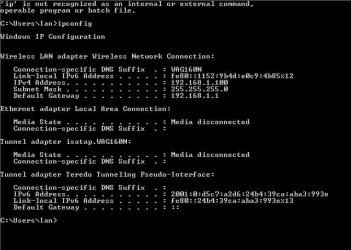
Screen capture attached.

Woody.
 

Attachments

  • ipconfig.JPG
    ipconfig.JPG
    42.1 KB · Views: 27

My Computer My Computer

Computer Manufacturer/Model Number
Dell 9150
OS
Dual boot - Windows 7 X64 & XP
CPU
Intel Pentium D 3.00GHz
Memory
4 GB
Graphics Card(s)
8800GTX
Monitor(s) Displays
HP 2475w
Screen Resolution
1920 x 1200
Internet Speed
8MB
Woody

Great Idea. what browser did you see that in? DO you have javascript disabled with an addon?
 

My Computer My Computer

Computer Manufacturer/Model Number
HP Pavillion dv-7 1005 Tx
OS
Win 8 Release candidate 8400
CPU
[email protected]
Memory
4 gigs
Graphics Card(s)
Nvidia 9600M
Sound Card
HD built-in
Monitor(s) Displays
17" Wxga
Screen Resolution
1440x900
Cooling
none
Internet Speed
45Mb down 5Mb up
Tews,
I have a baby on my lap asleep at the moment so cannot move to the other room to cycle the router! I will cycle it ASAP.

Woody.
 

My Computer My Computer

Computer Manufacturer/Model Number
Dell 9150
OS
Dual boot - Windows 7 X64 & XP
CPU
Intel Pentium D 3.00GHz
Memory
4 GB
Graphics Card(s)
8800GTX
Monitor(s) Displays
HP 2475w
Screen Resolution
1920 x 1200
Internet Speed
8MB
That was within firefox.
JavaScript is enabled and tested.

Woody.
 

My Computer My Computer

Computer Manufacturer/Model Number
Dell 9150
OS
Dual boot - Windows 7 X64 & XP
CPU
Intel Pentium D 3.00GHz
Memory
4 GB
Graphics Card(s)
8800GTX
Monitor(s) Displays
HP 2475w
Screen Resolution
1920 x 1200
Internet Speed
8MB
Woody

private browsing session? firewall? av? I dont know. It almost feels like you dont have permissions to even view that router page. something on the router like mac addressing. Im clueless.
 

My Computer My Computer

Computer Manufacturer/Model Number
HP Pavillion dv-7 1005 Tx
OS
Win 8 Release candidate 8400
CPU
[email protected]
Memory
4 gigs
Graphics Card(s)
Nvidia 9600M
Sound Card
HD built-in
Monitor(s) Displays
17" Wxga
Screen Resolution
1440x900
Cooling
none
Internet Speed
45Mb down 5Mb up
Right, managed to cycle the router - the same problem exists.
 

My Computer My Computer

Computer Manufacturer/Model Number
Dell 9150
OS
Dual boot - Windows 7 X64 & XP
CPU
Intel Pentium D 3.00GHz
Memory
4 GB
Graphics Card(s)
8800GTX
Monitor(s) Displays
HP 2475w
Screen Resolution
1920 x 1200
Internet Speed
8MB
Woody

Later you might want to try 'reseting' the router (you lose user and pword remember) and the PC at the same time.

Im sure its something stupid, and usually that easy for me, but this has me scratching my head


EDIT: woody a sharp eyed user (tews) pointed out I didnt tell you to hold in the reset button when you try that process later
 

My Computer My Computer

Computer Manufacturer/Model Number
HP Pavillion dv-7 1005 Tx
OS
Win 8 Release candidate 8400
CPU
[email protected]
Memory
4 gigs
Graphics Card(s)
Nvidia 9600M
Sound Card
HD built-in
Monitor(s) Displays
17" Wxga
Screen Resolution
1440x900
Cooling
none
Internet Speed
45Mb down 5Mb up
Ken,
Same here!! :-)

I just can't figure out at what point it's being 'blocked'. I say blocked, but it's just weird that I can get to the page, I just cannot view what is on the page.

I don't like giving up on these things, it's rather annoying me now!

MAC filtering would stop a connection full stop, rather than limit a certain page?
I just disabled the Windows firewall and I still couldn't see the page.
AV is Kaspersky - same on XP machine.

Woody.
 

My Computer My Computer

Computer Manufacturer/Model Number
Dell 9150
OS
Dual boot - Windows 7 X64 & XP
CPU
Intel Pentium D 3.00GHz
Memory
4 GB
Graphics Card(s)
8800GTX
Monitor(s) Displays
HP 2475w
Screen Resolution
1920 x 1200
Internet Speed
8MB
Back
Top