Cannot see stereo mix, also getting error message

TechSeven

member
Member
VIP
Local time
11:52 PM
Messages
407
I tried to record audio but no audio was being detected even though i hear audio when not trying to record.

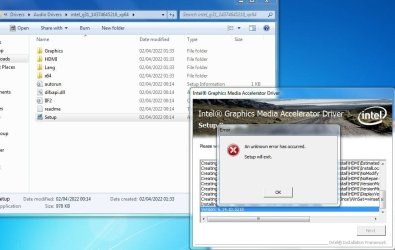
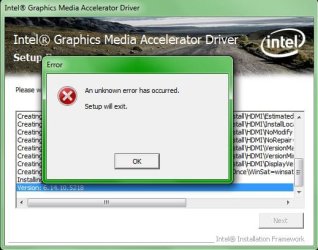
I tried installing audio drivers but i get an error message on one of them.

I tried uninstalling sound drivers and restarting but no luck still.

Im trying to get stereo mix to work but i cannot see it.

error setting intel_g31_14374645218_xp64.JPG
 

My Computer

Computer type
PC/Desktop
Computer Manufacturer/Model Number
Custom Build (First built from scratch in 2010 by someone else.. then I rebuilt it in 2015).
OS
Windows 7 Home Premium 64bit
CPU
i7 4790k processor
Motherboard
Z97 Sabertooth Mark 1
Memory
Patriot 16gb
Graphics Card(s)
EVGA GeForce GTX 980 Ti FTW
Monitor(s) Displays
19" Monitor
Screen Resolution
1920 x 1080
Hard Drives
Samsung 850 Evo 120gb ssd
PSU
Corsair Cx600
Case
Haf 922
Cooling
Hydro Series H60 High Performance 120 mm
Keyboard
Microsoft
Mouse
Logitech
Browser
Firefox 37.0.4
Other Info
*Computer Manufacturer/Model Number: HP 15-d002tx Notebook* /

OS: Windows 7 Home Premium 64-bit / CPU: Intel Core i3-3110M / Memory: DDR3 4GB / Graphics Card: Intel HD Graphics 4000, GeForce 820M / Keyboard: Microsoft / Browser: Firefox 37.0

My Computer

Computer type
PC/Desktop
Computer Manufacturer/Model Number
medionl/Aspire 6930G/acer x55a
OS
W7 home premium 32bit/W7HP 64bit/w10 tp insider ring
CPU
E5300 dual core
Motherboard
medion MS7366
Memory
3gb
Graphics Card(s)
Nvidia Geforce 7100 Nforce 630i
Monitor(s) Displays
avixc
Internet Speed
n (isp resticted to 72)
Antivirus
mse/pands
Browser
palemoon
Other Info
Belkin Fd7050 n USB using Railink RT2870 drivers, more upto date
What do you mean logs? How do i attach the logs?
 

My Computer

Computer type
PC/Desktop
Computer Manufacturer/Model Number
Custom Build (First built from scratch in 2010 by someone else.. then I rebuilt it in 2015).
OS
Windows 7 Home Premium 64bit
CPU
i7 4790k processor
Motherboard
Z97 Sabertooth Mark 1
Memory
Patriot 16gb
Graphics Card(s)
EVGA GeForce GTX 980 Ti FTW
Monitor(s) Displays
19" Monitor
Screen Resolution
1920 x 1080
Hard Drives
Samsung 850 Evo 120gb ssd
PSU
Corsair Cx600
Case
Haf 922
Cooling
Hydro Series H60 High Performance 120 mm
Keyboard
Microsoft
Mouse
Logitech
Browser
Firefox 37.0.4
Other Info
*Computer Manufacturer/Model Number: HP 15-d002tx Notebook* /

OS: Windows 7 Home Premium 64-bit / CPU: Intel Core i3-3110M / Memory: DDR3 4GB / Graphics Card: Intel HD Graphics 4000, GeForce 820M / Keyboard: Microsoft / Browser: Firefox 37.0

My Computer

Computer type
PC/Desktop
Computer Manufacturer/Model Number
medionl/Aspire 6930G/acer x55a
OS
W7 home premium 32bit/W7HP 64bit/w10 tp insider ring
CPU
E5300 dual core
Motherboard
medion MS7366
Memory
3gb
Graphics Card(s)
Nvidia Geforce 7100 Nforce 630i
Monitor(s) Displays
avixc
Internet Speed
n (isp resticted to 72)
Antivirus
mse/pands
Browser
palemoon
Other Info
Belkin Fd7050 n USB using Railink RT2870 drivers, more upto date
Code:
Diagnostic Report (1.9.0027.0):
-----------------------------------------
Windows Validation Data-->

Validation Code: 0
Cached Online Validation Code: N/A, hr = 0xc004f012
Windows Product Key: *****-*****-FW9HH-4CG29-D9XQP
Windows Product Key Hash: 25AFI91MQRXDfRY0gfyUyB/KTYg=
Windows Product ID: 00359-OEM-8703046-81497
Windows Product ID Type: 3
Windows License Type: OEM System Builder
Windows OS version: 6.1.7601.2.00010300.1.0.003
ID: {4B732BED-3C0A-480B-B7CF-6F3F252F85D4}(1)
Is Admin: Yes
TestCab: 0x0
LegitcheckControl ActiveX: N/A, hr = 0x80070002
Signed By: N/A, hr = 0x80070002
Product Name: Windows 7 Home Premium
Architecture: 0x00000009
Build lab: 7601.win7sp1_rtm.101119-1850
TTS Error: 
Validation Diagnostic: 
Resolution Status: N/A

Vista WgaER Data-->
ThreatID(s): N/A, hr = 0x80070002
Version: N/A, hr = 0x80070002

Windows XP Notifications Data-->
Cached Result: N/A, hr = 0x80070002
File Exists: No
Version: N/A, hr = 0x80070002
WgaTray.exe Signed By: N/A, hr = 0x80070002
WgaLogon.dll Signed By: N/A, hr = 0x80070002

OGA Notifications Data-->
Cached Result: N/A, hr = 0x80070002
Version: N/A, hr = 0x80070002
OGAExec.exe Signed By: N/A, hr = 0x80070002
OGAAddin.dll Signed By: N/A, hr = 0x80070002

OGA Data-->
Office Status: 109 N/A
OGA Version: N/A, 0x80070002
Signed By: N/A, hr = 0x80070002
Office Diagnostics: 025D1FF3-364-80041010_025D1FF3-229-80041010_025D1FF3-230-1_025D1FF3-517-80040154_025D1FF3-237-80040154_025D1FF3-238-2_025D1FF3-244-80070002_025D1FF3-258-3

Browser Data-->
Proxy settings: N/A
User Agent: Mozilla/4.0 (compatible; MSIE 8.0; Win32)
Default Browser: C:\Program Files\Mozilla Firefox\firefox.exe
Download signed ActiveX controls: Prompt
Download unsigned ActiveX controls: Disabled
Run ActiveX controls and plug-ins: Allowed
Initialize and script ActiveX controls not marked as safe: Disabled
Allow scripting of Internet Explorer Webbrowser control: Disabled
Active scripting: Allowed
Script ActiveX controls marked as safe for scripting: Allowed

File Scan Data-->
File Mismatch: C:\Windows\system32\wat\watadminsvc.exe[Hr = 0x80070003]
File Mismatch: C:\Windows\system32\wat\npwatweb.dll[Hr = 0x80070003]
File Mismatch: C:\Windows\system32\wat\watux.exe[Hr = 0x80070003]
File Mismatch: C:\Windows\system32\wat\watweb.dll[Hr = 0x80070003]

Other data-->
Office Details: <GenuineResults><MachineData><UGUID>{4B732BED-3C0A-480B-B7CF-6F3F252F85D4}</UGUID><Version>1.9.0027.0</Version><OS>6.1.7601.2.00010300.1.0.003</OS><Architecture>x64</Architecture><PKey>*****-*****-*****-*****-D9XQP</PKey><PID>00359-OEM-8703046-81497</PID><PIDType>3</PIDType><SID>S-1-5-21-2249451826-1201944878-3833678288</SID><SYSTEM><Manufacturer>Hewlett-Packard</Manufacturer><Model>Compaq Presario CQ71 Notebook PC</Model></SYSTEM><BIOS><Manufacturer>Hewlett-Packard</Manufacturer><Version>F.11</Version><SMBIOSVersion major="2" minor="4"/><Date>20090821000000.000000+000</Date></BIOS><HWID>6FA13207018400F8</HWID><UserLCID>0809</UserLCID><SystemLCID>0409</SystemLCID><TimeZone>GMT Standard Time(GMT+00:00)</TimeZone><iJoin>0</iJoin><SBID><stat>3</stat><msppid></msppid><name></name><model></model></SBID><OEM><OEMID>HPQOEM</OEMID><OEMTableID>SLIC-MPC</OEMTableID></OEM><GANotification/></MachineData><Software><Office><Result>109</Result><Products/><Applications/></Office></Software></GenuineResults>  

Spsys.log Content: 0x80070002

Licensing Data-->
Software licensing service version: 6.1.7601.17514

Name: Windows(R) 7, HomePremium edition
Description: Windows Operating System - Windows(R) 7, OEM_COA_NSLP channel
Activation ID: 586bc076-c93d-429a-afe5-a69fbc644e88
Application ID: 55c92734-d682-4d71-983e-d6ec3f16059f
Extended PID: 00359-00174-030-481497-02-2057-7601.0000-0922022
Installation ID: 007412760582667030071220931505133153446442948015082876
Processor Certificate URL: http://go.microsoft.com/fwlink/?LinkID=88338
Machine Certificate URL: http://go.microsoft.com/fwlink/?LinkID=88339
Use License URL: http://go.microsoft.com/fwlink/?LinkID=88341
Product Key Certificate URL: http://go.microsoft.com/fwlink/?LinkID=88340
Partial Product Key: D9XQP
License Status: Licensed
Remaining Windows rearm count: 3
Trusted time: 04/04/2022 20:37:49

Windows Activation Technologies-->
HrOffline: 0x00000000
HrOnline: N/A
HealthStatus: 0x0000000000000000
Event Time Stamp: N/A
ActiveX: Not Registered - 0x80040154
Admin Service: Not Registered - 0x80040154
HealthStatus Bitmask Output:


HWID Data-->
HWID Hash Current: MAAAAAEAAQABAAIAAAACAAAAAgABAAEA6GEWE04oEjfuLuLH4At+H8xYgv2SN0bK

OEM Activation 1.0 Data-->
N/A

OEM Activation 2.0 Data-->
BIOS valid for OA 2.0: yes
Windows marker version: 0x20001
OEMID and OEMTableID Consistent: yes
BIOS Information: 
  ACPI Table Name	OEMID Value	OEMTableID Value
  APIC			HPQOEM		SLIC-MPC
  FACP			HPQOEM		SLIC-MPC
  HPET			HPQOEM		SLIC-MPC
  BOOT			HPQOEM		SLIC-MPC
  MCFG			HPQOEM		SLIC-MPC
  ASF!			HPQOEM		SLIC-MPC
  SLIC			HPQOEM		SLIC-MPC
  SSDT			PmRef		CpuPm

- - - Updated - - -

View attachment COMPAQ-PC-04_04_2022_204129_55.zip
 

My Computer

Computer type
PC/Desktop
Computer Manufacturer/Model Number
Custom Build (First built from scratch in 2010 by someone else.. then I rebuilt it in 2015).
OS
Windows 7 Home Premium 64bit
CPU
i7 4790k processor
Motherboard
Z97 Sabertooth Mark 1
Memory
Patriot 16gb
Graphics Card(s)
EVGA GeForce GTX 980 Ti FTW
Monitor(s) Displays
19" Monitor
Screen Resolution
1920 x 1080
Hard Drives
Samsung 850 Evo 120gb ssd
PSU
Corsair Cx600
Case
Haf 922
Cooling
Hydro Series H60 High Performance 120 mm
Keyboard
Microsoft
Mouse
Logitech
Browser
Firefox 37.0.4
Other Info
*Computer Manufacturer/Model Number: HP 15-d002tx Notebook* /

OS: Windows 7 Home Premium 64-bit / CPU: Intel Core i3-3110M / Memory: DDR3 4GB / Graphics Card: Intel HD Graphics 4000, GeForce 820M / Keyboard: Microsoft / Browser: Firefox 37.0
Hi

part 1,, your system is not fully activated, licenced but not Registered
please run from a command mode
slui4


then reboot 2x and then update

There is something strange here
The licence you currently have in use is a System Builder key option, but from what i can see and find,
you DID NOT have to BUY that key the HP default should have kicked in, or if not the COA sticker key would have sufficed

will be back after looking at the other report

Please report if updating is successfull
 

My Computer

Computer type
PC/Desktop
Computer Manufacturer/Model Number
medionl/Aspire 6930G/acer x55a
OS
W7 home premium 32bit/W7HP 64bit/w10 tp insider ring
CPU
E5300 dual core
Motherboard
medion MS7366
Memory
3gb
Graphics Card(s)
Nvidia Geforce 7100 Nforce 630i
Monitor(s) Displays
avixc
Internet Speed
n (isp resticted to 72)
Antivirus
mse/pands
Browser
palemoon
Other Info
Belkin Fd7050 n USB using Railink RT2870 drivers, more upto date
"please run from a command mode slui4" - Sorry how do i run from command mode? Do i type in cmd.exe in start?


Also i noticed not long ago when i tried to install intel_31 audio driver, it said i was installing an older version than the current one. If i still tried to install i would get error.

w9.JPGw11.JPG

My other question was if i installed windows 10, would i be able to get stereo mix? As windows 10 updates are ongoing unlike windows 7.
 

My Computer

Computer type
PC/Desktop
Computer Manufacturer/Model Number
Custom Build (First built from scratch in 2010 by someone else.. then I rebuilt it in 2015).
OS
Windows 7 Home Premium 64bit
CPU
i7 4790k processor
Motherboard
Z97 Sabertooth Mark 1
Memory
Patriot 16gb
Graphics Card(s)
EVGA GeForce GTX 980 Ti FTW
Monitor(s) Displays
19" Monitor
Screen Resolution
1920 x 1080
Hard Drives
Samsung 850 Evo 120gb ssd
PSU
Corsair Cx600
Case
Haf 922
Cooling
Hydro Series H60 High Performance 120 mm
Keyboard
Microsoft
Mouse
Logitech
Browser
Firefox 37.0.4
Other Info
*Computer Manufacturer/Model Number: HP 15-d002tx Notebook* /

OS: Windows 7 Home Premium 64-bit / CPU: Intel Core i3-3110M / Memory: DDR3 4GB / Graphics Card: Intel HD Graphics 4000, GeForce 820M / Keyboard: Microsoft / Browser: Firefox 37.0
hi

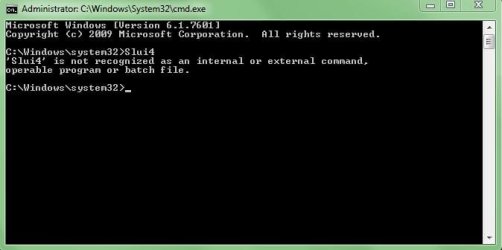
hit the orb, select Windows Tools scroll to Command prompt RIGHT click run as administator then type
Slui4 (enter)

As for windows 10 it should instal no problem im running a Vista machine with out problems

saw you on the W10 site when i was pulling this link
Upgrade to Windows 10 from Windows 7 for Free | Tutorials
 

My Computer

Computer type
PC/Desktop
Computer Manufacturer/Model Number
medionl/Aspire 6930G/acer x55a
OS
W7 home premium 32bit/W7HP 64bit/w10 tp insider ring
CPU
E5300 dual core
Motherboard
medion MS7366
Memory
3gb
Graphics Card(s)
Nvidia Geforce 7100 Nforce 630i
Monitor(s) Displays
avixc
Internet Speed
n (isp resticted to 72)
Antivirus
mse/pands
Browser
palemoon
Other Info
Belkin Fd7050 n USB using Railink RT2870 drivers, more upto date
Windows finally seems updated with no more important updates left.
w14.JPG


hit the orb, select Windows Tools scroll to Command
I got the following below
w13.JPG


Trying to attempt for windows 10.
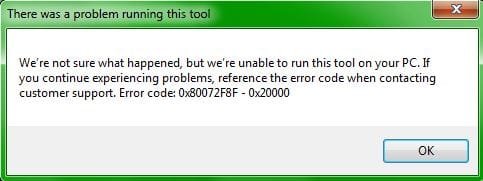
When i installed the media creation tool, i got the following
w12.JPG


I also followed instructions by hitting Windows + X key on keyboard.
But for #3, i could not see command.

Method 1:

1. Go to C:\Windows\SoftwareDistribution\Download and delete all files in that folder.
2. Press Windows + X key on the keyboard.

3. Go to Command Prompt as admin.

4. Type this command "wuauclt.exe /updatenow"

5. Press Enter
 

My Computer

Computer type
PC/Desktop
Computer Manufacturer/Model Number
Custom Build (First built from scratch in 2010 by someone else.. then I rebuilt it in 2015).
OS
Windows 7 Home Premium 64bit
CPU
i7 4790k processor
Motherboard
Z97 Sabertooth Mark 1
Memory
Patriot 16gb
Graphics Card(s)
EVGA GeForce GTX 980 Ti FTW
Monitor(s) Displays
19" Monitor
Screen Resolution
1920 x 1080
Hard Drives
Samsung 850 Evo 120gb ssd
PSU
Corsair Cx600
Case
Haf 922
Cooling
Hydro Series H60 High Performance 120 mm
Keyboard
Microsoft
Mouse
Logitech
Browser
Firefox 37.0.4
Other Info
*Computer Manufacturer/Model Number: HP 15-d002tx Notebook* /

OS: Windows 7 Home Premium 64-bit / CPU: Intel Core i3-3110M / Memory: DDR3 4GB / Graphics Card: Intel HD Graphics 4000, GeForce 820M / Keyboard: Microsoft / Browser: Firefox 37.0
Back
Top