Solved Cannot send link from IE9 web page

keeg

New member
Local time
3:44 PM
Messages
8
I have IE9, Windows7 x64, use Windows Mail as default Email, from Vista x64

If I am at a website page & want to send page or link by email, I would normally (with Vista) simply hit the dropdown of 'Page' located at upper right of my browser. Both 'Send page by e-mail...' & 'Send link by e-mail...' are greyed out & obviuosly won't work. This morning both WERE NOT greyed out but still didn't work. I'm 4 days new to Windows 7, so I got 'help' from a Dell Tech, thus the two options are now greyed out. I have gone to all sections & have successfully made Windows Mail (not windows Live) my default & even removed Windows Live Mail completely but I still can't do it. The 'expert' tried for 2 hours without luck & said they would get back to me within 24-48 hrs, so it seems as if this is a tough fix/challenge for you guys. Can anyone help me?
 

My Computer

OS
Home Premium x64
Hello keeg,
I gather IE9 was preinstalled on your new computer.

I'm curious....As an alternative measure see if this works...
Go to File {top left hand corner}>click send > choose Page or Link by email.
 

My Computer

Computer Manufacturer/Model Number
LAPTOP. HP Pavilion dv7-4010TX .
OS
Win 7 Ultimate 64-bit. SP1.
CPU
Intel i7 -720QM.[1.6GHz Turbo Boost 2.8GHz. 6MB Cache.]
Memory
8 DDR 3 RAM. 1066MHZ
Graphics Card(s)
ATI 1024 MB. DDR3. Radeon HD5650
Monitor(s) Displays
17.3" High Definition Brightview LCD. LED Backlit.
Screen Resolution
1600 x 900.
Hard Drives
640GB
Case
Laptop / notebook.
Mouse
Logitech Anywhere mouse. MX.
Internet Speed
ADSL [ but too slow ]
I'm not very familiar with IE 9 only use it occasionally but it only took me 20 seconds to find that by right clicking with the mouse on the Page or link there is an email with Windows Live option in the context menu.
 

My Computer

Computer type
PC/Desktop
Computer Manufacturer/Model Number
self build
OS
Windows 7 Ultimate 64 bit
CPU
Intel Core i7 4770K overclocked to 4.7GHz Quad Core Haswell
Motherboard
Asus Z87 Pro (Socket 1150) ATX Motherboard
Memory
16GB Team Group Vulcan Gold 2133MHz
Graphics Card(s)
ATI Radeon HD 7880 Series Display adapter
Monitor(s) Displays
NEC LCD2690WUXi2
Screen Resolution
26" 1920 x 1200
Hard Drives
Samsung 500GB SSD 840 EVO SATA 6Gb/s
Samsung 250GB SSD 840 EVO SATA 6Gb/s
PSU
Corsair AX760 Platinum
Case
Cooler Master HAF X Gaming Tower
Cooling
XSPC RayStorm 750 RS360 Water cooling
Mouse
Razer Death Adder left handed
Internet Speed
126Mb download 11.5Mb up
Antivirus
Avast free
Browser
Opera
Other Info
Main Browser is Opera
Favorite software Adobe Lightroom & Photoshop
best plugins Nik software
Firewall : Private firewall 7
Click Start then Default Programs and make sure you've selected the right defaults for whichever e-mail program you're using and also IE9.

Next, right-click the Title bar and select the Command bar.

Click the Page drop-down menu on the Command bar, and then click Send link by e-mail.
 

My Computer

Computer Manufacturer/Model Number
HP Pavilion Elite 495UK
OS
Windows 7 Ultimate SP1 64-Bit
CPU
Intel Core i7 870 @ 2.93GHz
Motherboard
MSI 2A9C (CPU1)
Memory
8Gb Dual-Channel DDR3 @ 664MHz
Graphics Card(s)
nVidia GeForce GTX 460 1024MB dedicated RAM
Sound Card
Realtek HD Audio
Monitor(s) Displays
HP2310i
Screen Resolution
1920 x 1080
Hard Drives
1x1954GB Hitachi HDS22020ALA 330 (RAID), 1x1954GB Hitachi External for backup and storage
PSU
460W
Case
HP Elite
Cooling
Air cooled
Keyboard
Logitech K750 solar-powered keyboard
Mouse
Logitech Wireless M180 mouse
Internet Speed
2Mb
Other Info
Pure Avanti Flow Internet Radio with iPod Dock, 64Gb iPod, HP USB Speakers, Sony MDR-V500 Headphones, Sony Vaio F-Series Laptop

JMH


Win 7 Ultimate 64-bit.
6,189 posts
The Great Southland.


Hello keeg,
I gather IE9 was preinstalled on your new computer.

I'm curious....As an alternative measure see if this works...
Go to File {top left hand corner}>click send > choose Page or Link by email.


Ty JMH, yes, it was pre-installed w/IE9. It is still'greyed out following your instructions as well. :( Also, if I go up top the envelope at the top right section to check email that way, I get a message that reads:

Could not perform this operation because the default mail client is not properly installed. Just what I wanted to see...
 

My Computer

OS
Home Premium x64

stve
Senior Member
guru.png


reputation_green.gif
reputation_greenh.gif


Join Date: Mar 2010

Windows 7 64 bit
480 posts


user_online.gif


I'm not very familiar with IE 9 only use it occasionally but it only took me 20 seconds to find that by right clicking with the mouse on the Page or link there is an email with Windows Live option in the context menu.

My System Specs Ty for your reply...I am using Windows Mail, not Windows Live Mail.
 

My Computer

OS
Home Premium x64
Click Start then Default Programs and make sure you've selected the right defaults for whichever e-mail program you're using and also IE9.

Next, right-click the Title bar and select the Command bar.

Click the Page drop-down menu on the Command bar, and then click Send link by e-mail.


Ty for your attention...Windows mail isn't even listed in the list under Default Programs. Also, you lost me big time, I don't know what the 'Title bar' is nor the Command bar. Obviously, I never got to any drop down stuff...but ty for trying!
wink.gif
 

My Computer

OS
Home Premium x64
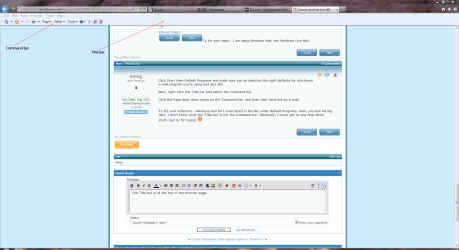
The Title bar is at the top of the browser page.

IE9.PNG

Just click the Page drop-down menu for further options.

Anyway, you'd be better off using Live Mail, which should show in your default program list after you've installed it.
 

My Computer

Computer Manufacturer/Model Number
HP Pavilion Elite 495UK
OS
Windows 7 Ultimate SP1 64-Bit
CPU
Intel Core i7 870 @ 2.93GHz
Motherboard
MSI 2A9C (CPU1)
Memory
8Gb Dual-Channel DDR3 @ 664MHz
Graphics Card(s)
nVidia GeForce GTX 460 1024MB dedicated RAM
Sound Card
Realtek HD Audio
Monitor(s) Displays
HP2310i
Screen Resolution
1920 x 1080
Hard Drives
1x1954GB Hitachi HDS22020ALA 330 (RAID), 1x1954GB Hitachi External for backup and storage
PSU
460W
Case
HP Elite
Cooling
Air cooled
Keyboard
Logitech K750 solar-powered keyboard
Mouse
Logitech Wireless M180 mouse
Internet Speed
2Mb
Other Info
Pure Avanti Flow Internet Radio with iPod Dock, 64Gb iPod, HP USB Speakers, Sony MDR-V500 Headphones, Sony Vaio F-Series Laptop
Ty but I hate Windows Live & Love Windows Mail. Of course I can use Live but this was not my issue.
 

My Computer

OS
Home Premium x64
Ty but I hate Windows Live & Love Windows Mail. Of course I can use Live but this was not my issue.

It is partly, because as you said, Windows Mail doesn't show in your list of Default Programs, whereas Live Mail does if you have installed it.

Anyway, I don't want to get involved in an argument, so I'm hoping someone else will be along with a solution for you. ;)
 

My Computer

Computer Manufacturer/Model Number
HP Pavilion Elite 495UK
OS
Windows 7 Ultimate SP1 64-Bit
CPU
Intel Core i7 870 @ 2.93GHz
Motherboard
MSI 2A9C (CPU1)
Memory
8Gb Dual-Channel DDR3 @ 664MHz
Graphics Card(s)
nVidia GeForce GTX 460 1024MB dedicated RAM
Sound Card
Realtek HD Audio
Monitor(s) Displays
HP2310i
Screen Resolution
1920 x 1080
Hard Drives
1x1954GB Hitachi HDS22020ALA 330 (RAID), 1x1954GB Hitachi External for backup and storage
PSU
460W
Case
HP Elite
Cooling
Air cooled
Keyboard
Logitech K750 solar-powered keyboard
Mouse
Logitech Wireless M180 mouse
Internet Speed
2Mb
Other Info
Pure Avanti Flow Internet Radio with iPod Dock, 64Gb iPod, HP USB Speakers, Sony MDR-V500 Headphones, Sony Vaio F-Series Laptop

My Computer

Computer type
PC/Desktop
Computer Manufacturer/Model Number
self build
OS
Windows 7 Ultimate 64 bit
CPU
Intel Core i7 4770K overclocked to 4.7GHz Quad Core Haswell
Motherboard
Asus Z87 Pro (Socket 1150) ATX Motherboard
Memory
16GB Team Group Vulcan Gold 2133MHz
Graphics Card(s)
ATI Radeon HD 7880 Series Display adapter
Monitor(s) Displays
NEC LCD2690WUXi2
Screen Resolution
26" 1920 x 1200
Hard Drives
Samsung 500GB SSD 840 EVO SATA 6Gb/s
Samsung 250GB SSD 840 EVO SATA 6Gb/s
PSU
Corsair AX760 Platinum
Case
Cooler Master HAF X Gaming Tower
Cooling
XSPC RayStorm 750 RS360 Water cooling
Mouse
Razer Death Adder left handed
Internet Speed
126Mb download 11.5Mb up
Antivirus
Avast free
Browser
Opera
Other Info
Main Browser is Opera
Favorite software Adobe Lightroom & Photoshop
best plugins Nik software
Firewall : Private firewall 7
stve
Try this guide.
http://www.sevenforums.com/tutorials...il.html?filter[3]=Browsers%20and%20Mail
if you have problems you might have to live with them or use another email program plenty of good ones available.

TY Steve. I want to add that I used this link (http://www.sevenforums.com/tutorials/5481-windows-mail.html) to install windows mail on my laptop. I'm hoping this will give someone some clues as to what's left for me to do for my PC to recognize Windows Mail (not Windows Live Mail) as my default e-mail handler. Also, everything else works, it's just my issue of the greyed out areas to send page or link by email, that I'm trying to correct. And I have completely removed Windows Live from my PC. Thank you all for trying.
smile.gif
 

My Computer

OS
Home Premium x64
I am sorry that I am not posting correctly either. I want to be able to have the post I'm addressing to appear above & then my reply below it in the same box. I am failing misersbly...
 

My Computer

OS
Home Premium x64
If you want to quote a reply in you post, just go to the appropiate comment and click the Quote button.

A new comment box should appear for your reply along with the quote you wanted to refer to.
 

My Computer

Computer Manufacturer/Model Number
HP Pavilion Elite 495UK
OS
Windows 7 Ultimate SP1 64-Bit
CPU
Intel Core i7 870 @ 2.93GHz
Motherboard
MSI 2A9C (CPU1)
Memory
8Gb Dual-Channel DDR3 @ 664MHz
Graphics Card(s)
nVidia GeForce GTX 460 1024MB dedicated RAM
Sound Card
Realtek HD Audio
Monitor(s) Displays
HP2310i
Screen Resolution
1920 x 1080
Hard Drives
1x1954GB Hitachi HDS22020ALA 330 (RAID), 1x1954GB Hitachi External for backup and storage
PSU
460W
Case
HP Elite
Cooling
Air cooled
Keyboard
Logitech K750 solar-powered keyboard
Mouse
Logitech Wireless M180 mouse
Internet Speed
2Mb
Other Info
Pure Avanti Flow Internet Radio with iPod Dock, 64Gb iPod, HP USB Speakers, Sony MDR-V500 Headphones, Sony Vaio F-Series Laptop
If you want to quote a reply in you post, just go to the appropiate comment and click the Quote button.

A new comment box should appear for your reply along with the quote you wanted to refer to.
I thank you all for trying to help. It seems that my situation was not possible to resolve because I would need to use/buy windows outlook to enable the 'grayed out' areas I tried to use.

Keeg
 

My Computer

OS
Home Premium x64
Ie9 &w7

Hi,
Go to Tools and select Internet Options.
Click Programs and select Set Programs
Select Set Program access and computer defaults
Click Custom
Select Windows Live mail
You can set other program access here as well.
Click OK
and restart browser.
In File Send; the link should appear.
It worked for me anyway.
 

My Computer

OS
Windows 7
Hi,
Go to Tools and select Internet Options.
Click Programs and select Set Programs
Select Set Program access and computer defaults
Click Custom
Select Windows Live mail
You can set other program access here as well.
Click OK
and restart browser.
In File Send; the link should appear.
It worked for me anyway.

Can anybody confirm if this works. Because I have found that at first I had M/S Office "Outlook" installed and when I added WML the area was not grayed out. I did remove Outlook and then found that the area was grayed out. So I reloaded Outlook and than it allowed me send a link. So at this point I can't verify that the above correction works. "I just don't feel like removing Outlook again" ;o)
 

My Computer

OS
Win 7
Back
Top