Cannot set Win 7 as default boot, Dual Boot OSX Win 7 machine

cnsjones

New member
Local time
3:48 PM
Messages
26
Location
Brevard Co FL
The machine is functioning fine in OSX AND in Windows 7, BUT I cannot set the default boot system to Windows.

Neither Windows (loaded using "Option" F8 key) nor OSX will let me reset the default system to Windows.

When I try using System Preferences in OSX, I get the screen with two systems shown, "Mac OSX 10.7.2" and "Untitled Windows."
When I highlight the Windows, and click restart, I get a popup window that says "You can't change the startup disk... The Bless tool was unable to set the current boot disk."

I need the machine to boot into windows by default.

I am a novice, so details will be needed.

Help appreciated!
 

My Computer My Computer

Computer Manufacturer/Model Number
Custom
OS
win7 ult x64 Dual Boot OSX
CPU
Intel i7-870/2.93 GHz
Motherboard
ASUS P7P55
Memory
4 gb
Graphics Card(s)
EVGA GeForce 9500 GT Graphics Card
Monitor(s) Displays
NEC Multisync 1560M
Hard Drives
Seagate 1 Tb SATA
PSU
Antec 500w
Case
Antec
Cooling
1 case fan
Type msconfig into start/search and hit Enter. Go to the Boot tab. There you can change it. If that does not work, let us know. There are other ways too.
 

My Computer My Computer

Computer Manufacturer/Model Number
HP, Dell, Gateway, Toshiba - 4 laptops and 2 desktops
OS
Vista, Windows7, Mint Mate, Zorin, Windows 8
CPU
from 1.6GHz Duo to i7
Monitor(s) Displays
2x HP w2207
Hard Drives
5x HDD, 7x SSD, 12x Externals
Keyboard
with trackball - no mices
Mouse
Trackball mice
Internet Speed
DSL 6000
Should have mentioned- Totally unfamiliar with Mac systems and operations.
 

My Computer My Computer

Computer Manufacturer/Model Number
Custom
OS
win7 ult x64 Dual Boot OSX
CPU
Intel i7-870/2.93 GHz
Motherboard
ASUS P7P55
Memory
4 gb
Graphics Card(s)
EVGA GeForce 9500 GT Graphics Card
Monitor(s) Displays
NEC Multisync 1560M
Hard Drives
Seagate 1 Tb SATA
PSU
Antec 500w
Case
Antec
Cooling
1 case fan
Did as you suggested; Will not let me do it.

Boot Tab: "Set as default" is greyed out.

Next?
 

My Computer My Computer

Computer Manufacturer/Model Number
Custom
OS
win7 ult x64 Dual Boot OSX
CPU
Intel i7-870/2.93 GHz
Motherboard
ASUS P7P55
Memory
4 gb
Graphics Card(s)
EVGA GeForce 9500 GT Graphics Card
Monitor(s) Displays
NEC Multisync 1560M
Hard Drives
Seagate 1 Tb SATA
PSU
Antec 500w
Case
Antec
Cooling
1 case fan
I wonder if EasyBCD would do it......Wolfgang?

The free version is at the very bottom of the page....
 

My Computer My Computer

Computer type
PC/Desktop
Computer Manufacturer/Model Number
Golden Mk. I.4
OS
Windows 10 Pro x64 ; Xubuntu x64
CPU
Intel i7 860 @ 2.80 GHz O/C'ed to 4.0GHz
Motherboard
Gigabyte P55A-UD3R Rev.1. Award BIOS F13
Memory
16GB Corsair Vengance DDR3 @ 661 MHz Dual Channel (9-9-9-24)
Graphics Card(s)
EVGA NVidia GTX 560 1024MB
Sound Card
Realtek Integrated
Monitor(s) Displays
Dual Samsung SyncMaster 2494HS
Screen Resolution
1920*1080 and 1920*1080
Hard Drives
1*Samsung 840 EVO 120GB SSD;
1*OCZ Vertex 2 60GB SSD;
2*Samsung F3 SpinPoint 1TB in RAID0;
1*Samsung F1 SpinPoint 1TB;
2*Western Digital 1TB External USB 3.0
1*Western Digital 500GB External USB 3.0
1*Seagate 500GB External USB 2.0
PSU
Thermaltake ToughPower QFan 750W
Case
Thermaltake Element S VK60001W2Z
Cooling
Corsair H60 Water Cooling, 2*230mm and 2*80mm case fans
Keyboard
Logitech G110
Mouse
Logitech MX518
Yes, try EasyBCD as Golden suggests. The procedure is in Step 3 of this tutorial.
 

My Computer My Computer

Computer Manufacturer/Model Number
HP, Dell, Gateway, Toshiba - 4 laptops and 2 desktops
OS
Vista, Windows7, Mint Mate, Zorin, Windows 8
CPU
from 1.6GHz Duo to i7
Monitor(s) Displays
2x HP w2207
Hard Drives
5x HDD, 7x SSD, 12x Externals
Keyboard
with trackball - no mices
Mouse
Trackball mice
Internet Speed
DSL 6000
That reads like DELETING the OS, I don't want to delete either OS, just make Win 7 the default Boot System.

Will that BCD do that without deleting the OS?

Thanks
 

My Computer My Computer

Computer Manufacturer/Model Number
Custom
OS
win7 ult x64 Dual Boot OSX
CPU
Intel i7-870/2.93 GHz
Motherboard
ASUS P7P55
Memory
4 gb
Graphics Card(s)
EVGA GeForce 9500 GT Graphics Card
Monitor(s) Displays
NEC Multisync 1560M
Hard Drives
Seagate 1 Tb SATA
PSU
Antec 500w
Case
Antec
Cooling
1 case fan
Sorry, my bad. I'll get back with the right link in a minute.
 

My Computer My Computer

Computer Manufacturer/Model Number
HP, Dell, Gateway, Toshiba - 4 laptops and 2 desktops
OS
Vista, Windows7, Mint Mate, Zorin, Windows 8
CPU
from 1.6GHz Duo to i7
Monitor(s) Displays
2x HP w2207
Hard Drives
5x HDD, 7x SSD, 12x Externals
Keyboard
with trackball - no mices
Mouse
Trackball mice
Internet Speed
DSL 6000

My Computer My Computer

Computer Manufacturer/Model Number
HP, Dell, Gateway, Toshiba - 4 laptops and 2 desktops
OS
Vista, Windows7, Mint Mate, Zorin, Windows 8
CPU
from 1.6GHz Duo to i7
Monitor(s) Displays
2x HP w2207
Hard Drives
5x HDD, 7x SSD, 12x Externals
Keyboard
with trackball - no mices
Mouse
Trackball mice
Internet Speed
DSL 6000
Easy BCD

OK I downloaded the Easy BCD in the Windows mode, and it does not even show the Mac OSX! Only Win 7 is shown. Two systems are not on the screen.

What now?
 

My Computer My Computer

Computer Manufacturer/Model Number
Custom
OS
win7 ult x64 Dual Boot OSX
CPU
Intel i7-870/2.93 GHz
Motherboard
ASUS P7P55
Memory
4 gb
Graphics Card(s)
EVGA GeForce 9500 GT Graphics Card
Monitor(s) Displays
NEC Multisync 1560M
Hard Drives
Seagate 1 Tb SATA
PSU
Antec 500w
Case
Antec
Cooling
1 case fan
Hi,

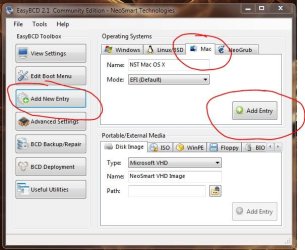
Well...you have to set it up first, it won't do it for you automatically. Click on the Mac tab, then click 'Add Entry'.

1.JPG

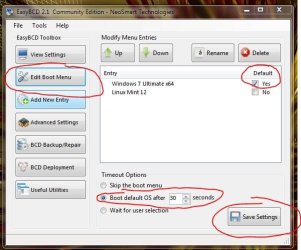
Now go to 'Edit Book Menu' and select which option should be default (my example shown here).

2.JPG

Click 'Save Settings', then exit and reboot. Upon reboot the Windows bootloader will show the two options. If you select the Mac option, it should chainload to the Mac bootloader.

Regards,
Golden
 

My Computer My Computer

Computer type
PC/Desktop
Computer Manufacturer/Model Number
Golden Mk. I.4
OS
Windows 10 Pro x64 ; Xubuntu x64
CPU
Intel i7 860 @ 2.80 GHz O/C'ed to 4.0GHz
Motherboard
Gigabyte P55A-UD3R Rev.1. Award BIOS F13
Memory
16GB Corsair Vengance DDR3 @ 661 MHz Dual Channel (9-9-9-24)
Graphics Card(s)
EVGA NVidia GTX 560 1024MB
Sound Card
Realtek Integrated
Monitor(s) Displays
Dual Samsung SyncMaster 2494HS
Screen Resolution
1920*1080 and 1920*1080
Hard Drives
1*Samsung 840 EVO 120GB SSD;
1*OCZ Vertex 2 60GB SSD;
2*Samsung F3 SpinPoint 1TB in RAID0;
1*Samsung F1 SpinPoint 1TB;
2*Western Digital 1TB External USB 3.0
1*Western Digital 500GB External USB 3.0
1*Seagate 500GB External USB 2.0
PSU
Thermaltake ToughPower QFan 750W
Case
Thermaltake Element S VK60001W2Z
Cooling
Corsair H60 Water Cooling, 2*230mm and 2*80mm case fans
Keyboard
Logitech G110
Mouse
Logitech MX518
No Joy

Did that; Let it reboot, it went as before to a Mac only screen and was in the process of booting to OSX. I "caught" it by hitting F8 before the 30 seconds was up, and the dual screen came up.

I could continue to do this, but surely there is a way?

Thanks
 

My Computer My Computer

Computer Manufacturer/Model Number
Custom
OS
win7 ult x64 Dual Boot OSX
CPU
Intel i7-870/2.93 GHz
Motherboard
ASUS P7P55
Memory
4 gb
Graphics Card(s)
EVGA GeForce 9500 GT Graphics Card
Monitor(s) Displays
NEC Multisync 1560M
Hard Drives
Seagate 1 Tb SATA
PSU
Antec 500w
Case
Antec
Cooling
1 case fan
Do I need to do this in the Mac mode?
 

My Computer My Computer

Computer Manufacturer/Model Number
Custom
OS
win7 ult x64 Dual Boot OSX
CPU
Intel i7-870/2.93 GHz
Motherboard
ASUS P7P55
Memory
4 gb
Graphics Card(s)
EVGA GeForce 9500 GT Graphics Card
Monitor(s) Displays
NEC Multisync 1560M
Hard Drives
Seagate 1 Tb SATA
PSU
Antec 500w
Case
Antec
Cooling
1 case fan
No - run this application from within Windows. You do not need to do it from inside Mac. Windows will chainload (pass off) to the OSX loader when you select the option.

Regards,
Golden
 

My Computer My Computer

Computer type
PC/Desktop
Computer Manufacturer/Model Number
Golden Mk. I.4
OS
Windows 10 Pro x64 ; Xubuntu x64
CPU
Intel i7 860 @ 2.80 GHz O/C'ed to 4.0GHz
Motherboard
Gigabyte P55A-UD3R Rev.1. Award BIOS F13
Memory
16GB Corsair Vengance DDR3 @ 661 MHz Dual Channel (9-9-9-24)
Graphics Card(s)
EVGA NVidia GTX 560 1024MB
Sound Card
Realtek Integrated
Monitor(s) Displays
Dual Samsung SyncMaster 2494HS
Screen Resolution
1920*1080 and 1920*1080
Hard Drives
1*Samsung 840 EVO 120GB SSD;
1*OCZ Vertex 2 60GB SSD;
2*Samsung F3 SpinPoint 1TB in RAID0;
1*Samsung F1 SpinPoint 1TB;
2*Western Digital 1TB External USB 3.0
1*Western Digital 500GB External USB 3.0
1*Seagate 500GB External USB 2.0
PSU
Thermaltake ToughPower QFan 750W
Case
Thermaltake Element S VK60001W2Z
Cooling
Corsair H60 Water Cooling, 2*230mm and 2*80mm case fans
Keyboard
Logitech G110
Mouse
Logitech MX518
No Joy

Started again, loaded Easy BCD again. Both systems now showing, Windows 7 set as default. Saved. Exited, Restarted, let it go; no joy. It went directly to Lion OSX and loaded it.

'bout to give up, but obviously there is a setting somewhere locking this OSX into the boot sequence that Easy BCD does not affect???

Thanks
 

My Computer My Computer

Computer Manufacturer/Model Number
Custom
OS
win7 ult x64 Dual Boot OSX
CPU
Intel i7-870/2.93 GHz
Motherboard
ASUS P7P55
Memory
4 gb
Graphics Card(s)
EVGA GeForce 9500 GT Graphics Card
Monitor(s) Displays
NEC Multisync 1560M
Hard Drives
Seagate 1 Tb SATA
PSU
Antec 500w
Case
Antec
Cooling
1 case fan
In the OSX mode the System Preferences says I cannot change the option, "Can't change the startup disk... Bless tool unable to set the current boot disk"
 

My Computer My Computer

Computer Manufacturer/Model Number
Custom
OS
win7 ult x64 Dual Boot OSX
CPU
Intel i7-870/2.93 GHz
Motherboard
ASUS P7P55
Memory
4 gb
Graphics Card(s)
EVGA GeForce 9500 GT Graphics Card
Monitor(s) Displays
NEC Multisync 1560M
Hard Drives
Seagate 1 Tb SATA
PSU
Antec 500w
Case
Antec
Cooling
1 case fan
Ran across this on a search
-------------------------------
Wrong system booted by default Problem: On a system with multiple OSes, boot wants to boot the wrong (non-PureDarwin) one by default. This happens when a non-HFS+ partition (e.g., FAT32 or NTFS) has the bootable ("active") flag and comes before the HFS+ partition that contains PureDarwin.


Solution: Modify boot so that it uses the first HFS+ partition instead of the first partition with the bootable ("active") flag:


In boot-132/i386/lib/libsaio/sys.c, comment the following line:


for ( bvr = chain; bvr; bvr = bvr->next )
{
if ( bvr->flags & kBVFlagNativeBoot ) bvr1 = bvr;
// if ( bvr->flags & kBVFlagPrimary ) bvr2 = bvr;
}
----------------------------------------------------
This is all that was there, and naturally I am not expert enough to even attempt such without guidance. Is it even relevant?

Thanks
 

My Computer My Computer

Computer Manufacturer/Model Number
Custom
OS
win7 ult x64 Dual Boot OSX
CPU
Intel i7-870/2.93 GHz
Motherboard
ASUS P7P55
Memory
4 gb
Graphics Card(s)
EVGA GeForce 9500 GT Graphics Card
Monitor(s) Displays
NEC Multisync 1560M
Hard Drives
Seagate 1 Tb SATA
PSU
Antec 500w
Case
Antec
Cooling
1 case fan
This seems to be managed by the OSX bootmgr. But there I cannot help you because I know nothing about OSX. It is not legal to run an OSX on a PC, so I have never done that.
 
Last edited:

My Computer My Computer

Computer Manufacturer/Model Number
HP, Dell, Gateway, Toshiba - 4 laptops and 2 desktops
OS
Vista, Windows7, Mint Mate, Zorin, Windows 8
CPU
from 1.6GHz Duo to i7
Monitor(s) Displays
2x HP w2207
Hard Drives
5x HDD, 7x SSD, 12x Externals
Keyboard
with trackball - no mices
Mouse
Trackball mice
Internet Speed
DSL 6000
Is this the mac forum? I showed that this was a dual boot system (OSX and W7).

Is there a forum that is knowledgeable about the issue you mentioned?
Thanks
 

My Computer My Computer

Computer Manufacturer/Model Number
Custom
OS
win7 ult x64 Dual Boot OSX
CPU
Intel i7-870/2.93 GHz
Motherboard
ASUS P7P55
Memory
4 gb
Graphics Card(s)
EVGA GeForce 9500 GT Graphics Card
Monitor(s) Displays
NEC Multisync 1560M
Hard Drives
Seagate 1 Tb SATA
PSU
Antec 500w
Case
Antec
Cooling
1 case fan
The Mac OS X EULA forbids Mac installations on a non Apple-branded computer.

OSx86 - Wikipedia, the free encyclopedia

Our forum rules say we shouldn't be discussing hacking or piracy - end of. :)

So, in a nutshell, no, this isn't a Mac forum.
 

My Computer My Computer

Computer Manufacturer/Model Number
HP Pavilion Elite 495UK
OS
Windows 7 Ultimate SP1 64-Bit
CPU
Intel Core i7 870 @ 2.93GHz
Motherboard
MSI 2A9C (CPU1)
Memory
8Gb Dual-Channel DDR3 @ 664MHz
Graphics Card(s)
nVidia GeForce GTX 460 1024MB dedicated RAM
Sound Card
Realtek HD Audio
Monitor(s) Displays
HP2310i
Screen Resolution
1920 x 1080
Hard Drives
1x1954GB Hitachi HDS22020ALA 330 (RAID), 1x1954GB Hitachi External for backup and storage
PSU
460W
Case
HP Elite
Cooling
Air cooled
Keyboard
Logitech K750 solar-powered keyboard
Mouse
Logitech Wireless M180 mouse
Internet Speed
2Mb
Other Info
Pure Avanti Flow Internet Radio with iPod Dock, 64Gb iPod, HP USB Speakers, Sony MDR-V500 Headphones, Sony Vaio F-Series Laptop
Back
Top