
Hello Masters. I already upgraded my laptop so I could play Counter Strike: Source just like what you have told me on my previous post hehe 
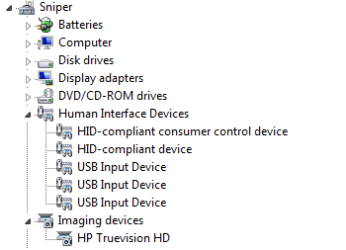
Now, I noticed that this laptop has a built-in camera. However, I checked add new scanner or camera device and was not able to locate this webcam. I checked Device Manager and seen something under 'Imaging Device' which is an HP Truevision HD. I was wondering if this is the build-in camera already? If it is, then how could I make it work? Do I need to install another program? I was trying to ask Google to no avail, unless I'm just quite noob with wholesome search techniques. Pardon me.
Or if it is not the HP Truevision, how could I know that this thing is still working or a display and needed to be ignored already? Moreover, I would like to thank you all in advance for checking this post and letting me know what to do. Sorry for this thing, just feeding my curiosity //humbly bows//
Now, I noticed that this laptop has a built-in camera. However, I checked add new scanner or camera device and was not able to locate this webcam. I checked Device Manager and seen something under 'Imaging Device' which is an HP Truevision HD. I was wondering if this is the build-in camera already? If it is, then how could I make it work? Do I need to install another program? I was trying to ask Google to no avail, unless I'm just quite noob with wholesome search techniques. Pardon me.
Or if it is not the HP Truevision, how could I know that this thing is still working or a display and needed to be ignored already? Moreover, I would like to thank you all in advance for checking this post and letting me know what to do. Sorry for this thing, just feeding my curiosity //humbly bows//
Attachments
My Computer
At a glance
Windows 7 64-bitIntel i5-3317U CPU @ 1.70 GHz4.00 GbNVidia GeForce GT 630M
- Computer type
- Laptop
- Computer Manufacturer/Model Number
- HP Pavillion Sleekbook 15
- OS
- Windows 7 64-bit
- CPU
- Intel i5-3317U CPU @ 1.70 GHz
- Motherboard
- InsydeH2O
- Memory
- 4.00 Gb
- Graphics Card(s)
- NVidia GeForce GT 630M
- Browser
- Mozilla Firefox
