Cannot sign into one website with any browser

PeakRock

New member
Local time
2:52 PM
Messages
7
I have a Windows 7 Professional install on a newish laptop that is unable to sign into one particular website. I can navigate to the website ok, enter the user-id and password (which works fine on other machines with the same setup) but when I press enter the fields go blank with no error message. I've tried IE11, Chrome & Firefox, disabling the firewall and AV software, swapping between the wireless adapter and the ethernet adapter, running the Microsoft fix for the hosts file, flushing dns, changing machine name, creating another user account on the machine, resetting IE to default settings, putting the website into a trusted zone, running Ccleaner to clean out cookies and temp data and quite frankly I'm at a loss as to what to do next.


I've enabled event logging in IE through a registry setting but nothing is logged.


The website can be signed into on other machines with Win 7 and Win 8 running IE or Firefox with no special setup and the same userid and password so it appears machine specific but what it is beats me. My next idea is to swap the hard drive into another identical laptop to see what happens....
Any ideas considered !
 

My Computer My Computer

Computer type
PC/Desktop
OS
Windows 8.1EE 64 & 32 bit
Wow. You have tried a lot.

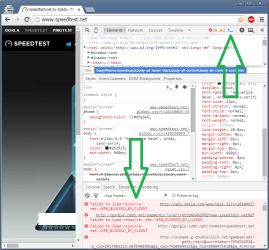
While in Chrome, press F12 and see if anything is not getting thru.

F12.png
 

My Computer My Computer

Computer type
Laptop
Computer Manufacturer/Model Number
Employer provided Dell Latitude
OS
W7 Pro SP1 64bit
CPU
i7
Memory
8GB
Graphics Card(s)
Intel HD Graphics
Hard Drives
crappy SSD
Antivirus
Employer mandated Symantec Endpoint Protection
Browser
Pale Moon 64bit, IE11 64bit & Chrome 64bit
Just some ideas: Maybe something in the Credential Manager (Control Panel - User Accounts - Manage Accounts - Manage Your Credentials)

Content/URL filtering on the router? Would it log in from a Live Linux boot?

Run in cmd: netsh winsock reset
 

My Computer My Computer

Computer type
PC/Desktop
Computer Manufacturer/Model Number
Custom Build
OS
Windows 7 Ultimate x64 SP1
CPU
AMD Phenom 2 1090T
Motherboard
Gigabyte GA-890FXA-UD5
Memory
2x8GB Kingston HyperX Fury Black 1600Mhz Unganged
Graphics Card(s)
MSI GTX 970 Gaming 4G
Sound Card
Realtek On-Board HD 7.1 Audio / Logitech G35
Monitor(s) Displays
3xAcer GD245HQ
Screen Resolution
1920x1080
Hard Drives
Samsung 850 Pro 512GB SSD - OS /
WD Caviar Black SATA 3 - 1 TBx2 - Dynamic RAID 0 /
WD Caviar Green SATA 2 - 640GBx2 - Dynamic RAID 0 /
WD Caviar Green SATA 2 - 640GB - Internal Backup /
Seagate Barracude SATA 3 - 3TB - External Backup/ Sync
PSU
HighPower 1000W
Case
Cooler Master HAF 932
Cooling
Noctua NH-D14
Keyboard
Logitech G19
Mouse
Logitech G500
Internet Speed
100/4 Mbit Cable (100GB quota)
Antivirus
ZoneAlarm Extreme Security / MBAM Pro / MBAE Free / SAS Free
Browser
IE 11 - Firefox - Chrome
Other Info
Logitech F710/ G27/ G940/ Z5500 // TrackIR 5 // Nvidia 3D Surround Vision
It's hardware...

Since this machine is one of four identical laptops, all with the same initial software image, I moved the hard drive into another laptop (call it A) and put that laptops hard drive into this one (call it B). Much to my surprise I was able to log into the website successfully on laptop A with image B but not with image A on laptop B. I swapped the drives back and was unable to login with image B on laptop B but able to login with image A back on laptop A.

So astonishingly it has to be a hardware fault. I swapped memory modules over, flashed the Bios to the latest level, ran on-board diagnostics but found nothing.

My next job will be to convince the vendor that the laptop, which is still under warranty, has a genuine fault since I doubt their testing will find anything.
 

My Computer My Computer

Computer type
PC/Desktop
OS
Windows 8.1EE 64 & 32 bit
Hmm, try changing MAC address then (Win7 MAC Address Changer v2.0) - last 2 couple should be enough. Or else I would first try connecting to modem directly and try resetting router to factory defaults after a power cycle if still not fixed.
 

My Computer My Computer

Computer type
PC/Desktop
Computer Manufacturer/Model Number
Custom Build
OS
Windows 7 Ultimate x64 SP1
CPU
AMD Phenom 2 1090T
Motherboard
Gigabyte GA-890FXA-UD5
Memory
2x8GB Kingston HyperX Fury Black 1600Mhz Unganged
Graphics Card(s)
MSI GTX 970 Gaming 4G
Sound Card
Realtek On-Board HD 7.1 Audio / Logitech G35
Monitor(s) Displays
3xAcer GD245HQ
Screen Resolution
1920x1080
Hard Drives
Samsung 850 Pro 512GB SSD - OS /
WD Caviar Black SATA 3 - 1 TBx2 - Dynamic RAID 0 /
WD Caviar Green SATA 2 - 640GBx2 - Dynamic RAID 0 /
WD Caviar Green SATA 2 - 640GB - Internal Backup /
Seagate Barracude SATA 3 - 3TB - External Backup/ Sync
PSU
HighPower 1000W
Case
Cooler Master HAF 932
Cooling
Noctua NH-D14
Keyboard
Logitech G19
Mouse
Logitech G500
Internet Speed
100/4 Mbit Cable (100GB quota)
Antivirus
ZoneAlarm Extreme Security / MBAM Pro / MBAE Free / SAS Free
Browser
IE 11 - Firefox - Chrome
Other Info
Logitech F710/ G27/ G940/ Z5500 // TrackIR 5 // Nvidia 3D Surround Vision
I should have added that I'd previously tried it on two different networks in two different locations (the school network and my home network) and still had the problem...
 

My Computer My Computer

Computer type
PC/Desktop
OS
Windows 8.1EE 64 & 32 bit

My Computer My Computer

Computer type
PC/Desktop
Computer Manufacturer/Model Number
Custom Build
OS
Windows 7 Ultimate x64 SP1
CPU
AMD Phenom 2 1090T
Motherboard
Gigabyte GA-890FXA-UD5
Memory
2x8GB Kingston HyperX Fury Black 1600Mhz Unganged
Graphics Card(s)
MSI GTX 970 Gaming 4G
Sound Card
Realtek On-Board HD 7.1 Audio / Logitech G35
Monitor(s) Displays
3xAcer GD245HQ
Screen Resolution
1920x1080
Hard Drives
Samsung 850 Pro 512GB SSD - OS /
WD Caviar Black SATA 3 - 1 TBx2 - Dynamic RAID 0 /
WD Caviar Green SATA 2 - 640GBx2 - Dynamic RAID 0 /
WD Caviar Green SATA 2 - 640GB - Internal Backup /
Seagate Barracude SATA 3 - 3TB - External Backup/ Sync
PSU
HighPower 1000W
Case
Cooler Master HAF 932
Cooling
Noctua NH-D14
Keyboard
Logitech G19
Mouse
Logitech G500
Internet Speed
100/4 Mbit Cable (100GB quota)
Antivirus
ZoneAlarm Extreme Security / MBAM Pro / MBAE Free / SAS Free
Browser
IE 11 - Firefox - Chrome
Other Info
Logitech F710/ G27/ G940/ Z5500 // TrackIR 5 // Nvidia 3D Surround Vision
I tried changing the MAC on both adapters and resetting the BIOS but no change in the fault.....
 

My Computer My Computer

Computer type
PC/Desktop
OS
Windows 8.1EE 64 & 32 bit

My Computer My Computer

Computer type
PC/Desktop
Computer Manufacturer/Model Number
Custom Build
OS
Windows 7 Ultimate x64 SP1
CPU
AMD Phenom 2 1090T
Motherboard
Gigabyte GA-890FXA-UD5
Memory
2x8GB Kingston HyperX Fury Black 1600Mhz Unganged
Graphics Card(s)
MSI GTX 970 Gaming 4G
Sound Card
Realtek On-Board HD 7.1 Audio / Logitech G35
Monitor(s) Displays
3xAcer GD245HQ
Screen Resolution
1920x1080
Hard Drives
Samsung 850 Pro 512GB SSD - OS /
WD Caviar Black SATA 3 - 1 TBx2 - Dynamic RAID 0 /
WD Caviar Green SATA 2 - 640GBx2 - Dynamic RAID 0 /
WD Caviar Green SATA 2 - 640GB - Internal Backup /
Seagate Barracude SATA 3 - 3TB - External Backup/ Sync
PSU
HighPower 1000W
Case
Cooler Master HAF 932
Cooling
Noctua NH-D14
Keyboard
Logitech G19
Mouse
Logitech G500
Internet Speed
100/4 Mbit Cable (100GB quota)
Antivirus
ZoneAlarm Extreme Security / MBAM Pro / MBAE Free / SAS Free
Browser
IE 11 - Firefox - Chrome
Other Info
Logitech F710/ G27/ G940/ Z5500 // TrackIR 5 // Nvidia 3D Surround Vision
I haven't tried Linux Mint Mate as yet, I have got Linux Lite on a bootable USB stick which I could try easily, it would be interesting to see if I could access the web site that way.. Given that when I put this disk into another identical laptop the website can be logged into I had excluded it being a software bug - as far as the disk image goes...
 

My Computer My Computer

Computer type
PC/Desktop
OS
Windows 8.1EE 64 & 32 bit
I've now booted the machine with Linux Lite and still get the same problem on that one website - not on any others...

So, thanks for everyone's ideas and help and I guess it's over to Lenovo as the machine is still under warranty.....
 

My Computer My Computer

Computer type
PC/Desktop
OS
Windows 8.1EE 64 & 32 bit
Back
Top