Cannot tag my PDF files

jaochoo

New member
I am currently working on my thesis, so doing a lot of literature research and needing to manage a lot of PDF files. Now I tried to tag the PDF files which I stored on my external HDD but it wasn't possible. I right-click the file, then select properties and then details. There are some entries in the details tab but nothing for tags. The file is not read-only and the owner entry says "Everyone."

How can I tag my documents?
 

My Computer

OS
Windows 7
You can't tag PDF documents. You also can't add details (inside the PDF document), because that must be done during PDF creation. If you are running a 32 bit version of Windows 7, there should be an ifilter built in that allows you to crawl PDF documents via the Windows 7 search engine. For example, in Windows 7 you can go to a directory that has multiple word documents and you can search for terms inside a particular document. That document will be listed in the search pane. This should be the same for any 32 bit Windows operating system using a current (version 8 or higher) of Reader. AFAIK, there is no ifiler for 64 bit Windows 7, but you can go here to read about workarounds.

So, to keep things organized, you'll need to manage some sort of folder/file structure so you know where things are located.
 

My Computer

Computer Manufacturer/Model Number
Dell XPS 15 L502x
OS
Windows 7 Ultimate x64 SP1
CPU
Core i7-2670QM
Memory
8GB DDR3 PC3-10600
Graphics Card(s)
Intel HD Graphics 3000 + GeForce GT 540M
Screen Resolution
1920x1080
Hard Drives
1TB 5400RPM Seagate

My Computer

Computer type
PC/Desktop
Computer Manufacturer/Model Number
Alienware Aurora ALX R4
OS
Windows 10 Pro (x64)
CPU
Intel Core i7-3930K (3.2GHz - 4.5GHz)
Motherboard
Alienware Aurora-R4 x79
Memory
4x Samsung 4GB PC3-12800 DDR3 (16GB 1600MHz)
Graphics Card(s)
Nvidia Geforce GTX 690
Sound Card
SteelSeries Siberia Elite
Monitor(s) Displays
Dell UltraSharp U3011
Screen Resolution
2560x1600
Hard Drives
Samsung 850 Pro 256 GB, Seagate 1TB Desktop Hybrid HDD, 2x Western Digital 4TB Green HDD
PSU
875W Some Dell PSU <.<
Case
Alienware Aurora ALX
Cooling
Custom Liquid Cooling (EK CPU & GPU blocks) dual EK 480RAD
Keyboard
Logitech G710+ Mechanical
Mouse
Logitech G700s
Internet Speed
Verizon Fios (50 mbps average)
Other Info
Server: Intel NUC D54250WYK: i5-4250U, 16GB, 256 GB mSATA, Windows Server 2012 R2
I did not know that tagging is dependent on the file type. Why doesn't Microsoft implement a general tagging of any file for Windows so that you just can assign tags to every file you want?
 

My Computer

OS
Windows 7

My Computer

Computer Manufacturer/Model Number
Dell XPS 15 L502x
OS
Windows 7 Ultimate x64 SP1
CPU
Core i7-2670QM
Memory
8GB DDR3 PC3-10600
Graphics Card(s)
Intel HD Graphics 3000 + GeForce GT 540M
Screen Resolution
1920x1080
Hard Drives
1TB 5400RPM Seagate
I did not know that tagging is dependent on the file type. Why doesn't Microsoft implement a general tagging of any file for Windows so that you just can assign tags to every file you want?

They don't own Adobe, so they can't force Adobe to implement anything. If you want the ability to tag an Adobe Acrobat file, then I suggest you contact them and request it.
 

My Computer

Computer Manufacturer/Model Number
Dell XPS 15 L502x
OS
Windows 7 Ultimate x64 SP1
CPU
Core i7-2670QM
Memory
8GB DDR3 PC3-10600
Graphics Card(s)
Intel HD Graphics 3000 + GeForce GT 540M
Screen Resolution
1920x1080
Hard Drives
1TB 5400RPM Seagate
I see it is for Vista x64, but not Windows 7 x64. Does it install and work correctly under 7 x64?
I don't see why it wouldn't work for Windows 7.
I did not know that tagging is dependent on the file type. Why doesn't Microsoft implement a general tagging of any file for Windows so that you just can assign tags to every file you want?
Tagging in depended on the file type because the information is stored in the file itself. The files metadata store needs to have some constructs to use for tags. Plus Adobe already slammed Microsoft for including PDF support in Office 2007 forcing it to be removed to a download.
 

My Computer

Computer type
PC/Desktop
Computer Manufacturer/Model Number
Alienware Aurora ALX R4
OS
Windows 10 Pro (x64)
CPU
Intel Core i7-3930K (3.2GHz - 4.5GHz)
Motherboard
Alienware Aurora-R4 x79
Memory
4x Samsung 4GB PC3-12800 DDR3 (16GB 1600MHz)
Graphics Card(s)
Nvidia Geforce GTX 690
Sound Card
SteelSeries Siberia Elite
Monitor(s) Displays
Dell UltraSharp U3011
Screen Resolution
2560x1600
Hard Drives
Samsung 850 Pro 256 GB, Seagate 1TB Desktop Hybrid HDD, 2x Western Digital 4TB Green HDD
PSU
875W Some Dell PSU <.<
Case
Alienware Aurora ALX
Cooling
Custom Liquid Cooling (EK CPU & GPU blocks) dual EK 480RAD
Keyboard
Logitech G710+ Mechanical
Mouse
Logitech G700s
Internet Speed
Verizon Fios (50 mbps average)
Other Info
Server: Intel NUC D54250WYK: i5-4250U, 16GB, 256 GB mSATA, Windows Server 2012 R2
Here's my workaround

I found this thread when I was looking for a solution to the same problem that jaochoo faced: Organizing PDFs using the Windows 7 tagging system. For him any anyone else who comes across this thread, I thought I'd share the workaround I came up with.

I created a folder in my documents library where I dump all PDF files. For each PDF, I then create a Word document. In the Word document I write the title of the PDF, and make it a hyperlink to the file in the PDF folder. In effect, the Word document is a shortcut to the actual file. I can then add all the tags I want to the Word document, and otherwise file it for later reference.
 

My Computer

OS
Windows 7
I also have lots of pdf files on my computer. I tried out creating a file with hyperlinks to my pdf files as jaochoo suggested. This works although it is a bit of a pain.

I have a 64 bit Windows 7 Dell and went to the link discussion suggested by kegobeer.
There is now an ifilter for 64 bit Adobe - Acrobat : For Windows : Adobe PDF iFilter 9 for 64-bit platforms.
Perhaps, I'm familiar with the terms, but this fix looks like it is for computers on a server. I need to sort on my home machine. Can someone clarify.
 

My Computer

Computer Manufacturer/Model Number
Dell Studio XPS
OS
Windows 7
quick pdf tagging solution

I've been using Quick PDF Tools (quickpdftools.com). It adds a context (right click) menu to windows explorer. One of the commands allows you to edit document properties.

Also, to search within pdf files you need a ifilter. On 64 bit systems, Foxit ifilter 2.0 is the go. One hassle I've had is the Foxit ifilter stops working occasionally (maybe after a windows update) with no clue other than known files are not turning up in the search results. It then requires a reinstall which is very quick (but keep the installer handy).

Maybe someone will stumble over this old thread like I did. Hope it helps.

David
 

My Computer

OS
windows 7
I looked at Quick PDF Tools and I think it'll do just what I'm looking for. One catch though: McAfee Site Advisor gives the site a good rating and says they trust the download, but the trend micro internet security trial that came with my laptop says the download is malicious. Have you had any problems with it or is trend micro just making a mistake? I've never known McAfee's siteadvisor to give a bad download a good rating, but I don't want this to be the one time I get something bad. Thanks!
 

My Computer

Computer Manufacturer/Model Number
Asus u30jc-a2b
OS
Windows 7 Professional
I've been using Quick PDF Tools for several months with no problems. My anti-virus (MS Security Essentials) has no problem with it.
 

My Computer

OS
windows 7
alright - the trend micro page looks to be based on some kind of automatic thing, rather than an actual test, so since mcafee actually tested it and you've used it w/out any problems it looks like I'm good to go! Thanks for the help.
 

My Computer

Computer Manufacturer/Model Number
Asus u30jc-a2b
OS
Windows 7 Professional
I'm trying to search for text in pdfs

Also, to search within pdf files you need a ifilter. On 64 bit systems, Foxit ifilter 2.0 is the go.

The problem with the Foxit ifilter 2.0 is that it apparently costs $450. The earlier Foxit ifilter doesn't seem to work on 64-bit Windows 7.

I am a student with a number of research-related pdfs through which I would like to search for text from an explorer window and the start menu search box. I am using Windows 7 on a 64-bit system.

I have gone into Indexing Options->Advanced->File types->pdf->Index Properties and File Contents but that did not solve the problem. My computer spent a while indexing after I made that change, but I still can't find text inside pdfs.

I looked into iFilters from Adobe. But Adobe claims that the latest iFilters are bundled with the latest versions of Acrobat and Reader, so I should have them.

I'm going to try Mendeley, but does anyone have a solution that will allow 64-bit Windows 7 to work? I want to find the word “causative” among pdfs in a folder with a few dozen of them.
 

My Computer

OS
Windows 7
I am solving this issue as follows:
Use a good viewer like pdfxchange viewer (close to Acrobat, more than a viewer):

Tracker Software Products :: Downloads

So I edit pdf metadata (CTRL+D) and add any keyword I like, comma separated, I think of it as tagging.
Then using its "search pdf" you can specify location (it could be a whole drive) and just uncheck "include pages content" (for lightning speed). It will pick from your keywords as well from other doc infos, as title etc. So by using a keyword you'll pick all tagged files.
I also keep a tag list somewhere (text file, piece of paper..) for convenience.

I have tried using file manager programs, but it turns out they copy tagged files into their program directory, so they duplicate disk space, which is unpleasant to me.
I only found one, Stuff Organizer from sourceforge, where you can avoid this issue by leaving "new directory" as blank field, so it will basically index the source file itself. It's up to you..
 

My Computer

OS
Windows 7 HP
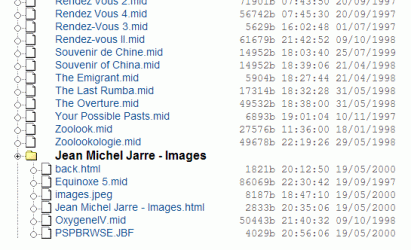
DIMIN HTML Directory Structure Creator

This small free program creates a index file of PDF files in a HTML file format in a tree structure for a group of folders containing PDF files. This HTML file can be opened in a web browser and any PDF file can be opened in browser just by clicking on the file name. (hyperlinks automatically created).

I used this program for cataloguing my e-books library containing more than 2000 files.
 

Attachments

  • tree_view.gif
    tree_view.gif
    20.2 KB · Views: 26

My Computer

Computer Manufacturer/Model Number
Toshiba Satellite P775-S7232
OS
MS Windows 7 Ultimate 64-bit SP1
CPU
i5-2410M 2.3GHz (2.9GHz Turbo-Boost) Sandy Bridge 32nm
Motherboard
Toshiba PHRAA ver. PSBY1U-00F003
Memory
4GB+4GB Samsung DDR3 PC3-10700 (1333 MHz)
Graphics Card(s)
Video Intel(R) HD Graphics Family, 1696MB available memory
Sound Card
Realtek High Definition Audio version=6.0.1.6323
Monitor(s) Displays
17.3 " Trubrite TFT LCD, LED Backlit
Screen Resolution
1600x900 32 bit, Native support for 720P content
Hard Drives
TOSHIBA MK6476GSXN
580.614 [GB] partitioned C: 80GB and D: 500GB with hidden recovery partitons.

Spare bay for 2nd HDD but no SATA connector :-(
PSU
Toshiba AC/DC Adapter
Case
Notebook
Cooling
Built-in Fan
Keyboard
Premium Raised Tile keyboard
Mouse
Logitech M215 wireless mouse
Internet Speed
Not fast enough
Other Info
Built-in Harman Kardon speakers with Dolby Advanced Audio, Waves MaxxAudio® 3. HDMI, 1xUSB3+3xUSB2 ports, WebCam, Battery life 4hrs 11mins, 4GB Readyboost SDHC card, WD My Book Essential Ext HDDs 2 TB, 2x1TB, My Passport SE 1TB and WDTV 1st Gen for Multimedia playing on a Sony Wega 32" LCD.
Recent addition to my toys are Asus Transformer Pad TF300T with 32GB onboard sd card + 32GB microsd card.
This is about a free and open source solution to the problem, available at http://filemeta.codeplex.com.

I started out with the same problem as jaochoo, wanting to tag research PDF papers. What the linked solution does is to allow you to use Explorer to see and edit tags, comments, etc that are stored with the file, so that they will when you move the file, but not in it, so you are not making any changes to the original.it also works with Windows search. There is no separate database, the capability is built into NTFS.

I think that Microsoft almost shipped this in Vista, because all the plug points are there in both Explorer and NTFS. The key piece that I provide is one 17 K DLL ( 64-bit) to connect the dots. They seem to have backed off because although everything works great as long as the PDF file is on an NTFS drive, but is lost when you send the file as an e-mail attachment, or move it to a different file system.

If you can live with that limitation, feel free to take a look!
 

My Computer

Computer type
PC/Desktop
OS
Windows 7 Ultimate x64
I use the following workaround. I read and edit my PDFs with Foxit software (https://www.foxitsoftware.com/) and use Copernic (https://www.copernic.com/) to search the contents of my computer. To tag a PDF document I simply add a Note in Foxit and put my tags into the note. Those notes/tags become searchable with Copernic. Dead easy and works seamlessly.
 

My Computer

OS
Windows 7 64-bit
Back
Top