Cannot Turn System Icons On Or Off

Gemini Man

New member
Local time
7:38 AM
Messages
64
I can't customize which system icons show up on the taskbar. For some reason, I can only set the clock on or off. When I click the help file link that says "Why can't I change some of these settings?", it gives me some information about how an administrator may of changed group policies. I didn't change these settings, and I'm the administrator. Just noticed this issue as I installed the Windows 7 RTM Build x64 last night and this morning wanted to tweak which system icons showed up and which didn't. Any help would be appreciated.

(Screen attached of window with greyed out system icons.)
View attachment 20940
 

My Computer

Computer Manufacturer/Model Number
Dell Studio XPS 1640
OS
Windows 7 Professional x64 / Ubuntu 9.10
CPU
Intel Core 2 Duo P8700 @ 2.53 GHz (2 CPUs)
Motherboard
Intel Pentium III Xeon, 2533 MHz
Memory
4096MB DDR3 RAM
Graphics Card(s)
ATI Mobility Radeon HD 3670 (512 MB)
Sound Card
IDT High Definition Audio
Monitor(s) Displays
Generic PnP Monitor
Screen Resolution
1366 x 768 px
Hard Drives
320 GB 7200 RPM SATA / Internal HDD
Fantom Drive G-Force GF1000EU 1TB USB 2.0 & eSATA / External HDD
Western Digital My Book 320 GB 7200 RPM USB 2.0 / External HDD
Cooling
External USB Attached Mounted 2-Fan Unit
Mouse
Logitech USB Trackball
Internet Speed
120
Last edited:

My Computer

Computer type
PC/Desktop
Computer Manufacturer/Model Number
Self built custom
OS
64-bit Windows 11 Pro for Workstations
CPU
Intel i7-8700K OC'd to 5 GHz
Motherboard
ASUS ROG Maximus XI Formula Z390
Memory
64 GB (4x16GB) G.SKILL TridentZ RGB DDR4 3600 MHz
Graphics Card(s)
ASUS ROG-STRIX-GTX1080TI-O11G-GAMING
Sound Card
Integrated
Monitor(s) Displays
2 x Samsung Odyssey G7 27"
Screen Resolution
2560x1440
Hard Drives
1TB Samsung 990 PRO M.2,
4TB Samsung 990 PRO PRO M.2,
TerraMaster F8 SSD Plus NAS
PSU
Seasonic Prime Titanium 850W
Case
Thermaltake Core P3
Cooling
Corsair Hydro H115i
Keyboard
Logitech wireless K800
Mouse
Logitech MX Master 4
Internet Speed
2 Gb/s Download and 100 Mb/s Upload
Antivirus
Malwarebyte Anti-Malware Premium
Browser
Google Chrome
Other Info
Logitech Z625 speaker system,
Logitech BRIO 4K Pro webcam,
HP Color LaserJet Pro MFP M477fdn,
APC SMART-UPS RT 1000 XL - SURT1000XLI,
Galaxy S23 Plus phone

My Computer

Computer Manufacturer/Model Number
Samsung NP530U4B-S02IN
OS
Windows® 8 Pro (64-bit)
CPU
Intel® Core™ i5 Processor 2467M (1.60GHz, 3MB L3 Cache)
Motherboard
Samsung Electronics
Memory
6GB DDR3 System Memory at 1,333MHz (on BD 4GB + 2GB x 1)
Graphics Card(s)
AMD Radeon™ HD7550M 1GB DDR3 (Ext. Graphic)
Sound Card
Realtek High Definition Audio
Monitor(s) Displays
35.56cm (14.0) SuperBright 300nit HD LED Display
Screen Resolution
1366x768
Hard Drives
1TB S-ATA II Hard Drive (5400RPM) with ExpressCache 16GB SSD
Internet Speed
sucks
Antivirus
Microsoft Security Essentials
Browser
Google Chrome (Sync enabled)
You can also do this through Group Policy.

Click on the start orb and type gpedit.msc into the search box. When the program appears in the results panel, right click and select Run as administrator and provide administrative credentials.
View attachment 20958
Expand the category User Configuration and Administrative Templates. Click on Start Menu and Taskbar. The following screen appears. I have scrolled down, and you can see that the highlighted item is one of those you are having problems with. The others are immediately beneath it.
View attachment 20959
The setting of each of these options needs to be Not configured, so double click on each of these in turn to arrive at the following screen.
View attachment 20966
Make sure that Not configured is selected, as shown. Then click OK to return to the previous screen. Alternatively, click Next Setting to move to the next item. When you have adjusted the final setting, click OK twice to exit the adjustment screen and close the editor.

The other option that might be useful is Remove Clock from the system notification area.
 
Last edited:

My Computer

Computer type
PC/Desktop
Computer Manufacturer/Model Number
Dwarf Dwf/11/2012 r09/2013
OS
Windows 8.1 Pro RTM x64
CPU
Intel Core-i5-3570K 4-core @ 3.4GHz (Ivy Bridge) (OC 4.4GHz)
Motherboard
ASRock Z77 Extreme4-M
Memory
4 x 4GB DDR3-1600 Corsair Vengeance CMZ8GX3M2A1600C9B (16GB)
Graphics Card(s)
MSI GeForce GTX770 Gaming OC 2GB
Sound Card
Realtek High Definition on board solution (ALC 898)
Monitor(s) Displays
ViewSonic VA1912w Widescreen (VGA)
Screen Resolution
1440x900
Hard Drives
OCZ Agility 3 SSD 120GB SATA III x2 (RAID 0)
Samsung HD501LJ 500GB SATA II x2
Hitachi HDS721010CLA332 1TB SATA II
Iomega 1.5TB Ext USB 2.0
WD 2.0TB Ext USB 3.0
PSU
XFX Pro Series 850W Semi-Modular
Case
Gigabyte IF233
Cooling
1 x 120mm Front Inlet 1 x 120mm Rear Exhaust
Keyboard
Microsoft Comfort Curve Keyboard 3000 (USB)
Mouse
Microsoft Comfort Mouse 3000 for Business (USB)
Internet Speed
NetGear DG834Gv3 ADSL Modem/Router (Ethernet) ~4.0 Mb/s (O2)
Antivirus
Avast! 8.0.1497
Browser
IE 11
Other Info
Optical Drive: HL-DT-ST BD-RE BH10LS30 SATA Bluray
Lexmark S305 Printer/Scanner/Copier (USB)
WEI Score: 8.1/8.1/8.5/8.5/8.25
Asus Eee PC 1011PX Netbook (Windows 7 x86 Starter)
Thank you everyone for the help! Brink your method worked whereas the other two suggestions didn't. Of course I tried Brink's method last! I now notice that my options are still greyed out when I try to customize which icons show up on the taskbar... Which leads me to believe something is still funny with group policy settings. However, everything is back to showing up, so thanks again for all your help! As usual, seven forums never disappoints.
 

My Computer

Computer Manufacturer/Model Number
Dell Studio XPS 1640
OS
Windows 7 Professional x64 / Ubuntu 9.10
CPU
Intel Core 2 Duo P8700 @ 2.53 GHz (2 CPUs)
Motherboard
Intel Pentium III Xeon, 2533 MHz
Memory
4096MB DDR3 RAM
Graphics Card(s)
ATI Mobility Radeon HD 3670 (512 MB)
Sound Card
IDT High Definition Audio
Monitor(s) Displays
Generic PnP Monitor
Screen Resolution
1366 x 768 px
Hard Drives
320 GB 7200 RPM SATA / Internal HDD
Fantom Drive G-Force GF1000EU 1TB USB 2.0 & eSATA / External HDD
Western Digital My Book 320 GB 7200 RPM USB 2.0 / External HDD
Cooling
External USB Attached Mounted 2-Fan Unit
Mouse
Logitech USB Trackball
Internet Speed
120
You're welcome Gemini Man. I'm happy to hear that you got those icons sorted out now.

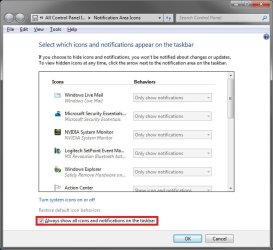
Do you mean the Notification Area Icons options below are grayed out now? If so, check to make sure that the boxed in red option below is unchecked.

Icons.jpg
 

My Computer

Computer type
PC/Desktop
Computer Manufacturer/Model Number
Self built custom
OS
64-bit Windows 11 Pro for Workstations
CPU
Intel i7-8700K OC'd to 5 GHz
Motherboard
ASUS ROG Maximus XI Formula Z390
Memory
64 GB (4x16GB) G.SKILL TridentZ RGB DDR4 3600 MHz
Graphics Card(s)
ASUS ROG-STRIX-GTX1080TI-O11G-GAMING
Sound Card
Integrated
Monitor(s) Displays
2 x Samsung Odyssey G7 27"
Screen Resolution
2560x1440
Hard Drives
1TB Samsung 990 PRO M.2,
4TB Samsung 990 PRO PRO M.2,
TerraMaster F8 SSD Plus NAS
PSU
Seasonic Prime Titanium 850W
Case
Thermaltake Core P3
Cooling
Corsair Hydro H115i
Keyboard
Logitech wireless K800
Mouse
Logitech MX Master 4
Internet Speed
2 Gb/s Download and 100 Mb/s Upload
Antivirus
Malwarebyte Anti-Malware Premium
Browser
Google Chrome
Other Info
Logitech Z625 speaker system,
Logitech BRIO 4K Pro webcam,
HP Color LaserJet Pro MFP M477fdn,
APC SMART-UPS RT 1000 XL - SURT1000XLI,
Galaxy S23 Plus phone
Back
Top