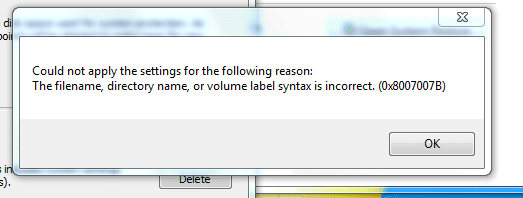
D drew1000 New member Member Local time 10:28 PM Messages 34 Mar 16, 2010 #1 Trying to turn system restore on but get the following message when I try to enable it. See attachment snip Any help much appreciated Attachments Capture.PNG 9.1 KB · Views: 16 My Computer OSW7CPUIntel Quad 9600MotherboardAsusMemory4GBGraphics Card(s)ATI Radeon HD2600Monitor(s) DisplaysNEC 18 inch LCDHard DrivesSamsung
Trying to turn system restore on but get the following message when I try to enable it. See attachment snip Any help much appreciated
zigzag3143 New member Local time 5:28 PM Messages 27,140 Mar 16, 2010 #2 drew1000 said: Trying to turn system restore on but get the following message when I try to enable it. See attachment snip Any help much appreciated Click to expand... Ok so what is the file name, the directory name, etc? My Computer Computer Manufacturer/Model NumberHP Pavillion dv-7 1005 TxOSWin 8 Release candidate 8400CPU[email protected]Memory4 gigsGraphics Card(s)Nvidia 9600MSound CardHD built-inMonitor(s) Displays17" WxgaScreen Resolution1440x900CoolingnoneInternet Speed45Mb down 5Mb up
drew1000 said: Trying to turn system restore on but get the following message when I try to enable it. See attachment snip Any help much appreciated Click to expand... Ok so what is the file name, the directory name, etc?
D drew1000 New member Member Thread Starter Local time 10:28 PM Messages 34 Mar 16, 2010 #3 I am not sure. I just go through the normal process to turn it on and I get this message appear. I am going via System Properties > Select C drive > Configure > Check box for restore system settings > Apply And the error message appears My Computer OSW7CPUIntel Quad 9600MotherboardAsusMemory4GBGraphics Card(s)ATI Radeon HD2600Monitor(s) DisplaysNEC 18 inch LCDHard DrivesSamsung
I am not sure. I just go through the normal process to turn it on and I get this message appear. I am going via System Properties > Select C drive > Configure > Check box for restore system settings > Apply And the error message appears