Cannot uninstall a app...no admin rights

iknowjohnny

New member
Power User
VIP
Local time
4:45 AM
Messages
237
When i try and uninstall a app from control panel it tells me i don't have sufficiant admin rights or some such phrase. I googled this and found out how to enable admin account both with the cmd prompt and in the OS by unchecking the disable admin box. Logged back on as admin but no joy. Tried safe mode and still no joy. How can i do this?
 

My Computer My Computer

OS
windows 7 professional

My Computer My Computer

Computer type
PC/Desktop
Computer Manufacturer/Model Number
self build
OS
win 7 ultimate32bit, Win8.1pro wmc 32bit
CPU
amd phenom x4 9600
Motherboard
asus m2n32-sli deluxe
Memory
corsair twinxs 2x2gb
Graphics Card(s)
2x nvidia 1gb 8500gt
Sound Card
onboard
Monitor(s) Displays
23" PB Viseo 233d
Screen Resolution
1920x1080
Hard Drives
maxtor sata 500gb
maxtor sata 320gb
fujitsu sata200gb
PSU
oryxx tornado 750w
Case
thermaltake xaser lll
Cooling
artic freezer64 pro + 7 case fans
First navigate to cmd, and then right click it and select "run as administrator". Then follow one of the two options below.

Deleting a program:
Type "cd %programfiles%"
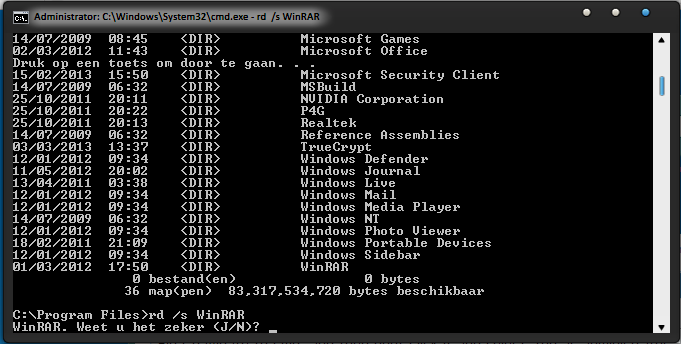
After that type "dir /p" this will show you a list of all programs.
Now to delete the program type "rd /s (name of the program as displayed in the list)", and type "Y" when cmd asks if you are sure.
For example, see the image below where I took WinRAR as an example.
CYVE1pg.png

NOTE: My PC is in Dutch, so you might not understand all text in the image.


Uninstalling a program:
First type "wmic" to enable root acces.
Then type "product where name="(name of the program)" uninstall" (this will take a while, be patient).
When cmd asks you if you are sure, type "Y".

Good luck and keep us posted!
Nommy
 

My Computer My Computer

Computer type
Laptop
Computer Manufacturer/Model Number
Dell Inspiron 5547
OS
Microsoft Windows 8.1 64-bit Professional
CPU
Intel(R) Core(TM) i7-4510U CPU @ 2.00GHz
Motherboard
Dell Inc. 08KNCD
Memory
8.00 GB (2 x 4.00 GB)
Graphics Card(s)
AMD Radeon R7 M265
Screen Resolution
1366 x 768 x 4294967296 colors
Hard Drives
(1) 1TB ST1000LM024 HN-M101MBB (2) 2TB Western Digital external hard drive (3) 500GB Packard Bell external hard drive
Mouse
Corsair Vengeance M60
Antivirus
Windows Defender & Malwarebytes
Browser
Firefox, Chromium
Other Info
+ Acer TravelMate 7730G with 32bit Ubuntu 14.04 LTS Trusty Tahr.
Hmmm....seems it's already uninstalled. But why is the name still in the add/remove progs list and why does it give me that admin rights message instead of the "app already removed, do you want to delete the emty" (paraphrasing) message?
 

My Computer My Computer

OS
windows 7 professional
why is the name still in the add/remove progs list

Sometimes you need to restart your PC in order for your system to update.

why does it give me that admin right message instead of the "app already removed, do you want to delete the empty" (paraphrasing) message?

I wouldn't know, maybe that'll be fixed too after a restart.

Keep us posted!
Nommy
 

My Computer My Computer

Computer type
Laptop
Computer Manufacturer/Model Number
Dell Inspiron 5547
OS
Microsoft Windows 8.1 64-bit Professional
CPU
Intel(R) Core(TM) i7-4510U CPU @ 2.00GHz
Motherboard
Dell Inc. 08KNCD
Memory
8.00 GB (2 x 4.00 GB)
Graphics Card(s)
AMD Radeon R7 M265
Screen Resolution
1366 x 768 x 4294967296 colors
Hard Drives
(1) 1TB ST1000LM024 HN-M101MBB (2) 2TB Western Digital external hard drive (3) 500GB Packard Bell external hard drive
Mouse
Corsair Vengeance M60
Antivirus
Windows Defender & Malwarebytes
Browser
Firefox, Chromium
Other Info
+ Acer TravelMate 7730G with 32bit Ubuntu 14.04 LTS Trusty Tahr.
Back
Top