Solved Cannot uninstall Driver Whiz

nottaclue9

New member
Member
VIP
Local time
10:55 PM
Messages
456
Location
San Antonio, TX
When I go to "Programs..." in my control panel, I am only offered the possibility of "change," not the usual drop-down with "change" and "uninstall."
 

My Computer

Computer type
PC/Desktop
Computer Manufacturer/Model Number
Custom
OS
Windows 7 Home Premium 64-bit, service pack 1
CPU
Intel box core i5 4460
Motherboard
Asus B85MECSM 1150
Memory
Kingston Hyper X Fury BLK 1866 8GB 4x2
Monitor(s) Displays
Samsung 23" wide-screen
Screen Resolution
1920 X 1080
Hard Drives
WD Passport, 1 TB
Case
Win Z583 Mini Tower w/ USB3.0
Keyboard
Microsoft ergo wave
Mouse
Logitech wireless
Antivirus
Bitdefender; Malwarebytes Pro
Browser
IE11
So what happens if you click on Change? Do you then get the option to uninstall?
 

My Computer

Computer type
PC/Desktop
Computer Manufacturer/Model Number
Home Built - Jan 2013
OS
Windows 7 64 Bit Home Premium SP1
CPU
i7-3820
Motherboard
Asus P9X79-PRO - Bios 4608
Memory
GSkill F3-14900CL9Q - 16GB
Graphics Card(s)
EVGA GeForce GTX660 - Driver 352.86
Sound Card
On board Realtek ALC898
Monitor(s) Displays
Acer S271HL
Screen Resolution
1920 x 1080
Hard Drives
#1- Samsung 840 Pro Series
#2- Western Digital WD1002FAEX Sata3 Black
#3- Western Digital WD1002FAEX Sata3 Black
PSU
Corsair CMPSU-850TX-V2 - 850 watt (by Seasonic)
Case
Corsair Obsidian 550D
Cooling
Standard 3 120mm case fans, Cooler Master Hyper 212 EVO
Keyboard
MS KC-0405
Mouse
Intellimouse 5-button
Internet Speed
56 Mbits/Sec (on a good day)
Antivirus
Avast & Malwarebytes
Browser
Firefox
Other Info
Asus DVD - DRW-24B1ST 24X
Thanks for the reply, TVeblen. What happens when I do what you suggested is that an "install wizard" window opens. It's like they don't want me to get rid of their program, and I don't want to be stuck with it.
 

My Computer

Computer type
PC/Desktop
Computer Manufacturer/Model Number
Custom
OS
Windows 7 Home Premium 64-bit, service pack 1
CPU
Intel box core i5 4460
Motherboard
Asus B85MECSM 1150
Memory
Kingston Hyper X Fury BLK 1866 8GB 4x2
Monitor(s) Displays
Samsung 23" wide-screen
Screen Resolution
1920 X 1080
Hard Drives
WD Passport, 1 TB
Case
Win Z583 Mini Tower w/ USB3.0
Keyboard
Microsoft ergo wave
Mouse
Logitech wireless
Antivirus
Bitdefender; Malwarebytes Pro
Browser
IE11

My Computer

Computer type
PC/Desktop
Computer Manufacturer/Model Number
Bruce ... somewhere in his 40's
OS
Windows 7 Ultimate 32bit SP1
CPU
Intel(R) Core(TM)2 Quad CPU @ 2.40GHz, 2400 MHz
Motherboard
INTEL/D975XBX2
Memory
4 GB
Graphics Card(s)
ATI Radeon HD 2600 Pro
Monitor(s) Displays
Samsung SyncMaster 914v
Screen Resolution
1280 x 1024
Hard Drives
2/500GB each ... ST3500630AS ATA Device.
One is not connected
PSU
Rocketfish 700 W
Case
G.Skill Gigabyte Chassis
Keyboard
Standard PS/2 Keyboard
Mouse
Microsoft PS/2 Mouse
Internet Speed
DSL
Antivirus
Avira Internet Security
Browser
IE 11
Other Info
ATI HDMI Audio
I went to that page after I'd tried option #2, which did not work. Then I tried option #1. It deleted the folder, but not the program. ??? :huh:
 

My Computer

Computer type
PC/Desktop
Computer Manufacturer/Model Number
Custom
OS
Windows 7 Home Premium 64-bit, service pack 1
CPU
Intel box core i5 4460
Motherboard
Asus B85MECSM 1150
Memory
Kingston Hyper X Fury BLK 1866 8GB 4x2
Monitor(s) Displays
Samsung 23" wide-screen
Screen Resolution
1920 X 1080
Hard Drives
WD Passport, 1 TB
Case
Win Z583 Mini Tower w/ USB3.0
Keyboard
Microsoft ergo wave
Mouse
Logitech wireless
Antivirus
Bitdefender; Malwarebytes Pro
Browser
IE11
So, is the program still showing in "Programs and Features"?
 

My Computer

Computer type
PC/Desktop
Computer Manufacturer/Model Number
Bruce ... somewhere in his 40's
OS
Windows 7 Ultimate 32bit SP1
CPU
Intel(R) Core(TM)2 Quad CPU @ 2.40GHz, 2400 MHz
Motherboard
INTEL/D975XBX2
Memory
4 GB
Graphics Card(s)
ATI Radeon HD 2600 Pro
Monitor(s) Displays
Samsung SyncMaster 914v
Screen Resolution
1280 x 1024
Hard Drives
2/500GB each ... ST3500630AS ATA Device.
One is not connected
PSU
Rocketfish 700 W
Case
G.Skill Gigabyte Chassis
Keyboard
Standard PS/2 Keyboard
Mouse
Microsoft PS/2 Mouse
Internet Speed
DSL
Antivirus
Avira Internet Security
Browser
IE 11
Other Info
ATI HDMI Audio
Yes.
 

My Computer

Computer type
PC/Desktop
Computer Manufacturer/Model Number
Custom
OS
Windows 7 Home Premium 64-bit, service pack 1
CPU
Intel box core i5 4460
Motherboard
Asus B85MECSM 1150
Memory
Kingston Hyper X Fury BLK 1866 8GB 4x2
Monitor(s) Displays
Samsung 23" wide-screen
Screen Resolution
1920 X 1080
Hard Drives
WD Passport, 1 TB
Case
Win Z583 Mini Tower w/ USB3.0
Keyboard
Microsoft ergo wave
Mouse
Logitech wireless
Antivirus
Bitdefender; Malwarebytes Pro
Browser
IE11
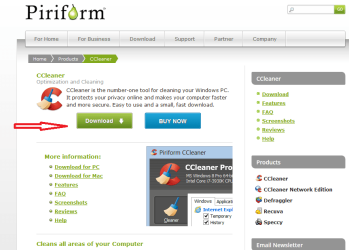
You could try CCleaner. CCleaner - PC Optimization and Cleaning - Free Download
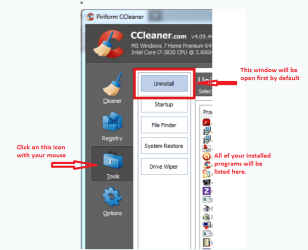
Download and install it, then go to the Tools Tab and the Uninstall Window.
Uninstall the program from there.
CCleaner will usually do the chore of removing the entry if the program is not installed, or removed from the system incorrectly.

Just to be sure, you should do a search for "Whiz" in Windows Explorer to be sure the folder does not exist somewhere.
 

My Computer

Computer type
PC/Desktop
Computer Manufacturer/Model Number
Home Built - Jan 2013
OS
Windows 7 64 Bit Home Premium SP1
CPU
i7-3820
Motherboard
Asus P9X79-PRO - Bios 4608
Memory
GSkill F3-14900CL9Q - 16GB
Graphics Card(s)
EVGA GeForce GTX660 - Driver 352.86
Sound Card
On board Realtek ALC898
Monitor(s) Displays
Acer S271HL
Screen Resolution
1920 x 1080
Hard Drives
#1- Samsung 840 Pro Series
#2- Western Digital WD1002FAEX Sata3 Black
#3- Western Digital WD1002FAEX Sata3 Black
PSU
Corsair CMPSU-850TX-V2 - 850 watt (by Seasonic)
Case
Corsair Obsidian 550D
Cooling
Standard 3 120mm case fans, Cooler Master Hyper 212 EVO
Keyboard
MS KC-0405
Mouse
Intellimouse 5-button
Internet Speed
56 Mbits/Sec (on a good day)
Antivirus
Avast & Malwarebytes
Browser
Firefox
Other Info
Asus DVD - DRW-24B1ST 24X
Thanks. TVeblen. Hadn't thought of that. I'll give it a go & let you know how things turn out.

OK, a question before I start: I've managed to dodge the "buy' prompts, but now I'm being shown a screen with a lot of things checked off. I am further informed by a warning that I am about to get rid of some things "permanently." I know I'll lose passwords, etc., but will I lose all of my Facebook entries? That happened the last time I cleared my cache.
 

My Computer

Computer type
PC/Desktop
Computer Manufacturer/Model Number
Custom
OS
Windows 7 Home Premium 64-bit, service pack 1
CPU
Intel box core i5 4460
Motherboard
Asus B85MECSM 1150
Memory
Kingston Hyper X Fury BLK 1866 8GB 4x2
Monitor(s) Displays
Samsung 23" wide-screen
Screen Resolution
1920 X 1080
Hard Drives
WD Passport, 1 TB
Case
Win Z583 Mini Tower w/ USB3.0
Keyboard
Microsoft ergo wave
Mouse
Logitech wireless
Antivirus
Bitdefender; Malwarebytes Pro
Browser
IE11
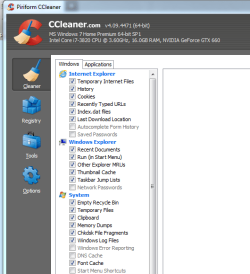
It sounds like you are on the "Cleaner" Tab. That is a great tool, but not what you want right now.

Go to the "Tools" Tab. The "Uninstall" window will open by default. Then find "Driver Whiz" in the list of programs and uninstall it.
 

My Computer

Computer type
PC/Desktop
Computer Manufacturer/Model Number
Home Built - Jan 2013
OS
Windows 7 64 Bit Home Premium SP1
CPU
i7-3820
Motherboard
Asus P9X79-PRO - Bios 4608
Memory
GSkill F3-14900CL9Q - 16GB
Graphics Card(s)
EVGA GeForce GTX660 - Driver 352.86
Sound Card
On board Realtek ALC898
Monitor(s) Displays
Acer S271HL
Screen Resolution
1920 x 1080
Hard Drives
#1- Samsung 840 Pro Series
#2- Western Digital WD1002FAEX Sata3 Black
#3- Western Digital WD1002FAEX Sata3 Black
PSU
Corsair CMPSU-850TX-V2 - 850 watt (by Seasonic)
Case
Corsair Obsidian 550D
Cooling
Standard 3 120mm case fans, Cooler Master Hyper 212 EVO
Keyboard
MS KC-0405
Mouse
Intellimouse 5-button
Internet Speed
56 Mbits/Sec (on a good day)
Antivirus
Avast & Malwarebytes
Browser
Firefox
Other Info
Asus DVD - DRW-24B1ST 24X
As far as the Cleaner goes, you use this to do a system cleanup and save file space.
You would not do this while you have programs running or your browser running. As a matter of fact, CCleaner will tell you that you need to close your browser before you can proceed.

You should bookmark all open tabs, save any work, and log out of any sites. When you start again after cleaning you will be starting your sessions over again fresh. Do not rely of the "Restore Session" function if you are going to do a cleanup.

The browser cache is where the vast majority of questionable files (potential threats) reside whenever doing a security scan. It is not a good idea to use the cache as a file folder. A better idea is to clear the cache often, or at least every time you shut down IMHO.
 

My Computer

Computer type
PC/Desktop
Computer Manufacturer/Model Number
Home Built - Jan 2013
OS
Windows 7 64 Bit Home Premium SP1
CPU
i7-3820
Motherboard
Asus P9X79-PRO - Bios 4608
Memory
GSkill F3-14900CL9Q - 16GB
Graphics Card(s)
EVGA GeForce GTX660 - Driver 352.86
Sound Card
On board Realtek ALC898
Monitor(s) Displays
Acer S271HL
Screen Resolution
1920 x 1080
Hard Drives
#1- Samsung 840 Pro Series
#2- Western Digital WD1002FAEX Sata3 Black
#3- Western Digital WD1002FAEX Sata3 Black
PSU
Corsair CMPSU-850TX-V2 - 850 watt (by Seasonic)
Case
Corsair Obsidian 550D
Cooling
Standard 3 120mm case fans, Cooler Master Hyper 212 EVO
Keyboard
MS KC-0405
Mouse
Intellimouse 5-button
Internet Speed
56 Mbits/Sec (on a good day)
Antivirus
Avast & Malwarebytes
Browser
Firefox
Other Info
Asus DVD - DRW-24B1ST 24X
I can't find the "Tools" option on the Piriform CCleaner page.
 

My Computer

Computer type
PC/Desktop
Computer Manufacturer/Model Number
Custom
OS
Windows 7 Home Premium 64-bit, service pack 1
CPU
Intel box core i5 4460
Motherboard
Asus B85MECSM 1150
Memory
Kingston Hyper X Fury BLK 1866 8GB 4x2
Monitor(s) Displays
Samsung 23" wide-screen
Screen Resolution
1920 X 1080
Hard Drives
WD Passport, 1 TB
Case
Win Z583 Mini Tower w/ USB3.0
Keyboard
Microsoft ergo wave
Mouse
Logitech wireless
Antivirus
Bitdefender; Malwarebytes Pro
Browser
IE11
Page???
Did you Download and install the program?
*
Capture1.PNG

When you first start it it looks like this:
*
Capture2.PNG

And you click on the Tools Tab like this:
*
Capture3.PNG
 

My Computer

Computer type
PC/Desktop
Computer Manufacturer/Model Number
Home Built - Jan 2013
OS
Windows 7 64 Bit Home Premium SP1
CPU
i7-3820
Motherboard
Asus P9X79-PRO - Bios 4608
Memory
GSkill F3-14900CL9Q - 16GB
Graphics Card(s)
EVGA GeForce GTX660 - Driver 352.86
Sound Card
On board Realtek ALC898
Monitor(s) Displays
Acer S271HL
Screen Resolution
1920 x 1080
Hard Drives
#1- Samsung 840 Pro Series
#2- Western Digital WD1002FAEX Sata3 Black
#3- Western Digital WD1002FAEX Sata3 Black
PSU
Corsair CMPSU-850TX-V2 - 850 watt (by Seasonic)
Case
Corsair Obsidian 550D
Cooling
Standard 3 120mm case fans, Cooler Master Hyper 212 EVO
Keyboard
MS KC-0405
Mouse
Intellimouse 5-button
Internet Speed
56 Mbits/Sec (on a good day)
Antivirus
Avast & Malwarebytes
Browser
Firefox
Other Info
Asus DVD - DRW-24B1ST 24X
I can get to the middle (2nd) screen shot you posted, but do not know how to get to "uninstall." Sorry to be so dense! :confused:
 

My Computer

Computer type
PC/Desktop
Computer Manufacturer/Model Number
Custom
OS
Windows 7 Home Premium 64-bit, service pack 1
CPU
Intel box core i5 4460
Motherboard
Asus B85MECSM 1150
Memory
Kingston Hyper X Fury BLK 1866 8GB 4x2
Monitor(s) Displays
Samsung 23" wide-screen
Screen Resolution
1920 X 1080
Hard Drives
WD Passport, 1 TB
Case
Win Z583 Mini Tower w/ USB3.0
Keyboard
Microsoft ergo wave
Mouse
Logitech wireless
Antivirus
Bitdefender; Malwarebytes Pro
Browser
IE11
Thanks for the reply, TVeblen. What happens when I do what you suggested is that an "install wizard" window opens. It's like they don't want me to get rid of their program, and I don't want to be stuck with it.

What happens when you continue with this ? Don`t you get a window with the 3 options: Modify, Repair or Remove ?


Are you clicking on the Tools icon of Ccleaner ?
 

My Computer

Computer type
PC/Desktop
Computer Manufacturer/Model Number
Skylake Special #666
OS
Windows 10 Pro x64
CPU
Intel Core i7 6700K
Motherboard
Asus Sabertooth Z170 Mark 1
Memory
GSkill TridentZ RGB 16GB 3600 16-16-16-36
Graphics Card(s)
EVGA GTX 980 Ti SC x2
Sound Card
Realtek High Definition
Monitor(s) Displays
AOC G2460PG
Screen Resolution
1920 x 1080 144Hz
Hard Drives
Samsung 860 Pro 256GB, Seagate Barracuda 4TB x2
PSU
EVGA 1000 P2, EVGA White Custom Braided Cables
Case
Corsair Vengeance C70 Gunmetal Black
Cooling
Corsair H100i v2, Corsair ML120 x2, Thermal Grizzly Kryonaut
Keyboard
Logitech G910 Orion Spectrum
Mouse
Logitech G700s
Internet Speed
Verizon Fios Quantum Gateway 75/75
Antivirus
Windows Defender, Malwarebytes Free 3.8.3
Browser
Chrome
Other Info
Corsair SP120 x4, LG Blu-ray Drive, Durabrand HT-395 100 Watt Dolby Digital Amp, Corsair H2100 Wireless 7.1 Headset
Capture.PNG
 

My Computer

Computer type
PC/Desktop
Computer Manufacturer/Model Number
Home Built - Jan 2013
OS
Windows 7 64 Bit Home Premium SP1
CPU
i7-3820
Motherboard
Asus P9X79-PRO - Bios 4608
Memory
GSkill F3-14900CL9Q - 16GB
Graphics Card(s)
EVGA GeForce GTX660 - Driver 352.86
Sound Card
On board Realtek ALC898
Monitor(s) Displays
Acer S271HL
Screen Resolution
1920 x 1080
Hard Drives
#1- Samsung 840 Pro Series
#2- Western Digital WD1002FAEX Sata3 Black
#3- Western Digital WD1002FAEX Sata3 Black
PSU
Corsair CMPSU-850TX-V2 - 850 watt (by Seasonic)
Case
Corsair Obsidian 550D
Cooling
Standard 3 120mm case fans, Cooler Master Hyper 212 EVO
Keyboard
MS KC-0405
Mouse
Intellimouse 5-button
Internet Speed
56 Mbits/Sec (on a good day)
Antivirus
Avast & Malwarebytes
Browser
Firefox
Other Info
Asus DVD - DRW-24B1ST 24X
Did not realize the lunch box was a tool kit. My bad. Will try again. I appreciate your patience with me.
 

My Computer

Computer type
PC/Desktop
Computer Manufacturer/Model Number
Custom
OS
Windows 7 Home Premium 64-bit, service pack 1
CPU
Intel box core i5 4460
Motherboard
Asus B85MECSM 1150
Memory
Kingston Hyper X Fury BLK 1866 8GB 4x2
Monitor(s) Displays
Samsung 23" wide-screen
Screen Resolution
1920 X 1080
Hard Drives
WD Passport, 1 TB
Case
Win Z583 Mini Tower w/ USB3.0
Keyboard
Microsoft ergo wave
Mouse
Logitech wireless
Antivirus
Bitdefender; Malwarebytes Pro
Browser
IE11
Success! Thank you so much for sticking with me and all of my totally "notta clue" questions.
 

My Computer

Computer type
PC/Desktop
Computer Manufacturer/Model Number
Custom
OS
Windows 7 Home Premium 64-bit, service pack 1
CPU
Intel box core i5 4460
Motherboard
Asus B85MECSM 1150
Memory
Kingston Hyper X Fury BLK 1866 8GB 4x2
Monitor(s) Displays
Samsung 23" wide-screen
Screen Resolution
1920 X 1080
Hard Drives
WD Passport, 1 TB
Case
Win Z583 Mini Tower w/ USB3.0
Keyboard
Microsoft ergo wave
Mouse
Logitech wireless
Antivirus
Bitdefender; Malwarebytes Pro
Browser
IE11
Did not realize the lunch box was a tool kit. My bad. Will try again. I appreciate your patience with me.

Hi Notty, you don't keep tools in your lunchbox? :p
 

My Computer

Computer type
PC/Desktop
Computer Manufacturer/Model Number
Self Built
OS
Win 10 Pro x64
CPU
Intel I5-2500K @3.3GHz
Motherboard
Asrock P67 Extreme4
Memory
16GB G.Skill Ripjaws X (4x4GB)
Graphics Card(s)
EVGA GeForce 750 Ti SC 2GB
Sound Card
ASUS Xonar DG 5.1 Channels 24-bit 96KHz PCI Interface Sound
Monitor(s) Displays
auria eq2367
Screen Resolution
1920 x 1080
Hard Drives
250GB Samsung 850 EVO SSD
1TB WD Blue
1TB Hitachi
PSU
SeaSonic X 650W 80 Plus Gold
Case
Corsair Obsidian 750D
Cooling
Corsair H60, Three 140mm case fans
Keyboard
Logitech Wireless Keyboard K520
Mouse
Logitech Wireless Mouse M310
Internet Speed
Wave Broadband ~ 100 dn 5 up
Antivirus
Windows Defender, Malwarebytes Premium
Browser
Edge, IE11, Chrome
Other Info
Laptop specs: HP g7-1365dx /
CPU: AMD A6-3420M APU with Radeon(tm) HD Graphics /
RAM: Crucial 8Gb (2x4Gb) /
SSD: Crucial M4-CT128M4SSD2 ATA Device/ FW 000F /
GFX: AMD Radeon HD 6520G /
OS: Windows 10 Pro x64
Glad to help! Congrats.

And why are OPTIONS a Gear Wheel?
Maybe the developer of CCleaner was a auto mechanic in another life. The gear goes in a transmission that gives you speed and power options. The tools go in a toolbox.
 

My Computer

Computer type
PC/Desktop
Computer Manufacturer/Model Number
Home Built - Jan 2013
OS
Windows 7 64 Bit Home Premium SP1
CPU
i7-3820
Motherboard
Asus P9X79-PRO - Bios 4608
Memory
GSkill F3-14900CL9Q - 16GB
Graphics Card(s)
EVGA GeForce GTX660 - Driver 352.86
Sound Card
On board Realtek ALC898
Monitor(s) Displays
Acer S271HL
Screen Resolution
1920 x 1080
Hard Drives
#1- Samsung 840 Pro Series
#2- Western Digital WD1002FAEX Sata3 Black
#3- Western Digital WD1002FAEX Sata3 Black
PSU
Corsair CMPSU-850TX-V2 - 850 watt (by Seasonic)
Case
Corsair Obsidian 550D
Cooling
Standard 3 120mm case fans, Cooler Master Hyper 212 EVO
Keyboard
MS KC-0405
Mouse
Intellimouse 5-button
Internet Speed
56 Mbits/Sec (on a good day)
Antivirus
Avast & Malwarebytes
Browser
Firefox
Other Info
Asus DVD - DRW-24B1ST 24X
Back
Top