Cannot Unpin a Network Folder from Jump List

copernicus

New member
Power User
VIP
Local time
11:57 AM
Messages
620
Having an issue with the jumplist for the the library icon.

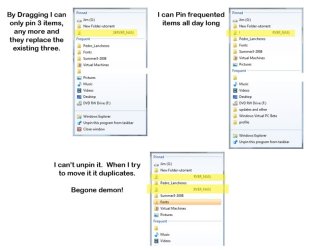
I can't pin more than three items by dragging. I can pinned frequently used items.

Also there's one pinned item I can't unpin, but it does allow me to pin it more than once. =?

Where in the registry is the jump list stuff for the libraries item.

7100 build, 64 bit, format > clean install.
 
Last edited by a moderator:

My Computer

OS
7264x64/7260x86
Hello Copernicus,

Could you post a screenshot of this with the one that you cannot unpin highlighted?

You might also check to see how many recent Items and Programs you have set to be displayed to see if it is set to 3 by mistake.
 

My Computer

Computer type
PC/Desktop
Computer Manufacturer/Model Number
Self built custom
OS
64-bit Windows 11 Pro for Workstations
CPU
Intel i7-8700K OC'd to 5 GHz
Motherboard
ASUS ROG Maximus XI Formula Z390
Memory
64 GB (4x16GB) G.SKILL TridentZ RGB DDR4 3600 MHz
Graphics Card(s)
ASUS ROG-STRIX-GTX1080TI-O11G-GAMING
Sound Card
Integrated
Monitor(s) Displays
2 x Samsung Odyssey G7 27"
Screen Resolution
2560x1440
Hard Drives
1TB Samsung 990 PRO M.2,
4TB Samsung 990 PRO PRO M.2,
TerraMaster F8 SSD Plus NAS
PSU
Seasonic Prime Titanium 850W
Case
Thermaltake Core P3
Cooling
Corsair Hydro H115i
Keyboard
Logitech wireless K800
Mouse
Logitech MX Master 4
Internet Speed
2 Gb/s Download and 100 Mb/s Upload
Antivirus
Malwarebyte Anti-Malware Premium
Browser
Google Chrome
Other Info
Logitech Z625 speaker system,
Logitech BRIO 4K Pro webcam,
HP Color LaserJet Pro MFP M477fdn,
APC SMART-UPS RT 1000 XL - SURT1000XLI,
Galaxy S23 Plus phone
its a network folder that I pinned, but I can pin an unpin other network folders. its not a limit because if I pin frequent used from the list the pun and add more than three, ill post a screen when I hey back to the machine

thanks
 

My Computer

OS
7264x64/7260x86
My screenshot with awesome explanations:
 

Attachments

  • pinned.demon.jpg
    pinned.demon.jpg
    40.2 KB · Views: 527

My Computer

OS
7264x64/7260x86
The issue of being unable to unpin got resolved, i started messing with the taskbar options. Turned off "Store and display recently opened items in the Start menu and the taskbar". Unpinned the folder in question, and it finally went away.

However it seems your not allowed to pin two shares residing on the same network device. Everytime I try to pin the second share, it replaces the first one, or clears the pinned list.

You can't pin sibling network drives either. This seems like a huge bug.

Pining network destitions is very very wonky. =/
 

My Computer

OS
7264x64/7260x86
Compernicus,

I'm happy to hear that you got the main issue sorted out. Thank you for posting back with the solution that you found. :)
 

My Computer

Computer type
PC/Desktop
Computer Manufacturer/Model Number
Self built custom
OS
64-bit Windows 11 Pro for Workstations
CPU
Intel i7-8700K OC'd to 5 GHz
Motherboard
ASUS ROG Maximus XI Formula Z390
Memory
64 GB (4x16GB) G.SKILL TridentZ RGB DDR4 3600 MHz
Graphics Card(s)
ASUS ROG-STRIX-GTX1080TI-O11G-GAMING
Sound Card
Integrated
Monitor(s) Displays
2 x Samsung Odyssey G7 27"
Screen Resolution
2560x1440
Hard Drives
1TB Samsung 990 PRO M.2,
4TB Samsung 990 PRO PRO M.2,
TerraMaster F8 SSD Plus NAS
PSU
Seasonic Prime Titanium 850W
Case
Thermaltake Core P3
Cooling
Corsair Hydro H115i
Keyboard
Logitech wireless K800
Mouse
Logitech MX Master 4
Internet Speed
2 Gb/s Download and 100 Mb/s Upload
Antivirus
Malwarebyte Anti-Malware Premium
Browser
Google Chrome
Other Info
Logitech Z625 speaker system,
Logitech BRIO 4K Pro webcam,
HP Color LaserJet Pro MFP M477fdn,
APC SMART-UPS RT 1000 XL - SURT1000XLI,
Galaxy S23 Plus phone
Back
Top