Solved Cannot Update, Code 800B0100

sasquatchalex

New member
Local time
4:39 AM
Messages
15
I've done a fresh install of Windows 7 on my new setup, Windows Update had about 135 important update to install, it got through about 100 of them and now I'm hung up on the last few (29). I have look through many tut's on this issue, and im not getting anywhere.

Ive downloaded and run the SURT, a couple of times, as well as run a sfc scan a bunch of times (both in cmd and at boot). The sfc scan tells me there are errors, but it cannot fix them

Ive tried only selecting a few (or individual) updates to see if there is one causing the problem, but to no avail (though i have NOT tried this with EVERY single update remaining)

Given the number of updates remaining, should i bother listing them?


Also, I have not attached my zipped Log file yet, as it is 60mb (possibly from running a million scans?)

Thanks for any incite on the issue


(P.S. This is my second install on this drive, the first time the updates installed just fine, but I started getting BSOD'd when i started installing the rest of my software)

(P.S.S.... I tried installing an optional update just to see, installed just fine; confusion continues)
 

My Computer

Computer type
PC/Desktop
OS
Window 7 Professional 64bit
Hey, I am not knowledgeable in troubleshooting your problem, just wanted to say:

- You can upload the file to a cloud service like MS OneDrive or Dropbox. Post a link to the file when you do, so experts can look at it. Compressing may also help.

I don't know if there is a way to delete that file and whether rerunning the tool would result in a smaller file though. So wait for another person to comment if you so wish.
 

My Computer

Computer type
PC/Desktop
Computer Manufacturer/Model Number
Custom Build
OS
Windows 7 Ultimate x64 SP1
CPU
AMD Phenom 2 1090T
Motherboard
Gigabyte GA-890FXA-UD5
Memory
2x8GB Kingston HyperX Fury Black 1600Mhz Unganged
Graphics Card(s)
MSI GTX 970 Gaming 4G
Sound Card
Realtek On-Board HD 7.1 Audio / Logitech G35
Monitor(s) Displays
3xAcer GD245HQ
Screen Resolution
1920x1080
Hard Drives
Samsung 850 Pro 512GB SSD - OS /
WD Caviar Black SATA 3 - 1 TBx2 - Dynamic RAID 0 /
WD Caviar Green SATA 2 - 640GBx2 - Dynamic RAID 0 /
WD Caviar Green SATA 2 - 640GB - Internal Backup /
Seagate Barracude SATA 3 - 3TB - External Backup/ Sync
PSU
HighPower 1000W
Case
Cooler Master HAF 932
Cooling
Noctua NH-D14
Keyboard
Logitech G19
Mouse
Logitech G500
Internet Speed
100/4 Mbit Cable (100GB quota)
Antivirus
ZoneAlarm Extreme Security / MBAM Pro / MBAE Free / SAS Free
Browser
IE 11 - Firefox - Chrome
Other Info
Logitech F710/ G27/ G940/ Z5500 // TrackIR 5 // Nvidia 3D Surround Vision
Please follow the Windows Update Posting Instructions and post the requested data

If the file is too large (8MB compressed), remove the older CBSPersist cab files until the final file is below the limit - you can always post them separately after zipping them. (the forum doesn't allow the upload of bare CAB files, for a number of reasons)

Please also post the C:\Windows\windowsudpate.log file
 

My Computer

Computer type
Laptop
Computer Manufacturer/Model Number
Asus K52F or Lenovo B51-80
OS
Win 7 x64 Home Premium (and x86 VirtualBox VM)/Win10
CPU
i3 370M/i7 6500U
Motherboard
Asus/Lenovo
Memory
8GB - finally :)/8GB
Graphics Card(s)
it's an i3, dude!/dual Intel&nVidia
Sound Card
onboard
Monitor(s) Displays
15.6" built-in
Screen Resolution
1366x768/1920x1080
Hard Drives
750GB Seagate internal
Sundry external drives attached to other computers on the local network
1TB SSD on the Lenovo
PSU
n/a
Internet Speed
as much as I can get - usually on a dongle/phone, so <1MB/s
Antivirus
MSE/Defender
Browser
IE11/12/Edge/Chrome/FF(if I must)
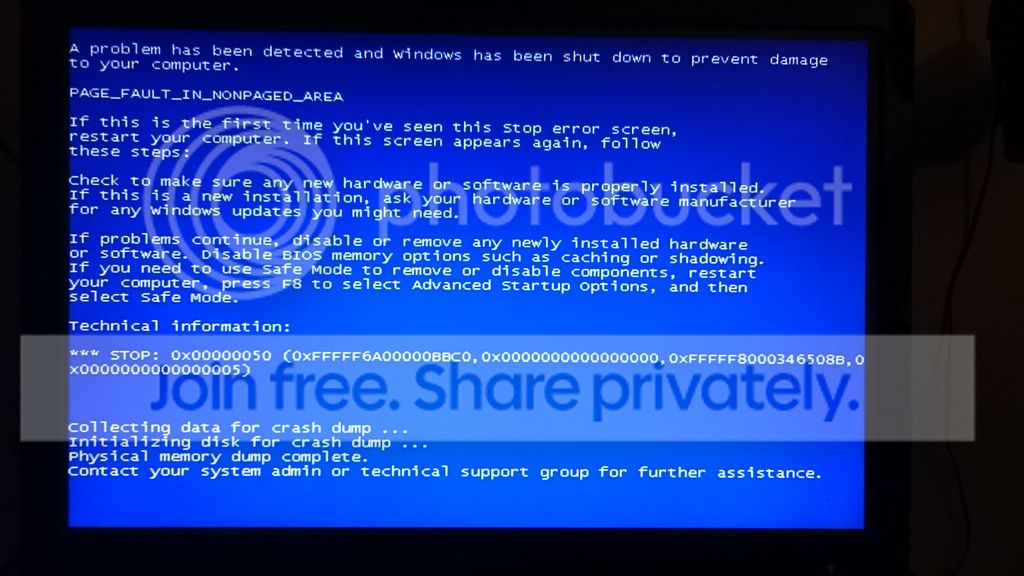
Deleted older CBSPersist files, trying to run scan again, and now my system is blue screening

When I started up again, I got a window that says "Window has recovered from an unexpected shutdown" and gives me some details;

Problem signature:
Problem Event Name: BlueScreen
OS Version: 6.1.7601.2.1.0.256.48
Locale ID: 4105
Additional information about the problem:
BCCode: 50
BCP1: FFFFF6A00000BBC0
BCP2: 0000000000000000
BCP3: FFFFF8000346508B
BCP4: 0000000000000005
OS Version: 6_1_7601
Service Pack: 1_0
Product: 256_1
Files that help describe the problem:
C:\Windows\Minidump\051715-4836-01.dmp
C:\Users\Alex\AppData\Local\Temp\WER-6676-0.sysdata.xml
Read our privacy statement online:
Windows 7 Privacy Statement - Microsoft Windows
If the online privacy statement is not available, please read our privacy statement offline:
C:\Windows\system32\en-US\erofflps.txt

I've also grabbed a picture of the BSOD, I'm not sure if this will help though,

DSC_0037_zpslmz6vyjd.jpg
 

My Computer

Computer type
PC/Desktop
OS
Window 7 Professional 64bit
ok, more blue screens, new problems cropping up... ugh

going re-install windows again, im sure ill be back soon with some error logs

and sorry for that image size, im having to do most of this through my phone and im having a hell of a time
 

My Computer

Computer type
PC/Desktop
OS
Window 7 Professional 64bit
I formatted my drive on another machine, did a clean install and was able to finish my updates, i really have NO idea why it worked this time.

I an still getting BSOD from time to time though, so i figure ill mark this thread as solved and take my issues to the appropriate thread
 

My Computer

Computer type
PC/Desktop
OS
Window 7 Professional 64bit
Good luck!
 

My Computer

Computer type
Laptop
Computer Manufacturer/Model Number
Asus K52F or Lenovo B51-80
OS
Win 7 x64 Home Premium (and x86 VirtualBox VM)/Win10
CPU
i3 370M/i7 6500U
Motherboard
Asus/Lenovo
Memory
8GB - finally :)/8GB
Graphics Card(s)
it's an i3, dude!/dual Intel&nVidia
Sound Card
onboard
Monitor(s) Displays
15.6" built-in
Screen Resolution
1366x768/1920x1080
Hard Drives
750GB Seagate internal
Sundry external drives attached to other computers on the local network
1TB SSD on the Lenovo
PSU
n/a
Internet Speed
as much as I can get - usually on a dongle/phone, so <1MB/s
Antivirus
MSE/Defender
Browser
IE11/12/Edge/Chrome/FF(if I must)
Back
Top