
unstableone
New member
- Local time
- 6:25 PM
- Messages
- 1
Hi.
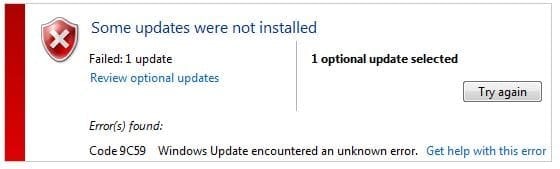
Today I finally decided to update IE, but unfortunately windows update failed(see screenshot). I downloaded a standalone IE10 package and tried to install it, but it didn't help either. Then I decided to uninstall IE9 before installing IE 10. Alas, uninstalling it from windows updates list didn't work.
Then I decided to remove IE9 by turning it off in "Windows features", but instead of features list, the system showed me an empty list. After some research, I followed instructions written here. That fixed Windows Features list, but still I was unable to disable IE this way.
Then I tried running following in elevated command prompt:
Here are results:
Unfortunately, it didn't actually uninstall IE9.
[sfc /scannow] ran successfully, no problems here.
SURT Logs attached. I would appreciate any advice.
Today I finally decided to update IE, but unfortunately windows update failed(see screenshot). I downloaded a standalone IE10 package and tried to install it, but it didn't help either. Then I decided to uninstall IE9 before installing IE 10. Alas, uninstalling it from windows updates list didn't work.
Then I decided to remove IE9 by turning it off in "Windows features", but instead of features list, the system showed me an empty list. After some research, I followed instructions written here. That fixed Windows Features list, but still I was unable to disable IE this way.
Then I tried running following in elevated command prompt:
Code:
FORFILES /P %WINDIR%\servicing\Packages /M Microsoft-Windows-InternetExplorer-*9.*.mum /c "cmd /c echo Uninstalling package @fname && start /w pkgmgr /up:@fname /norestart"Here are results:
Code:
Uninstalling package "Microsoft-Windows-InternetExplorer-Optional-Package~31bf38
56ad364e35~amd64~en-US~9.4.8112.16421"
Uninstalling package "Microsoft-Windows-InternetExplorer-Optional-Package~31bf38
56ad364e35~amd64~~9.4.8112.16421"
Uninstalling package "Microsoft-Windows-InternetExplorer-Package-MiniLP~31bf3856
ad364e35~amd64~en-US~9.4.8112.16421"
Uninstalling package "Microsoft-Windows-InternetExplorer-Package-TopLevel~31bf38
56ad364e35~amd64~~9.4.8112.16421"
Uninstalling package "Microsoft-Windows-InternetExplorer-Package~31bf3856ad364e3
5~amd64~en-US~9.4.8112.16421"
Uninstalling package "Microsoft-Windows-InternetExplorer-Package~31bf3856ad364e3
5~amd64~~9.4.8112.16421"
Uninstalling package "Microsoft-Windows-InternetExplorer-VistaPlus-Update~31bf38
56ad364e35~amd64~~9.4.8112.16421"
Unfortunately, it didn't actually uninstall IE9.
[sfc /scannow] ran successfully, no problems here.
SURT Logs attached. I would appreciate any advice.
Attachments
My Computer
- Computer type
- PC/Desktop
- OS
- Win7 Ultimate x64


