Cannot update Win 7 .Cannot install win update software !

NICK1000

New member
Local time
9:03 AM
Messages
21
Location
Sydney
I have an older HP laptop Pavilion dv6-1008TU .It originally had a hdd with vista on it ,which I removed & installed a 500Gb hdd with Win7 64 bit version .It has never updated & for the last few months I have been trying to get it to run updates.
When I attempt to run the update function it comes back with a screen telling me that I need to "Install new windows update software " . It then goes away and attempts to install it , but comes back and tells me ;

"Windows could not search for new updates "
An error occurred while checking for new updates for your computer
Error found
Code: 8007010B : Windows update encountered an unknown error
-----------

I have tried to install
Windows 6.0-KB947821 - v32-x86.msu
- v 32-x64.msu
- v26 - x64.msu

It tells me that none of these updates are applicable to my computer

Am I approaching this the wrong way ?

Tonight Itried to run sfc /scannow and got the following result

Microsoft Windows [Version 6.1.7600]
Copyright (c) 2009 Microsoft Corporation. All rights reserved.

C:\Users\Nick>sfc /scannow

Beginning system scan. This process will take some time.

Beginning verification phase of system scan.
Verification 4% complete.

Windows Resource Protection could not perform the requested operation.

C:\Users\Nick>
C:\Users\Nick>sfc /scannow

Beginning system scan. This process will take some time.

Beginning verification phase of system scan.
Verification 4% complete.

Windows Resource Protection could not perform the requested operation.

C:\Users\Nick>

Does anyone have any ideas what I should do next

Thanks in advance
cheers
Nick

spinner-ani48.gif

ping.php
spinner-ani48.gif

dotclear.gif


intext-close5.png


Optimize & Fix Windows PC Er...
intext-thdefault3.png
Help your PC run faster and Fix Errors - Automatically. Download & Fix Now!
click here

Error.pc-speedup-too...


box-arrow-lb2.png
 

My Computer

OS
Win 7 & XP on diff machines

My Computer

Computer type
Laptop
Computer Manufacturer/Model Number
Asus K52F or Lenovo B51-80
OS
Win 7 x64 Home Premium (and x86 VirtualBox VM)/Win10
CPU
i3 370M/i7 6500U
Motherboard
Asus/Lenovo
Memory
8GB - finally :)/8GB
Graphics Card(s)
it's an i3, dude!/dual Intel&nVidia
Sound Card
onboard
Monitor(s) Displays
15.6" built-in
Screen Resolution
1366x768/1920x1080
Hard Drives
750GB Seagate internal
Sundry external drives attached to other computers on the local network
1TB SSD on the Lenovo
PSU
n/a
Internet Speed
as much as I can get - usually on a dongle/phone, so <1MB/s
Antivirus
MSE/Defender
Browser
IE11/12/Edge/Chrome/FF(if I must)
Noel
As far as I can tell all I left out was the CBS file . Please find attached
cheers Nick
spinner-ani48.gif


spinner-ani48.gif
 

My Computer

OS
Win 7 & XP on diff machines
There are some major errors in the background CBS data - I think they all stem from this one...
Code:
2013-11-17 17:22:52, Error                 CSI    000004bf (F) c0000103 [Error,Facility=(system),Code=259 (0x0103)] #886490# from Windows::Rtl::SystemImplementation::DirectFileSystemProvider::SysCreateFile(flags = 0, handle = [EMAIL="{provider=@0x2aaca0"]{provider=@0x2aaca0[/EMAIL], handle=0}, da = (SYNCHRONIZE), oa = @0x145d418->OBJECT_ATTRIBUTES {s:48; rd:NULL; on:[39]"\SystemRoot\WinSxS\Temp\PendingRenames\"; a:(OBJ_CASE_INSENSITIVE)}, iosb = @0x145d450, as = (null), fa = (FILE_ATTRIBUTE_DIRECTORY), sa = (FILE_SHARE_READ|FILE_SHARE_WRITE|FILE_SHARE_DELETE), cd = FILE_OPEN_IF, co = (FILE_DIRECTORY_FILE|FILE_SYNCHRONOUS_IO_NONALERT|0x00004000), eab = NULL, eal = 0, disp = (null))

It looks to me as if this is also the error that crashed the SFC scan.
I think this may be a hard drive problem.

Please run a full CHKDSK, and report the results.


Click on Start > All Programs > Accessories
Right-click on the Command Prompt entry
Select Run as Administrator and accept the UAC prompt - the Elevated Command Prompt window should pop up.

At the Command prompt, type

CHKDSK C: /R

and hit the Enter key.
You will be told that the drive is locked,
and the CHKDSK will run at he next boot - hit the Y key, press Enter, and then reboot.

The CHKDSK will take a few hours depending on the size of the drive, so be patient!

After the CHKDSK has run, Windows should boot normally (possibly after a second auto-reboot) -

You'll find the results in the Event Viewer>Windows>Application logs> Wininit as source.
 

My Computer

Computer type
Laptop
Computer Manufacturer/Model Number
Asus K52F or Lenovo B51-80
OS
Win 7 x64 Home Premium (and x86 VirtualBox VM)/Win10
CPU
i3 370M/i7 6500U
Motherboard
Asus/Lenovo
Memory
8GB - finally :)/8GB
Graphics Card(s)
it's an i3, dude!/dual Intel&nVidia
Sound Card
onboard
Monitor(s) Displays
15.6" built-in
Screen Resolution
1366x768/1920x1080
Hard Drives
750GB Seagate internal
Sundry external drives attached to other computers on the local network
1TB SSD on the Lenovo
PSU
n/a
Internet Speed
as much as I can get - usually on a dongle/phone, so <1MB/s
Antivirus
MSE/Defender
Browser
IE11/12/Edge/Chrome/FF(if I must)
Hi Noel
I ran chkdsk which when I viewed the completion screen didnt seem to have found any problems.
The only place I could find a Wininit Folder was in ; Event Viewer > Applications & Services Logs > Microsoft > Windows > Wininit> Diagnostic
 

My Computer

OS
Win 7 & XP on diff machines
And there doesn't appear to be anything in the Wininit > Diagnostic Folder
 

My Computer

OS
Win 7 & XP on diff machines
You need Event Viewer> Windows Logs > Application
then use the filter view options to select/tick Wininit as Source
 

My Computer

Computer type
Laptop
Computer Manufacturer/Model Number
Asus K52F or Lenovo B51-80
OS
Win 7 x64 Home Premium (and x86 VirtualBox VM)/Win10
CPU
i3 370M/i7 6500U
Motherboard
Asus/Lenovo
Memory
8GB - finally :)/8GB
Graphics Card(s)
it's an i3, dude!/dual Intel&nVidia
Sound Card
onboard
Monitor(s) Displays
15.6" built-in
Screen Resolution
1366x768/1920x1080
Hard Drives
750GB Seagate internal
Sundry external drives attached to other computers on the local network
1TB SSD on the Lenovo
PSU
n/a
Internet Speed
as much as I can get - usually on a dongle/phone, so <1MB/s
Antivirus
MSE/Defender
Browser
IE11/12/Edge/Chrome/FF(if I must)
Noel
Thanks I have found it & Attach a copy of the screen shot of the page & also I have copied the details to a word doc.
The strange thing is that when I went to log off after my last msg it actually tried to install the updates but without a great deal of success
I have also taken screen shots of the update history
Ihave included screen shots of trying to install SP1
 

My Computer

OS
Win 7 & XP on diff machines
The CHKDSK result is fine - Bitmap errors are common and don't usually cause problems, but can do at times. The disk appears to be healthy otherwise, and the Bitmap errors are now fixed.
The problem from your history review appears to be that the Update Agent update isn't getting installed.
Does SFC work now?

Please try the WU instructions again
Post the CBS.log file, if SFC fails again - and the error message, if CheckSUR fails
If CheckSUR runs OK, we need the CheckSUR.log file from C:\Windows\Logs\CBS
 

My Computer

Computer type
Laptop
Computer Manufacturer/Model Number
Asus K52F or Lenovo B51-80
OS
Win 7 x64 Home Premium (and x86 VirtualBox VM)/Win10
CPU
i3 370M/i7 6500U
Motherboard
Asus/Lenovo
Memory
8GB - finally :)/8GB
Graphics Card(s)
it's an i3, dude!/dual Intel&nVidia
Sound Card
onboard
Monitor(s) Displays
15.6" built-in
Screen Resolution
1366x768/1920x1080
Hard Drives
750GB Seagate internal
Sundry external drives attached to other computers on the local network
1TB SSD on the Lenovo
PSU
n/a
Internet Speed
as much as I can get - usually on a dongle/phone, so <1MB/s
Antivirus
MSE/Defender
Browser
IE11/12/Edge/Chrome/FF(if I must)
Noel
Sorry Ive been off the air for a few days but we had my sons 21st last W/E so between organising , running , & cleaning up I have just got back to all this.
I have run the SURT tool --no success
SFC still fails at the same point as my original post
CBS log attached
Screen shots of W U attached
I did mannage to set the computer running to clone the Hdd.
Installed the clone ---- same result when I tried to run W U ....same error code 8007010B
 

My Computer

OS
Win 7 & XP on diff machines
Here's the last few lines from your CBS.log file

Code:
2013-11-26 21:36:41, Info                  CSI    0000001e [SR] Beginning Verify and Repair transaction
2013-11-26 21:36:44, Error                 CSI    0000001f (F) c0000103 [Error,Facility=(system),Code=259 (0x0103)] #631210# from Windows::Rtl::SystemImplementation::DirectFileSystemProvider::SysCreateFile(flags = 0, handle = [EMAIL="{provider=@0x34aca0"]{provider=@0x34aca0[/EMAIL], handle=0}, da = (SYNCHRONIZE), oa = @0x8cc4e8->OBJECT_ATTRIBUTES {s:48; rd:NULL; on:[39]"\SystemRoot\WinSxS\Temp\PendingRenames\"; a:(OBJ_CASE_INSENSITIVE)}, iosb = @0x8cc520, as = (null), fa = (FILE_ATTRIBUTE_DIRECTORY), sa = (FILE_SHARE_READ|FILE_SHARE_WRITE|FILE_SHARE_DELETE), cd = FILE_OPEN_IF, co = (FILE_DIRECTORY_FILE|FILE_SYNCHRONOUS_IO_NONALERT|0x00004000), eab = NULL, eal = 0, disp = (null))
[gle=0xd0000103]
2013-11-26 21:36:44, Error                 CSI    [EMAIL="00000020@2013/11/26:10:36:44.764"]00000020@2013/11/26:10:36:44.764[/EMAIL] (F) d:\w7rtm\base\wcp\sil\merged\ntu\ntsystem.cpp(2062): Error c0000103 [Error,Facility=(system),Code=259 (0x0103)] originated in function Windows::Rtl::SystemImplementation::DirectFileSystemProvider::SysCreateFile expression: (null)
[gle=0x80004005]
2013-11-26 21:36:44, Error                 CSI    00000021 (F) c0000103 [Error,Facility=(system),Code=259 (0x0103)] #631207# from Windows::Rtl::SystemImplementation::CFile_IRtlFileTearoff::SetContents(file = [l:104{52}]"\SystemRoot\WinSxS\FileMaps\_0000000000000000.cdf-ms", flags = 0, contents = {l:556 b:50636d480100000000000000d36fd1205ed0487611000000880000000c0000005400000000000000000000000100000084000000000000000000000003000000ffffffffff1b352825d55541acb06e7c64c725d80500000006000000080000000d0000000f00000007000000090000000e0000000a0000000c0000000b000000...})[gle=0xd0000103]
2013-11-26 21:36:44, Error                 CSI    00000022 (F) c0000103 [Error,Facility=(system),Code=259 (0x0103)] #631201# from CFileMapContext::AddFileMapping(...)[gle=0xd0000103]
2013-11-26 21:36:44, Error                 CSI    00000023 (F) c0000103 [Error,Facility=(system),Code=259 (0x0103)] #631161# from CFileInstaller::CommitChanges(...)[gle=0xd0000103]
2013-11-26 21:36:44, Error                 CSI    00000024 (F) c0000103 [Error,Facility=(system),Code=259 (0x0103)] #631160# from PrimitiveInstaller::CCoordinator::FinalizeChanges(...)[gle=0xd0000103]


Please run the following commands

DIR %SystemRoot%\WinSxS\Temp\PendingRenames
ICACLS %SystemRoot%\WinSxS\Temp\PendingRenames
ATTRIB %SystemRoot%\WinSxS\Temp\PendingRenames

and post the output.

Here are some instructions to make life easier :)
1) To open an Elevated Command Prompt Window (the ECP window), click on Start, All Programs, Accessories – then right-click on Command Prompt, and select Run as Administrator. Accept the UAC prompt.
2) To run the commands easier, highlight the block of commands, and right-click on the highlight – select Copy. In the CP Window, click on the black/white icon at top left – select Paste. The commands will run but may not complete the last command, so hit the Enter Key once.
3) To copy the results... click on the Black/White icon in the top left, and select Edit... 'Select All', and hit the Enter key - then use Ctrl+V or r-click+Paste to paste it into your response.
 

My Computer

Computer type
Laptop
Computer Manufacturer/Model Number
Asus K52F or Lenovo B51-80
OS
Win 7 x64 Home Premium (and x86 VirtualBox VM)/Win10
CPU
i3 370M/i7 6500U
Motherboard
Asus/Lenovo
Memory
8GB - finally :)/8GB
Graphics Card(s)
it's an i3, dude!/dual Intel&nVidia
Sound Card
onboard
Monitor(s) Displays
15.6" built-in
Screen Resolution
1366x768/1920x1080
Hard Drives
750GB Seagate internal
Sundry external drives attached to other computers on the local network
1TB SSD on the Lenovo
PSU
n/a
Internet Speed
as much as I can get - usually on a dongle/phone, so <1MB/s
Antivirus
MSE/Defender
Browser
IE11/12/Edge/Chrome/FF(if I must)
Noel
Here is the result from the above commands

Microsoft Windows [Version 6.1.7600]
Copyright (c) 2009 Microsoft Corporation. All rights reserved.

C:\Users\Nick>
C:\Users\Nick>DIR %SystemRoot%\WinSxS\Temp\PendingRenames
Volume in drive C has no label.
Volume Serial Number is CC6A-5FF0

Directory of C:\Windows\WinSxS\Temp

22/10/2012 04:57 PM 0 PendingRenames
1 File(s) 0 bytes
0 Dir(s) 99,978,043,392 bytes free

C:\Users\Nick>ICACLS %SystemRoot%\WinSxS\Temp\PendingRenames
C:\Windows\WinSxS\Temp\PendingRenames NT SERVICE\TrustedInstaller:(OI)(CI)(F)
BUILTIN\Administrators:(OI)(CI)(RX)
NT AUTHORITY\SYSTEM:(OI)(CI)(RX)
BUILTIN\Users:(OI)(CI)(RX)

Successfully processed 1 files; Failed processing 0 files

C:\Users\Nick>ATTRIB %SystemRoot%\WinSxS\Temp\PendingRenames
C:\Windows\WinSxS\Temp\PendingRenames

C:\Users\Nick>
 

My Computer

OS
Win 7 & XP on diff machines
Hmm - PendingRenames is supposed to be a folder, not a file!
Please open an Elevated Command Prompt, and run the following commands.

Code:
 DEL %SystemRoot%\WinSxS\Temp\PendingRenames
 MD %SystemRoot%\WinSxS\Temp\PendingRenames
 ICACLS %SystemRoot%\WinSxS\Temp\PendingRenames /grant TrustedInstaller:(OI)(CI)(F) SYSTEM:(OI)(CI)(RX) Users:(OI)(CI)(RX) 
  
 .
post the results, then reboot twice (with at least 20 minutes between reboots).

Run another SFC /SCANNOW, and post the new CBS folder
 

My Computer

Computer type
Laptop
Computer Manufacturer/Model Number
Asus K52F or Lenovo B51-80
OS
Win 7 x64 Home Premium (and x86 VirtualBox VM)/Win10
CPU
i3 370M/i7 6500U
Motherboard
Asus/Lenovo
Memory
8GB - finally :)/8GB
Graphics Card(s)
it's an i3, dude!/dual Intel&nVidia
Sound Card
onboard
Monitor(s) Displays
15.6" built-in
Screen Resolution
1366x768/1920x1080
Hard Drives
750GB Seagate internal
Sundry external drives attached to other computers on the local network
1TB SSD on the Lenovo
PSU
n/a
Internet Speed
as much as I can get - usually on a dongle/phone, so <1MB/s
Antivirus
MSE/Defender
Browser
IE11/12/Edge/Chrome/FF(if I must)
Noel
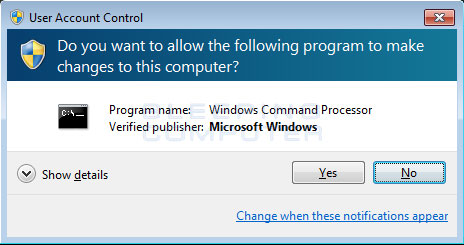
when i click "Run as administrator " I do not get the following window

uac-prompt.jpg


Is this correct
 

My Computer

OS
Win 7 & XP on diff machines
Microsoft Windows [Version 6.1.7600]
Copyright (c) 2009 Microsoft Corporation. All rights reserved.

C:\Users\Nick> DEL %SystemRoot%\WinSxS\Temp\PendingRenames
C:\Windows\WinSxS\Temp\PendingRenames
Access is denied.

C:\Users\Nick> MD %SystemRoot%\WinSxS\Temp\PendingRenames
A subdirectory or file C:\Windows\WinSxS\Temp\PendingRenames already exists.

C:\Users\Nick> ICACLS %SystemRoot%\WinSxS\Temp\PendingRenames /grant TrustedInst
aller:(OI)(CI)(F) SYSTEM:(OI)(CI)(RX) Users:(OI)(CI)(RX)
TrustedInstaller: No mapping between account names and security IDs was done.
Successfully processed 0 files; Failed processing 1 files

C:\Users\Nick>
C:\Users\Nick> .
 

My Computer

OS
Win 7 & XP on diff machines
OK - I goofed :)

Yes the pop-up is expected and you should answer Yes to it - if it doesn't appear then you would seen to be running with UAC disabled.

Here's the proper commands....


Code:
 TAKEOWN /F %SystemRoot%\WinSxS\Temp\PendingRenames
ICACLS %SystemRoot%\WinSxS\Temp\PendingRenames /grant Administrators:(F)
 DEL %SystemRoot%\WinSxS\Temp\PendingRenames
MD %SystemRoot%\WinSxS\Temp\PendingRenames
ICACLS %SystemRoot%\WinSxS\Temp\PendingRenames /grant TrustedInstaller:(OI)(CI)(F) SYSTEM:(OI)(CI)(RX) Users:(OI)(CI)(RX) 
  
.

Try that and see if it works any better.
 

My Computer

Computer type
Laptop
Computer Manufacturer/Model Number
Asus K52F or Lenovo B51-80
OS
Win 7 x64 Home Premium (and x86 VirtualBox VM)/Win10
CPU
i3 370M/i7 6500U
Motherboard
Asus/Lenovo
Memory
8GB - finally :)/8GB
Graphics Card(s)
it's an i3, dude!/dual Intel&nVidia
Sound Card
onboard
Monitor(s) Displays
15.6" built-in
Screen Resolution
1366x768/1920x1080
Hard Drives
750GB Seagate internal
Sundry external drives attached to other computers on the local network
1TB SSD on the Lenovo
PSU
n/a
Internet Speed
as much as I can get - usually on a dongle/phone, so <1MB/s
Antivirus
MSE/Defender
Browser
IE11/12/Edge/Chrome/FF(if I must)
Microsoft Windows [Version 6.1.7600]
Copyright (c) 2009 Microsoft Corporation. All rights reserved.

C:\Users\Nick> TAKEOWN /F %SystemRoot%\WinSxS\Temp\PendingRenames

SUCCESS: The file (or folder): "C:\Windows\WinSxS\Temp\PendingRenames" now owned
by user "Nicks-Laptop\Nick".

C:\Users\Nick>ICACLS %SystemRoot%\WinSxS\Temp\PendingRenames /grant Administrato
rs:(F)
processed file: C:\Windows\WinSxS\Temp\PendingRenames
Successfully processed 1 files; Failed processing 0 files

C:\Users\Nick> DEL %SystemRoot%\WinSxS\Temp\PendingRenames

C:\Users\Nick>MD %SystemRoot%\WinSxS\Temp\PendingRenames
Access is denied.

C:\Users\Nick>ICACLS %SystemRoot%\WinSxS\Temp\PendingRenames /grant TrustedInsta
ller:(OI)(CI)(F) SYSTEM:(OI)(CI)(RX) Users:(OI)(CI)(RX)
TrustedInstaller: No mapping between account names and security IDs was done.
Successfully processed 0 files; Failed processing 1 files

C:\Users\Nick>
C:\Users\Nick>.
 

My Computer

OS
Win 7 & XP on diff machines
sfc scannow seems to be going ok. its past 15 %. Ill send results when done
 

My Computer

OS
Win 7 & XP on diff machines
Microsoft Windows [Version 6.1.7600]
Copyright (c) 2009 Microsoft Corporation. All rights reserved.

C:\Users\Nick>SFC /SCANNOW

Beginning system scan. This process will take some time.

Beginning verification phase of system scan.
Verification 100% complete.
Windows Resource Protection found corrupt files but was unable to fix some of th
em.
Details are included in the CBS.Log windir\Logs\CBS\CBS.log. For example
C:\Windows\Logs\CBS\CBS.log

C:\Users\Nick>
 

My Computer

OS
Win 7 & XP on diff machines
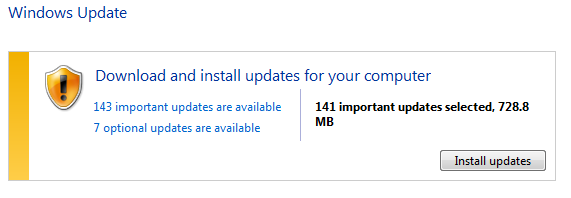
just ran W U again
Looks like it might work

f26bf860eee589c2d886c8991b897a84.png
 

My Computer

OS
Win 7 & XP on diff machines
Back
Top