

Well hello everyone, I hardly drop in anymore except when I have a problem. So here is the latest:
I have Firefox 12.0. For several months it's been asking me to update, but it always fails and issues the following message:
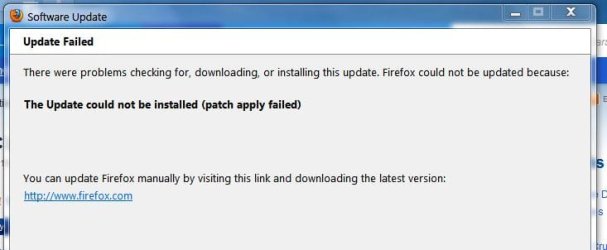
I tried updating manually. The first time it kept trying to force me to accept the newsletter. The last time, it just generated this same message that I've been seeing with every prompted update.
Also I frequently cannot open firefox because there is already a firefox.exe process loaded and not responding. So apparently it doesn't always close in the background when I close it from the "X" button. Is this a bug that the new version fixes? I would suspect some malware wanted to keep it open for some malicious reason, but weekly scans with MBAM and ongoing scans by NIS 2012 do not detect any malware. I'm the only user on my desktop PC computer and am vigilant about keeping it clean and streamlined. All Windows updates are current up until this week's.
Any idea what may be the problem?
Thanks,
Rusty
EDIT: I should add: if Firefox.exe keeps getting stuck in the background, a reboot will cure it for a couple of days. Since Windows Seven, I have not rebooted every day whether it needs it or not, like I always did before, since the beginning of Windows time.
I have Firefox 12.0. For several months it's been asking me to update, but it always fails and issues the following message:
I tried updating manually. The first time it kept trying to force me to accept the newsletter. The last time, it just generated this same message that I've been seeing with every prompted update.
Also I frequently cannot open firefox because there is already a firefox.exe process loaded and not responding. So apparently it doesn't always close in the background when I close it from the "X" button. Is this a bug that the new version fixes? I would suspect some malware wanted to keep it open for some malicious reason, but weekly scans with MBAM and ongoing scans by NIS 2012 do not detect any malware. I'm the only user on my desktop PC computer and am vigilant about keeping it clean and streamlined. All Windows updates are current up until this week's.
Any idea what may be the problem?
Thanks,
Rusty
EDIT: I should add: if Firefox.exe keeps getting stuck in the background, a reboot will cure it for a couple of days. Since Windows Seven, I have not rebooted every day whether it needs it or not, like I always did before, since the beginning of Windows time.
Last edited:
My Computer
- Computer type
- PC/Desktop
- Computer Manufacturer/Model Number
- eMachines ET1810-03 (Acer) - single user
- OS
- Windows 7 Home Premium - always up to date
- CPU
- Intel E2210 2.2Ghz
- Motherboard
- (OEM) ECS MCP73VT-PM with AMI BIOS R01-A3 (4-29-2009)
- Memory
- 3Gb DDR2
- Graphics Card(s)
- NVIDIA GeForce 7050/610I GPU
- Sound Card
- Realtek ALC888/1200 8-channel HD integrated
- Monitor(s) Displays
- AOC 22" LED
- Screen Resolution
- 1920 x 1080
- Hard Drives
- Internal - Seagate 320Gb SATA; External - Western Digital 320Gb USB (3.5" internal drive inside a RocketFish USB enclosure)
- Keyboard
- Wireless
- Mouse
- Logitech M705 laser wireless
- Internet Speed
- TWC Cable Broadband ~ 15 Mbps Down/1 Mbps Up
- Antivirus
- NIS
- Browser
- Chrome
- Other Info
- Microsoft Office 2007, incl Outlook SP3; Netgear router; ubee modem


