Cannot View Computer folders when saving

blakej777

New member
Local time
10:05 AM
Messages
20
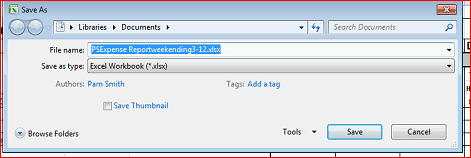
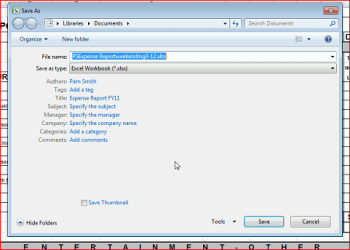
When saving in a MS program it does not allow the standard save screen(where you can navigate your file system on your computer)

ScreenShots are attached. One with hide folders on and then other with hide folders off.

Any ideas?
 

Attachments
  • Capture.PNG
    Capture.PNG
    16 KB · Views: 29
  • Capture2.PNG
    Capture2.PNG
    8.8 KB · Views: 15

My Computer

OS
Windows 7 home 64bit
Hello Blake,

You might see if it may allow you to navigate using the bread crumb arrows in the address bar for now.

Hope this helps,
Shawn
 

My Computer

Computer type
PC/Desktop
Computer Manufacturer/Model Number
Self built custom
OS
64-bit Windows 11 Pro for Workstations
CPU
Intel i7-8700K OC'd to 5 GHz
Motherboard
ASUS ROG Maximus XI Formula Z390
Memory
64 GB (4x16GB) G.SKILL TridentZ RGB DDR4 3600 MHz
Graphics Card(s)
ASUS ROG-STRIX-GTX1080TI-O11G-GAMING
Sound Card
Integrated
Monitor(s) Displays
2 x Samsung Odyssey G7 27"
Screen Resolution
2560x1440
Hard Drives
1TB Samsung 990 PRO M.2,
4TB Samsung 990 PRO PRO M.2,
TerraMaster F8 SSD Plus NAS
PSU
Seasonic Prime Titanium 850W
Case
Thermaltake Core P3
Cooling
Corsair Hydro H115i
Keyboard
Logitech wireless K800
Mouse
Logitech MX Master 4
Internet Speed
2 Gb/s Download and 100 Mb/s Upload
Antivirus
Malwarebyte Anti-Malware Premium
Browser
Google Chrome
Other Info
Logitech Z625 speaker system,
Logitech BRIO 4K Pro webcam,
HP Color LaserJet Pro MFP M477fdn,
APC SMART-UPS RT 1000 XL - SURT1000XLI,
Galaxy S23 Plus phone
Yes it does allow to enter the values by text, such as c:\users\username\desktop.

Cannot see folders or anything when that is done in the GUI though.
 

My Computer

OS
Windows 7 home 64bit
If you click on the small black arrows (bread crumbs) in front of say "Libraries" or "Documents" in the address bar of your screenshot above, do you get a drop down menu to select folders or drives in it?
 

My Computer

Computer type
PC/Desktop
Computer Manufacturer/Model Number
Self built custom
OS
64-bit Windows 11 Pro for Workstations
CPU
Intel i7-8700K OC'd to 5 GHz
Motherboard
ASUS ROG Maximus XI Formula Z390
Memory
64 GB (4x16GB) G.SKILL TridentZ RGB DDR4 3600 MHz
Graphics Card(s)
ASUS ROG-STRIX-GTX1080TI-O11G-GAMING
Sound Card
Integrated
Monitor(s) Displays
2 x Samsung Odyssey G7 27"
Screen Resolution
2560x1440
Hard Drives
1TB Samsung 990 PRO M.2,
4TB Samsung 990 PRO PRO M.2,
TerraMaster F8 SSD Plus NAS
PSU
Seasonic Prime Titanium 850W
Case
Thermaltake Core P3
Cooling
Corsair Hydro H115i
Keyboard
Logitech wireless K800
Mouse
Logitech MX Master 4
Internet Speed
2 Gb/s Download and 100 Mb/s Upload
Antivirus
Malwarebyte Anti-Malware Premium
Browser
Google Chrome
Other Info
Logitech Z625 speaker system,
Logitech BRIO 4K Pro webcam,
HP Color LaserJet Pro MFP M477fdn,
APC SMART-UPS RT 1000 XL - SURT1000XLI,
Galaxy S23 Plus phone
Ok. Good. This can be a good workaround until someone may know why it's doing what's in your screenshots above.
 

My Computer

Computer type
PC/Desktop
Computer Manufacturer/Model Number
Self built custom
OS
64-bit Windows 11 Pro for Workstations
CPU
Intel i7-8700K OC'd to 5 GHz
Motherboard
ASUS ROG Maximus XI Formula Z390
Memory
64 GB (4x16GB) G.SKILL TridentZ RGB DDR4 3600 MHz
Graphics Card(s)
ASUS ROG-STRIX-GTX1080TI-O11G-GAMING
Sound Card
Integrated
Monitor(s) Displays
2 x Samsung Odyssey G7 27"
Screen Resolution
2560x1440
Hard Drives
1TB Samsung 990 PRO M.2,
4TB Samsung 990 PRO PRO M.2,
TerraMaster F8 SSD Plus NAS
PSU
Seasonic Prime Titanium 850W
Case
Thermaltake Core P3
Cooling
Corsair Hydro H115i
Keyboard
Logitech wireless K800
Mouse
Logitech MX Master 4
Internet Speed
2 Gb/s Download and 100 Mb/s Upload
Antivirus
Malwarebyte Anti-Malware Premium
Browser
Google Chrome
Other Info
Logitech Z625 speaker system,
Logitech BRIO 4K Pro webcam,
HP Color LaserJet Pro MFP M477fdn,
APC SMART-UPS RT 1000 XL - SURT1000XLI,
Galaxy S23 Plus phone
These are methods of saving a file in Office 2010:
Save a file - Word - Microsoft Office

For example:
Save as a copy, or to a different location


  1. Click the File tab.
  2. Click Save As.
  3. In the File name box, enter a new name for the file.
  4. Click Save.
You can also use the Save As command to rename a file or change the location of where you save the file by clicking a different folder.
ZA079005001.gif
Save As dialog box in Windows 7 and Windows Vista
You can also save the file to a new location by using the Navigation pane.
ZA101850657.jpg

ZA001093948.gif
To choose a folder or type the path to a folder, use the Address Bar.
ZA001093949.gif
To quickly see locations you use often, use the Navigation pane.
ZA001093950.gif
To see more file types, click the arrow.

ALSO
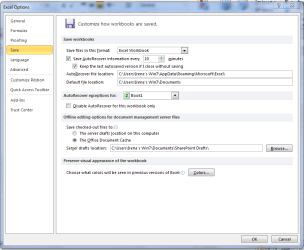
: I wonder of the default location is set -
File > Options > Save


Attachments

  • Default location.PNG
    Default location.PNG
    26.7 KB · Views: 26

My Computer

Computer type
PC/Desktop
Computer Manufacturer/Model Number
Packard Bell
OS
Windows 7 Home Premium 64bit
CPU
Intel(R) Core(TM) i3-2120 CPU @ 3.30GHz
Motherboard
Packard Bell IPISB-AG
Memory
3.00 GB
Graphics Card(s)
(1) Intel(R) HD Graphics (2) VNC Mirror Driver
Sound Card
Realtek High Definition Audio
Monitor(s) Displays
AIO LCD
Screen Resolution
1920 x 1080
Hard Drives
WDC WD10EADX-22TDHB0 ATA Device
Fixed hard disk media
4 partitions
931.51 GB
Keyboard
Wireless
Mouse
Wireless
Antivirus
Microsoft Security Essentials
Browser
IE; Firefox
Other Info
Also:
Samsung N220 Plus Netbook - Windows 7 Home
HP laptop
iPad 5
I did double check all the save options and they should all be correct. If you hit hide folders then browse folders you'll notice it goes to my screenshot above, then quickly shoots over to the folder view(how it should work). On my screenshot it doesn't swap, just stays at the document info screen.
 

My Computer

OS
Windows 7 home 64bit
Go up to the area under the organize and new folder, and when you see the opposing arrows, click and drag untill you see the save folders.
 

My Computer

Computer Manufacturer/Model Number
Apple
OS
Windows 7 64bit, OS X Leopard
CPU
dual processor Xeon quadcores
Motherboard
Intel
Memory
6GB
Graphics Card(s)
Ati HD2600
Sound Card
Internal
Monitor(s) Displays
Samsung BW2332 23in
Hard Drives
320GB, 400GB, 1TB
PSU
OEM
Case
OEM
Cooling
OEM
Back
Top