Canon IP4900 Series Printer Installs ok, but not connected on reboot

tanman

New member
Member
Local time
10:23 PM
Messages
50
Location
Kent - UK
Hi,

I have just rebuilt my home pc system and reinstalled windows 7. All has gone as expected.

Unfortunately, Windows 7 does not seem to like my Canon IP4950 printer.

The printer installs properly and works until reboot. Then when the computer reboots the printer is not recognised and is displayed as not connected?

If I disconnect the printer from USB and reboot, when I'm back in windows and I connect the usb lead, the printer is found!

Anyone have any ideas as to why the pc boots with the printer connected but does not recognise it correctly?

I have the latest Canon drivers and the printer worked fine on my previous Gigabyte board. I have tried to reboot with Legacy USB enabled and disabled, as I know this has caused problems with other USB devices previously.

It's a bit of a pain having to disconnect the printer and then reconnect when windows is running.

cheers,

Anthony
 

My Computer My Computer

At a glance

Windows 7 x64 ProfessionalIntel Core i7 i7-4790K CPU (Quad Core 4GHz)HyperX Savage 16 GB (2 x 8 GB) 2400 MHz DDR3 ...NVidia GeForce GTS 250
Computer type
PC/Desktop
Computer Manufacturer/Model Number
Home Built
OS
Windows 7 x64 Professional
CPU
Intel Core i7 i7-4790K CPU (Quad Core 4GHz)
Motherboard
Gigabyte GA-Z97P-D3
Memory
HyperX Savage 16 GB (2 x 8 GB) 2400 MHz DDR3 CL11 DIMM
Graphics Card(s)
NVidia GeForce GTS 250
Sound Card
On board
Monitor(s) Displays
2 x Dell E193FP
Screen Resolution
1280 x 1024
Hard Drives
Drive 0: Kingston SSD 128Gb
Drive 1: Samsung HD103UJ 1Tb
Drive 2: Western Digital WD1200JB-00EVA0 120Gb
External 1:Hitachi Touro Desk 2TB
External 2:Toshiba Removable Drive 1Tb
External 3:Seagate Removable Drive 300Gb
PSU
Corsair 650W modular
Case
iCute
Keyboard
Fujitsu Siemens
Mouse
MS Optical
Internet Speed
3Mbps
Antivirus
MS Security Essentials
Browser
IE 10

My Computer My Computer

At a glance

Windows 7 Ultimate x64 SP1AMD Phenom 2 1090T2x8GB Kingston HyperX Fury Black 1600Mhz Unga...MSI GTX 970 Gaming 4G
Computer type
PC/Desktop
Computer Manufacturer/Model Number
Custom Build
OS
Windows 7 Ultimate x64 SP1
CPU
AMD Phenom 2 1090T
Motherboard
Gigabyte GA-890FXA-UD5
Memory
2x8GB Kingston HyperX Fury Black 1600Mhz Unganged
Graphics Card(s)
MSI GTX 970 Gaming 4G
Sound Card
Realtek On-Board HD 7.1 Audio / Logitech G35
Monitor(s) Displays
3xAcer GD245HQ
Screen Resolution
1920x1080
Hard Drives
Samsung 850 Pro 512GB SSD - OS /
WD Caviar Black SATA 3 - 1 TBx2 - Dynamic RAID 0 /
WD Caviar Green SATA 2 - 640GBx2 - Dynamic RAID 0 /
WD Caviar Green SATA 2 - 640GB - Internal Backup /
Seagate Barracude SATA 3 - 3TB - External Backup/ Sync
PSU
HighPower 1000W
Case
Cooler Master HAF 932
Cooling
Noctua NH-D14
Keyboard
Logitech G19
Mouse
Logitech G500
Internet Speed
100/4 Mbit Cable (100GB quota)
Antivirus
ZoneAlarm Extreme Security / MBAM Pro / MBAE Free / SAS Free
Browser
IE 11 - Firefox - Chrome
Other Info
Logitech F710/ G27/ G940/ Z5500 // TrackIR 5 // Nvidia 3D Surround Vision
I uninstalled the Canon software again, ran CCleaner and then reinstalled. It now seems to be ok.

Thanks anyway
 

My Computer My Computer

At a glance

Windows 7 x64 ProfessionalIntel Core i7 i7-4790K CPU (Quad Core 4GHz)HyperX Savage 16 GB (2 x 8 GB) 2400 MHz DDR3 ...NVidia GeForce GTS 250
Computer type
PC/Desktop
Computer Manufacturer/Model Number
Home Built
OS
Windows 7 x64 Professional
CPU
Intel Core i7 i7-4790K CPU (Quad Core 4GHz)
Motherboard
Gigabyte GA-Z97P-D3
Memory
HyperX Savage 16 GB (2 x 8 GB) 2400 MHz DDR3 CL11 DIMM
Graphics Card(s)
NVidia GeForce GTS 250
Sound Card
On board
Monitor(s) Displays
2 x Dell E193FP
Screen Resolution
1280 x 1024
Hard Drives
Drive 0: Kingston SSD 128Gb
Drive 1: Samsung HD103UJ 1Tb
Drive 2: Western Digital WD1200JB-00EVA0 120Gb
External 1:Hitachi Touro Desk 2TB
External 2:Toshiba Removable Drive 1Tb
External 3:Seagate Removable Drive 300Gb
PSU
Corsair 650W modular
Case
iCute
Keyboard
Fujitsu Siemens
Mouse
MS Optical
Internet Speed
3Mbps
Antivirus
MS Security Essentials
Browser
IE 10
Well, back off holiday and there is definitely something wrong. Turned on today and no printer found.
However, when I un-pluged the power from the printer and then connected it again the printer is found. It looks as though something is wrong with the printer itself, it could just be a coincidence that it started to happen when I clean installed windows. I don't really believe in coincidences though.
The printer works fine when connected again, it even turns on automatically if the power is connected but its not turned on.
When it's not being found the printer still turns on as normal with all the setup sounds and the printer is found after a reboot? Will it work tomorrow?

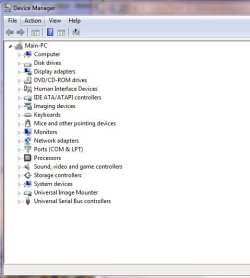
Has any one got any ideas, other wise I may as well get another printer, it is 4 years old! I've attached the Device Manager view when the printer is not being found, but this does not show anything.

cheers,

Anthony
 

Attachments

  • Capture.JPG
    Capture.JPG
    35.9 KB · Views: 2

My Computer My Computer

At a glance

Windows 7 x64 ProfessionalIntel Core i7 i7-4790K CPU (Quad Core 4GHz)HyperX Savage 16 GB (2 x 8 GB) 2400 MHz DDR3 ...NVidia GeForce GTS 250
Computer type
PC/Desktop
Computer Manufacturer/Model Number
Home Built
OS
Windows 7 x64 Professional
CPU
Intel Core i7 i7-4790K CPU (Quad Core 4GHz)
Motherboard
Gigabyte GA-Z97P-D3
Memory
HyperX Savage 16 GB (2 x 8 GB) 2400 MHz DDR3 CL11 DIMM
Graphics Card(s)
NVidia GeForce GTS 250
Sound Card
On board
Monitor(s) Displays
2 x Dell E193FP
Screen Resolution
1280 x 1024
Hard Drives
Drive 0: Kingston SSD 128Gb
Drive 1: Samsung HD103UJ 1Tb
Drive 2: Western Digital WD1200JB-00EVA0 120Gb
External 1:Hitachi Touro Desk 2TB
External 2:Toshiba Removable Drive 1Tb
External 3:Seagate Removable Drive 300Gb
PSU
Corsair 650W modular
Case
iCute
Keyboard
Fujitsu Siemens
Mouse
MS Optical
Internet Speed
3Mbps
Antivirus
MS Security Essentials
Browser
IE 10
Back
Top