Canon MP780 Driver Issue

jamesvdm

New member
Power User
Local time
12:05 PM
Messages
108
Location
Perth, Western Australia
Hey,

Just after some help with the MP780 on 7 x64.

The printer is plugged in via USB to another machine on the network. On the 7 machine I am running through the add printer wizard, which finds the printer and looks for drivers.

The first problem is that it can't find the MP780 drivers on Windows Update, which I think it should.

After it fails there, it asks to find the inf manually. I have downloaded the drivers from the Canon Australia website but that's just an installer. I have also downloaded drivers from other random driver sites but it just gives me fax and scan infs, nothing else.

Any ideas for me?

Cheers
 

My Computer

Computer Manufacturer/Model Number
Lenovo ThinkPad T400
OS
7 x64
CPU
P8600 2.4Ghz Core 2 Duo
Memory
4096
Graphics Card(s)
3470HD Hybrid
Monitor(s) Displays
14.4"
Screen Resolution
1440 x 900
Hard Drives
60GB OCZ Vertex Turbo + 160GB 5400
Internet Speed
15Mbps
OK if you can install this it might work - make sure the driver package is unzippped to a folder - or just select the setup.exe file and do the following if it wont unzip - this resolves an OS mismatch when the driver wont install on w7

To install a driver OR program in compatibility mode - right click the setup.exe file - click properties - click compatibility - check run in compatibility with vista/xp etc - check run as administrator - leave the rest blank. Start setup.exe and install.

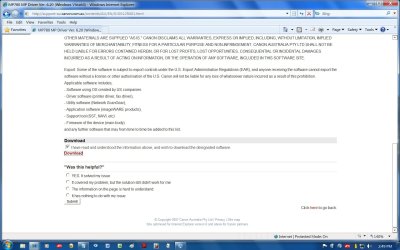
Driver page v6.20 - to download firstly click on the file, go to nxt page then - under disclaimer is download - select "i have read the instructions etc" then select download -in "red" and then click save
Canon&

If that doesnt work try installing it thru device manager and pointing to the folder the driver is unzipped to.
 

Attachments

  • print download.jpg
    print download.jpg
    163.9 KB · Views: 192

My Computer

OS
XP, Vista, W7 64bit Home Premium
CPU
Intel Core Duo 6850 3.0 ghz @ 3.7 ghz
Motherboard
Asus P5E
Memory
4GB Corsair DDR 2 PC-6400
Graphics Card(s)
Ati 4870 1ghz
Sound Card
Supreme FX 11
Monitor(s) Displays
View Sonic VX1962wm
Screen Resolution
1680 X1050
Hard Drives
3 Seagate Sata Drives 160gb 250gb 500gb
PSU
Thermaltake 600 watt
Case
NZXT Alpha
Cooling
3X120cm Fans
Keyboard
Microsoft Digital Media Pro Keyboard
Mouse
Microsoft Wheel Mouse Optical
Internet Speed
1.5Mb to 8Mb/384k
Hey

I think you misunderstood.

The printer is not connected to this machine, so device manager won't be of use.

The setup program only looks for local printers, so it won't work here.

Thanks anyway.
 

My Computer

Computer Manufacturer/Model Number
Lenovo ThinkPad T400
OS
7 x64
CPU
P8600 2.4Ghz Core 2 Duo
Memory
4096
Graphics Card(s)
3470HD Hybrid
Monitor(s) Displays
14.4"
Screen Resolution
1440 x 900
Hard Drives
60GB OCZ Vertex Turbo + 160GB 5400
Internet Speed
15Mbps
Can you move the printer to the win7 x64 machine long enough to install it as a local printer to find the drivers ? Then move it back to the other machine & look for it on the network ?

" Doc "
 

My Computer

Computer type
PC/Desktop
Computer Manufacturer/Model Number
Built them myself, Science Experiments !
OS
Win7 Enterprise, Win7 x86 (Ult 7600), Win7 x64 Ult 7600, TechNet RTM on AMD x64 (2.8Ghz)
CPU
AMD fx8350 4ghz, AMD-32 2400mhz, AMD-64 3200mhz, AMDx64 2.8G
Motherboard
SIS 755, ECS-K8M890M-M (Ult 7600), GigaByte & others
Memory
2gb, 4gb on the Ult 7600, 4gb on Technet RTM, 32gb on FX8350
Graphics Card(s)
Draw my own Graphics, several nVidia cards
Sound Card
on motherboard
Monitor(s) Displays
19" flat scr, 28" I-Inc widescr,22" Emprex Widescr, 23" Acer
Screen Resolution
1280 x 1024, 1440 x 900, 1920 x 1080
Hard Drives
6 pata Ide HD's & 2 Sata HD's
added 80gb external on Ult 7600 computer,
numerous extra 1tb, 2TB, 3Tb SATA HD's
A collection of ext HD Docks w/ HDs
PSU
430w, 550w, 600w, 700, 800, etc
Case
All Generic Full Towers
Cooling
Open Air & a few fans, some w/ colored LEDs
Keyboard
Compaq & Dell recycled from GoodWill
Mouse
Made in China Optical Wired Mouse
Internet Speed
Fast Cable InterNet
Antivirus
AVG Free on 24 different Desktops, NO Problems!
Browser
IE 8 is preferred, but use FireFox sometimes
Other Info
Linksys Routers, switches, & Hubs
Too Many USB Flash Drives to count, Biggest is 64GB !
Eight computers in my home network.
Sixteen computers at my business network.
Linked via TeamViewer !
Lots of old used spare computer parts everywhere!
follow what doc has to say (srry half a sleep) i was going to take a break shall do now
 

My Computer

OS
XP, Vista, W7 64bit Home Premium
CPU
Intel Core Duo 6850 3.0 ghz @ 3.7 ghz
Motherboard
Asus P5E
Memory
4GB Corsair DDR 2 PC-6400
Graphics Card(s)
Ati 4870 1ghz
Sound Card
Supreme FX 11
Monitor(s) Displays
View Sonic VX1962wm
Screen Resolution
1680 X1050
Hard Drives
3 Seagate Sata Drives 160gb 250gb 500gb
PSU
Thermaltake 600 watt
Case
NZXT Alpha
Cooling
3X120cm Fans
Keyboard
Microsoft Digital Media Pro Keyboard
Mouse
Microsoft Wheel Mouse Optical
Internet Speed
1.5Mb to 8Mb/384k
Nice thought, I'll try it.
 

My Computer

Computer Manufacturer/Model Number
Lenovo ThinkPad T400
OS
7 x64
CPU
P8600 2.4Ghz Core 2 Duo
Memory
4096
Graphics Card(s)
3470HD Hybrid
Monitor(s) Displays
14.4"
Screen Resolution
1440 x 900
Hard Drives
60GB OCZ Vertex Turbo + 160GB 5400
Internet Speed
15Mbps
Just thought of something else !!!
What machine is the printer connected to ?

x32 non-win7 ??

I had a problem networking my x64 box to a xp x32 box with an older epson printer :p
 

My Computer

Computer type
PC/Desktop
Computer Manufacturer/Model Number
Built them myself, Science Experiments !
OS
Win7 Enterprise, Win7 x86 (Ult 7600), Win7 x64 Ult 7600, TechNet RTM on AMD x64 (2.8Ghz)
CPU
AMD fx8350 4ghz, AMD-32 2400mhz, AMD-64 3200mhz, AMDx64 2.8G
Motherboard
SIS 755, ECS-K8M890M-M (Ult 7600), GigaByte & others
Memory
2gb, 4gb on the Ult 7600, 4gb on Technet RTM, 32gb on FX8350
Graphics Card(s)
Draw my own Graphics, several nVidia cards
Sound Card
on motherboard
Monitor(s) Displays
19" flat scr, 28" I-Inc widescr,22" Emprex Widescr, 23" Acer
Screen Resolution
1280 x 1024, 1440 x 900, 1920 x 1080
Hard Drives
6 pata Ide HD's & 2 Sata HD's
added 80gb external on Ult 7600 computer,
numerous extra 1tb, 2TB, 3Tb SATA HD's
A collection of ext HD Docks w/ HDs
PSU
430w, 550w, 600w, 700, 800, etc
Case
All Generic Full Towers
Cooling
Open Air & a few fans, some w/ colored LEDs
Keyboard
Compaq & Dell recycled from GoodWill
Mouse
Made in China Optical Wired Mouse
Internet Speed
Fast Cable InterNet
Antivirus
AVG Free on 24 different Desktops, NO Problems!
Browser
IE 8 is preferred, but use FireFox sometimes
Other Info
Linksys Routers, switches, & Hubs
Too Many USB Flash Drives to count, Biggest is 64GB !
Eight computers in my home network.
Sixteen computers at my business network.
Linked via TeamViewer !
Lots of old used spare computer parts everywhere!
Here is a link to the canon site for installing from wxp cdrom and the path to use to the info file -this might work the same on w7

Is print sharing possible?
 

My Computer

OS
XP, Vista, W7 64bit Home Premium
CPU
Intel Core Duo 6850 3.0 ghz @ 3.7 ghz
Motherboard
Asus P5E
Memory
4GB Corsair DDR 2 PC-6400
Graphics Card(s)
Ati 4870 1ghz
Sound Card
Supreme FX 11
Monitor(s) Displays
View Sonic VX1962wm
Screen Resolution
1680 X1050
Hard Drives
3 Seagate Sata Drives 160gb 250gb 500gb
PSU
Thermaltake 600 watt
Case
NZXT Alpha
Cooling
3X120cm Fans
Keyboard
Microsoft Digital Media Pro Keyboard
Mouse
Microsoft Wheel Mouse Optical
Internet Speed
1.5Mb to 8Mb/384k

My Computer

Computer Manufacturer/Model Number
Lenovo ThinkPad T400
OS
7 x64
CPU
P8600 2.4Ghz Core 2 Duo
Memory
4096
Graphics Card(s)
3470HD Hybrid
Monitor(s) Displays
14.4"
Screen Resolution
1440 x 900
Hard Drives
60GB OCZ Vertex Turbo + 160GB 5400
Internet Speed
15Mbps
I tried the 'plug in via USB first then try to install over network' with no success, it still heads over to Windows Update and fails :( I will have to update the printer server to 7 I think.
 

My Computer

Computer Manufacturer/Model Number
Lenovo ThinkPad T400
OS
7 x64
CPU
P8600 2.4Ghz Core 2 Duo
Memory
4096
Graphics Card(s)
3470HD Hybrid
Monitor(s) Displays
14.4"
Screen Resolution
1440 x 900
Hard Drives
60GB OCZ Vertex Turbo + 160GB 5400
Internet Speed
15Mbps
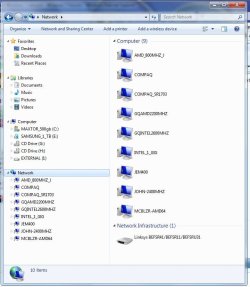
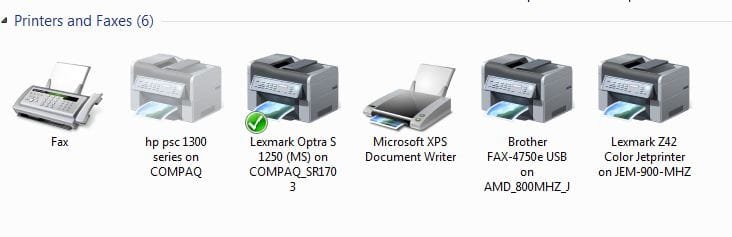
Here is my network printers all on x32 XP boxes ;)


" Doc "
 

Attachments

  • Docs_Network_printers.JPG
    Docs_Network_printers.JPG
    26.5 KB · Views: 47
  • NetWork_Computers.JPG
    NetWork_Computers.JPG
    67 KB · Views: 58

My Computer

Computer type
PC/Desktop
Computer Manufacturer/Model Number
Built them myself, Science Experiments !
OS
Win7 Enterprise, Win7 x86 (Ult 7600), Win7 x64 Ult 7600, TechNet RTM on AMD x64 (2.8Ghz)
CPU
AMD fx8350 4ghz, AMD-32 2400mhz, AMD-64 3200mhz, AMDx64 2.8G
Motherboard
SIS 755, ECS-K8M890M-M (Ult 7600), GigaByte & others
Memory
2gb, 4gb on the Ult 7600, 4gb on Technet RTM, 32gb on FX8350
Graphics Card(s)
Draw my own Graphics, several nVidia cards
Sound Card
on motherboard
Monitor(s) Displays
19" flat scr, 28" I-Inc widescr,22" Emprex Widescr, 23" Acer
Screen Resolution
1280 x 1024, 1440 x 900, 1920 x 1080
Hard Drives
6 pata Ide HD's & 2 Sata HD's
added 80gb external on Ult 7600 computer,
numerous extra 1tb, 2TB, 3Tb SATA HD's
A collection of ext HD Docks w/ HDs
PSU
430w, 550w, 600w, 700, 800, etc
Case
All Generic Full Towers
Cooling
Open Air & a few fans, some w/ colored LEDs
Keyboard
Compaq & Dell recycled from GoodWill
Mouse
Made in China Optical Wired Mouse
Internet Speed
Fast Cable InterNet
Antivirus
AVG Free on 24 different Desktops, NO Problems!
Browser
IE 8 is preferred, but use FireFox sometimes
Other Info
Linksys Routers, switches, & Hubs
Too Many USB Flash Drives to count, Biggest is 64GB !
Eight computers in my home network.
Sixteen computers at my business network.
Linked via TeamViewer !
Lots of old used spare computer parts everywhere!
MP m780 on Xp Machine - print from networked W7 Machine

I had this same issue. I resoved it by connecting the MP780 to the windows 7 machine, installing the drivers, and then bringing the mp780 back to the xp machine.

Everything worked fine.

Mark
 

My Computer

Computer type
PC/Desktop
Computer Manufacturer/Model Number
3 Home Built Computers
OS
Server 2012 R2, Windows 8.1 , W7 ultimate x64
CPU
Q6600,
Motherboard
Gigabyte ga-p35-ds4, ga-ep45-ud3p, ga-p35-dq6
Memory
8G, 4G, 2G
Graphics Card(s)
7300GS, 9600GT, 8600GT
Sound Card
onboard ALC889
Monitor(s) Displays
dell, TV
Screen Resolution
1280x1024, PAL SD TV
Hard Drives
WD 1.0T GP x2,wd 320G x2,WD 1.0T GP x2
PSU
corsair HX520,corsair HX520,corsair HX520
Case
Antec Solo, Antec Solo,Thermaltake DH101
Cooling
Thermalright TRUE, Thermalright TRUE, Ninja mini
Internet Speed
not too fast
Thanks, I have tried that but it just goes off to Windows Update again to find the driver. I'll try it with another W7 computer on Monday.
 

My Computer

Computer Manufacturer/Model Number
Lenovo ThinkPad T400
OS
7 x64
CPU
P8600 2.4Ghz Core 2 Duo
Memory
4096
Graphics Card(s)
3470HD Hybrid
Monitor(s) Displays
14.4"
Screen Resolution
1440 x 900
Hard Drives
60GB OCZ Vertex Turbo + 160GB 5400
Internet Speed
15Mbps
I have the same problem. I was able to use the printer and scanner when it is connected directly to my Windows 7 64-bit machine. However, when the printer is connected to my Windows Home Server and I connect to the remote printer, it fails using the Windows Update scan.

This doesn't happen on a Windows 7 32-bit machine.
 

My Computer

OS
Windows 7
Here's a workaround:
1. Open the Devices and Printers folder.
2. Click on "Add a Printer".
3. Click "Add a local printer".
4. Select "Create a new port". The type of port should be "Local Port". Click Next.
5. Enter the remote print share name, e.g. "\\server\printer" and press Enter.
6. Select the Canon Inkjet MP780 Series driver.
7. Go through and finish adding the printer.
 

My Computer

OS
Windows 7
No go, tried this and it installs but nothing prints
 

My Computer

Computer Manufacturer/Model Number
Lenovo ThinkPad T400
OS
7 x64
CPU
P8600 2.4Ghz Core 2 Duo
Memory
4096
Graphics Card(s)
3470HD Hybrid
Monitor(s) Displays
14.4"
Screen Resolution
1440 x 900
Hard Drives
60GB OCZ Vertex Turbo + 160GB 5400
Internet Speed
15Mbps
Did you ever get your problem solved? I am having the same issue.
 

My Computer

Computer Manufacturer/Model Number
Dell/Studio/1537
OS
Windows 7 64bit
No sorry.
 

My Computer

Computer Manufacturer/Model Number
Lenovo ThinkPad T400
OS
7 x64
CPU
P8600 2.4Ghz Core 2 Duo
Memory
4096
Graphics Card(s)
3470HD Hybrid
Monitor(s) Displays
14.4"
Screen Resolution
1440 x 900
Hard Drives
60GB OCZ Vertex Turbo + 160GB 5400
Internet Speed
15Mbps
Some printers especially Canon ones require the printer itself to be connected and found by the system during driver and untility installation process. Means, during the driver install, it will try to locate the printer, if the printer is not located, you will get a notice, but the install will still complete, but you won't be able to print afterwards. The sequence of installing driver and detecting printer is all important.
 

My Computer

Computer Manufacturer/Model Number
Lenovo ThinkPad T60
OS
Windows 7 Ultimate 64Bit
CPU
GenuineIntel Intel(R) Core(TM) DuoCore T2400 @ 1.83GHz
Motherboard
Intel(R) 82801G (ICH7 Family)
Memory
2.00 GB
Graphics Card(s)
Mobile Intel(R) 945 Express Chipset
Sound Card
SoundMAX Integrated Digital HD Audio
Monitor(s) Displays
ThinkPad Display
Screen Resolution
1400x1050
Hard Drives
100Gb SATA
Keyboard
Standard Keyboard
Mouse
HID-compliant Mouse
Internet Speed
Cable Broadband - 54Mbps
Other Info
Intel(R) PRO/1000 PL Network Connection
11a/b/g Wireless LAN Mini PCI Express Adapter
On the "sharing" computer, in the sharing tab, there should be a button you can click to supply additional drivers for computers that attempt to connect to the shared printer.
 

My Computer

Computer Manufacturer/Model Number
Dell XPS 15 L502x
OS
Windows 7 Ultimate x64 SP1
CPU
Core i7-2670QM
Memory
8GB DDR3 PC3-10600
Graphics Card(s)
Intel HD Graphics 3000 + GeForce GT 540M
Screen Resolution
1920x1080
Hard Drives
1TB 5400RPM Seagate
Back
Top