Can't access CorelDRAW Recent Documents

Thom99

New member
Local time
12:15 AM
Messages
3
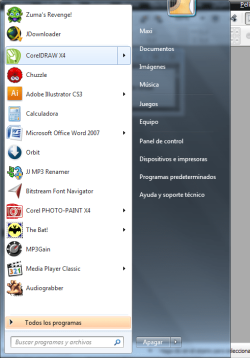
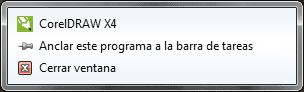
Hi, I have installed Corel Graphics Suite X4 on my Windows 7 machine, and I can't access the recent files nor the anchored files from the superbar or the start menu. In the start menu it simply does not expand when I click on the arrow, and right clicking on the superbar has a similar effect. First I thought there was something wrong with explorer.exe so I ended it and started it again. The problem continued, so I reinstalled Corel with no success. I have to say that it ONLY seems to be a problem with that program in particular, other programs (including others from the same suite) do not seem to show this behavior. I attached some caps to show what I mean.
Thank you.
 

Attachments

  • nuevo-2.png
    nuevo-2.png
    46.8 KB · Views: 2
  • nuevo-1.png
    nuevo-1.png
    2.9 KB · Views: 429

My Computer

OS
Windows 7 Ultimate
CPU
Intel Core2 Duo E7400 @ 2.80Ghz
Motherboard
ASRock G31M-VS
Memory
2 GB
Graphics Card(s)
Integrated
Sound Card
Integrated
Hello Thom, and welcome to Seven Forums.

Since you can open and see recent items for other programs and that you just installed the program, it may take it a bit for the recent items to show up as you are opening them. Give it a day with opening the recent items off and on to see if they show up afterwards.

Hope this helps,
Shawn
 

My Computer

Computer type
PC/Desktop
Computer Manufacturer/Model Number
Self built custom
OS
64-bit Windows 11 Pro for Workstations
CPU
Intel i7-8700K OC'd to 5 GHz
Motherboard
ASUS ROG Maximus XI Formula Z390
Memory
64 GB (4x16GB) G.SKILL TridentZ RGB DDR4 3600 MHz
Graphics Card(s)
ASUS ROG-STRIX-GTX1080TI-O11G-GAMING
Sound Card
Integrated
Monitor(s) Displays
2 x Samsung Odyssey G7 27"
Screen Resolution
2560x1440
Hard Drives
1TB Samsung 990 PRO M.2,
4TB Samsung 990 PRO PRO M.2,
TerraMaster F8 SSD Plus NAS
PSU
Seasonic Prime Titanium 850W
Case
Thermaltake Core P3
Cooling
Corsair Hydro H115i
Keyboard
Logitech wireless K800
Mouse
Logitech MX Master 4
Internet Speed
2 Gb/s Download and 100 Mb/s Upload
Antivirus
Malwarebyte Anti-Malware Premium
Browser
Google Chrome
Other Info
Logitech Z625 speaker system,
Logitech BRIO 4K Pro webcam,
HP Color LaserJet Pro MFP M477fdn,
APC SMART-UPS RT 1000 XL - SURT1000XLI,
Galaxy S23 Plus phone
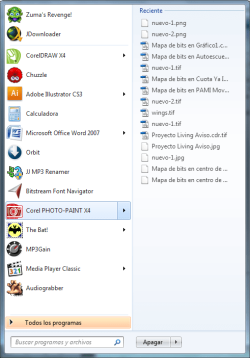
Hey Shawn, thanks for your answer, but you see, the thing is that I had the suite installed for months and I had documents that I frequently access fixed to this new "launch menu". I uninstalled the full suite, reboot, and reinstall it again. Windows, seems to remember these documents even when you reinstall a program. To exemplify this, take for instance Corel PHOTO-PAINT which is also part of the suite. See, this program even after reinstalling still remembers the files (see image attached), but with CorelDRAW it just seems like something is broken...
 

Attachments

  • nuevo-3.png
    nuevo-3.png
    28.5 KB · Views: 2

My Computer

OS
Windows 7 Ultimate
CPU
Intel Core2 Duo E7400 @ 2.80Ghz
Motherboard
ASRock G31M-VS
Memory
2 GB
Graphics Card(s)
Integrated
Sound Card
Integrated
I'm not sure, but it may be a issue with CorelDraw itself. You might also check to see if there are any updates available for the program at Corel to see if that may address this issue or bug. If not, then you might report this to them as well to let them know.
 

My Computer

Computer type
PC/Desktop
Computer Manufacturer/Model Number
Self built custom
OS
64-bit Windows 11 Pro for Workstations
CPU
Intel i7-8700K OC'd to 5 GHz
Motherboard
ASUS ROG Maximus XI Formula Z390
Memory
64 GB (4x16GB) G.SKILL TridentZ RGB DDR4 3600 MHz
Graphics Card(s)
ASUS ROG-STRIX-GTX1080TI-O11G-GAMING
Sound Card
Integrated
Monitor(s) Displays
2 x Samsung Odyssey G7 27"
Screen Resolution
2560x1440
Hard Drives
1TB Samsung 990 PRO M.2,
4TB Samsung 990 PRO PRO M.2,
TerraMaster F8 SSD Plus NAS
PSU
Seasonic Prime Titanium 850W
Case
Thermaltake Core P3
Cooling
Corsair Hydro H115i
Keyboard
Logitech wireless K800
Mouse
Logitech MX Master 4
Internet Speed
2 Gb/s Download and 100 Mb/s Upload
Antivirus
Malwarebyte Anti-Malware Premium
Browser
Google Chrome
Other Info
Logitech Z625 speaker system,
Logitech BRIO 4K Pro webcam,
HP Color LaserJet Pro MFP M477fdn,
APC SMART-UPS RT 1000 XL - SURT1000XLI,
Galaxy S23 Plus phone
Alright I will. By the way, It is up to date.
Thanks
 

My Computer

OS
Windows 7 Ultimate
CPU
Intel Core2 Duo E7400 @ 2.80Ghz
Motherboard
ASRock G31M-VS
Memory
2 GB
Graphics Card(s)
Integrated
Sound Card
Integrated
Please let us know if they reply back with a solution for you. :)
 

My Computer

Computer type
PC/Desktop
Computer Manufacturer/Model Number
Self built custom
OS
64-bit Windows 11 Pro for Workstations
CPU
Intel i7-8700K OC'd to 5 GHz
Motherboard
ASUS ROG Maximus XI Formula Z390
Memory
64 GB (4x16GB) G.SKILL TridentZ RGB DDR4 3600 MHz
Graphics Card(s)
ASUS ROG-STRIX-GTX1080TI-O11G-GAMING
Sound Card
Integrated
Monitor(s) Displays
2 x Samsung Odyssey G7 27"
Screen Resolution
2560x1440
Hard Drives
1TB Samsung 990 PRO M.2,
4TB Samsung 990 PRO PRO M.2,
TerraMaster F8 SSD Plus NAS
PSU
Seasonic Prime Titanium 850W
Case
Thermaltake Core P3
Cooling
Corsair Hydro H115i
Keyboard
Logitech wireless K800
Mouse
Logitech MX Master 4
Internet Speed
2 Gb/s Download and 100 Mb/s Upload
Antivirus
Malwarebyte Anti-Malware Premium
Browser
Google Chrome
Other Info
Logitech Z625 speaker system,
Logitech BRIO 4K Pro webcam,
HP Color LaserJet Pro MFP M477fdn,
APC SMART-UPS RT 1000 XL - SURT1000XLI,
Galaxy S23 Plus phone
Back
Top