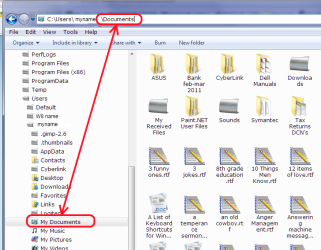
New to Win 7 and feeling my way around file management. Folders which I think I should have access to don't seem available. Examples:
c:\users\my username\application data
c:\users\my username\cookies
c:\users\my username\local settings
Also Print Hood, net hood, start menu
I tried right clicking and editing permissions under the security tab but it's a little confusing. "Everyone" already seems to have full control.
I am the only "user" and presumably have administrative privileges.
I'm glad to read up on this if you can give me a link. The Windows "help" module wasn't helpful.
Many thanks.
Jack
c:\users\my username\application data
c:\users\my username\cookies
c:\users\my username\local settings
Also Print Hood, net hood, start menu
I tried right clicking and editing permissions under the security tab but it's a little confusing. "Everyone" already seems to have full control.
I am the only "user" and presumably have administrative privileges.
I'm glad to read up on this if you can give me a link. The Windows "help" module wasn't helpful.
Many thanks.
Jack
My Computer
- Computer Manufacturer/Model Number
- Toshiba Tecra R850
- OS
- Windows 7 Professsional 64 bit
- CPU
- Intel i7-2620M
- Motherboard
- n/a Laptop
- Memory
- 8 GB
- Graphics Card(s)
- AMD Radeon™ HD 6450M w/1GB DDR3
- Sound Card
- n/a
- Monitor(s) Displays
- n/a
- Screen Resolution
- 1366 X768
- Hard Drives
- 500GB HDD (7200rpm, Serial-ATA)
- PSU
- n/a
- Case
- n/a
- Cooling
- n/a
- Keyboard
- n/a
- Mouse
- Toshiba Nano Wireless PA3844U-1ETB
- Internet Speed
- Download 35.9 Mbps Upload 1.89 Mbps
- Other Info
- Laptop