Can't Access Hidden, Temp files, App Data, Cookies etc

RealGem

New member
Member
VIP
Local time
6:33 PM
Messages
269
Location
UK
Hi,

There's a padlock on all these folders and it won't let me even look to see how much space they're taking up.

I am the only user of this PC and the administrator.

I Googled login as administrator and didn't understand any of the options.

I've had the PC since 2011, and always could access these folders before now.

How do I access them as an admin please, without downloading anything?

Thank you
 

My Computer My Computer

Computer type
PC/Desktop
Computer Manufacturer/Model Number
iBuild™ custom PC
OS
Windows 7 Home Premium 64 bit
CPU
Intel® Core™ i5 650 Dual Core 2x 3.2Ghz 4MB Cache
Motherboard
ASUS P7H55-M 6x Rear USB 2.0 2x Front
Memory
Samsung 4GB (2x2GB) DDR3 1333MHz
Graphics Card(s)
nvidia GT430 1GB Graphics Card
Sound Card
Built-in audio
Monitor(s) Displays
Videoseven CMC 17" AD
Screen Resolution
1280 x 1024
Hard Drives
250GB 7200RPM SATA II
Hitachi 1TB Serial ATA II 32MB cache
PSU
Corsair 500Watt PSU
Case
Gigabyte GZ-X2 Black ATX MIDI Tower Case
Cooling
Standard CPU Cooling Fan
Keyboard
Packard Bell 9205
Mouse
Microsoft IntelliMouse Optical
Internet Speed
Supposed to be 100mbps (Average: 54mbps!)
Other Info
Also Windows 7 64 Bit on my Acer i3 Laptop
Exctley which folders and check the permission who owns them is it system?
 

My Computer My Computer

Computer type
PC/Desktop
OS
win 8 32 bit
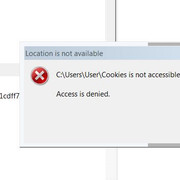
No they are inside the User section. When I try clicking on them a box comes up (and a loud annoying Noise!) saying

C:\User\user\cookies is not accessible.

Access is denied​

Thanks


PS I can now access AppData though. Weird. I could not before.

UPDATE: (Only MINUTES later) Now I can't access AppData again!!!
What the heck is going on THERE?!!
:eek:
 

My Computer My Computer

Computer type
PC/Desktop
Computer Manufacturer/Model Number
iBuild™ custom PC
OS
Windows 7 Home Premium 64 bit
CPU
Intel® Core™ i5 650 Dual Core 2x 3.2Ghz 4MB Cache
Motherboard
ASUS P7H55-M 6x Rear USB 2.0 2x Front
Memory
Samsung 4GB (2x2GB) DDR3 1333MHz
Graphics Card(s)
nvidia GT430 1GB Graphics Card
Sound Card
Built-in audio
Monitor(s) Displays
Videoseven CMC 17" AD
Screen Resolution
1280 x 1024
Hard Drives
250GB 7200RPM SATA II
Hitachi 1TB Serial ATA II 32MB cache
PSU
Corsair 500Watt PSU
Case
Gigabyte GZ-X2 Black ATX MIDI Tower Case
Cooling
Standard CPU Cooling Fan
Keyboard
Packard Bell 9205
Mouse
Microsoft IntelliMouse Optical
Internet Speed
Supposed to be 100mbps (Average: 54mbps!)
Other Info
Also Windows 7 64 Bit on my Acer i3 Laptop
Hi RealGem,

There's a padlock on all these folders and it won't let me even look to see how much space they're taking up.
I am the only user of this PC and the administrator.
I Googled login as administrator and didn't understand any of the options.
I've had the PC since 2011, and always could access these folders before now.
How do I access them as an admin please, without downloading anything?

[1] You can check the permissions of the folder by clicking Start => Computer => browse to and right-click the relevant folder => select Properties => slelect the Security tab.

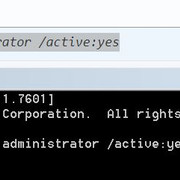
[2.1] To unlock the hidden Administrator account, open an Elevated Command Prompt, and type . . .

Code:
[LEFT][COLOR=#432d2d]net user administrator /active:yes[/COLOR][/LEFT]
. . . and press Enter.

[2.2] Obviously, to hide the Administrator account, open an Elevated Command Prompt, and type . . .

Code:
[LEFT][COLOR=#432d2d]net user administrator /active:no[/COLOR][/LEFT]
. . . and press Enter.

I hope this helps!
 

My Computer My Computer

Computer type
Laptop
Computer Manufacturer/Model Number
Fujitsu LIFEBOOK
OS
Win 7 HP SP1 64-bit Vista HB SP2 32-bit Linux Mint 18.3
CPU
Intel(R) Pentium(R) CPU P6200 @ 2.13GHz
Motherboard
FUJITSU FJNBB06
Memory
4.00 GB
Graphics Card(s)
Intel(R) Graphics Media Accelerator HD
Sound Card
[1] Realtek High Definition Audio [2] Intel(R) Display Audio
Screen Resolution
1366 x 768 x 32 bits (4294967296 colors) @ 59 Hz
Hard Drives
TOSHIBA MK5076GSX
Antivirus
AVG FREE
Thank you Paul,

I am in the UK so it's late now. I will do that tomorrow.
Thanks
 

My Computer My Computer

Computer type
PC/Desktop
Computer Manufacturer/Model Number
iBuild™ custom PC
OS
Windows 7 Home Premium 64 bit
CPU
Intel® Core™ i5 650 Dual Core 2x 3.2Ghz 4MB Cache
Motherboard
ASUS P7H55-M 6x Rear USB 2.0 2x Front
Memory
Samsung 4GB (2x2GB) DDR3 1333MHz
Graphics Card(s)
nvidia GT430 1GB Graphics Card
Sound Card
Built-in audio
Monitor(s) Displays
Videoseven CMC 17" AD
Screen Resolution
1280 x 1024
Hard Drives
250GB 7200RPM SATA II
Hitachi 1TB Serial ATA II 32MB cache
PSU
Corsair 500Watt PSU
Case
Gigabyte GZ-X2 Black ATX MIDI Tower Case
Cooling
Standard CPU Cooling Fan
Keyboard
Packard Bell 9205
Mouse
Microsoft IntelliMouse Optical
Internet Speed
Supposed to be 100mbps (Average: 54mbps!)
Other Info
Also Windows 7 64 Bit on my Acer i3 Laptop

My Computer My Computer

Computer type
Laptop
Computer Manufacturer/Model Number
Fujitsu LIFEBOOK
OS
Win 7 HP SP1 64-bit Vista HB SP2 32-bit Linux Mint 18.3
CPU
Intel(R) Pentium(R) CPU P6200 @ 2.13GHz
Motherboard
FUJITSU FJNBB06
Memory
4.00 GB
Graphics Card(s)
Intel(R) Graphics Media Accelerator HD
Sound Card
[1] Realtek High Definition Audio [2] Intel(R) Display Audio
Screen Resolution
1366 x 768 x 32 bits (4294967296 colors) @ 59 Hz
Hard Drives
TOSHIBA MK5076GSX
Antivirus
AVG FREE
Are you accessing your folders or another users folder?
 

My Computer My Computer

Computer type
PC/Desktop
OS
win 8 32 bit
In Windows Explorer, go as far as you can go before hitting the roadblock. Then click on the problem folder. In Organize in Windows Explorer, select Folder and Search Options. In the View tab, activate the circle for "show hidden files and folders" in the Hidden Files and Folders Section. Apply it to all subfolders (a message should come up about that).

Does that help?
 

My Computer My Computer

Computer type
Laptop
Computer Manufacturer/Model Number
Dell M6500 Precision Work Station
OS
Windows 7 Pro SP1 64 bit
Memory
8 GB
Screen Resolution
1920x
Internet Speed
30 Mbps
Antivirus
Norton Security
Browser
IE 11
Hi RealGem,


[1] You can check the permissions of the folder by clicking Start => Computer => browse to and right-click the relevant folder => select Properties => slelect the Security tab.

[2.1] To unlock the hidden Administrator account, open an Elevated Command Prompt, and type . . .

Code:
[LEFT][COLOR=#432d2d]net user administrator /active:yes[/COLOR][/LEFT]
. . . and press Enter.

[2.2] Obviously, to hide the Administrator account, open an Elevated Command Prompt, and type . . .

Code:
[LEFT][COLOR=#432d2d]net user administrator /active:no[/COLOR][/LEFT]
. . . and press Enter.

I hope this helps!

Hi Paul, fellow Brit!

Sorry that looks very helpful but I still managed to find it a challenge.


I did the Properties thing, clicked Security but didn't understand the next bit. I googled Elevate Command Prompt and the site that explains it, Then I typed you intructions and hit Enter, but it just said Access is Denied! What did I do wrong.

(I'm from Manchester but live in Cardiff. Got thrown outta Manchester! That might explain things ...now my own PC has kicked me out too lol!)
 
Last edited:

My Computer My Computer

Computer type
PC/Desktop
Computer Manufacturer/Model Number
iBuild™ custom PC
OS
Windows 7 Home Premium 64 bit
CPU
Intel® Core™ i5 650 Dual Core 2x 3.2Ghz 4MB Cache
Motherboard
ASUS P7H55-M 6x Rear USB 2.0 2x Front
Memory
Samsung 4GB (2x2GB) DDR3 1333MHz
Graphics Card(s)
nvidia GT430 1GB Graphics Card
Sound Card
Built-in audio
Monitor(s) Displays
Videoseven CMC 17" AD
Screen Resolution
1280 x 1024
Hard Drives
250GB 7200RPM SATA II
Hitachi 1TB Serial ATA II 32MB cache
PSU
Corsair 500Watt PSU
Case
Gigabyte GZ-X2 Black ATX MIDI Tower Case
Cooling
Standard CPU Cooling Fan
Keyboard
Packard Bell 9205
Mouse
Microsoft IntelliMouse Optical
Internet Speed
Supposed to be 100mbps (Average: 54mbps!)
Other Info
Also Windows 7 64 Bit on my Acer i3 Laptop

My Computer My Computer

Computer type
PC/Desktop
Computer Manufacturer/Model Number
iBuild™ custom PC
OS
Windows 7 Home Premium 64 bit
CPU
Intel® Core™ i5 650 Dual Core 2x 3.2Ghz 4MB Cache
Motherboard
ASUS P7H55-M 6x Rear USB 2.0 2x Front
Memory
Samsung 4GB (2x2GB) DDR3 1333MHz
Graphics Card(s)
nvidia GT430 1GB Graphics Card
Sound Card
Built-in audio
Monitor(s) Displays
Videoseven CMC 17" AD
Screen Resolution
1280 x 1024
Hard Drives
250GB 7200RPM SATA II
Hitachi 1TB Serial ATA II 32MB cache
PSU
Corsair 500Watt PSU
Case
Gigabyte GZ-X2 Black ATX MIDI Tower Case
Cooling
Standard CPU Cooling Fan
Keyboard
Packard Bell 9205
Mouse
Microsoft IntelliMouse Optical
Internet Speed
Supposed to be 100mbps (Average: 54mbps!)
Other Info
Also Windows 7 64 Bit on my Acer i3 Laptop
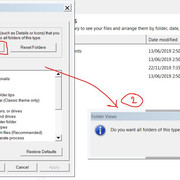
In Windows Explorer, go as far as you can go before hitting the roadblock. Then click on the problem folder. In Organize in Windows Explorer, select Folder and Search Options. In the View tab, activate the circle for "show hidden files and folders" in the Hidden Files and Folders Section. Apply it to all subfolders (a message should come up about that).

Does that help?

Thanks, I think that is already checked.


I clicked Apply to Folders and got another box.
Do I click Yes to this?
I haven't changed any check boxes. They were all like that already.

Thanks
 

My Computer My Computer

Computer type
PC/Desktop
Computer Manufacturer/Model Number
iBuild™ custom PC
OS
Windows 7 Home Premium 64 bit
CPU
Intel® Core™ i5 650 Dual Core 2x 3.2Ghz 4MB Cache
Motherboard
ASUS P7H55-M 6x Rear USB 2.0 2x Front
Memory
Samsung 4GB (2x2GB) DDR3 1333MHz
Graphics Card(s)
nvidia GT430 1GB Graphics Card
Sound Card
Built-in audio
Monitor(s) Displays
Videoseven CMC 17" AD
Screen Resolution
1280 x 1024
Hard Drives
250GB 7200RPM SATA II
Hitachi 1TB Serial ATA II 32MB cache
PSU
Corsair 500Watt PSU
Case
Gigabyte GZ-X2 Black ATX MIDI Tower Case
Cooling
Standard CPU Cooling Fan
Keyboard
Packard Bell 9205
Mouse
Microsoft IntelliMouse Optical
Internet Speed
Supposed to be 100mbps (Average: 54mbps!)
Other Info
Also Windows 7 64 Bit on my Acer i3 Laptop
Hi RealGem,

I googled Elevate Command Prompt and the site that explains it, I could only understand how to open cmd, but not anything after. Sorry.

To open an Elevated Command Prompt . . .

[1] Click Start => All Programs => Accessories => right-click Command Prompt => select Run as administrator.

OR

[2] Click Start => in the search box type cmd => when cmd appears in the list under Programs => right-click cmd => select Run as administrator.

I hope this helps!
 

My Computer My Computer

Computer type
Laptop
Computer Manufacturer/Model Number
Fujitsu LIFEBOOK
OS
Win 7 HP SP1 64-bit Vista HB SP2 32-bit Linux Mint 18.3
CPU
Intel(R) Pentium(R) CPU P6200 @ 2.13GHz
Motherboard
FUJITSU FJNBB06
Memory
4.00 GB
Graphics Card(s)
Intel(R) Graphics Media Accelerator HD
Sound Card
[1] Realtek High Definition Audio [2] Intel(R) Display Audio
Screen Resolution
1366 x 768 x 32 bits (4294967296 colors) @ 59 Hz
Hard Drives
TOSHIBA MK5076GSX
Antivirus
AVG FREE
Hi RealGem,


To open an Elevated Command Prompt . . .

[1] Click Start => All Programs => Accessories => right-click Command Prompt => select Run as administrator.

OR

[2] Click Start => in the search box type cmd => when cmd appears in the list under Programs => right-click cmd => select Run as administrator.

I hope this helps!


That did help thanks Paul.

Sadly though, what I thought was the problem seems not to be the case.

I did what you suggested, and it said it was successful. But I still couldn't access the temp and cookies folders I wanted. So I restarted and it now gave me the option of two users to log in to. My name, and Administrator.

That's when I realised I can't be the Administrator. Oops sorry guys, I thought I was, because several times in the past, I am certain I have just clicked something simple to get Administrator privileges on my own user account.

So I logged into Administrator out of curiosity, and was horrified to see my PC set up nothing like I have it, so I can't have logged into that since I first got the PC in 2011.

I quickly logged out again, and thought Never mind; I should still be able to access those folders in my user account, as I have rebooted.

Nope!

There now isn't a padlock on the folders I can't access. There is a Shortcut icon. Not sure if that was there originally, and I was mistaken, or if that has changed, but I am still getting the same No Access notice.

The reason I thought this was an Administrator issue is because my PC was unusually slow this past week, and I wasn't able to delete cookies the usual method, so I wanted to do it manually, and delete all the other stuff in temp folders manually too.

I know for a fact I have been able to access these folders many times before, so I don't understand why I can't now, and why they have a Shortcut icon attached to them.

Sorry for the confusion. Any suggestions how I can access these folders that have Short icons on them please?

Thanks
 

My Computer My Computer

Computer type
PC/Desktop
Computer Manufacturer/Model Number
iBuild™ custom PC
OS
Windows 7 Home Premium 64 bit
CPU
Intel® Core™ i5 650 Dual Core 2x 3.2Ghz 4MB Cache
Motherboard
ASUS P7H55-M 6x Rear USB 2.0 2x Front
Memory
Samsung 4GB (2x2GB) DDR3 1333MHz
Graphics Card(s)
nvidia GT430 1GB Graphics Card
Sound Card
Built-in audio
Monitor(s) Displays
Videoseven CMC 17" AD
Screen Resolution
1280 x 1024
Hard Drives
250GB 7200RPM SATA II
Hitachi 1TB Serial ATA II 32MB cache
PSU
Corsair 500Watt PSU
Case
Gigabyte GZ-X2 Black ATX MIDI Tower Case
Cooling
Standard CPU Cooling Fan
Keyboard
Packard Bell 9205
Mouse
Microsoft IntelliMouse Optical
Internet Speed
Supposed to be 100mbps (Average: 54mbps!)
Other Info
Also Windows 7 64 Bit on my Acer i3 Laptop
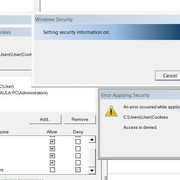
I'm now in a recurring vicious cycle and cannot close any of the boxes down. :confused:

If I click Cancel, they come back, and if I click Continue I get an error notice, that (although it allowed me to check all boxes under "Everyone" all privileges), it is now saying I can't have inconsistent settings ...see pic:


The only way to get rid of all the error boxes is to set the permissions as they were before.

:(

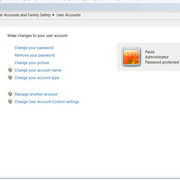
Also I just noticed the last pic seems to indicate that I, Paula am also an Administrator. This is what I was told by the guy who built the PC. Is this correct? Thanks
 

My Computer My Computer

Computer type
PC/Desktop
Computer Manufacturer/Model Number
iBuild™ custom PC
OS
Windows 7 Home Premium 64 bit
CPU
Intel® Core™ i5 650 Dual Core 2x 3.2Ghz 4MB Cache
Motherboard
ASUS P7H55-M 6x Rear USB 2.0 2x Front
Memory
Samsung 4GB (2x2GB) DDR3 1333MHz
Graphics Card(s)
nvidia GT430 1GB Graphics Card
Sound Card
Built-in audio
Monitor(s) Displays
Videoseven CMC 17" AD
Screen Resolution
1280 x 1024
Hard Drives
250GB 7200RPM SATA II
Hitachi 1TB Serial ATA II 32MB cache
PSU
Corsair 500Watt PSU
Case
Gigabyte GZ-X2 Black ATX MIDI Tower Case
Cooling
Standard CPU Cooling Fan
Keyboard
Packard Bell 9205
Mouse
Microsoft IntelliMouse Optical
Internet Speed
Supposed to be 100mbps (Average: 54mbps!)
Other Info
Also Windows 7 64 Bit on my Acer i3 Laptop
Hi

lets have a look at your users panel = screenshot

Roy
 

Attachments

  • allu.PNG
    allu.PNG
    47.4 KB · Views: 0

My Computer My Computer

Computer type
PC/Desktop
Computer Manufacturer/Model Number
medionl/Aspire 6930G/acer x55a
OS
W7 home premium 32bit/W7HP 64bit/w10 tp insider ring
CPU
E5300 dual core
Motherboard
medion MS7366
Memory
3gb
Graphics Card(s)
Nvidia Geforce 7100 Nforce 630i
Monitor(s) Displays
avixc
Internet Speed
n (isp resticted to 72)
Antivirus
mse/pands
Browser
palemoon
Other Info
Belkin Fd7050 n USB using Railink RT2870 drivers, more upto date
A lot of these folders are owned by system so you can't screw the windows up. Cookies you can view in most browsers or there is software that can do it
 

My Computer My Computer

Computer type
PC/Desktop
OS
win 8 32 bit
Hi

just re-read post #3

there should NOT be any such animal there
Cookies are not stored under c/user/user/cookies
only in your browsers

please perform some AV scans
suggest
ESET on-line (dissable your current whilst scanning)
Malwarebytes x3 free/JRT and Adwarecleaner


Roy
 

My Computer My Computer

Computer type
PC/Desktop
Computer Manufacturer/Model Number
medionl/Aspire 6930G/acer x55a
OS
W7 home premium 32bit/W7HP 64bit/w10 tp insider ring
CPU
E5300 dual core
Motherboard
medion MS7366
Memory
3gb
Graphics Card(s)
Nvidia Geforce 7100 Nforce 630i
Monitor(s) Displays
avixc
Internet Speed
n (isp resticted to 72)
Antivirus
mse/pands
Browser
palemoon
Other Info
Belkin Fd7050 n USB using Railink RT2870 drivers, more upto date
There is a folder there for cookies but its a shortcut not the actual folder
 

My Computer My Computer

Computer type
PC/Desktop
OS
win 8 32 bit
cookies SHOULD NOT BE THERE
Thats why he's getting Access Denied
They dont hold privaliges at that high a level


Roy
 

My Computer My Computer

Computer type
PC/Desktop
Computer Manufacturer/Model Number
medionl/Aspire 6930G/acer x55a
OS
W7 home premium 32bit/W7HP 64bit/w10 tp insider ring
CPU
E5300 dual core
Motherboard
medion MS7366
Memory
3gb
Graphics Card(s)
Nvidia Geforce 7100 Nforce 630i
Monitor(s) Displays
avixc
Internet Speed
n (isp resticted to 72)
Antivirus
mse/pands
Browser
palemoon
Other Info
Belkin Fd7050 n USB using Railink RT2870 drivers, more upto date

My Computer My Computer

Computer type
PC/Desktop
Computer Manufacturer/Model Number
iBuild™ custom PC
OS
Windows 7 Home Premium 64 bit
CPU
Intel® Core™ i5 650 Dual Core 2x 3.2Ghz 4MB Cache
Motherboard
ASUS P7H55-M 6x Rear USB 2.0 2x Front
Memory
Samsung 4GB (2x2GB) DDR3 1333MHz
Graphics Card(s)
nvidia GT430 1GB Graphics Card
Sound Card
Built-in audio
Monitor(s) Displays
Videoseven CMC 17" AD
Screen Resolution
1280 x 1024
Hard Drives
250GB 7200RPM SATA II
Hitachi 1TB Serial ATA II 32MB cache
PSU
Corsair 500Watt PSU
Case
Gigabyte GZ-X2 Black ATX MIDI Tower Case
Cooling
Standard CPU Cooling Fan
Keyboard
Packard Bell 9205
Mouse
Microsoft IntelliMouse Optical
Internet Speed
Supposed to be 100mbps (Average: 54mbps!)
Other Info
Also Windows 7 64 Bit on my Acer i3 Laptop
Back
Top