
cant access internet

littlerammer

New member
Local time
9:27 AM
Messages
3
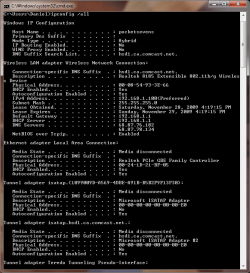
Just got windows 7 home premium. installed it today. the installation was smooth, but i cant connect to the internet. i use a wifi connection. my wireless card is an ENCORE ENLWI-G(2) and the router is a Linksys WTR54G version 2 and the firmware is up to date. the device manager says the wifi card is installed properly (no yellow signs). according to the network and sharing center i am connected to the internet. i cant figure it out, all other computers and devices can access the internet with no problem. any ideas?
 

Attachments
  • Untitled-1.png
    Untitled-1.png
    24.1 KB · Views: 25

My Computer

Computer Manufacturer/Model Number
Home Built
OS
Windows 7
CPU
Intel Core 2 Duo E8400 Wolfdale 3.0GHz
Motherboard
GIGABYTE GA-EP45-UD3R
Memory
Kingston HyperX 8GB (4x2GB) 240-Pin DDR2 SDRAM DDR2 1066
Graphics Card(s)
EVGA 512-P3-N873-AR GeForce 9800 GTX+
Sound Card
Rockin the mobo
Monitor(s) Displays
Acer H213H bmid Black 21.5" 5ms HDMI Full HD 1080P
Screen Resolution
1920x1080
Hard Drives
Seagate Barracuda 7200.12 ST3500418AS 500GB 7200 RPM 16MB Cache SATA 3.0Gb/s 3.5" Internal Hard Drive

Seagate Barracuda 7200.10 ST380815AS 80GB 7200 RPM 8MB Cache SATA 3.0Gb/s 3.5" Internal Hard Drive
PSU
hec HP585D RETAIL 585W ATX12V
Case
HEC 6C28BBX585 Black Steel ATX Mid Tower
Just got windows 7 home premium. installed it today. the installation was smooth, but i cant connect to the internet. i use a wifi connection. my wireless card is an ENCORE ENLWI-G(2) and the router is a Linksys WTR54G version 2 and the firmware is up to date. the device manager says the wifi card is installed properly (no yellow signs). according to the network and sharing center i am connected to the internet. i cant figure it out, all other computers and devices can access the internet with no problem. any ideas?

Hi and welcome

You have picked up an IP from the router. Can you ping something like microsoft.com and seeif you get returns? also it may be a dns problem. try ipconfig /flushdns, followed by ipconfig /renew. if these work then its a quick dns fix. Are you using encryption, or a firewall, or av that could be blocking?

Hope this helps and let us know if you need help

Kenn J++
 

My Computer

Computer Manufacturer/Model Number
HP Pavillion dv-7 1005 Tx
OS
Win 8 Release candidate 8400
CPU
[email protected]
Memory
4 gigs
Graphics Card(s)
Nvidia 9600M
Sound Card
HD built-in
Monitor(s) Displays
17" Wxga
Screen Resolution
1440x900
Cooling
none
Internet Speed
45Mb down 5Mb up
i tried to ping both microsoft and google. both timed out 4 times and then canceled.

i tried the /flushdns and that seemed to go through just fine. when i did /renew i got an error that said "An error occurred while renewing interface Wireless Network Connection : unable to contact your DHCP server. Request has timed out. No operation can be performed on Local Area Connection while it has its media disconnected. An error occurred while releasing interface Loopbac Pseudo-Interface 1: The system cannot find the file specified."

also worth noting, even though im connected with the router (i can see the computer when i log into the router from another computer) i cant load the router on the windows 7 computer. when i put in 192.168.1.1 it times out just like its doing when i try to access the web. programs like AVG (downloaded from another computer) and windows update cannot access anything either.

there is no av installed yet. the firewall is just default 7 one, ive tried to disable that, but it didnt help. the router is set up to only allow certain MAC addresses connect, and is set up correctly for this nic.
 

My Computer

Computer Manufacturer/Model Number
Home Built
OS
Windows 7
CPU
Intel Core 2 Duo E8400 Wolfdale 3.0GHz
Motherboard
GIGABYTE GA-EP45-UD3R
Memory
Kingston HyperX 8GB (4x2GB) 240-Pin DDR2 SDRAM DDR2 1066
Graphics Card(s)
EVGA 512-P3-N873-AR GeForce 9800 GTX+
Sound Card
Rockin the mobo
Monitor(s) Displays
Acer H213H bmid Black 21.5" 5ms HDMI Full HD 1080P
Screen Resolution
1920x1080
Hard Drives
Seagate Barracuda 7200.12 ST3500418AS 500GB 7200 RPM 16MB Cache SATA 3.0Gb/s 3.5" Internal Hard Drive

Seagate Barracuda 7200.10 ST380815AS 80GB 7200 RPM 8MB Cache SATA 3.0Gb/s 3.5" Internal Hard Drive
PSU
hec HP585D RETAIL 585W ATX12V
Case
HEC 6C28BBX585 Black Steel ATX Mid Tower
a little update.

i reset my modem and router. i renamed the wireless network. now its connecting to the network but in network and sharing center it states that im connected to an unidentified public network and its auto assigning me an ip address of 169.254.229.127 for ipv4.
 

My Computer

Computer Manufacturer/Model Number
Home Built
OS
Windows 7
CPU
Intel Core 2 Duo E8400 Wolfdale 3.0GHz
Motherboard
GIGABYTE GA-EP45-UD3R
Memory
Kingston HyperX 8GB (4x2GB) 240-Pin DDR2 SDRAM DDR2 1066
Graphics Card(s)
EVGA 512-P3-N873-AR GeForce 9800 GTX+
Sound Card
Rockin the mobo
Monitor(s) Displays
Acer H213H bmid Black 21.5" 5ms HDMI Full HD 1080P
Screen Resolution
1920x1080
Hard Drives
Seagate Barracuda 7200.12 ST3500418AS 500GB 7200 RPM 16MB Cache SATA 3.0Gb/s 3.5" Internal Hard Drive

Seagate Barracuda 7200.10 ST380815AS 80GB 7200 RPM 8MB Cache SATA 3.0Gb/s 3.5" Internal Hard Drive
PSU
hec HP585D RETAIL 585W ATX12V
Case
HEC 6C28BBX585 Black Steel ATX Mid Tower
bigger prob

ok so i am having same issue i currently have two differnt isp's, one i can plug and computer with any OS onto it and works fine....

the other one works fine with windows xp and older. but anything computer running vista and newer. gets all the ip's jsut fine getting from what i can see all it needs for internet access. but give me a yellow triangle at the botom right of the screen says unidentified network and no internet access. no matter what i do disable my anti virus, disable my firewall. all the same and again only happenign on windows vista and newer. tried 3 differnt computers running eiather windows 7 or vista and all are the same. help!!!!!
 

My Computer

OS
windows 7 ultimate
a little update.

i reset my modem and router. i renamed the wireless network. now its connecting to the network but in network and sharing center it states that im connected to an unidentified public network and its auto assigning me an ip address of 169.254.229.127 for ipv4.

Can you try this.

1) turn off your router
2) turn off your modem
3) turn on modem..wait abit for your ISP to allocate you an IP.
4) Once your modem is set, turn on your Router.

Do the ipconfig and see if you can get a 192.168.1.x IP.
 

My Computer

Computer Manufacturer/Model Number
Lenovo ThinkPad T60
OS
Windows 7 Ultimate 64Bit
CPU
GenuineIntel Intel(R) Core(TM) DuoCore T2400 @ 1.83GHz
Motherboard
Intel(R) 82801G (ICH7 Family)
Memory
2.00 GB
Graphics Card(s)
Mobile Intel(R) 945 Express Chipset
Sound Card
SoundMAX Integrated Digital HD Audio
Monitor(s) Displays
ThinkPad Display
Screen Resolution
1400x1050
Hard Drives
100Gb SATA
Keyboard
Standard Keyboard
Mouse
HID-compliant Mouse
Internet Speed
Cable Broadband - 54Mbps
Other Info
Intel(R) PRO/1000 PL Network Connection
11a/b/g Wireless LAN Mini PCI Express Adapter
Back
Top